


JSMS iOS SDK Integration Guide
Note: The client SDK for Jiguang SMS is no longer updated or maintained. Developers should use the REST API to implement business logic.
SDK Description
- The SDK currently supports iOS 7.0 or later.
SDK Package Contents
- lib folder: contains header files JSMSSDK.h and JSMSConstant.h, and the static library file libsms-lib.a. The supported iOS version is 7.0 or later.
- pdf file: integration guide.
- demo folder: sample.
Integration Steps
Create an App
Register as a JPush developer. Create an app on the Jiguang web portal to obtain the APPKey. If you are already a user of other Jiguang products and have created an app, you do not need to create one again.
Import the SDK Package
Unzip the SDK package and add the unzipped Jsms SDK folder to your project directory. It contains the include header folder and the static library file libsms-lib.a. The header directory contains two public interface files: JSMSSDK.h and JSMSConstant.h.
Configure Build Settings
- In project configuration, under Build Settings, add -ObjC to Other Linker Flags.
After version 1.2.0, the SDK fully supports HTTPS transmission, and AppTransportSecurity-related settings are no longer required.
Configure Capabilities
Because the SDK's internal encryption protocol involves KeyChain, if you develop with Xcode 8 or later and run debugging on a simulator, enable Capabilities -> KeyChain Sharing for the Application Target, as shown below: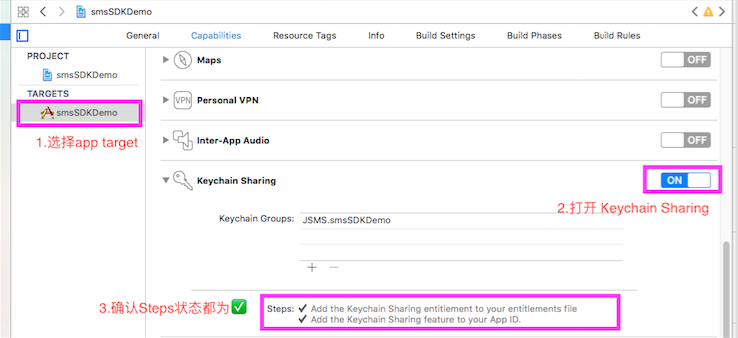
Add Initialization Code
+ (void)registerWithAppKey:(NSString * _Nonnull)appkey;
API Description
SDK registration API: after creating an app on the official website, an AppKey is automatically generated to identify the app.
Call Example:
          - (BOOL)application:(UIApplication *)application didFinishLaunchingWithOptions:(NSDictionary *)launchOptions {
 // Override point for customization after application launch.

 // Obtain from official website registration
 // Register the appKey for SMS verification
 [JSMSSDK registerWithAppKey:kAppKey];

 return YES;
 }
For more APIs, see the iOS SDK API documentation.

