


Android SDK Overview
JPush Android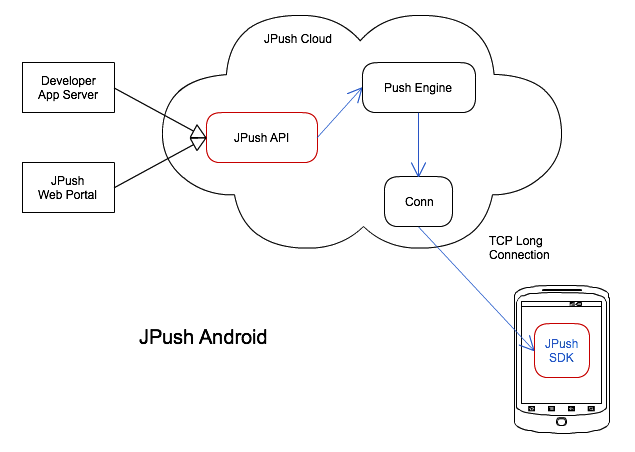
Developers integrate JPush Android SDK into their applications, and JPush Android SDK creates a long-lasting connection to JPush Cloud, providing the App with long-term online capabilities.
When developers want to push messages to the App in a timely manner, they only need to call the JPush API push, or use other convenient smart push tools to easily communicate with users.
The red part in the picture is the contact point between JPush and App developers. On the mobile client side, the App needs to integrate the JPush SDK; on the server side, developers call the JPush REST API to push.
Android SDK Service
JPush Android SDK runs in the background as an Android Service for a long time, thereby creating and maintaining long connections, providing the App with long-term online capabilities. Of course, it will also be controlled by the manufacturer's device system-level process management mechanism. For details, see [FAQ](https://docs.jiguang.cn/jpush/client/Android/android_faq#Third-party systems cannot receive push messages).
Multi-platform support
In addition to the jar package, JPush Android SDK also has a.so file. The.so file needs to be adapted to the CPU platform. Which platform CPU needs to be supported, you need to include the corresponding.so compiled file for this platform.
In addition to supporting the default ARM CPU platform, JPush SDK also provides CPU version SDK for x86 and MIPs platforms. Please go to the Resource Download page to download separately.
Power and flow
Because JPush Android SDK uses a custom protocol, the protocol body is extremely small and the traffic consumption is very small.
In terms of power, JPush Android SDK has been continuously optimized to reduce unnecessary code execution as much as possible; and, through long-term version upgrade iterations and continuous optimization, it has minimal requirements on ensuring certain network connection stability and reduces power consumption.
Compression package description
The JPush Android SDK compressed package for download generally contains the following parts:
-.jar files -.so files
- AndroidManifest.xml configuration example
Among them,.jar and.so files have version number suffixes and need to match each other. Please remember to check the version number when upgrading and delete the old version.
The AndroidManifest.xml configuration example may be changed during version upgrades. Please note the Release Notes(/jpush/jpush_changelog/updates_Android).
Android SDK integration
Please refer to the following documents and tutorials to integrate the Android SDK.

