


Android SDK FAQ
Jiguang Android How to select the push channel by default?
- When the message is delivered, the channel selection is based on the delivery strategy field selected by the developer when pushing. distribution Determined by value, please refer toPush API protocol
JPushfree version and VIP What's the difference?
- For details, please refer toJPush Free version vs. VIP Version function comparisonillustrate
Why App Messages may be delayed or not received after shutdown?
- When the message is sent, the mobile device may be disconnected from the network, and the message can only be sent after the device network is normal.
- The moment the message is sent,APPThe process may have just been killed by the system. For details, please see below.Third-party systems cannot receive push messages
AccessJiguangDo I need to apply for and configure the vendor channel later?
- along withAndroidsystem upgrade, systemAPPProcess control is becoming more and more stringent, andJiguangChannel delivery of messages relies on a long online connection (the network is normal + APPprocess online), in most cases, due toAPPIf the long connection is not online, real-time access to messages cannot be guaranteed, and messages can only be stored inJiguangserver, wait untilAPPThe message can be reached only when the long connection is online next time.
- Based on the above situation, it is recommended that you access the system push of each manufacturer. The system push of each manufacturer does not need to rely onAPPThe process only requires that the mobile phone itself and the manufacturer's server have a normal connection to send messages.
- Reference for vendor push application and configuration guide:Manufacturer Channel Parameter Application Guide、Manufacturer channel SDK Integration Guide、Vendor Channel Receipt Configuration Guide、Vendor Message Classification Usage Guide
- If you passJiguangThe channel for docking with manufacturers has not been opened.JiguangVIPServices require special attention:JiguangPlatform restrictions
how to improve Android Offline message delivery rate?
- It is recommended to increase the offline message storage time of message push. This is specified by the developer when pushing and corresponds to the push delivery protocol.time_to_liveField, this ensures that as long asAPPAs long as the offline message storage time is normal and the connection is normal, you can receive push notifications.
- It is recommended to activate the manufacturer push service
- It is recommended to activateJiguangVIPservices, try to avoid non-VIPQuota management and control issued by the user manufacturer channel
- NoVIPUsers who exceed the quota will be removedJiguangPassage is sent, goJiguangChannel delivery depends onAPPWhether the process is online, and the offline message storage time set by the developer.
JPush Android SDK Will the service be automatically initialized for data collection?
- If the developer is using JCore Android SDK v2.3.0 and above, there will be no automatic initialization logic, and no data collection will be performed before the service is initialized;
- If the developer actively calls SDK of init method or other methods context parameter method will proceed SDK initialization;
- consider APP For online compliance, developers must be APP After the user agrees to the privacy policy, the user can then call the initialization interface to use it.JiguangServe;
- about APP Privacy policy suggestions and instructions, please refer to How to draft a compliant privacy policy。
How to deal with PluginXiaomiPlatformsReceiver Self-starting compliance issues caused by broadcast?
PluginXiaomiPlatformsReceiver It’s pushed by Xiaomi SDK The required configuration of the broadcast component. During compliance detection, some devices may be determined to have compliance issues because this component triggers self-starting behavior. If you encounter such a situation, it is recommended to confirm and handle it from the following aspects:
- confirm SDK Is it the latest version?
- Please make sure you integrateJPush SDK is the latest version.JiguangIn each update, it will be adapted to Xiaomi manufacturers simultaneously. SDK, using the latest version can effectively avoid known compliance issues.
- Confirm the Xiaomi Service Framework version of the detected device
- It is recommended to check whether the device used for detection is installed and upgraded to Xiaomi Service Framework 7.4.9 and above versions. In this version, Xiaomi has made self-initiated compliance optimization for broadcast behavior, which can effectively reduce the risk of misjudgment. If it is lower than this version, please upgrade before performing compliance testing.
- The viewing and upgrade paths are as follows:
- Open "Settings" → Enter "Application Settings" → Click "Application Management" → Enter "Xiaomi Service Framework" in the search box at the top, and click to enter the application details page to upgrade or confirm the version.
Why the application cannot receive Push information(Android)?
- confirm appKey(exist Portal generated on) has been written correctly Androidmanifest.xml
- Confirm that the test phone (or simulator) has successfully connected to the network
- Confirm there is a client "Login succeed" log
log:Java.lang.UnsatisfiedLinkError
          E/art: No implementation found for int cn.jiguang.service.Protocol.GetSdkVersion() (tried Java_cn_jiguang_service_Protocol_GetSdkVersion and Java_cn_jiguang_service_Protocol_GetSdkVersion__)
E/JIGUANG-JCore: [JCoreGlobal] Get sdk version fail![获取sdk版本失败!]
W/System.err: java.lang.UnsatisfiedLinkError: No implementation found for int cn.jiguang.service.Protocol.GetSdkVersion() (tried Java_cn_jiguang_service_Protocol_GetSdkVersion and Java_cn_jiguang_service_Protocol_GetSdkVersion__)
W/System.err:     at cn.jiguang.service.Protocol.GetSdkVersion(Native Method)
W/System.err:     at cn.jiguang.d.a.a(Unknown Source)
W/System.err:     at cn.jiguang.d.a.d(Unknown Source)
W/System.err:     at cn.jiguang.d.a.b(Unknown Source)
W/System.err:     at cn.jiguang.api.JCoreInterface.init(Unknown Source)
W/System.err:     at cn.jiguang.d.d.j.b(Unknown Source)
W/System.err:     at cn.jiguang.api.JCoreInterface.triggerSceneCheck(Unknown Source)
W/System.err:     at cn.jiguang.a.a.d.a.onActivityStarted(Unknown Source)
E/JIGUANG-JCore: [JCoreGlobal] JCore .so file do not match JCore .jar file in the project, Failed to init JCore
W/JIGUANG-JCore: [JCoreInterface] JCore init failed
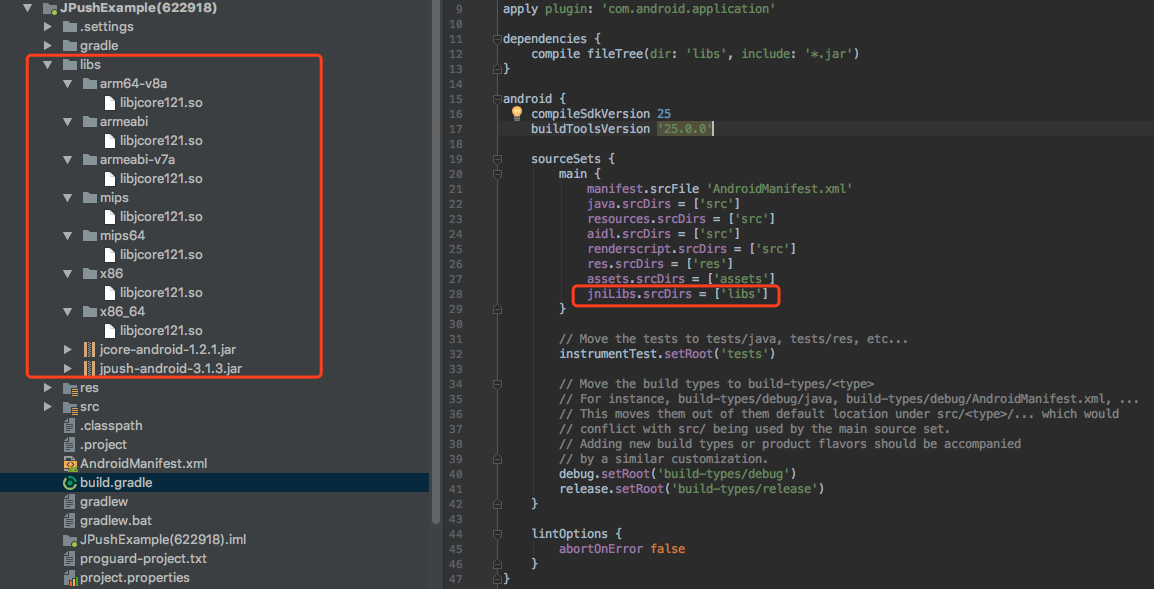
This error is due to not loading correctly libjcore.so file, please check libjcore.so Is it in the right place (libs–>armeabi–>libjcore.so)
JPush SDK Migrate to Android Studio Need to add.so Files are packaged into APK of lib folder, can be edited build.gradle Script, Custom *.so catalog, reference Demo:
log:The permission should be defined
          E/JIGUANG-JCore: [AndroidUtil] The permissoin is required - com.jpush.test.permission.JPUSH_MESSAGE
E/JIGUANG-JCore: [AndroidUtil] The permission should be defined - com.jpush.test.permission.JPUSH_MESSAGE
W/JIGUANG-JCore: [JCoreInterface] JCore init failed
This error is that there is no correct definition permision, please add permissions:
              <permission
        android:name="您应用的包名.permission.JPUSH_MESSAGE"
        android:protectionLevel="signature" />

    <uses-permission android:name="您应用的包名.permission.JPUSH_MESSAGE" />
How to obfuscate ignores in code jpush-sdk-release.jar
Please download 4.x and above versions proguard.jar, and replace your Android SDK "tools\proguard\lib\proguard.jar"
Development tool usage Eclipse or Android Studio, please check the project's project.properties Configured in proguard-android.txt, and in proguard-android.txt Configuration:
-dontoptimize -dontpreverify -dontwarn cn.jpush.** -keep class cn.jpush.** { *; }-dontoptimize -dontpreverify -dontwarn cn.jpush.** -keep class cn.jpush.** { *; }This code block is shown in the floating windowPlease use SDK1.3.X and later versions
v2.0.5 and above versions due to the introduction of protobuf, adding the configuration to eliminate confusion based on the above.
#==================gson========================== -dontwarn com.google.** -keep class com.google.gson.** {*;} #==================protobuf====================== -dontwarn com.google.** -keep class com.google.protobuf.** {*;}#==================gson========================== -dontwarn com.google.** -keep class com.google.gson.** {*;} #==================protobuf====================== -dontwarn com.google.** -keep class com.google.protobuf.** {*;}This code block is shown in the floating window
The push is successful, why can't some clients receive the push?
Please check the phone where you are not receiving notifications:
- please logcat Check the logs to determine the client's jpush Is the integration successful? Is there any problem with the network?
- Please read the log or use the interface isPushStopped to check whether the stoppush
- Check cell phone JPush Is "Allow push time" set in the advanced settings?
- Is "Show notifications" checked in the mobile app?
Third-party systems cannot receive push messages
due to third parties ROM Management software requires manual operation by users
Millet【 MIUI 】
- Self-starting management: The application needs to be added to the [Auto-starting management] list, otherwise the process cannot be started after killing the process or restarting the computer.
- Notification bar settings: The application displays notification bar notifications by default. If it is turned off, it will not prompt when receiving notifications.
- Network Assistant: You can manually block access to installed third-party programs 2G/3G and WIFI network and settings to allow new installers to access in the future. 2G/3G and WIFI network
- MIUI 7 Hidden Mode: Allows the application to customize the configuration mode, and the application remains connected to the Internet in the background. Otherwise, when the application enters the background, the application cannot receive messages normally. [Settings] Under battery and performance [Hidden Mode]
Huawei【 Emotion 】
- Self-starting management: The application needs to be added to the [Auto-starting management] list, otherwise the process will not be started after killing the process or restarting the computer, and the application can only be started manually.
- Background application protection: You need to manually add the application to this list, otherwise the device will automatically kill the application process after entering sleep, and the application can only be resumed by manually opening it.
- Notification management: There are three application states: prompt, allowed, and prohibited. If the application is disabled, there will be no reminder in the notification bar.
Meizu【 Flyme 】
- Self-starting management: The application needs to be added to the [Auto-starting management] list, otherwise the process cannot be started after killing the process or restarting the computer.
- Notification bar push: If app notifications are turned off, there will be no display of received messages.
- Power-saving management: Set the power-saving mode in the security center. When allowing the application to standby in [Standby Power Consumption Management], keep allowing it. Otherwise, the phone will sleep or the application will be idle for a period of time and messages will not be received normally.
VIVO【 Funtouch OS 】
- One-click memory cleaning: You need to add the application to the [White List] list, otherwise the system's built-in "One-click Acceleration" will kill the process.
- Self-starting management: The application needs to be added to the [Self-starting Management] list in “i Butler”, otherwise the process will not start automatically after restarting the phone. However, if the process is forced to be killed manually, even if it is added to this list, subsequent processes will not be able to start automatically.
OPPO【 ColorOS 】
- Freeze application management: The application needs to be added to the pure background, otherwise messages cannot be received in time when the screen is locked.
- Self-starting management: When adding the application to the [Auto-starting management] list, you also need to lock the application process in Settings-Application-Running. Otherwise, the process will be killed or the process will not start after booting, and the application can only be opened manually.
Samsung
- One-click memory optimization: the application needs to be added to the [whitelist] list, otherwise the application process will be killed after system memory optimization
How to solve the problem with other third-party push SDK conflict?
This method is only suitable for manual integration.
if App Also integrates other third-party push SDK, such as personal push, Umeng push, etc., you need to perform the following steps:
Xiaomi Manufacturer Channel:
- This can beJiguangbuilt-inReceiver, replace it with your own definedReceiver(like:MyXmPushReceiver)。
2.ThisReceiverMust inherit Xiaomi’scom.xiaomi.mipush.sdk.PushMessageReceiver。
3. In each callback method, call back toJiguangofPluginXiaomiPlatformsReceiver。
          public class MyXmPushReceiver extends PushMessageReceiver {

    final PluginXiaomiPlatformsReceiver receiver = new PluginXiaomiPlatformsReceiver();

    @Override
    public void onReceivePassThroughMessage(final Context context, final MiPushMessage message) {
        receiver.onReceivePassThroughMessage(context, message);
    }

    @Override
    public void onNotificationMessageClicked(Context context, MiPushMessage message) {
        receiver.onNotificationMessageClicked(context, message);
    }

    @Override
    public void onNotificationMessageArrived(Context context, MiPushMessage message) {
        receiver.onNotificationMessageArrived(context, message);
    }

    @Override
    public void onCommandResult(Context context, MiPushCommandMessage message) {
        receiver.onCommandResult(context, message);
    }

    @Override
    public void onReceiveRegisterResult(Context context, MiPushCommandMessage message) {
        receiver.onReceiveRegisterResult(context, message);
    }
}
Huawei manufacturer channel:
- This can beJiguangbuilt-inService, replace it with your own definedService(like:MyHwPushService)。
2.Create Service Inherit Huawei's com.huawei.hms.push.HmsMessageService。
3. In each callback method, call back toJiguangof PluginHuaweiPlatformsService。
          public class MyHwPushService extends HmsMessageService {

    final PluginHuaweiPlatformsService service = new PluginHuaweiPlatformsService();

    @Override
    public void onNewToken(String s) {
        service.onNewToken(s);
    }

    @Override
    public void onMessageReceived(RemoteMessage remoteMessage) {
        service.onMessageReceived(remoteMessage);
    }

    @Override
    public void onMessageSent(String s) {
        service.onMessageSent(s);
    }

    @Override
    public void onSendError(String s, Exception e) {
        service.onSendError(s,e);
    }

    @Override
    public void onDeletedMessages() {
        service.onDeletedMessages();
    }
}
Meizu manufacturer channel:
- This can beJiguangbuilt-inReceiver, replace it with your own definedReceiver(like:MyMZPushReceiver)。
2.Create Receiver Must inherit from Meizu com.meizu.cloud.pushsdk.MzPushMessageReceiver。
3. Each callback method calls back toJiguangof PluginMeizuPlatformsReceiver。
          public class MyMZPushReceiver extends MzPushMessageReceiver {

    final PluginMeizuPlatformsReceiver receiver = new PluginMeizuPlatformsReceiver();

    @Override
    public void onReceive(Context context, Intent intent) {
        receiver.onReceive(context, intent);
    }

    @Override
    public void onRegister(Context context, String s) {
        receiver.onRegister(context, s);
    }

    @Override
    public void onMessage(Context context, String s) {
        receiver.onMessage(context, s);
    }

    @Override
    public void onNotificationArrived(Context context, MzPushMessage mzPushMessage) {
        receiver.onNotificationArrived(context, mzPushMessage);
    }

    @Override
    public void onNotificationClicked(Context context, MzPushMessage mzPushMessage) {
        receiver.onNotificationClicked(context, mzPushMessage);
    }


    @Override
    public void onUnRegister(Context context, boolean b) {
        receiver.onUnRegister(context, b);
    }

    @Override
    public void onPushStatus(Context context, PushSwitchStatus pushSwitchStatus) {
        receiver.onPushStatus(context, pushSwitchStatus);
    }

    @Override
    public void onRegisterStatus(Context context, RegisterStatus registerStatus) {
        receiver.onRegisterStatus(context, registerStatus);
    }

    @Override
    public void onUnRegisterStatus(Context context, UnRegisterStatus unRegisterStatus) {
        receiver.onUnRegisterStatus(context, unRegisterStatus);
    }

    @Override
    public void onSubTagsStatus(Context context, SubTagsStatus subTagsStatus) {
        receiver.onSubTagsStatus(context, subTagsStatus);
    }

    @Override
    public void onSubAliasStatus(Context context, SubAliasStatus subAliasStatus) {
        receiver.onSubAliasStatus(context, subAliasStatus);
    }

    @Override
    public void onUpdateNotificationBuilder(PushNotificationBuilder pushNotificationBuilder) {
        receiver.onUpdateNotificationBuilder(pushNotificationBuilder);
    }
}
**VIVOManufacturer channel: **
- This can beJiguangBuilt-in inherited fromVIVOManufacturer'sReceiver, replace it with your own definedReceiver(like:MyVivoPushReceiver)。
2.ThisReceivermust be inheritedVIVOofcom.vivo.push.sdk.OpenClientPushMessageReceiver。
3. In each callback method, call back toJiguangof PluginVivoMessageReceiver。
          public class MyVivoPushReceiver extends OpenClientPushMessageReceiver {

    final PluginVivoMessageReceiver receiver = new PluginVivoMessageReceiver();

    @Override
      public void onReceiveRegId(Context context, String regId) {
          receiver.onReceiveRegId(context, regId);
      }
}
Honor Manufacturer Channel:
- This can beJiguangBuilt-in inherited from Honor manufacturerService, replace it with your own definedService(like:MyHonorService)。
2.ThisServiceMust inherit the glorycom.hihonor.push.sdk.HonorMessageService。
3. In each callback method, call back toJiguangof JHonorService。
          public class MyHonorService extends HonorMessageService {

    final JHonorService service = new JHonorService();


    @Override
    public void onMessageReceived(HonorPushDataMsg dataMessage) {
      service.onMessageReceived(dataMessage);
    }

    @Override
    public void onNewToken(String token) {
      service.onNewToken(token);
    }
}
**OPPOManufacturer channel: **
- This can beJiguangBuilt-in inherited fromOPPOManufacturer'sService, replace it with your own definedService(like:MyOppoService)。
2.ThisServicemust be inheritedOPPOofcom.heytap.msp.push.service.CompatibleDataMessageCallbackService。
Android 5.0 System error:INSTALL_FAILED_DUPLICATE_PERMISSION
and 5.0 Related to the multi-account system, if one account installs an application, other accounts will automatically install the application; if one of the accounts uninstalls the application, the other accounts will not be affected (other accounts still have the application), so if the application is uninstalled under a certain account and a package with the same package name but inconsistent signature is installed, the installation will fail.
Solution: Uninstall the application that installed this program on each account, and then reinstall it to solve this problem.
AsyncTask There is no way to execute it onPostExecute() method
This is Android The solutions to the problems associated with the old system are as follows:
exist application inside onCreate Method plus:
          try {
            Class.forName("android.os.AsyncTask");
        } catch (ClassNotFoundException e) {
            e.printStackTrace();
        }
Please see the link for details:https://code.google.com/p/android/issues/detail?id=20915
Tag、Alias、Registration Does the ID need to be reset every time it is initialized? Will it change?
tag、alias Can refer to Aliases and tags APIMake settings,3.0.7 Each interface setting in previous versions is an override setting, not an incremental setting; from 3.0.7 Starting from version 1, an interface for adding, deleting, modifying and querying alias tags will be provided.Tag and alias Once set successfully, it will not change unless canceled or overwritten. Set up tag、alias The corresponding relationship with the client is stored in JPush server, there is currently no JPush The server queries the interface for this corresponding relationship, so the client needs to save the corresponding relationship in APP application server.
Registration ID is client SDK First successful connection to JPush When the serverJPush assigned by the server. can pass get RegistrationID API to get Registration ID to push.Registration ID corresponds to a client of an application,Android of registration The ID generally does not change.
no sandbox API How to test?
Use directly JPush of API Just test.
Can it be used in other countries?JPush(Can LAN be used?JPush)?
As long as you can connect to the Internet JPush Any server is fine. Determine whether the Internet can be reached JPush Server method:ping Pass api.jpush.cn 443
Why send push notification without any device or call API return 1011
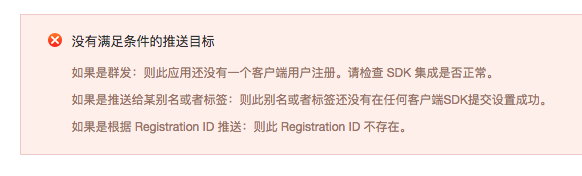
This may occur in the following situations:
- SDK No integration is successful, the client has "Login succeed"Log, obtained registration ID only indicates SDK Integration successful.
- There is a 10-minute delay in broadcast push. If the broadcast push is performed immediately after the first device is successfully initialized, an error will be reported.
- Failed to set alias or label, please check the callback result of setting alias label, from 3.0.7 Starting from version, the new interface is asynchronous callback, which needs to be Androidmanifest Configure a custom broadcast receiver inside, refer to Error code definitionto modify until the setting returns 0 successfully.
- what was preached registration Assigned by the client corresponding to the ID Appkey Used with push Appkey Inconsistent.
can be openedJiguangOfficial website www.jiguang.cn, but cannot be openedJiguangDocument, prompt cannot be found docs.jiguang.cn
- Try another browser
- If it still doesn’t work, execute the following command to feedback the results and troubleshoot the problem.
- ping docs.jiguang.cn
- nslookup docs.jiguang.cn
- telnet docs.jiguang.cn
- Check whether your machine can access other external websites normally.
appkey How does it correspond?
one Appkey Only one package name is allowed to be configured.Appkey and the package name inJiguangOnly one application is identified.
Intranet useJPushHow should it be set?
Intranet useJPushThe server needs to open the following port restrictions for JPush Log in to register and keep pushing long links:
- 19000
- 3000-3020
- 7000-7020
- 8000-8020

