


Compliance guidance
Upgrade Update SDK
Please make sure that you haveJPush SDKUpgrade to new regulations.Updated version.
SDK Configure description of expanded business functionality
Access description:JPush SDK Includes basic business functions and expanded business functions.
Basic function: Provides the developers with the ability to send messages and notifications, and enables the delivery of messages to your end user.
Extension: To enhance the service experience of developers, we provide user grouping, geo-fence push, self-starting, chain adjusters, user insight, active-time statistics.
| Functional differentiation | Operational functions | Functional Introduction | Relevant personal information and purpose of processing | Configure Mode |
|---|---|---|---|---|
| Basic functions | Message Delivery | Sending messages and notifications to your end users by giving them the ability to send messages and notifications | Necessary information: Device identifier (includes)Android ID, GAID, OAID, UAID, IDFA, AAID, Boot ID: The end-user device unique identifier used to generate dissensitisation to ensure accurate transmission; Equipment hardware information (including equipment model, equipment screen resolution, equipment hardware manufacturer, equipment product name, equipment storage space), operating system information (including operating system version, system name, system language): used to ensure compatibility of services on different equipment and to ensure accurate delivery of information; Network information (including network type,carriersInformation, IP addresses,DHCP, WIFIStatus information: used for judgement SDKNetwork connectivity to servers to ensure stability and continuity of services; Sending information logs: This is for you to search for the upload service record. Custom message Device identifier (includes)IMEI, MAC, IMSI): To supplement the generation of the only identifier for end-user devices, to enhance the accuracy of the unique identifier and thus the accuracy and touch rate of the delivery; Network information (includingSSID, BSSID, WiFiList information, base station information,SIMCard status: To determine blurring position information, choose to provide a push service for the near push service node, and to increase the push touch rate. |
Basic business, optional personal information configuration as described in detail SDKProfile description for optional personal information |
| Extension | user segmentSend | Helps you insinuate your end user's preferences and achievesuser segmentSending, reducing the disruption to users of useless delivery content, further enhancing user experience. | Software list information (including software list and software running list information), location information, Bluetooth information (including bluetooth)mac, Bluetooth name, bluetooth type: helps you to see the preferences of your end user and achievesuser segmentPush function. |
Android: Open: JPushInterface. setSmartPushEnable(context, true); Close: JPushInterface. setSmartPushEnable(context, false); Default Start iOS: Example of configuration on, off:[JPUSHService setSmartPushEnable:YES]; // NO Close YES Open Default Start Harmony: Open: JPushInterface. setSmartPushEnable(context,true); Close: JPushInterface. setSmartPushEnable(context, false); Default Start |
| Geographic fence push | A fine, fine delivery based on location information for the bottom scene of the line | Position Information, Bluetooth Information (including Bluetooth)MAC, Bluetooth name, Bluetooth type: for geo-fence lift. |
Android: Open: JPushInterface. setGeofenceEnable(context,true); Close: JPushInterface. setGeofenceEnable(context,false); Default Start iOS: Example:JPushCollectControl *control = [[JPushCollectControl alloc] init];control. gps = NO; // NO Close YES OpenJPUSHService setCollectControl:control]; Default Start Harmony This function is not supported |
|
| Apply Self Start | This interface allows developers to control whether or not to allow SDKIt's the first time I've started. SDKSelf-start is mainly for optimization SDKChina Unicom, enhance delivery and application activity. | Software list information (including software list and software running list information): Optimize SDKLong-link stability, increased delivery and application activity. |
Android: Open: JCollectionAuth. enableAutoWakeup(context, true); Close: JCollectionAuth. enableAutoWakeup(context, false); Default Start iOS, Harmony This function is not supported |
|
| China Unicomor | Associated start-up can be activated in the context of sharing a reasonable application of the feed chain, which will save the user the flow. The closure will lead to increased electricity and flow consumption, while the rate of information reach will decrease. | Software list information (including software list and software running list information): when a device has multiple devicesAPPWhen the push links are active at the same time, we use the combined link technique, which is randomly combined into a single link for the purpose of saving the flow of electricity for users. |
Android: Open: JPushInterface. setLinkMergeEnable(context, true); Close: JPushInterface. setLinkMergeEnable(context, false); Default Start iOS, Harmony This function is not supported |
|
| User Insight | Helps you see. APPInterest and geographical distribution of end-users, etc. user profile, which provides you with a user-specific image and sublinear behaviour analysis service, and supports equipment analysis functions. | Software list information (including software list and software running list information), location information, Bluetooth information (including bluetooth)MAC, Bluetooth name, bluetooth type: help you seeAPPEnd-user interest preferences and regional distribution information achieveduser profileInsight. |
Android: Open: JPushInterface. setDataInsightsEnable(context,true); Close: JPushInterface. setDataInsightsEnable(context,false); Default Start Harmony: Open: JPushInterface. setDataInsightsEnable(context,true); Close: JPushInterface. setDataInsightsEnable(context,false); Default Start iOS Linkable technical support solutions |
|
| Apply active time statistics | To help developers better analyse the delivery effects and user behaviour, further optimize your delivery strategy and increase user participation and conversion. | Apply active time-lapse data received and transferred backstage and front desk. |
Android: Open: JCollectionAuth. enableAppTerminate(this, true); Close: JCollectionAuth. enableAppTerminate(this, false); Harmony: Open: JPushInterface. setDataInsightsEnable(context,true); Close: JPushInterface. setDataInsightsEnable(context,false); Default Start iOS This function is not supported |
SDK Profile description for optional personal information
Access description:JPush SDK Control of optional collection of personal information that can be accessed by developers SDK An example of the configuration of an optional personal information is a description of the configuration. ** If you close the collection of optional information, it will seriously affect your useJPush SDKThe achievement and effectiveness of some functions will not affect the achievement of the underlying functions** and the developers are requested to rationalize their configuration in the light of the operational needs.
SDK Examples of configurations of optional personal information
| Personal profile description | ||
|---|---|---|
| Type of personal information | Purpose of personal data collection | Configure Mode |
| Device InformationIMEI) | Used to generate dissensitized end-user device identifiers and send push messages to the device. |
Android: Example: JPushCollectControl. Builder builder=new JPushCollectControl. Builder(); builder. imei(boolean enable); JPushInterface. setCollectControl(Context context, builder. build()); Parameters: context: applied Context, enable: AllowimeiGet in. true: Allow;false: not allowed;default astrue iOS, Harmony Do Not Collect |
| Device InformationMAC) | Used to generate dissensitized end-user device identifiers and send push messages to the device. |
Android: Example: JPushCollectControl. Builder builder=new JPushCollectControl. Builder(); builder. mac(boolean enable); JPushInterface. setCollectControl(Context context, builder. build()); Parameters: context: applied Context, enable: AllowmacGet in. true: Allow;false: not allowed;default astrue iOS, Harmony Do Not Collect |
| Device InformationIMSI) | Used to generate dissensitized end-user device identifiers and send push messages to the device. |
Android: Example: JPushCollectControl. Builder builder=new JPushCollectControl. Builder(); builder. imsi(boolean enable); JPushInterface. setCollectControl(Context context, builder. build()); Parameters: context: applied Context, enable: AllowimsiGet in. true: Allow;false: not allowed;default astrue iOS, Harmony Do Not Collect |
| Network InformationSSID) | To determine the blurring of location information, choose to provide a push service to the nearest node of the service, and to increase the push rate. |
Android: Example: JPushCollectControl. Builder builder=new JPushCollectControl. Builder(); builder. ssid(boolean enable); JPushInterface. setCollectControl(Context context, builder. build()); Parameters: context: applied Context, enable: AllowssidGet in. true: Allow;false: not allowed;default astrue iOS: Example: JPushCollectControl *control = [[JPushCollectControl alloc] init]; control. ssid = NO; // NO Close YES Open [JPUSHService setCollectControl:control]; Harmony Do Not Collect |
| Network InformationBSSID) | To determine the blurring of location information, choose to provide a push service to the nearest node of the service, and to increase the push rate. |
Android: Example: JPushCollectControl. Builder builder=new JPushCollectControl. Builder(); builder. bssid(boolean enable); JPushInterface. setCollectControl(Context context, builder. build()); Parameters: context: applied Context, enable: AllowbssidGet in. true: Allow;false: not allowed;default astrue iOS: Example: JPushCollectControl *control = [[JPushCollectControl alloc] init]; control. bssid = NO; // NO Close YES Open [JPUSHService setCollectControl:control]; Harmony Do Not Collect |
| WIFIList Information | To determine the blurring of location information, choose to provide a push service to the nearest node of the service, and to increase the push rate. |
Android: Example: JPushCollectControl. Builder builder=new JPushCollectControl. Builder(); builder. wifi(boolean enable); JPushInterface. setCollectControl(Context context, builder. build()); Parameters: context: applied Context, enable: AllowwifiList Information Access,true: Allow;false: not allowed;default astrue Harmony: Open: JCollectControl. setListWifi(this. context. getApplicationContext(),true) Close: JCollectControl. setListWifi(this. context. getApplicationContext(),false) iOS Do Not Collect |
| Base station information,SIMCard Status | To determine the blurring of location information, choose to provide a push service to the nearest node of the service, and to increase the push rate. |
Android: Example: JPushCollectControl. Builder builder=new JPushCollectControl. Builder(); builder. cell(boolean enable); JPushInterface. setCollectControl(Context context, builder. build()); Parameters: context: applied Context, enable: Whether to allow access to base information,true: Allow;false: not allowed;default astrue iOS: Example: JPushCollectControl *control = [[JPushCollectControl alloc] init]; control. cell = NO; // NO Close YES Open [JPUSHService setCollectControl:control]; Harmony Do Not Collect |
| Location Information | Based on location informationuser segmentSend, geo-fence, user insight. | Reference SDK Profile description of extended business functionality |
| Software List Information | Foruser segmentSend, apply self-starter and link adjuster functions. | Reference SDK Profile description of extended business functionality HarmonyDo not collect this information |
| Bluetooth information (including bluetooth)macBluetooth name, bluetooth type) | Based on location informationuser segmentSend, user insight. | Reference SDKProfile description of extended business functionality |
SDK Frequency, precision description of personal data collection
Input statement: We will undertake the collection of user-specific information as minimally necessary to achieve business functions. I'm not sure what I'm talking about. JPush SDK Only data collectionsAppTrigger when calling related functions, about frequency APP The developers can't configure themselves, so we don't provide an alternative configuration, an example of the frequency; the accuracy of the collection is mainly related to location-related functions, which are controlled primarily through permission. JPush SDK Through Optional Permissions APP It is possible to control whether or not to apply for precise or rough geographical privileges. If you need to configure your locator privileges, refer to the following ""SDKA description of the authority to apply for the system" is configured.
SDK Description of the competence of the application system
Access description:JPush SDK The system permissions that you can apply for can be consulted in the following table, which provides you with detailed information on the relationship of the authority to the functions of the industry and the timing of the application.
| Android Operating System Application Permission List | |||
|---|---|---|---|
| Permissions | Optional | Purpose | Timing of application |
| INTERNET | Selected | Web access. For the realization and server communications to provide information delivery services. | Enable operations to read |
| ACCESS_NETWORK_STATE | Selected | Access to view the network status. For following network breakup SDK Reconnect. | Enable operations to read |
| POST_NOTIFICATIONS | Selected | For adaptation Android 13 Eject notification for application of equipment and above. | Use when sending messages |
| JPUSH_MESSAGE | Selected | JPush Customises the permission to send the permission to receive a broadcast. | Enable operations to read |
| ACCESS_COARSE_LOCATION | Optional | Allows applications to get rough positions. Used to perform geo-fence functions in the delivery scene. | Use when lifting a geographical fence |
| ACCESS_FINE_LOCATION | Optional | Allows applications to obtain precision positions. To achieve the geographical fence,user segmentSend, user insight. | Use when lifting a geographical fence |
| ACCESS_BACKGROUND_LOCATION | Optional | Android 10 Appropriate equipment and above to apply backstage positioning privileges. To achieve the geographical fence,user segmentSend, user insight. | Use when lifting a geographical fence |
| READ_PHONE_STATE | Optional | Get cell phone status parameters, assistive generation Jiguang Only device identifier. | Enable operations to read |
| QUERY_ALL_PACKAGES | Optional | Android10I'm not sure if I'm going to do this. deeplinkNotify jump to judge if the target application is installed. | Use for group distribution |
| ACCESS_WIFI_STATE | Optional | Allow program access wifi Web status information to achieve information delivery. | Enable operations to read |
| WRITE_EXTERNAL_STORAGE | Optional | To avoid generating multiple push-off targets for the same user JiguangRID) avoid duplication with the same user and save the cost of the push. | Enable operations to read |
| READ_EXTERNAL_STORAGE | Optional | To avoid generating multiple push-off targets for the same user JiguangRID) avoid duplication with the same user and save the cost of the push. | Enable operations to read |
| BLUETOOTH | Optional | Collection of Bluetooth information for the geo-fence,user segmentSend, user insight. | Enable geographic fences,user segmentSend, user insight and read when users authorize bluetooth privileges |
| BLUETOOTH_ADMIN | Optional | Collecting bluetooth information to achieve the geo-fence of the scene,user segmentSend, user insight. | Enable geographic fences,user segmentSend, user insight and read when users authorize bluetooth privileges |
| iOS Operating System Application Permission List | |||
| Permissions | Optional | Purpose | Timing of application |
| Network access rights | Selected | Allow SDKNetworking and data reporting, achieved SDKThe most basic authority for operational functions. | Enables operations to read (the system automatically applies for a bullet window without a code when there is a network). |
| Positioning Permissions | Optional | Used to perform geo-fence functions in the delivery scene. | The geographical fence is used when pushing. |
| IDFA | Optional | idfa Package used to obtain the only identifier for the device. | Enables operations to read. |
| Harmony Operating System Application Permission List | |||
| Permissions | Optional | Purpose | Timing of application |
| INTERNET | Selected | Web access. For the realization and server communications to provide information delivery services. | Enable operations to read |
| GET_WIFI_INFO | Selected | ViewWIFIChina Unicomion status. For following network breakup SDK Reconnect. | Enable operations to read |
| GET_NETWORK_INFO | Selected | View the network connection status. For information dissemination services. | Enable operations to read |
| APP_TRACKING_CONSENT | Selected | The end-user device is used to generate a dissensitized unique identifier to ensure accurate transmission. | Enable operations to read |
| APPROXIMATELY_LOCATION | Optional | Allows applications to access precise locations. This is used to achieve group distribution, user insight. | Enable operations to read |
| LOCATION | Optional | Allows applications to get rough positions. This is used to achieve group distribution, user insight. | Enable operations to read |
| ACCESS_BLUETOOTH | Optional | Allows applications to access Bluetooth information. This is used to achieve group distribution, user insight. | Enableuser segmentSend, user insight and read when users authorize bluetooth privileges |
SDK Permission Control
Android Select Rights
- The following is the mandatory permissions, which must be configured to meet basic delivery capabilities
          <!-- JPush自定义权限, 用于发送接收广播权限校验(必选)-->
<permission
 android:name="${applicationId}.permission. JPUSH_MESSAGE"
 android:protectionLevel="signature" />
<uses-permission android:name="${applicationId}.permission. JPUSH_MESSAGE" />

<!-- 网络权限 (必选)-->
<uses-permission android:name="android. permission. INTERNET" />
<!-- 查看网络状态, SDK重连机制等需要使用-->
<uses-permission android:name="android. permission. ACCESS_NETWORK_STATE" />
<!-- 适配Android 13, 应用弹出通知必须权限-->
 <uses-permission android:name="android. permission. POST_NOTIFICATIONS"/>
Android Optional Rights
- If you need access to the geographical fence,user segment, User Insight, recommends integration of the following privileges (optional)
          <!--允许应用获取粗略位置-->
<uses-permission android:name="android. permission. ACCESS_COARSE_LOCATION" />
<!--允许应用获取精准位置-->
<uses-permission android:name="android. permission. ACCESS_FINE_LOCATION" />
<!-- Android Q适配 应用后台定位权限 -->
<uses-permission android:name="android. permission. ACCESS_BACKGROUND_LOCATION" />
<!--蓝牙相关权限-->
<uses-permission android:name="android. permission. BLUETOOTH" />
<uses-permission android:name="android. permission. BLUETOOTH_ADMIN" />
- If you need the corresponding device to notify the capability, it is recommended that the following privileges be integrated (optional)
          <!-- 华为角标权限 -->
<uses-permission android:name="com. huawei. android. launcher. permission. CHANGE_BADGE" />
<!-- VIVO角标权限 -->
<uses-permission android:name="com. vivo. notification. permission. BADGE_ICON" />
<!--振动器权限, JPUSH支持通知开启振动功能, 小米推送必须-->
<uses-permission android:name="android. permission. VIBRATE" />
<!--honor 角标-->
<uses-permission android:name="com. hihonor. android. launcher. permission. CHANGE_BADGE" />
- Use to generate an accurate delivery target ID(s)JiguangRID) to ensure the accurate delivery of the information and the reasonable distribution of the route by the manufacturer to increase the rate of service (optional)
          <!-- 获取手机状态参数, 辅助生成极光唯一ID -->
<uses-permission android:name="android. permission. READ_PHONE_STATE" />
<!-- AndroidR 适配, deeplink通知跳转, 判断目标应用是否已安装 -->
<uses-permission android:name="android. permission. QUERY_ALL_PACKAGES" />
<!-- 允许程序访问wifi网络状态信息 -->
<uses-permission android:name="android. permission. ACCESS_WIFI_STATE" />
 <!-- 允许程序对外部存储进行读写操作 -->
<uses-permission android:name="android. permission. WRITE_EXTERNAL_STORAGE" />
 <!-- 允许程序对外部存储进行读操作 -->
<uses-permission android:name="android. permission. READ_EXTERNAL_STORAGE" />
iOS Select Rights
- The following is the mandatory permissions, which must be configured to meet basic delivery capabilities
          JPUSHRegisterEntity * entity = [[JPUSHRegisterEntity alloc] init];
entity. types = JPAuthorizationOptionAlert|JPAuthorizationOptionBadge|JPAuthorizationOptionSound;
[JPUSHService registerForRemoteNotificationConfig:entity delegate:self];
iOS Optional Rights
- If you need access to the geographical fence, user insight,user segmentSending business with recommended integration of the following privileges (optional)
          NSLocationWhenInUseUsageDescription //访问位置信息
NSLocationAlwaysAndWhenInUseUsageDescription //访问位置信息
NSUserTrackingUsageDescription //idfa包使用
HarmonySelect Rights
- The following is the mandatory permissions, which must be configured to meet basic delivery capabilities
          "requestPermissions": [
 {
 //网络权限
 "name": "ohos. permission. INTERNET"
 },
 {
 //获取WIFI连接状态权限
 "name": "ohos. permission. GET_WIFI_INFO"
 },
 {
 //获取网络状态权限
 "name": "ohos. permission. GET_NETWORK_INFO"
 },
 {
 //获取OAID
 "name": "ohos. permission. APP_TRACKING_CONSENT"
 }
]
HarmonyOptional Rights
- Optional permissions, if you need themuser segment, User Insight Operations, recommend the following privileges (optional)
          "requestPermissions": [
 {
 //获取粗略位置信息权限
 "name": "ohos. permission. APPROXIMATELY_LOCATION"
 },
 {
 //获取位置信息权限
 "name": "ohos. permission. LOCATION"
 },
 {
 //蓝牙信息权限
 "name":"ohos. permission. ACCESS_BLUETOOTH"
 }
]
SDKPrivacy policy disclosure requirements and examples
According: Developer in App IntegrationJPush SDKAfter that,JPush SDK The proper operation of the system collects the necessary end-user information for dissemination. Please developer based on integrationJPush SDK♪ The truth in you ♪ App In the privacy policy, yes. JPush SDK The name, the name of the company, the type and purpose of processing personal information, the method of collection, the privacy policy link, etc. are disclosed. ** Suggestion: Confirm what you accessJPush SDK Versions and functional modules, identified from privacy policy, compliance guidanceJPush SDKinteractive data content;in you App in the privacy policy, in the form of words or lists to the public Pea. Lou. JPush SDK and related information. **
** Examples of disclosure (for information only, please refer to actual cooperation):
SDKName:JPush-JPush SDK
** Third-party subject: Shenzhen City and Tsawa Valley Information Technology Ltd.
** The purpose of the cooperation is: APP Users provide information delivery services
** Types and uses of processing of personal information: equipment identifier (includingAndroid ID, GAID, OAID, UAID, IDFA, AAID, Boot id), equipment hardware information (including equipment model, equipment screen resolution, equipment hardware manufacturer, equipment product name, equipment storage space), operating system information (including operating system version, system name, system language), network information (including network type,carriersInformation, IP addresses,DHCP, WIFIStatus information, posting of information logs: the necessary personal information to generate dissensitized end-user device uniqueness markers in the service ' s basic business scenario, to ensure compatibility and accurate identification of the service on different devices, and to obtain information delivery. Device identifier (includes)IMEI, MAC, IMSI: Optional personal information to generate a single end-user device supplement in the service ' s basic business scenario to improve the accuracy of the unique device identifier and thus the accuracy and touch rate of the delivery; network information (includingSSID, BSSID, WIFIList information, base station information,SIMCard status: Selective personal information for determining vague location information in the service ' s basic business scenario, choosing to provide a push service for the service node and to increase the rate of penetration. ** Location information**, Bluetooth information (including Bluetooth)MACBluetooth name, bluetooth type: geographic fence,user segmentSend, insight the personal information necessary for the extension to provide a fine, fine push to the bottom scene of the line, and recommend a more appropriate delivery according to location information; software list information (including software list and software running list information):user segment, apply the personal information necessary for self-starter, chain adjuster, user insinuation extension: helps you to see the preferences of your end user, helps you to provide a more appropriate delivery to the user, while optimizing SDKLong-link stability, increased delivery and application activity and the use of combined links to save the flow for users.
** Data processing**: through de-marking, encrypted transmission and other secure means
Jiguang Privacy Policy Link:AURORA Jiguang Privacy policy》
Official link:https://www.jiguang.cn/
Description and examples of end-user consent
Access description:App For the first run, there should be a private bullet window, with a short version of the privacy policy content and a full version of the privacy policy link, with a clear indication that the end user is informed to read and choose whether to agree to the privacy policy; the private bullet window should provide a consent button and a refusal button and be chosen by the end user. ** Where sensitive personal information is involved, your end-user authorization should be obtained with the consent of your end-user, which can be obtained in the form of a stand-alone bullet window, and displayed in your Privacy Policy in bold fonts or other prominent markings for sensitive personal information.**
Examples of privacy policy authorizations:
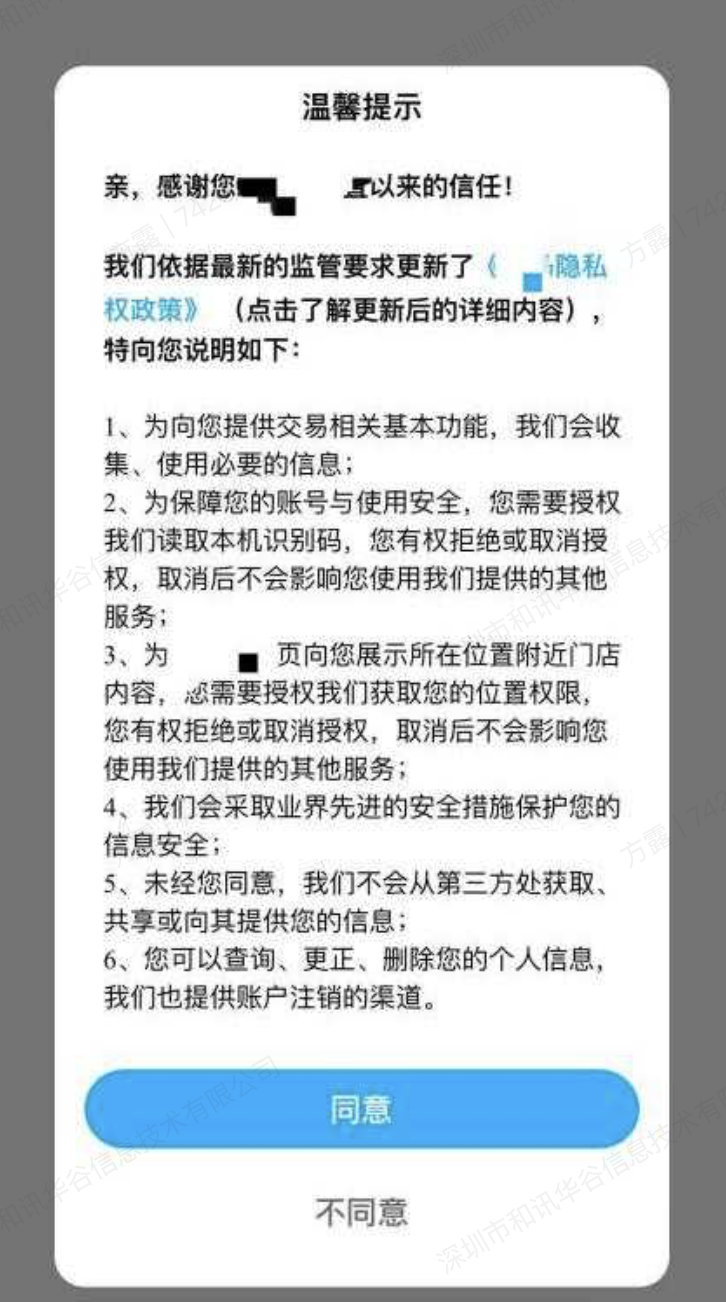
Example of authorized bullet windows for sensitive personal information:
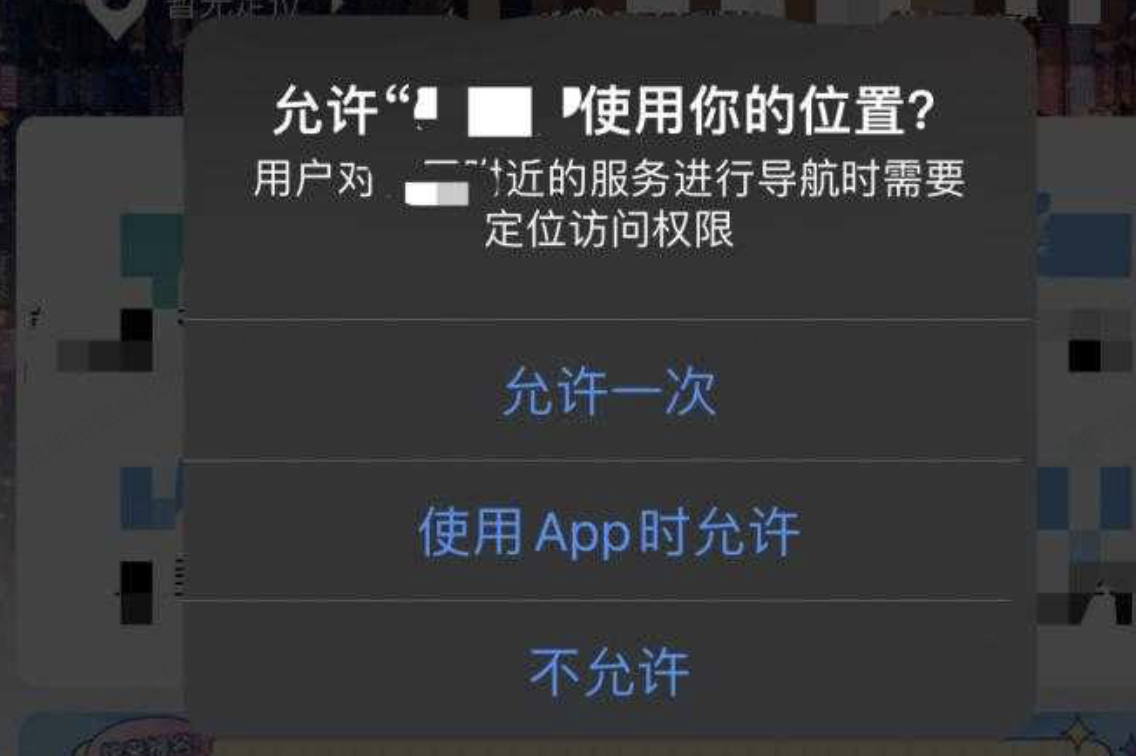
** An example of privacy policy disclosure of sensitive personal information**: "** location-related information**: used to provide geographical fences anduser segmentPush function."
Statement of rights exercised by end-users
Input: Developer in APP Medium IntegrationJPush SDK After that,JPush SDK The proper operation of the system collects the necessary end-user information for the purpose of transmitting or expanding the information. The developer shall, in accordance with the relevant laws and regulations, provide the end-user with a path or function for exercising the rights of the subject of personal information, ifJPush SDK Please cooperate. Jiguang company liaises in a timely manner, and we will work with developers to properly address end-user claims.
SDK Business function call times
Access description: Please consent to you at user level APP After the privacy policy in progressJPush SDK Business function calls. Avoid dynamic applications for sensitive equipment privileges related to the user's personal information until the user agrees to the privacy policy.
SDK Send Business Enabled
- Transfer business functional interface call: ensure APP At the time of the first launch, it was only when the user reads your Privacy Policy and obtains a user ' s authorization that the business function interface was called:Android: JPushInterface. init(); iOS: [JPUSHService setupWithOption:appKey:channel:apsForProduction:]; Harmony: JPushInterface. init() At this time SDKIt's registered and generated. JPushUnique IDRID) and collect and report the personal information necessary for the operational function (based on the system ' s functionality and the developer ' s own configuration)
- If the user does not authorize or agree to your Privacy Policy, the business function interface cannot be called.
- Once APP Lack of user authorization for Privacy Policy, follow-up APP Cold start, the developer should ensure that no other call is made before calling the business interface. JPushService interface.
Calls for relevant interfaces for compliance
- Before users agree to privacy provisions:
- If the user has not agreed to the privacy clause, the call must be made JCollectionAuth. setAuth(context, false) to inform SDK Do not enable rollover operations.
- (**JCore 5.0.4 The above version no longer requires a call setAuth(context, false) but there is still a need to ensure that no calls are made until the user agrees SDK Interface. **
- Do Not Call Jiguang SDK Any interface. Including JPushInterface, JCoreInterface, JCollectionAuthand related interfaces of the manufacturer, such as:JPluginPlatformInterface And it can't be configured.
<meta-data android:name="push_kit_auto_init_enabled" android:value="true"/>. - After the user agrees to the privacy clause:
- If the user has agreed to the privacy clause, or if the user has triggered the consent operation, the call must be made JCollectionAuth. setAuth(context, true) to enable rollover operations.
- If not called setAuth(context, false♪ For example ♪ JCore 5.0.4 No visible settings in later versions false, no additional call required setAuth(context, true), SDK Automatically handles authorized status.
For example:
// 调整点一: 调用启用推送业务功能代码前增加setAuth调用
boolean isPrivacyReady; // app根据是否已弹窗获取隐私授权来赋值
if(!isPrivacyReady){
 // JCore 5.0.4之前版本需要显式设置false
 if (JCoreInterface. getJCore SDKVersionInt() < 504) { // 5.0.4版本号对应504
 JCollectionAuth. setAuth(context, false);
 }

 // 所有版本在未授权时都不应初始化SDK
 return;
}

JPushInterface. init();

// 调整点二: App用户同意了隐私政策授权, 并且开发者确定要开启推送服务后调用
// JCore 5.0.4+会自动处理授权状态, 可不需要显式设置true
JCollectionAuth. setAuth(context, true);
Third-party privacy policy disclosure reference
If passedJPush SDK(AndroidIn addition, please include in the Privacy Policy a statement of privacy policy with respect to the manufacturer's access as follows:
** Xiaomi Push SDK**
Type of personal information involved:
Equipment information (producer, model, place of origin,carriersName, etc.), memory of equipment, version of operating system, Xiaomi push SDKVersion, upload message content, notice bar settings, network type,WIFIStatus
Use Purpose: Send Message
Use of scene: use when transmitting messages from milliphone terminals
Third party subject: Beijing Mi Mobile Software Ltd.
Network links:https://dev.mi.com/console/appservice/push.html
Privacy policy:https://dev.mi.com/xiaomihyperos/documentation/detail?pId=1534
** The Chinese HMS SDK**
Types of personal information involved: application information (applying basic information), equipment information (equipment models, operating systems and system settings), network information (network information, web-based information)carriersInformation,SSIDIP address)
Use Purpose: Send Message
Use scene: use when sending messages to a mobile phone terminal in China
Third party subject: China Software Technology Ltd.
Network links:https://developer.huawei.com/consumer/cn/
Privacy policy:https://developer.huawei.com/consumer/cn/doc/development/HMSCore-Guides/sdk-data-security-0000001050042177
** Honor presents SDK**
Type of personal information involved: Device identifier ()AAID, PushToken), APPID,Package Name
Use Purpose: Send Message
Use of scenes: Use of Honor mobile phone terminals when sending messages
Third party subject: Shenzhen Honor Software Technology Ltd.
Network links:https://developer.hihonor.com/cn/
Privacy policy:https://developer.hihonor.com/cn/kitdoc/?category=%E5%9F%BA%E7%A1%80%E6%9C%8D%E5%8A%A1&kitId=11002&navigation=guides&docId=sdk-data-security.md
OPPO Send SDK
Type of personal information involved: Application of basic informationMCS Apply package name, application version number,OPUSH SDKVersion number, application of the package name and application of the device identifier (infra)RegistraterID, appKey, appSecret)
Use Purpose: Send Message
Use scene: in OPPO Use cell phone terminal to send messages
Third party subject: Guangdong Jingtae Technology Ltd.
Network links:https://open.oppomobile.com/
Privacy policy:https://open.oppomobile.com/new/developmentDoc/info?id=11228
vivo Send SDK
Type of personal information involved: Application of basic informationappid, appkey, apply the package name, apply the version number,push SDKVersion), application device identifier (regid), hardware information on equipment (type of equipment), system basic information (type of system, version of system)
Purpose of use: Provision of messaging services, statistical delivery SDK Interface call success rate
Use scene: in vivo Use cell phone terminal to send messages
Third party subject: Vivo Mobile Communications Ltd.
Network links:https://dev.vivo.com.cn/promote/pushNews
Privacy policy:https://dev.vivo.com.cn/documentCenter/doc/652#w1-12075822
Mima sent SDK
Type of personal information involved: equipment-related information (cell phone brand, cell phone model, system version, system language, and equipment identification) SymbolPUSHID) and application of information, delivery status
Purpose of use: Provision of real-time news transmission, optimization of experience transfer and statistical analysis of Himal telephones
Use scene: use when sending messages from the Himalayas mobile terminal
Third-party subject: Mirage Information Technology Ltd.
Network links:https://open.flyme.cn/service?type=push
Privacy policy:https://open.flyme.cn/docs?id=202
** Come to deliver ** SDK**
Type of personal information involved: equipment-related informationGAID, OAID, VDID, AAID, equipment model), application-related information (pull service)SDKVersion number, application number, application name)
Purpose: Messages are sent
Use scene: Use when sending messages from the cellular terminal
Third-party subject: Ultron Mobile Technology Ltd.
Privacy policy:https://phone.nio.com/privacy/push/privacy.html?policy_lang=zh_CN
** Please note that third-party vendor access SDKPlease note that the processing of information may change due to, for example, the upgrade of the version. **
Privacy protection mechanisms
If you're right,JPush SDK Any doubts, observations and recommendations, or because of need Jiguang To assist in the closure of a certain capacity, we can be contacted by means of:
E-mail:[support@jiguang. cn](mailto:support@jiguang. cn)
Telephone:400-888-2376
Contact: 12 A floors of Shenzhen Bay Science and Technology Ecological Park, at the intersection of Whitestone Road and the Western Road in the High South Side Street of Shenzhen City
You can also visit at any time.Jiguang network of officialsTheonlinecustomerservicesystem is in touch, and we will provide you with advice and services in a timely manner to ensure the implementation and enforcement of privacy protection mechanisms.

