


Android SDK Advanced Guide
Custom notification bar style
About custom notification styles
When JPush delivers notifications to the client, the notification bar uses the device defaults by default, including sound and vibration.
To achieve the following, use custom notification bar styles:
- Use settings different from defaults, such as:
- Sound and vibration
- Icons
- Replace the default notification layout.
Specify notification style ID when pushing
On the server, notification style is represented only by a numeric ID.
The style ID should correspond to a style configured on the client.
If the ID on the notification does not exist on the client, the default style is used.
Default ID is 0 without custom styles. For custom styles, use ID > 0 and < 1000. Set styles on the client via API, then set Builder ID when pushing.
When pushing via API, set builder_id under Notification → Android.
In the Portal, select Android, expand optional settings, and specify the style ID: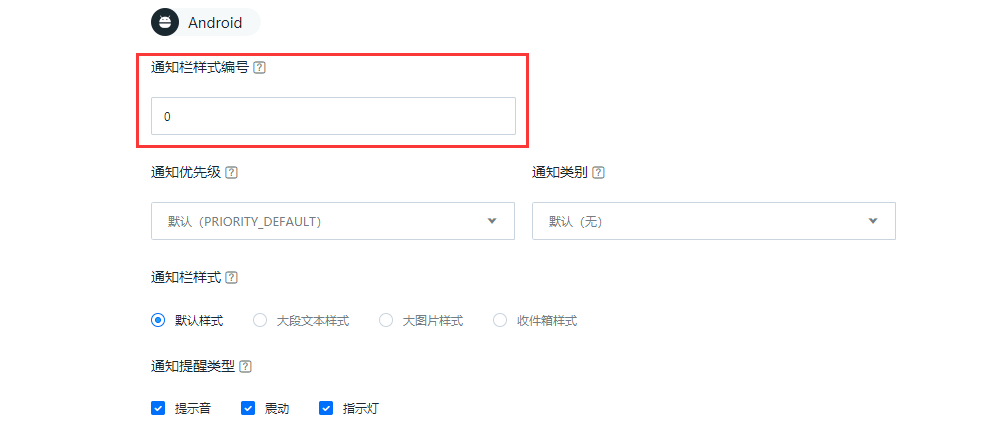
Client-side style configuration
Custom styles are configured on the client. See Notification style API.
Design
- Use
PushNotificationBuilderandsetPushNotificationBuilderto assign an ID to each builder. - Call after
JPushInterface.init()from app logic or at startup. - Set once; JPush SDK remembers it and applies the builder matching the notification ID.
API - setDefaultPushNotificationBuilder
Changes the default style for ID 0.
API - setPushNotificationBuilder
Sets a custom PushNotificationBuilder for a specified ID.
Example - BasicPushNotificationBuilder
Customize sound, vibration, and lights.
BasicPushNotificationBuilder builder = new BasicPushNotificationBuilder(MainActivity.this); builder.statusBarDrawable = R.drawable.jpush_notification_icon; builder.notificationFlags = Notification.FLAG_AUTO_CANCEL | Notification.FLAG_SHOW_LIGHTS; //Set to auto-disappear and blister builder.notificationDefaults = Notification.DEFAULT_SOUND | Notification.DEFAULT_VIBRATE | Notification.DEFAULT_LIGHTS; // Set it for bells, vibrating, breathing lights. JPushInterface.setPushNotificationBuilder(1, builder);
Multi-action notification (SDK 3.0.0+, may not display on some non-stock Android devices).
MultiActionsNotificationBuilder builder = new MultiActionsNotificationBuilder(PushSetActivity.this); //Add buttons, parameters (button pictures, button text, extension data) builder.addJPushAction(R.drawable.jpush_ic_richpush_actionbar_back, "first", "my_extra1"); builder.addJPushAction(R.drawable.jpush_ic_richpush_actionbar_back, "second", "my_extra2"); builder.addJPushAction(R.drawable.jpush_ic_richpush_actionbar_back, "third", "my_extra3"); JPushInterface.setPushNotificationBuilder(2, builder);
Example - CustomPushNotificationBuilder
Further customize layout based on BasicPushNotificationBuilder.
The sample customer_notitfication_layout is in the example project under /res/layout/. You may use your own layout.
              CustomPushNotificationBuilder builder = new
    CustomPushNotificationBuilder(MainActivity.this,
         R.layout.customer_notitfication_layout,
         R.id.icon,
         R.id.title,
         R.id.text,
         R.id.time);
        // 指定定制的 Notification Layout
    builder.statusBarDrawable = R.drawable.your_notification_icon;
    // 指定最顶层状态栏小图标
    builder.layoutIconDrawable = R.drawable.your_2_notification_icon;
    // 指定下拉状态栏时显示的通知图标
    JPushInterface.setPushNotificationBuilder(2, builder);
Style not sufficient?
Custom notification support is limited. For example, Notification styles on Android 4.0+ are not fully supported by JPush SDK.
For complex custom UI without the advanced builder, use custom messages instead: receive the full payload in the app and render notifications yourself. See Notification vs. custom message below.
Notification vs custom message
JPush supports notifications and custom messages. This section describes differences and recommended use cases.
Functional differences
Notification
A notification appears in the system notification bar. This is a basic Android/iOS capability.
Notifications mainly alert users; plain text is often enough.
Notifications help improve app engagement.
Custom message
Custom messages are not notifications. By default the SDK does not show them in the notification bar; JPush passes them through. Content and display are fully defined by the developer.
Custom messages are mainly for in-app logic and special display.
Developer usage differences
Notification
For simple cases, the SDK can show default effects and open the main activity on tap without custom code.
JPush Android SDK provides APIs to customize the notification bar; see this guide. A Receiver can customize behavior on receive and on tap.
Custom message
The SDK does not show custom messages in the notification bar. Check logs to see server payloads during debugging.
You must implement Message Receiver to handle custom messages.
Note:
If msg_content is empty, the SDK will not broadcast the message and the app may not receive it. Always include content for custom message push.
Using notifications
Example:
          public class MyReceiver extends BroadcastReceiver {
    private static final String TAG = "MyReceiver";

    private NotificationManager nm;

    @Override
    public void onReceive(Context context, Intent intent) {
        if (null == nm) {
            nm = (NotificationManager) context.getSystemService(Context.NOTIFICATION_SERVICE);
        }

        Bundle bundle = intent.getExtras();
        Logger.d(TAG, "onReceive - " + intent.getAction() + ", extras: " + AndroidUtil.printBundle(bundle));

        if (JPushInterface.ACTION_REGISTRATION_ID.equals(intent.getAction())) {
            Logger.d(TAG, "JPush 用户注册成功");

        } else if (JPushInterface.ACTION_MESSAGE_RECEIVED.equals(intent.getAction())) {
            Logger.d(TAG, "接受到推送下来的自定义消息");

        } else if (JPushInterface.ACTION_NOTIFICATION_RECEIVED.equals(intent.getAction())) {
            Logger.d(TAG, "接受到推送下来的通知");

           receivingNotification(context,bundle);

        } else if (JPushInterface.ACTION_NOTIFICATION_OPENED.equals(intent.getAction())) {
            Logger.d(TAG, "用户点击打开了通知");

           openNotification(context,bundle);

        } else {
            Logger.d(TAG, "Unhandled intent - " + intent.getAction());
        }
    }

   private void receivingNotification(Context context, Bundle bundle){
        String title = bundle.getString(JPushInterface.EXTRA_NOTIFICATION_TITLE);
        Logger.d(TAG, " title: " + title);
        String message = bundle.getString(JPushInterface.EXTRA_ALERT);
        Logger.d(TAG, "message: " + message);
        String extras = bundle.getString(JPushInterface.EXTRA_EXTRA);
        Logger.d(TAG, "extras: " + extras);
    }

   private void openNotification(Context context, Bundle bundle){
        String extras = bundle.getString(JPushInterface.EXTRA_EXTRA);
        String myValue = "";
        try {
            JSONObject extrasJson = new JSONObject(extras);
            myValue = extrasJson.optString("myKey");
        } catch (Exception e) {
            Logger.w(TAG, "Unexpected: extras is not a valid json", e);
            return;
        }
        if (TYPE_THIS.equals(myValue)) {
            Intent mIntent = new Intent(context, ThisActivity.class);
            mIntent.putExtras(bundle);
            mIntent.setFlags(Intent.FLAG_ACTIVITY_NEW_TASK);
            context.startActivity(mIntent);
        } else if (TYPE_ANOTHER.equals(myValue)){
            Intent mIntent = new Intent(context, AnotherActivity.class);
            mIntent.putExtras(bundle);
            mIntent.setFlags(Intent.FLAG_ACTIVITY_NEW_TASK);
            context.startActivity(mIntent);
        }
    }
}
Using custom messages
Implement a BroadcastReceiver for JPush SDK broadcasts. See Message Receiver.
Example from Push Talk:
          public class TalkReceiver extends BroadcastReceiver {
    private static final String TAG = "TalkReceiver";

    private NotificationManager nm;

    @Override
    public void onReceive(Context context, Intent intent) {
        if (null == nm) {
            nm = (NotificationManager) context.getSystemService(Context.NOTIFICATION_SERVICE);
        }

        Bundle bundle = intent.getExtras();
        Logger.d(TAG, "onReceive - " + intent.getAction() + ", extras: " + AndroidUtil.printBundle(bundle));

        if (JPushInterface.ACTION_REGISTRATION_ID.equals(intent.getAction())) {
            Logger.d(TAG, "JPush 用户注册成功");

        } else if (JPushInterface.ACTION_MESSAGE_RECEIVED.equals(intent.getAction())) {
            Logger.d(TAG, "接受到推送下来的自定义消息");

            // Push Talk messages are push down by custom message format
            processCustomMessage(context, bundle);

        } else if (JPushInterface.ACTION_NOTIFICATION_RECEIVED.equals(intent.getAction())) {
            Logger.d(TAG, "接受到推送下来的通知");

           receivingNotification(context,bundle);

        } else if (JPushInterface.ACTION_NOTIFICATION_OPENED.equals(intent.getAction())) {
            Logger.d(TAG, "用户点击打开了通知");

           openNotification(context,bundle);

        } else {
            Logger.d(TAG, "Unhandled intent - " + intent.getAction());
        }
    }

    private void processCustomMessage(Context context, Bundle bundle) {
        String title = bundle.getString(JPushInterface.EXTRA_TITLE);
        String message = bundle.getString(JPushInterface.EXTRA_MESSAGE);
        if (StringUtils.isEmpty(title)) {
            Logger.w(TAG, "Unexpected: empty title (friend). Give up");
            return;
        }

        boolean needIncreaseUnread = true;

        if (title.equalsIgnoreCase(Config.myName)) {
            Logger.d(TAG, "Message from myself. Give up");
            needIncreaseUnread = false;
            if (!Config.IS_TEST_MODE) {
                return;
            }
        }

        String channel = null;
        String extras = bundle.getString(JPushInterface.EXTRA_EXTRA);
        try {
            JSONObject extrasJson = new JSONObject(extras);
            channel = extrasJson.optString(Constants.KEY_CHANNEL);
        } catch (Exception e) {
            Logger.w(TAG, "Unexpected: extras is not a valid json", e);
        }

        // Send message to UI (Webview) only when UI is up
        if (!Config.isBackground) {
            Intent msgIntent = new Intent(MainActivity.MESSAGE_RECEIVED_ACTION);
            msgIntent.putExtra(Constants.KEY_MESSAGE, message);
            msgIntent.putExtra(Constants.KEY_TITLE, title);
            if (null!= channel) {
                msgIntent.putExtra(Constants.KEY_CHANNEL, channel);
            }

            JSONObject all = new JSONObject();
            try {
                all.put(Constants.KEY_TITLE, title);
                all.put(Constants.KEY_MESSAGE, message);
                all.put(Constants.KEY_EXTRAS, new JSONObject(extras));
            } catch (JSONException e) {
            }
            msgIntent.putExtra("all", all.toString());

            context.sendBroadcast(msgIntent);
        }

        String chatting = title;
        if (!StringUtils.isEmpty(channel)) {
            chatting = channel;
        }

        String currentChatting = MyPreferenceManager.getString(Constants.PREF_CURRENT_CHATTING, null);
        if (chatting.equalsIgnoreCase(currentChatting)) {
            Logger.d(TAG, "Is now chatting with - " + chatting + ". Dont show notificaiton.");
            needIncreaseUnread = false;
            if (!Config.IS_TEST_MODE) {
                return;
            }
        }

        if (needIncreaseUnread) {
            unreadMessage(title, channel);
        }

        NotificationHelper.showMessageNotification(context, nm, title, message, channel);
    }

    // When received message, increase unread number for Recent Chat
    private void unreadMessage(final String friend, final String channel) {
        new Thread() {
            public void run() {
                String chattingFriend = null;
                if (StringUtils.isEmpty(channel)) {
                    chattingFriend = friend;
                }

                Map<String, String> params = new HashMap<String, String>();
                params.put("udid", Config.udid);
                params.put("friend", chattingFriend);
                params.put("channel_name", channel);

                try {
                    HttpHelper.post(Constants.PATH_UNREAD, params);
                } catch (Exception e) {
                    Logger.e(TAG, "Call pushtalk api to report unread error", e);
                }
            }
        }.start();
    }
}

