


iOS notification click navigation
Last updated:2022-3-29
Send extra parameters when pushing; the client reads them and performs the corresponding navigation logic.
Server usage
Console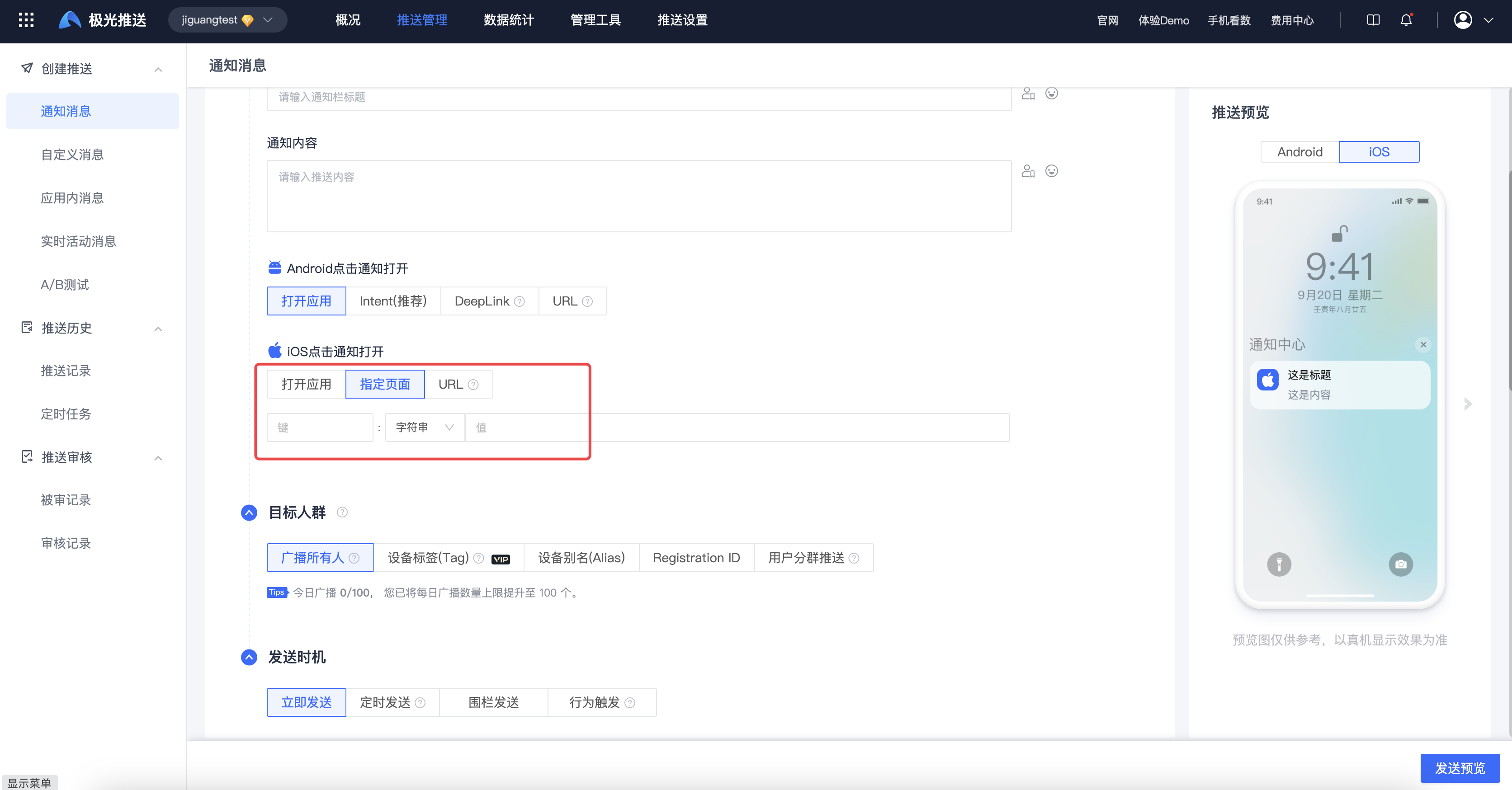
API
| Keyword | Type | Options | Meaning | Annotations |
|---|---|---|---|---|
| extras | JSON Object | Optional | Attached Fields | Custom here Key / value Information for operational use. |
          "ios": {
 "alert": "hello, JPush!",
 "badge": 1,
 "extras": {
 "news_id": 134,
 "my_key": "a value"
 }
}
"ios": {
"alert": "hello, JPush!",
"badge": 1,
"extras": {
"news_id": 134,
"my_key": "a value"
}
}
This code block is shown in the floating window
Client: read parameters
Notification
When an iOS device receives an APNs notification and the user taps it to open the app, behavior depends on app state:
- App in foreground:
          - (void)jpushNotificationCenter:(UNUserNotificationCenter *)center willPresentNotification:(UNNotification *)notification withCompletionHandler:(void (^)(NSInteger options))completionHandler {
 NSDictionary * userInfo = notification.request.content.userInfo;

 UNNotificationRequest *request = notification.request; // 收到推送的请求
 UNNotificationContent *content = request.content; // 收到推送的消息内容

 NSNumber *badge = content.badge; // 推送消息的角标
 NSString *body = content.body; // 推送消息体
 UNNotificationSound *sound = content.sound; // 推送消息的声音
 NSString *subtitle = content.subtitle; // 推送消息的副标题
 NSString *title = content.title; // 推送消息的标题

 if([notification.request.trigger isKindOfClass:[UNPushNotificationTrigger class]]) {
 [JPUSHService handleRemoteNotification:userInfo];
 NSLog(@"iOS10 前台收到远程通知:%@", [self logDic:userInfo]);

 [rootViewController addNotificationCount];
 }
 else {
 // 判断为本地通知
 NSLog(@"iOS10 前台收到本地通知:{\nbody:%@,\ntitle:%@,\nsubtitle:%@,\nbadge:%@,\nsound:%@,\nuserInfo:%@\n}",body,title,subtitle,badge,sound,userInfo);
 }
 completionHandler(UNNotificationPresentationOptionBadge|UNNotificationPresentationOptionSound|UNNotificationPresentationOptionAlert); // 需要执行这个方法,选择是否提醒用户,有Badge、Sound、Alert三种类型可以设置
}
- (void)jpushNotificationCenter:(UNUserNotificationCenter *)center willPresentNotification:(UNNotification *)notification withCompletionHandler:(void (^)(NSInteger options))completionHandler {
NSDictionary * userInfo = notification.request.content.userInfo;
UNNotificationRequest *request = notification.request; // 收到推送的请求
UNNotificationContent *content = request.content; // 收到推送的消息内容
NSNumber *badge = content.badge; // 推送消息的角标
NSString *body = content.body; // 推送消息体
UNNotificationSound *sound = content.sound; // 推送消息的声音
NSString *subtitle = content.subtitle; // 推送消息的副标题
NSString *title = content.title; // 推送消息的标题
if([notification.request.trigger isKindOfClass:[UNPushNotificationTrigger class]]) {
[JPUSHService handleRemoteNotification:userInfo];
NSLog(@"iOS10 前台收到远程通知:%@", [self logDic:userInfo]);
[rootViewController addNotificationCount];
}
else {
// 判断为本地通知
NSLog(@"iOS10 前台收到本地通知:{\nbody:%@,\ntitle:%@,\nsubtitle:%@,\nbadge:%@,\nsound:%@,\nuserInfo:%@\n}",body,title,subtitle,badge,sound,userInfo);
}
completionHandler(UNNotificationPresentationOptionBadge|UNNotificationPresentationOptionSound|UNNotificationPresentationOptionAlert); // 需要执行这个方法,选择是否提醒用户,有Badge、Sound、Alert三种类型可以设置
}
This code block is shown in the floating window
- App in background (callback fires when user taps the notification):
          - (void)jpushNotificationCenter:(UNUserNotificationCenter *)center didReceiveNotificationResponse:(UNNotificationResponse *)response withCompletionHandler:(void(^)(void))completionHandler {

 NSDictionary * userInfo = response.notification.request.content.userInfo;
 UNNotificationRequest *request = response.notification.request; // 收到推送的请求
 UNNotificationContent *content = request.content; // 收到推送的消息内容

 NSNumber *badge = content.badge; // 推送消息的角标
 NSString *body = content.body; // 推送消息体
 UNNotificationSound *sound = content.sound; // 推送消息的声音
 NSString *subtitle = content.subtitle; // 推送消息的副标题
 NSString *title = content.title; // 推送消息的标题

 if([response.notification.request.trigger isKindOfClass:[UNPushNotificationTrigger class]]) {
 [JPUSHService handleRemoteNotification:userInfo];
 NSLog(@"iOS10 收到远程通知:%@", [self logDic:userInfo]);
 [rootViewController addNotificationCount];

 }
 else {
 // 判断为本地通知
 NSLog(@"iOS10 收到本地通知:{\nbody:%@,\ntitle:%@,\nsubtitle:%@,\nbadge:%@,\nsound:%@,\nuserInfo:%@\n}",body,title,subtitle,badge,sound,userInfo);
 }

 completionHandler(); // 系统要求执行这个方法
}
- (void)jpushNotificationCenter:(UNUserNotificationCenter *)center didReceiveNotificationResponse:(UNNotificationResponse *)response withCompletionHandler:(void(^)(void))completionHandler {
NSDictionary * userInfo = response.notification.request.content.userInfo;
UNNotificationRequest *request = response.notification.request; // 收到推送的请求
UNNotificationContent *content = request.content; // 收到推送的消息内容
NSNumber *badge = content.badge; // 推送消息的角标
NSString *body = content.body; // 推送消息体
UNNotificationSound *sound = content.sound; // 推送消息的声音
NSString *subtitle = content.subtitle; // 推送消息的副标题
NSString *title = content.title; // 推送消息的标题
if([response.notification.request.trigger isKindOfClass:[UNPushNotificationTrigger class]]) {
[JPUSHService handleRemoteNotification:userInfo];
NSLog(@"iOS10 收到远程通知:%@", [self logDic:userInfo]);
[rootViewController addNotificationCount];
}
else {
// 判断为本地通知
NSLog(@"iOS10 收到本地通知:{\nbody:%@,\ntitle:%@,\nsubtitle:%@,\nbadge:%@,\nsound:%@,\nuserInfo:%@\n}",body,title,subtitle,badge,sound,userInfo);
}
completionHandler(); // 系统要求执行这个方法
}
This code block is shown in the floating window
- App not launched:
          - (BOOL)application:(UIApplication *)application didFinishLaunchingWithOptions:(NSDictionary *)launchOptions;
// apn 内容获取:
NSDictionary *remoteNotification = [launchOptions objectForKey: UIApplicationLaunchOptionsRemoteNotificationKey]
- (BOOL)application:(UIApplication *)application didFinishLaunchingWithOptions:(NSDictionary *)launchOptions;
// apn 内容获取:
NSDictionary *remoteNotification = [launchOptions objectForKey: UIApplicationLaunchOptionsRemoteNotificationKey]
This code block is shown in the floating window
Custom message
- Custom message push is received only when the app is in the foreground.
- Read custom message content, title, and extras from the JPush server.
Implementation
Register for notifications in the delegate and implement the callback.
Add the following in - (BOOL)application:(UIApplication *)application didFinishLaunchingWithOptions:(NSDictionary *)launchOptions:
          NSNotificationCenter *defaultCenter = [NSNotificationCenter defaultCenter];
[defaultCenter addObserver:self selector:@selector(networkDidReceiveMessage:) name:kJPFNetworkDidReceiveMessageNotification object:nil];
NSNotificationCenter *defaultCenter = [NSNotificationCenter defaultCenter];
[defaultCenter addObserver:self selector:@selector(networkDidReceiveMessage:) name:kJPFNetworkDidReceiveMessageNotification object:nil];
This code block is shown in the floating window
Implement networkDidReceiveMessage:
          - (void)networkDidReceiveMessage:(NSNotification *)notification {
 NSDictionary * userInfo = [notification userInfo];
 NSString *content = [userInfo valueForKey:@"content"];
 NSString *messageID = [userInfo valueForKey:@"_j_msgid"];
 NSDictionary *extras = [userInfo valueForKey:@"extras"];
 NSString *customizeField1 = [extras valueForKey:@"customizeField1"]; //服务端传递的 Extras 附加字段,key 是自己定义的
}
- (void)networkDidReceiveMessage:(NSNotification *)notification {
NSDictionary * userInfo = [notification userInfo];
NSString *content = [userInfo valueForKey:@"content"];
NSString *messageID = [userInfo valueForKey:@"_j_msgid"];
NSDictionary *extras = [userInfo valueForKey:@"extras"];
NSString *customizeField1 = [extras valueForKey:@"customizeField1"]; //服务端传递的 Extras 附加字段,key 是自己定义的
}
This code block is shown in the floating window
Was this document helpful?

