


Product FAQ
This FAQ explains common JPush questions from three angles: product capabilities, business scenarios, and compliance limits. It helps you quickly decide which capability to use, which scenario it fits, and which restrictions to consider.
If you are choosing capabilities or designing a business solution, start here. If you are already seeing error codes, delivery failures, vendor-channel issues, or similar problems, see Technical and Troubleshooting FAQ.
Quick Navigation
| If You Want to Know | See |
|---|---|
| Basic concepts such as notifications, custom messages, and Registration ID | Basic Concepts |
| How to send important messages such as orders, logistics, transactions, and security alerts | How to send important messages |
| How to control disturbance for campaigns, recommendations, and announcements | How to send operational messages |
| App processes a business protocol online, but still needs to remind offline users | Custom message to vendor notification |
| How to reach users who disabled notification permission | Reach users with notification permission disabled |
| Message override, recall, SMS fallback, and VIP capabilities | Scenario Capability Selection |
| Compliance, sensitive messages, message length, and vendor limits | Limits and Compliance |
Basic Concepts
What is Registration ID?
After the client initializes JPush successfully, the JPush server assigns a Registration ID as the push identifier for the current app on the current device. Different apps on the same phone have different Registration IDs.
Registration ID is commonly used for single-device testing, troubleshooting, and precise push. For details, see Android Get RegistrationID API and iOS Get RegistrationID API.
What is the difference between notifications and custom messages?
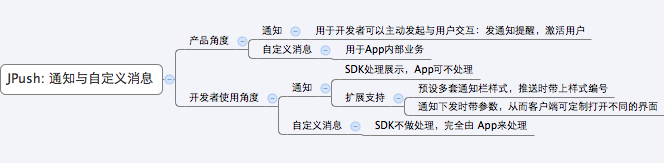
Notification is displayed in the phone notification tray and is mainly used to remind users, such as order status, campaigns, version updates, and content reminders.
Custom message is not displayed in the notification tray by default. JPush only passes it through to the client SDK. Display format and business logic are implemented by developers, so it is suitable for in-app protocols, state synchronization, and special display scenarios.
If the app should receive a custom message when online and still remind users by notification when offline, use Custom Message to Vendor Notification.
How do I view server-side push records?
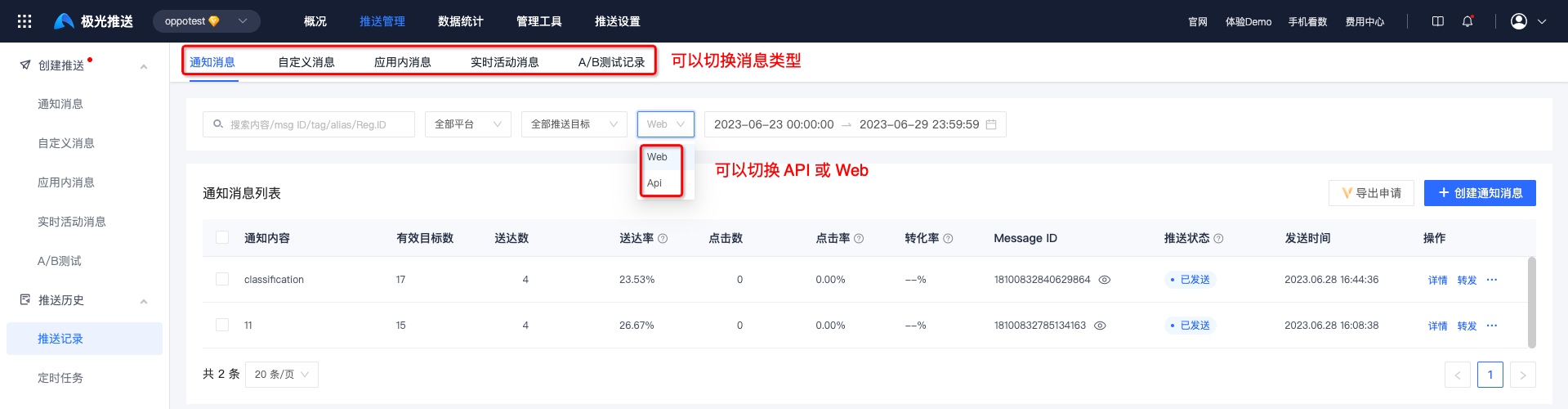
Go to Message Push > Push Management > Push Records to view records for notification messages, custom messages, in-app messages, Live Activity messages, and A/B tests.
To view API push records, filter the push method by "API". The Message ID in Push Records can be used for later statistics and troubleshooting.
What do push statistics and loss reasons mean?
Push statistics show sent, delivered, displayed, clicked, and related metrics. Loss reasons help locate drop-off at different stages, such as invalid targets, channel failure, non-delivery, or non-display.
For details, see Push Statistics and Loss.
Scenario Capability Selection
How should I send important messages such as orders, logistics, transactions, and account security?
These messages are strongly related to users. Use notification messages first, and configure important-message classifications such as system messages, service and communication messages, or private messages according to vendor rules.
Recommendations:
- Integrate Android vendor channels to improve offline reach.
- Set an accurate
options.classificationwhen using the API. Important messages usually use1. - Set offline retention based on business validity to avoid message loss during short offline periods.
- Configure SMS fallback for must-reach scenarios.
- Integrate push statistics, callbacks, and troubleshooting tools to monitor delivery, clicks, and non-delivery reasons.
Related documents:
- Important Notification High Delivery Rate Best Practices
- Vendor Message Classification and Quota Management
- SMS Fallback
How should I send operational messages such as campaigns, content recommendations, and platform announcements?
Operational messages should not consume important-message classifications. Use operational-message classification, segmentation, frequency control, and acceptable time windows to reduce user disturbance.
Recommendations:
- Use
options.classification=0when sending through the API. If omitted, the default is also operational message. - Use tags, aliases, user attributes, or segments to select target users.
- Enable daily per-device frequency control and acceptable time windows.
- For Android vendor channels, configure vendor operational-message policies and comply with vendor per-device limits, quota, and QPS.
- For low-value content, consider in-app messages, inbox messages, or not sending.
Related documents:
- Operational Push Frequency Control and User Disturbance Best Practices
- Vendor Quota and QPS Limits
- Tag and Alias Usage Guide
If the app should process a business protocol when online and still remind users when offline, which capability should I use?
Use custom-message-to-vendor-notification. When the app is online, message passes through the business protocol. When the app long connection is offline, notification_3rd converts it to a vendor notification.
Suitable scenarios:
- IM, tickets, to-dos, alerts, and other business scenarios that originally depend on custom messages.
- Online devices process the message in app logic, while offline devices need a notification-tray reminder.
- Android, iOS, and HarmonyOS all need best-effort reach.
Notes:
- Use
notification_3rd_ver=v2. notificationandnotification_3rdcannot both contain content.- After conversion to vendor notifications, notification permission, vendor classification, and operational-message frequency control rules still apply.
Related documents:
Can users still be reached after disabling notification permission?
Yes, but you should not rely only on notification-tray delivery. Choose in-app reminders, SMS fallback, inbox messages, or permission guidance based on message importance.
Recommendations:
- For users still active in the app, use in-app reminders or in-app messages.
- For must-reach messages such as transactions, account security, and order exceptions, use SMS fallback.
- For general operational messages, reduce frequency and do not use SMS fallback by default.
- Guide users to enable notification permission when they understand the value, such as after subscribing, placing an order, booking, or configuring account security.
Related documents:
How can I avoid sending multiple historical notifications for one continuously updated business state?
Use message override so users see only the latest state of the same business event.
Implementation:
- Android uses
options.override_msg_idto override the previous push. - iOS uses
options.apns_collapse_idto update notifications in Notification Center with the same identifier. - The landing page should still query the latest state by business ID to avoid showing expired content.
Related documents:
What should I do if a notification was sent by mistake, expired, or should no longer be displayed?
Use the push recall API to attempt message recall, and add state validation to the business landing page.
Recommendations:
- Call the push recall API as soon as possible after a mistaken send.
- For displayed but unclicked notifications, the SDK attempts device-side recall within supported capabilities.
- For campaigns, coupons, tasks, and orders, the landing page must validate the current state so users cannot continue through historical notifications.
Related documents:
How should free users and VIP users choose scenario capabilities?
Free users can use basic push capabilities, but vendor-channel capability and some advanced capabilities have resource limits. VIP users usually receive more stable vendor-channel resources, faster push speed, and more advanced capability support.
Recommendations:
- Use basic capabilities first for normal notifications and low-frequency operational notifications.
- Evaluate VIP service when offline delivery rate, timeliness, or large-scale push is important.
- For must-reach business scenarios, combine vendor channels, SMS fallback, callbacks, and statistics into a complete delivery flow.
Related documents:
Limits and Compliance
What are the core compliance requirements when using JPush?
To protect user privacy and data security, we recommend prioritizing routine messages that do not involve sensitive or private information, such as maintenance announcements, version upgrades, and campaign notifications.
For private, confidential, or highly sensitive content, avoid displaying plaintext details in the notification tray. Design the flow with business authorization, encryption, and compliance requirements in mind.
Can sensitive messages be placed directly in notification content?
Not recommended. Content involving user privacy or business confidentiality, such as account information, real-name data, and private conversations, should not be pushed in plaintext.
Recommendations:
- Show only a non-sensitive summary in the notification tray, such as "You have a new account reminder."
- Show sensitive details in the app after login and business permission validation.
- If sensitive content must be pushed, developers must implement end-to-end encryption, key management, and the decryption flow on their own.
Related documents:
Is there a message length limit?
- On Android, Notification + Message is limited to 4000 bytes.
- On iOS, the total length of
"ios": {}and its contents must not exceed 2000 bytes, including custom parameters and symbols. - The iOS Message section must not exceed 4000 bytes.
Why do information and marketing messages have frequency and per-device limits?
Vendors classify messages by type. The default type is usually operational message. A single device can generally receive only 2-5 operational messages per day, and such messages may have no sound or popup.
Follow the Vendor Message Classification Guide to separate system messages from operational messages, and use Operational Push Frequency Control and User Disturbance Best Practices for frequency control.
What does it mean when the app is blacklisted and messages cannot be sent?
This error usually means the app has not been listed on the Xiaomi App Market. Xiaomi requires the app to be listed before messages can be delivered through the Xiaomi channel. For vendor listing instructions, see Vendor Channel Parameter Application Guide.
How much battery and data does the push SDK consume?
Actual battery and data usage depends on network condition, device status, and business usage. Excluding push payload content, theoretical averages are approximately 20 KB/day data and 30 mAh/day battery.
What does push service stopped mean?
This status usually means the client called stopPush to stop the push service. Call resumePush to restore push service. For details, see SDK API documentation.
Where can I find push-limit terminology?
For JPush limit terminology, see Push Terminology.

