


Manufacturer limits and QPS limit
Overview
JiguangPlatform restrictions
- Sending limit: no VIP The application supports the manufacturer channel capability, but due to resource scheduling policy considerations, there is an upper limit (up to 30%) on the number of users who can use the manufacturer channel in each push request. The specific instructions are as follows:
- The actual total number of vendor users that can be distributed is determined based on the distribution strategy (30% is the upper limit)
- After the total number of manufacturers' users is allocated proportionally, the actual amount delivered by each manufacturer's channel will be randomly distributed, so the amount delivered each time may be different for each channel, which is normal.
- Message requests that exceed the manufacturer's channel quota do not mean that the message cannot be delivered, but will be switched toJiguangThe channel continues to be issued.
- If the business has higher requirements for offline message delivery rate, real-time performance or large-scale message push, it is recommended to upgrade. VIP The service is supported by more stable manufacturer channel resources.
- you cancontact businessupgradeJiguang VIP service, enjoyJiguangUnlimited service.
Vendor system restrictions
Each vendor channel has its own vendor quota and QPS Limit, in order to ensure the delivery of developer messages, when the developer's push request exceeds the manufacturer's limit,JiguangThe following measures will be taken:
- When a developer's push request exceeds the manufacturer's quota,Jiguangwill passJiguangChannels are used to deliver messages to ensure that messages reach them as much as possible.
- When developers push requests beyond vendors QPS When restricted,JiguangIt will be pushed slowly to ensure that it is not affected by the manufacturer.QPSLimit derivative message loss.
- Vendor system restriction rules cannot be overcome, evenJiguang VIP Users are also required to comply.
| Manufacturer | Message type | Total push limit | Single user acceptance limit |
|---|---|---|---|
| vivo | System messages | 3 times the number of valid users enabled by notifications. You can apply for unlimited message permissions by email. For details, see Push message restriction instructions 。 | Unlimited |
| Operational news | OPPO | private message | Unlimited | Unlimited |
| public trust | |||
| Millet | private message | Unlimited | Unlimited |
| Public information | 2-3 times, please refer to the specific rules public trust restriction rules 。 | Single application, single device, single day 5-8 strip | |
| default | 1x | Single application, single device, 1 article per day | |
| Huawei | Service and communication news | Unlimited | Unlimited |
| Information marketing news | Unlimited | glory | Service and communication news | Unlimited | Unlimited |
| Information marketing news | Unlimited |
Usage suggestions
- Classify messages according to manufacturer requirements to improve the arrival rate of important messages. For details, refer to Vendor Message Classification Usage Guide。
- Understand the total push quota, adjust the push strategy when the quota is exceeded, and check the quota reference Console manufacturer quota query。
- Enable the manufacturer's operation message policy and configure the upper limit of daily operation messages for a single user (which must meet the upper limit requirements of each manufacturer for different application categories). For details, see Configure vendor operation message policy。
Configure vendor operation message policy
In order to adapt to various manufacturers' restrictions on operational messages and system messages,JiguangProvides the manufacturer operation message policy function. When the daily message volume of a single user exceeds the upper limit of the manufacturer operation message, it will be usedJiguangPush through the channel to ensure message delivery as much as possible. Each manufacturer has the following requirements for the upper limit of push quantity for different application categories:
Note: Manufacturer’s user operation message restriction policy andJiguangThe single-user restriction policy (if enabled) takes effect at the same time, and the manufacturer's user operation message upper limit should be set to less than or equal to JiguangLimit on the number of push messages sent to a single device。
- The "operation news" here corresponds to the "information marketing news" of Huawei manufacturers. Please follow Huawei's official "Maximum push quantity requirements for different application categories" Documentation describes the configuration.
- The "operation news" here corresponds to the "information marketing news" of Honor manufacturers. Please follow the official instructions of Honor. "Push Quantity Management Rules" Documentation describes the configuration.
- The "operational information" here corresponds to the "public trust information" of Xiaomi manufacturers. Please follow Xiaomi's official "Daily Push Quantity Limit" Documentation describes the configuration.
- Here "Operation News" corresponds OPPO For manufacturer "public trust information", please follow OPPO official "Limit on the number of push items per device" Documentation describes the configuration.
- Here "Operation News" corresponds vivo Manufacturer "Operation News", please follow vivo official "Push message classification description" Documentation describes the configuration.
Operation guide
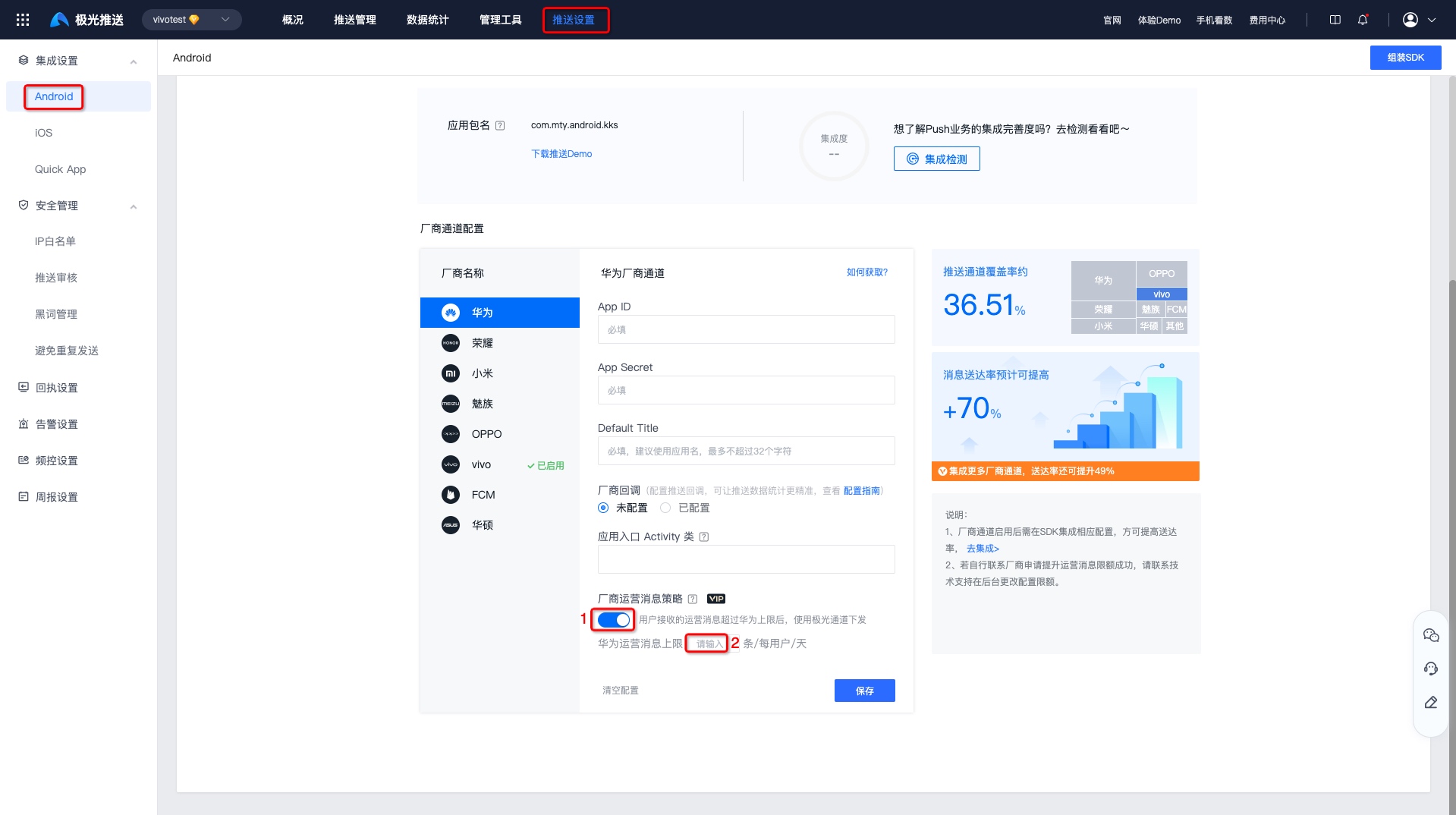
- Enter [Console]-[Push Settings]-[Integration Settings]-[Android】 page, click "Modify Configuration".
- Enable the manufacturer's operation message policy and fill in the upper limit of daily operation messages for a single user (it must meet the upper limit requirements of each manufacturer for different application categories, and fill it in according to your actual situation).
- Click Save to take effect.
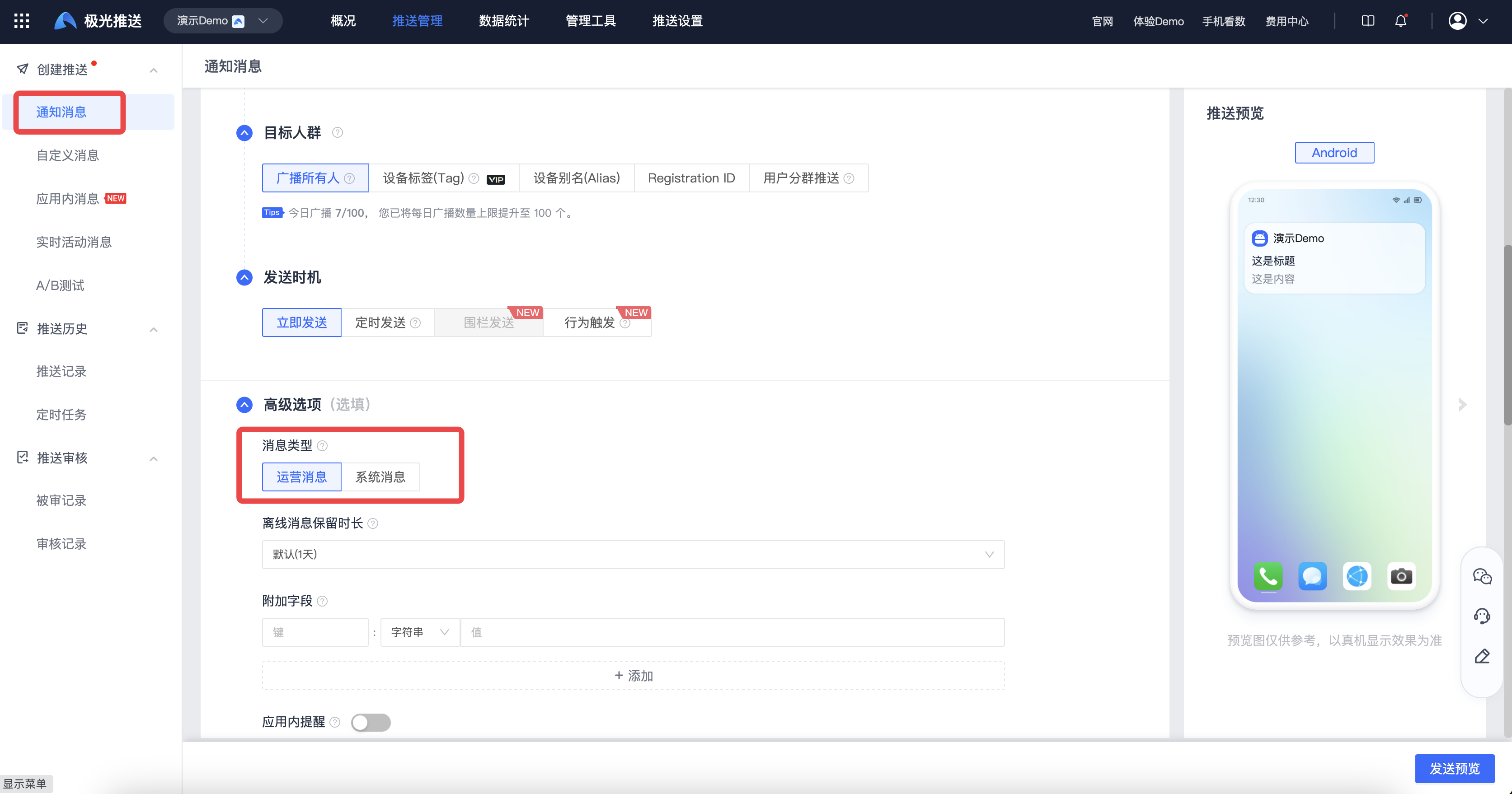
Note: After the above configuration is completed, when sending push notifications, you also need to clearly specify whether the notification message type is "system message" or "operation message"; Pass WebPortal The developer who pushes can be specified through the interface; through Rest API Pushed developer reference agreement fields: options.classification illustrate.
vivo Official push channel
Definition
vivo The message classification function divides push message types into operational messages and system messages. In order to improve users’ message notification experience and create a good push ecosystem,vivo Push service to 2023 Starting from April 3, 2020, messages of different application categories will be managed in a unified manner.
Limit description
- Valid users with notification turned on: application integrated push-sdk The subscription is successful, and the device has been connected to the Internet within the past 14 days and the notification permission is enabled for the user.
- Number of effective users with notification enabled<10000, then the operational message level defaults to 10000。
- The number of valid users with enabled notifications and the magnitude of operational messages that can be sent can be queried in the push operation background.
- The push limit is calculated based on the "arrival amount". If the arrival amount exceeds the limit on the same day, it will be included in the control.
- Test messages are not limited by magnitude and frequency control. Please fill in the information when sending a test message pushMode=1 (0: official push; 1: test push; default is 0 if left blank). If not filled in, if the copywriting is the same, it will be regarded as a duplicate operation message and be deduplicated.
| Message type | System messages | Operational news |
|---|---|---|
| push content | Information that users need to know in a timely manner, such as instant messages, emails, reminders set by users, logistics and other notifications. | Messages that users pay less attention to, such as content recommendations, activity recommendations, social updates and other notifications. |
| Notification bar permissions |
|
|
| Push quantity limit | 3 times the number of valid users enabled by notifications. You can apply for unlimited message permissions by email. For details, see Push message restriction instructions。 |
|
| Limit on the number of users receiving | Unlimited |
|
| Configuration method | API Configure when delivering "classification”:1 | default |
Quota Inquiry Guide
- 【vivo open platform】-[Push Statistics]-[Push Data] can be viewed SDK Number of subscriptions and total number of messages that can be sent.
QPS restrictive rules
vivo Push QPS Automatically adjust according to the number of effective users who have enabled notifications, the default is the lowest 3000/seconds, maximum 5000/Second.
QPS Definition: Indicates the number of push messages that can be sent in 1 second. For example:3000 QPS, the maximum number of messages that can be pushed within 1 second is 3000 message.
| Number of valid users with notification enabled | Push speed |
|---|---|
| 0-500W | 3000 |
| 500W-800W | 4000 |
| 800W above | 5000 |
QPS Promotion application
- Not open for application yet
OPPO Official push channel
Limit description
| Message type | private message | public trust |
|---|---|---|
| push content | For information that users have a certain degree of attention and hope to receive in a timely manner, such as instant chat information, personal order changes, express delivery notifications, subscription content updates, comment interactions, member points changes, etc. | Public trust refers to content that is universally applicable to multiple users, such as hot news, new product promotions, platform announcements, community topics, prize-winning activities, etc. |
| Push quantity limit | Unlimited | There are public trust channels that share the number of pushes. Once the push volume limit is reached on that day, all public trust channels will no longer be able to push messages; Push limit: When the cumulative number of users <50000, press 100000 Calculation; when the cumulative number of users ≥50000 When, the cumulative number of users * 2. |
| Single user push limit (articles/day) | Unlimited |
|
| API call | JiguangThe quota will be automatically deducted by default (without distinguishing between public and private messages), it is recommended to use API When delivering, set skip_quota:true Skip quota judgment and deduction, see for details REST API document。 | - |
illustrate: The cumulative number of users refers to the number of users accessed from OPPO PUSH of app Client, the cumulative number of users installed and activated by the user, excluding the number of uninstalled users.
Quota Inquiry Guide
- Management console query: The cumulative number of users is OPPO Push operation platform It can be queried and will be refreshed every day.
- API Query: Reference OPPO PUSH Server API。
QPS restrictive rules
from 2024.10.28 start,OPPOThe platform is implemented in accordance with the following new regulations. For details, please refer toOPPOPush service restriction description (new);
OPPO PUSH Different categories are divided according to the accumulated user level of the application.QPSSpeed limit.
QPSdefinition:(Quantity per second) indicates that it can be pushed in 1 secondOPPO PUSHThe number of users, for example, for the application dimension,3000QPSIndicates that this application can push up to3000users (the total value of the application dimension rate limit shared by all interfaces).
specific QPS The corresponding values are as follows:
| serial number | Cumulative number of users | Push QPS Reference value |
|---|---|---|
| 1 | ≥10000 Ten thousand | 5000 |
| 2 | ≥500 Wan Qi<1000 Ten thousand | 3000 |
| 3 | <500 Ten thousand | 2000 |
Special instructions: QPSThe value restriction is mainly for content and marketing (formerly public letter) messages and will not affect the delivery requests for communication and service (formerly private message) messages. It is recommended to differentiate between public and private messages and implement separate request delivery strategies to avoid queuing for private message delivery, thereby affecting the user's receiving experience of strongly related messages.
QPS Promotion application
- Not open for application yet
Xiaomi official push channel
Limit description
according to"New rules for classifying Xiaomi push messages", Xiaomi Push divides messages into two categories: "Private message" and "Public message". If the application chooses not to access private messages or public messages, it will access the default channel.
| Message type | default | Public information | private message |
|---|---|---|---|
| push content | You can follow Xiaomi’s Public trust scenario description | Hot news, new product promotions, platform announcements, community topics, prize activities, etc., content that is universal for multiple users. | Chat messages, personal order changes, express delivery notifications, transaction reminders,IoT System notifications and other content related to private notifications. |
| Reminder method | none | none | Ring, vibrate |
| Push quantity limit | 1x | 2-3 times, please refer to the specific rules public trust restriction rules。 | Unlimited |
| Limit on the number of users receiving | Single application, single device, 1 article per day | Single application, single device, single day 5-8 strip | Unlimited |
| Application method | No need to apply | You need to apply on Xiaomi push platform, please see for details channel Application and access methods。 | |
| API call | - | JiguangThe quota will be automatically deducted by default (without distinguishing between public and private messages), it is recommended to use API When delivering, set skip_quota:true Skip quota judgment and deduction, see for details REST API document。 | |
**2023 Starting from February 1, 2020, it will be officially operated according to the message classification in Xiaomi’s new regulations. **
restrictive rules
There is no limit to the number of private messages pushed in a single day, but the number of public messages pushed in a single day will be capped, as follows:
The calculation formula for the total amount of public information that can be pushed in a single day: applied in MIUI x times the number of installs and notifications turned on. The default multiple is 2 times, and applications with an "Internet News Information Service License" are 3 times, as shown in the table below. The number of notifications opened is less than 10000 of press 10000 count.
| Whether you have the "Internet News Information Service License" | Limit multiple of the number of push notifications per device per day for a single app (unit: times) |
The number of notifications received by a single application on a single device in a single day (unit: items) |
|---|---|---|
| have | 3 | 8 |
| none | 2 | 5 |
illustrate:
"Apply to MIUI The definition of "installed on the app and with notifications turned on": The user has activated the app and actively turned on the switch for total message notifications.
The daily push limit is calculated based on the "delivery volume". If the delivery volume exceeds the limit on the same day, it will be included in the control.
illustrate:
If special circumstances require an additional increase in push level, developers can appeal to Xiaomi Push and contact email:mipush-permission@xiaomi.com。
Quota Inquiry Guide
- Management desk query:Xiaomi open platform- Push operation platform - Push statistics - User data - Data details can be queried MIUI Number of connected devices per day.
- API Query: Reference Xiaomi Push Message Limitation Instructions, query the total quantity that can be issued on the day and the number of items delivered on the day.
QPS restrictive rules
Xiaomi push versus push rate (QPS) is mainly based on the allocation ofAppThe number of notification switches turned on is calculated hierarchically. For the latest instructions, please refer to the official website documentation.Xiaomi push rateQPSlimit;
| MIUI Number of connected devices per day | QPS limit || MIUI Number of connected devices per day | QPS limit |This code block is shown in the floating window| ------------------------ | ----------- | | ≥1000 Ten thousand | 3000 | | ≥500 Wan Qi <1000 Ten thousand | 2500 | | ≥100 Wan Qi <500 Ten thousand | 2000 | | ≥100,000 and <100 Ten thousand | 1000 | | <100,000 | 500 |
QPS Promotion application
- Not open for application yet
Meizu official push channel
Limit description
There is a rate limit for the push of a single business, and the default is:10000 device/10 seconds.
The number of single business subscription tags does not exceed 100 indivual.
If a single device is inactive for 1 month, the subscription will be cancelled.
If a single service push message from a single device is ≥ 4, they will be collapsed and displayed.Flyme System versions below 10 will store messages that have not been clicked multiple times in the message storage box in the upper right corner.
QPS restrictive rules
- default App yes 10000 Equipment / 10 seconds
QPS Promotion application
- You can contact Meizu official for adjustment. QPS, application email:push_support@meizu.com or push_support@dreamsmart.com
Huawei official push channel
Limit description
according to Message classification criteria, Huawei push service divides notification messages into two categories: information marketing, service and communication. The daily push number of information marketing messages starts from 2023 Starting from January 5, 2020, the number of push messages will be capped based on application type, and the number of service and communication messages pushed per day will be unlimited.
| Message Classification | Service and Communication News | Information Marketing News |
|---|---|---|
| Type description | Social Communication: Instant chat, audio, video calls. Service Reminders: Subscription, travel, health, work reminders, account dynamics, orders & logistics, finance, equipment reminders, system prompts, emails. For specific categories, please see Description of service and communication message scenarios。 |
Content information: Content recommendations, news, financial updates, life information, social updates, research, and others. Marketing activities: Product promotion, feature recommendations, operational activities. For specific categories, please see Information marketing message scenario description。 |
| Push quantity limit | Unlimited | Limit the number of daily pushes based on application categories. For specific requirements, see Maximum push quantity requirements for different application categories。 |
Maximum push quantity requirements for different application categories
For information marketing messages in the notification bar of devices connected to Huawei's push service, the daily push limit will be managed based on the application category.
According to Huawei Push quantity management rules,from2023 Starting from September 15, 2020, Huawei Push Service will implement grayscale control on the frequency and classification of local notifications sent by applications. The local information marketing messages sent by the application will be included in the total frequency of information marketing messages. There is a total limit on the frequency of application push every day (the total frequency of cloud + local information marketing messages cannot exceed the limited frequency). It is recommended to apply an information marketing message sending strategy that reasonably plans two sending channels.
| Secondary classification | Third level classification | Number of push notifications per device per day for a single app (unit: items) |
|---|---|---|
| news reading | news | 5 |
| E-books, magazines, audio books, animation, humor, sports, classified information | 2 | |
| Casual puzzle | all | 2 |
| business strategy | all | 2 |
| Sports competition | all | 2 |
| Board games | all | 2 |
| action shooting | all | 2 |
| role play | all | 2 |
| Audiovisual entertainment | all | 2 |
| Utility tools | all | 2 |
| social communication | all | 2 |
| educate | all | 2 |
| news reading | all | 2 |
| beautify the shoot | all | 2 |
| gourmet food | all | 2 |
| Travel navigation | all | 2 |
| tourist accommodation | all | 2 |
| shopping comparison | all | 2 |
| Business | all | 2 |
| child | all | 2 |
| financial management | all | 2 |
| Sports and health | all | 2 |
| Convenient life | all | 2 |
| car | all | 2 |
| theme personality | all | 2 |
illustrate
- For application category information, see Huawei App Market application classification example。
- The "daily" in the limit on the number of messages sent by a single application per day per device refers to a natural day.
- If the app is not in the above categories, the number of push notifications per device per day for a single app is 2 by default.
QPS restrictive rules
sending rate(QPS)= App In Huawei channels MAU x Apply category weight coefficient x 0.00072
illustrate:
MAU: The value of the last calendar day of each month when the application is pushed through Huawei channels is used as the value of that month. MAU。
If it is not published in Huawei App Store, press Default Classification, the weight coefficient of this category is 1.
If your application passes QPS The formula calculated does not yield enough value. 6000, will execute the default 6000 of QPS. If the entire network traffic is high, system-level flow control will also occur.
QPS Promotion application
- You can contact Huawei officials for adjustments. QPS, application email:hwpush@huawei.com
Honor official push channel
Limit description
- Push limit: referenceHonor Push Quantity Management Rules。
- Push rate limit: single appQPSThe default limit is3000,achieveQPSThe upper limit will be returnedhttpCode 503Error code, this request failed.
- Recommended applications:
- (1) Reduce the number of concurrent requests and control the number of requests per second toQPSwithin quota.
- (2) Optimize sending efficiency and carry more in one requesttoken。
Note:QPS(Quantity Per Second): Number of push requests per second. Each request can carry up to1000indivualtoken。
Maximum push quantity requirements for different application categories
- Honor push service will divide push messages into two categories: service communication and information marketing based on application type, message content and message sending scenario. Refer toHonor message classification standard
- According to glory Push quantity management rules,2024 After December 31, 2020, for applications that have not applied for access to message self-categorization, message notifications will be classified as information marketing messages by default.
FCM push channel
Definition
- Notification message:FCM Automatically displays messages to end-user devices on behalf of client applications. Notification messages contain a predefined set of user-visible keys and an optional data payload of custom key-value pairs.
- Data Message: Use custom key-value pairs to set the appropriate keys to send the data payload to the client app.
Limit description
Push message limit per app is 1,500,000 bars/minute to avoid overloading the push target server.
The limit for receiving push messages per device is 1000 bars/minute to prevent battery drain due to bad app behavior.
QPS restrictive rules
- Connect to FCM XMPP The server is rate limited to 400 times/minute,FCM allowed to exist 2500 parallel connections.
QPS Promotion application
- None yet
Console manufacturer quota query
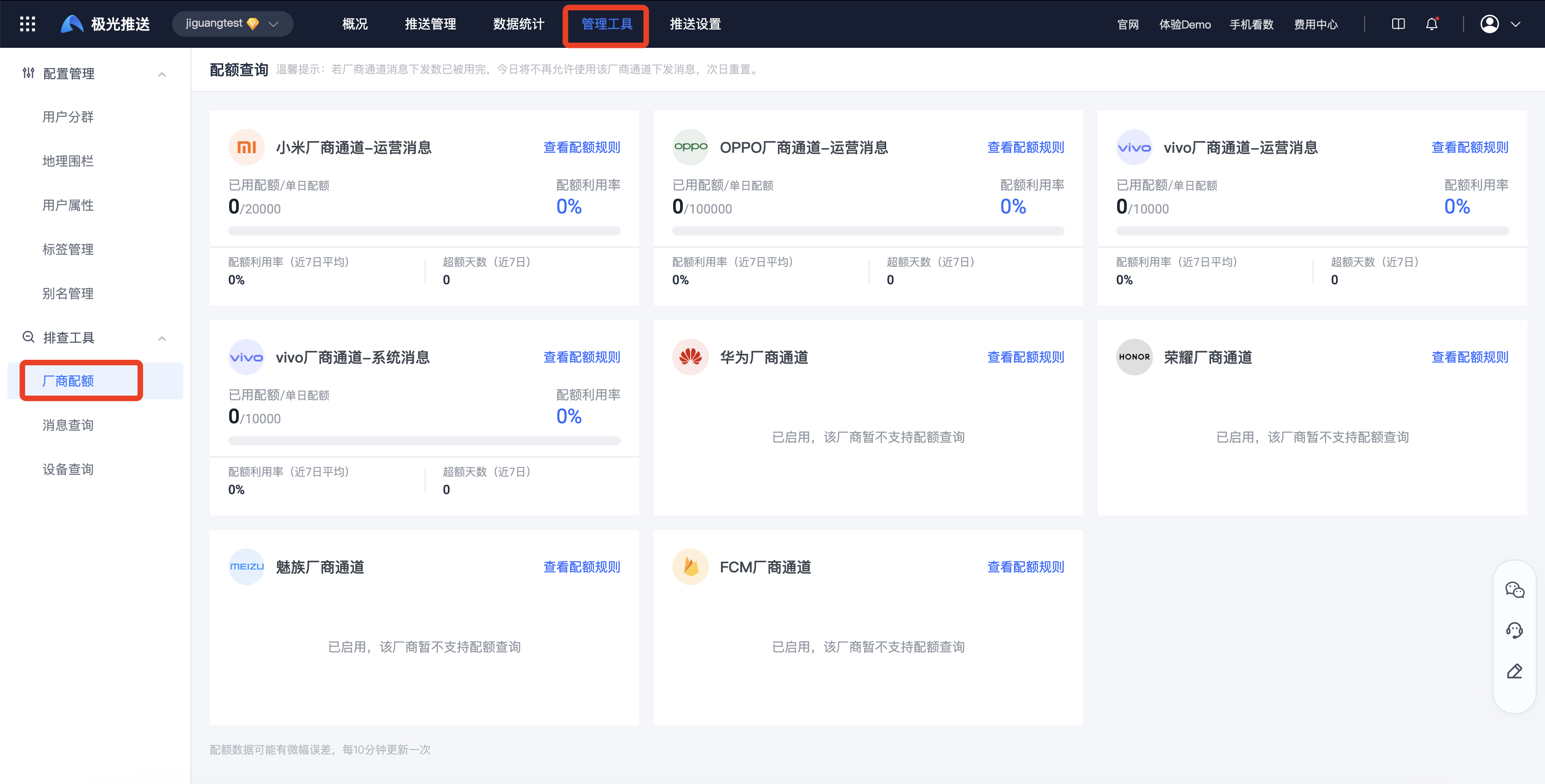
Enter【JPush】-[Management Tools]-[Troubleshooting Tools]-[Manufacturer Quota] page, you can check the quota and balance of each manufacturer.
Query frequency description
| Manufacturer brand | Quota inquiry for the day | Latest balance (manufacturer) query | Real-time margin (Jiguang) calculation logic |
|---|---|---|---|
| Millet | support, interval 10min Query and record | support, interval 300s Query and record | Latest balance - the number of successful submissions,30s Calculated 1 time |
| OPPO | support, interval 10min Query and record | support, interval 300s Query and record | Latest balance - the number of successful submissions,30s Calculated 1 time |
| vivo | support, interval 10min Query and record | support, interval 300s Query and record | Latest balance - the number of successful submissions,30s Calculated 1 time |
| Huawei | Not supported, currently not queried | Not supported, currently not queried | Issued directly without calculating the quota |
| glory | Not supported, currently not queried | Not supported, currently not queried | Issued directly without calculating the quota |
| Meizu | Not supported, currently not queried | Not supported, currently not queried | Issued directly without calculating the quota |
| ASUS | Not supported, currently not queried | Not supported, currently not queried | Issued directly without calculating the quota |
| FCM | Not supported, currently not queried | Not supported, currently not queried | Issued directly without calculating the quota |

