


Vendor Message Classification Usage Guide
Message classification description
from Android 8.0(API Starting with level 26), all messages must go through the corresponding channel ID (ChannelID) is issued. Currently, in order to improve end-user push experience and create a good and sustainable notification ecosystem, each manufacturer will classify and manage push messages according to the content of the message. Different message classifications are mainly through channel ID (ChannelID) to differentiate. At present, messages are mainly divided into the following two categories:
| Message type | importance level message | Ordinary level message |
|---|---|---|
| push content | Instant messaging messages, personal attention dynamic reminders, personal event reminders, personal order status changes, personal financial reminders, and other important personal notification reminders. | Hot news, new product promotions, platform announcements, community topics, prize-winning activities, etc. are mostly content that is universal to users. |
JiguangChannel message classification usage
If you need to classify and manage messages based on push content, you can customize Channel ID。
- Create client-side custom channels。
- The corresponding channel ID is issued when pushing.
channel_id The parameters are in notification of android under the field.
| Keywords | type | Options | meaning | illustrate |
|---|---|---|---|---|
| channel_id | string | Optional | android notify channel_id | no more than1000Bytes, here based on Channel ID to specify the notification bar display effect. |
Examples are as follows:
          {
    "platform": "all",
    "audience": {
        "registration_id": [
            "1104a8979278ae64e75"
        ]
    },
    "notification": {
        "android": {
            "alert": "message alert",
            "channel_id": "your channel_id"
        }
    }
}
- If you need to deliver manufacturer channel importance level messages, please refer to the usage guide for each manufacturer message category below.
Xiaomi message classification usage guide
Xiaomi message classification description
According to the 2026 Xiaomi Push Message Classification Rules, Xiaomi Push divides messages into Private messages and Public messages. Push delivery fails if the app does not integrate either message category.
| Message type | Public information | private message |
|---|---|---|
| push content | Hot news, new product promotions, platform announcements, community topics, prize activities, etc., content that is universal for multiple users. | Chat messages, personal order changes, express delivery notifications, transaction reminders,IoT System notifications and other content related to private notifications. |
| Reminder method | none | Ring, vibrate |
| Push quantity limit | 2-3 times. For details, see the Public-message quota rules. | Unlimited |
| Limit on the number of users receiving | Single application, single device, single day 5-8 strip | Unlimited |
| Application method | Apply on the Xiaomi Push platform. For details, see Channel application and integration. | |
| API call | - | JiguangIt will automatically determine whether the quota needs to be deducted according to the message classification. It is recommended to use API When delivering, set options.classification Is 1, see details REST API document。 |
Note: According to the Xiaomi Push Message Classification Rules, there is no default message category. Developers must integrate message classification and migrate delivery to a new channel. Every push must include
channel_id; otherwise, Xiaomi returns a delivery failure and JPush records it as a stage-2 loss caused by an invalid parameter.Additionally: According to the Xiaomi Message Template Push Rules, every private message must include both
channel_idand a template ID. The rule took effect at 00:00 on July 1, 2026, and the template integration deadline is 23:59 on December 31, 2026. For details, see the Xiaomi Push Template Integration Guide.
Xiaomi important level information application
For application instructions, see the official Xiaomi Push Template Integration Guide.
Note: You must receive an approved email before you can use the private message function! And when pushing, you must pass channel_id field, otherwise the manufacturer will return a push failure error.JiguangIt will be treated as a "parameter error" type and stage 2 loss processing.
Xiaomi message classification usage
Server use
classification The parameters are in options under field;
channel_id The parameters are in options of third_party_channel under the field.
| Keyword | Type | Required | Description | Parent | Notes |
|---|---|---|---|---|---|
| classification | int | Optional | Message classification | options | JPush does not validate or adjust the specified message type. It adapts Android vendor channels according to the type specified by the developer. The default is 0 if omitted. |
| channel_id | string | Optional | Android notification channel ID | options.third_party_channel.xiaomi | android object also contains a channel_id field, which applies to the JPush channel and supported vendor channels.android object is used. If this field is specified, it takes precedence. |
| mi_template_id | string | Optional | Private-message template ID | options.third_party_channel.xiaomi | channel_id and mi_template_id. |
| mi_template_param | string | Optional | Message template parameters | options.third_party_channel.xiaomi |
Examples are as follows:
          {
    "options": {
        "classification":1,
        "third_party_channel": {
            "xiaomi": {
                "channel_id": "小米推送平台登记的 channel id",
                "mi_template_id": "小米推送平台登记的模板 id",  //私信消息需要传递
                "mi_template_param": "\{\"app_name\":\"⼩⽶商城\",\"order_no\":\"XM202601130001\",\"order_amount\":\"11.00\",\"delivery_time\":\"2026-01-15 18:00\"\}"  //私信消息模板对应的参数
            }
        }
    }
}
Console usage
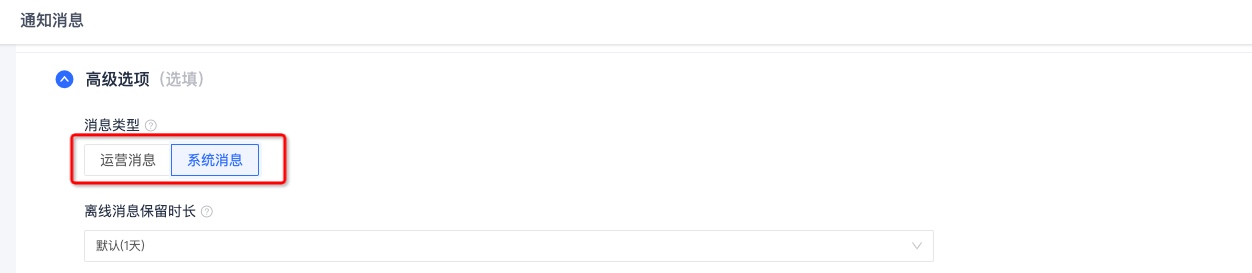
- For private messages, you need to select "System Message".
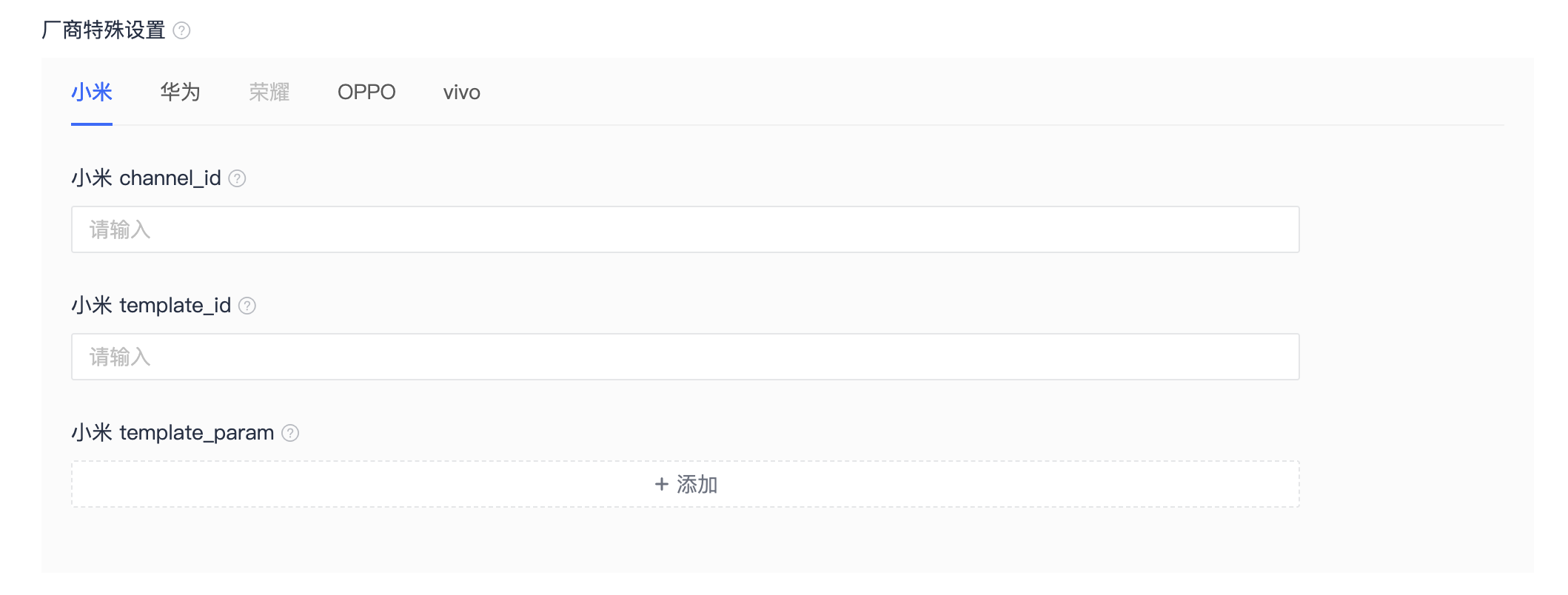
- Fill in the Xiaomi push platform registration channel id、mi_template_id、mi_template_param。
Huawei message classification usage guide
Huawei message classification instructions
Based on the message content, Huawei Push classifies notifications into two categories: service and communication, and information marketing, and differentiates the reminder methods and message styles of different categories of messages, as follows:
| Message type | Services and communications | Information marketing |
|---|---|---|
| push content | Including social communication messages and service reminder messages. | Including information messages and marketing messages, which refers to event information, content recommendations, information, etc. sent by carriers to users. |
| Reminder method (EMUI 10.0and above) | Lock screen, ringtone, vibration | Silent notification, only display messages in the drop-down notification bar |
| Message style | Text + thumbnail | text only |
| Push quantity | Unlimited | since 2023 Starting from January 5, 2020, the daily push limit for information marketing messages will be managed based on the application type. For specific requirements, please refer to Maximum push quantity requirements for different application categories。 |
| Configuration method | You need to apply for self-classification rights from Huawei. After passing the review, the classification information provided by the developer will be trusted, and the messages will not be intelligently classified. | default |
Huawei message classification method
Huawei Classification Standard
from2023Starting from September 15, 2020, Huawei Push Service will divide notifications into "Cloud Notifications" and "Local Notifications" based on the "Huawei Message Classification Standards". For specific reference Huawei message classification management solution。
How to use Huawei message classification "Cloud Notification"
"Cloud Notification" server usage
After the application for message classification is approved, you can specify classification、importance To issue,
classification The parameters are in options under the parameter field.
importance The parameters are in options Optional parameters third_party_channel under the field.
| Keywords | type | Options | meaning | Parent project | illustrate |
|---|---|---|---|---|---|
| classification | int | Optional | Message type classification | options | JiguangThe specified message type will not be judged or calibrated, and will be adapted to the message type specified by the developer. Android Manufacturer channel. If left blank, the default value is 0. |
| importance | string | Optional | Intelligent classification of Huawei notification bar messages | options.third_party_channel.huawei | |
| category | string | Optional | Huawei manufacturer message scene identification | options.third_party_channel.huawei | In order to adapt to Huawei mobile phone manufacturer messages, completeApplication for self-categorization rights Finally, it is used to identify the message type, determine the message reminder method, and speed up the sending of specific types of messages. Corresponding values and their description reference category Value description。 |
The code example is as follows:
          {
    "options": {
        "classification":1,
        "third_party_channel": {
            "huawei": {
                "importance": "NORMAL",
                "category":"IM"
            }
        }
    }
}
Using the "Cloud Notification" console
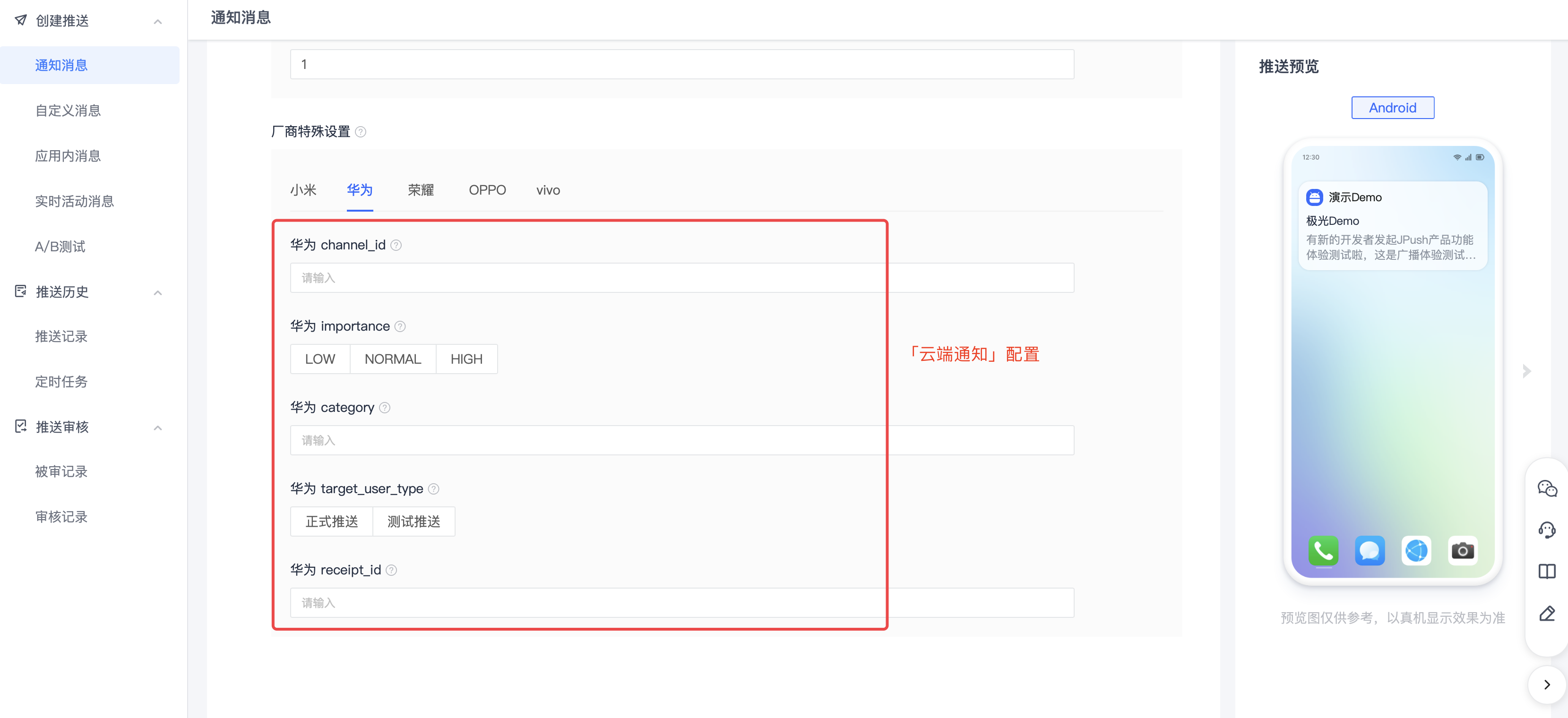
- Service and communication messages need to select "System Messages".
How to use Huawei message classification "local notification"
"Local notification" server usage
Specify category To issue,
The parameter is notification.android Optional parameters.
| Keywords | type | Options | meaning | Parent project | illustrate |
|---|---|---|---|---|---|
| category | string | Optional | Notification bar message category entries | notification.android | |
| priority | string | Optional | Notification bar display priority | notification.android |
The code example is as follows:
          {
    "notification": {
        "android": {
            "alert": "Hi, JPush!",
            "title": "Send to Android",
            "category": "CATEGORY_NAVIGATION",
            "priority": "0"
        }
    }
}
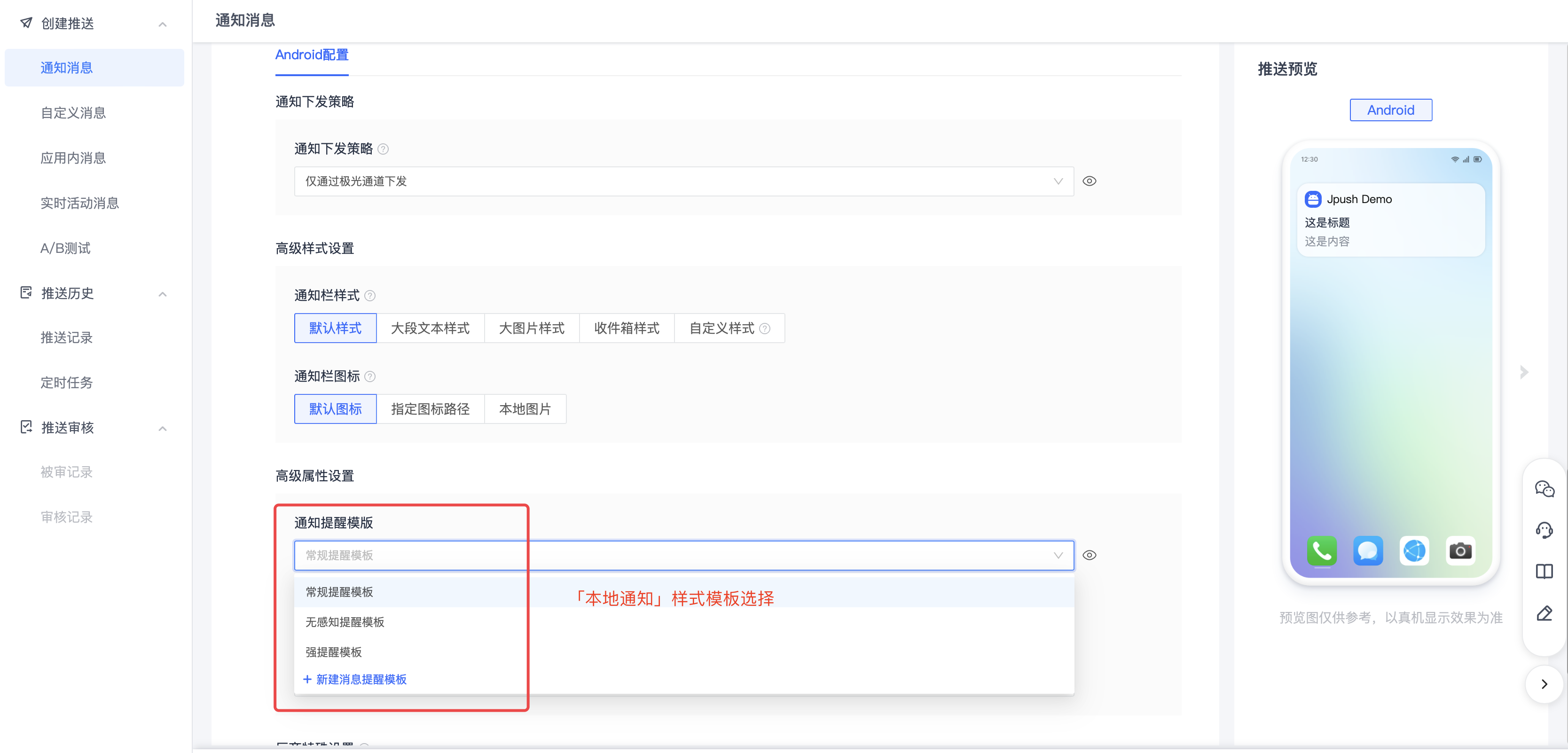
"Local notification" console usage
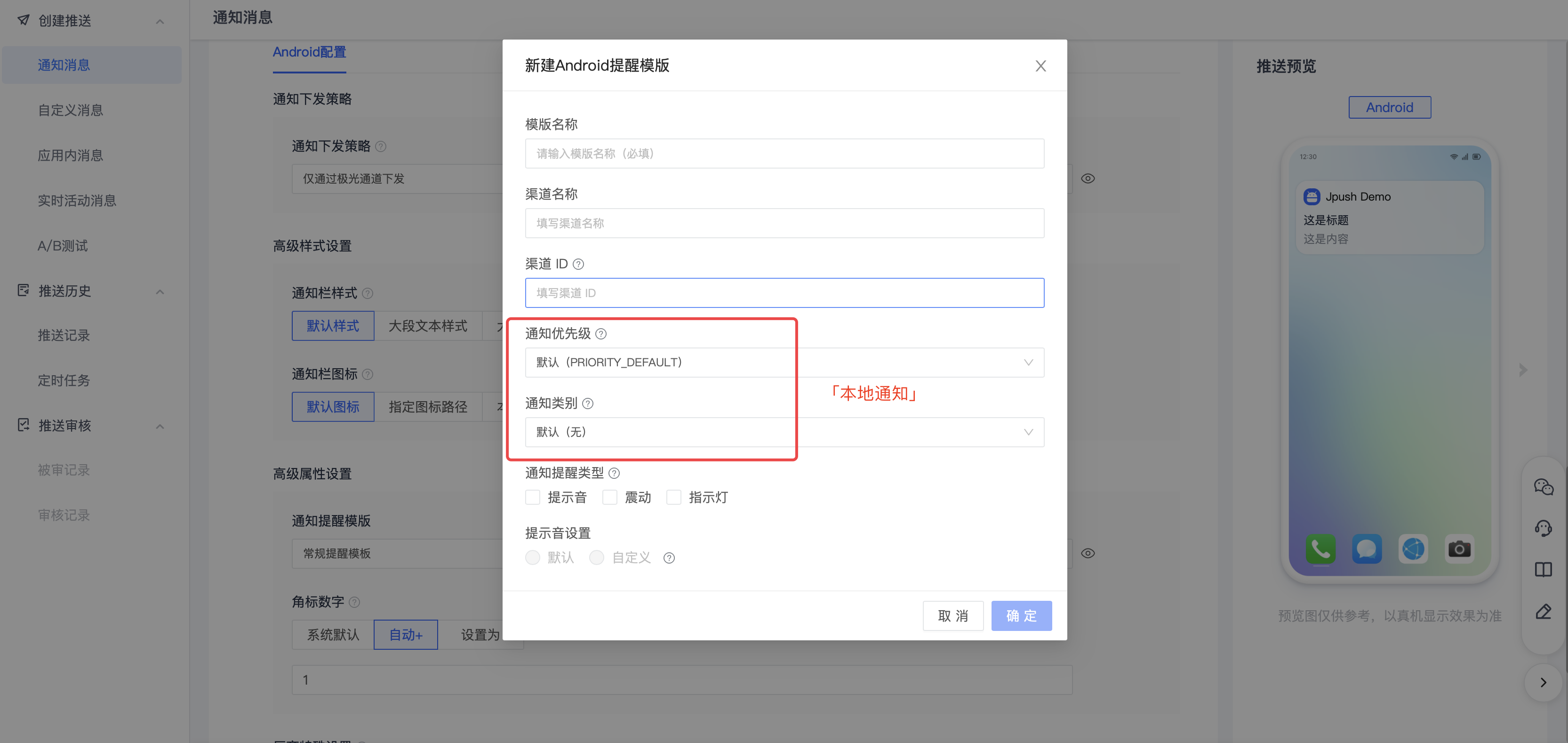
Huawei message classification correspondence table
As the message sending scenarios of applications continue to change, the classification standards pushed by Huawei will continue to evolve and be supplemented. Please pay attention to the latest classification instructions in Huawei's official documents. Reference Message classification criteria Query.
Cloud notification importance For the value rules, please refer to the above "How to use Huawei message classification "Cloud Notification"" importance Field description.
| Message type/first level classification | Message type/secondary classification | Message type/three-level classification | Cloud notificationcategoryvalue | local notificationcategoryvalue | local notificationimportancevalue |
|---|---|---|---|---|---|
| Services and communications | social communication | Live chat | IM | CATEGORY_MESSAGE | IMPORTANCE_DEFAULT |
| Services and communications | social communication | Audio and video calls | VOIP | CATEGORY_CALL | IMPORTANCE_DEFAULT |
| Services and communications | Service reminder | subscription | SUBSCRIPTION | - | - |
| Services and communications | Service reminder | travel | TRAVEL | CATEGORY_NAVIGATION | IMPORTANCE_DEFAULT |
| Services and communications | Service reminder | healthy | HEALTH | - | - |
| Services and communications | Service reminder | Work reminder | WORK | CATEGORY_REMINDER | IMPORTANCE_DEFAULT |
| Services and communications | Service reminder | Account updates | ACCOUNT | - | - |
| Services and communications | Service reminder | Order & Logistics | EXPRESS | - | - |
| Services and communications | Service reminder | finance | FINANCE | CATEGORY_SERVICE | IMPORTANCE_DEFAULT |
| Services and communications | Service reminder | Device reminder | DEVICE_REMINDER | - | - |
| Services and communications | Service reminder | CATEGORY_EMAIL | IMPORTANCE_DEFAULT | ||
| Services and communications | Service reminder | Alarm clock/timer | - | CATEGORY_ALARM | IMPORTANCE_DEFAULT |
| Services and communications | Service reminder | Stopwatch | - | CATEGORY_STOPWATCH | IMPORTANCE_DEFAULT |
| Services and communications | Service reminder | schedule | - | CATEGORY_PROGRESS | IMPORTANCE_DEFAULT |
| Services and communications | Service reminder | location sharing | - | CATEGORY_LOCATION_SHARING | IMPORTANCE_DEFAULT |
| Information marketing | Content information | Content recommendations | MARKETING | CATEGORY_RECOMMENDATION | IMPORTANCE_MIN |
| Information marketing | Content information | news | MARKETING | CATEGORY_RECOMMENDATION | IMPORTANCE_MIN |
| Information marketing | Content information | Financial news | MARKETING | CATEGORY_RECOMMENDATION | IMPORTANCE_MIN |
| Information marketing | Content information | Life information | MARKETING | CATEGORY_RECOMMENDATION | IMPORTANCE_MIN |
| Information marketing | Content information | Social updates | MARKETING | CATEGORY_SOCIAL | IMPORTANCE_MIN |
| Information marketing | Content information | Research | MARKETING | CATEGORY_PROMO | IMPORTANCE_MIN |
| Information marketing | Content information | other | MARKETING | CATEGORY_PROMO | IMPORTANCE_MIN |
| Information marketing | Marketing activities | product promotion | MARKETING | CATEGORY_PROMO | IMPORTANCE_MIN |
| Information marketing | Marketing activities | Feature recommendation | MARKETING | CATEGORY_PROMO | IMPORTANCE_MIN |
| Information marketing | Marketing activities | Operational activities | MARKETING | CATEGORY_PROMO | IMPORTANCE_MIN |
Honor message classification usage guide
Honor message classification description
According to the message content, Honor Push classifies notifications into two categories: service and communication, and information marketing, and differentiates the reminder methods and message styles of different categories of messages, as follows:
| Message type | Services and communications | Information marketing |
|---|---|---|
| push content | Including social communication messages and service reminder messages. | Including information messages and marketing messages, which refers to event information, content recommendations, information, etc. sent by carriers to users. |
| Reminder method | Lock screen display + drop-down notification bar display, supports ringtones and vibrations | Silent notification, only display messages in the drop-down notification bar |
| Message style | Text + thumbnail | text only |
| Push quantity | Unlimited | Information marketing messages have an upper limit on the number of daily pushes based on application type. For specific requirements, see Maximum push quantity requirements for different application categories。 |
| REST API Configuration |
Honor message classification method
According to Honor’s official description: 2024Before December 31, 2020, developers need to log in to the Honor Developer Service Platform to apply for self-categorization rights and conduct classified management of push service messages. If the application does not have self-categorization rights, or the application has self-classification rights but the push message does not carry them importance field, the push messages of the application will be automatically classified as information marketing messages. For details, please seeHonor message classification method。
How to use Honor message classification
Server use
Specify classification、importance Deliver;
classification The parameters are in options Under the parameter field;
importance The parameters are in options Optional parameters third_party_channel under the field.
| Keywords | type | Options | meaning | Parent project | illustrate |
|---|---|---|---|---|---|
| classification | int | Optional | Message type classification | options | JiguangThe specified message type will not be judged or calibrated, and will be adapted to the message type specified by the developer. Android Manufacturer channel. If left blank, the default value is 0. |
| importance | string | Optional | Intelligent classification of messages in the Honor notification bar | options.third_party_channel.honor |
Examples are as follows:
          {
    "options": {
        "classification":1,  // 特别说明:此字段优先级更高,当classification指定值和importance指定值不一致时,以此字段值为准
        "third_party_channel": {
            "honor": {
                "importance": "NORMAL"
            }
        }
    }
}
Console usage
- Service and communication messages need to select "System Messages".
- Service and communication messages need to be set up importance for NORMAL。

OPPO Message Classification Usage Guide
OPPO Message classification description
- OPPO Manufacturer 2024.11.20 implementOPPONew rules for message classification, messages are divided into two categories: "Communication and Services" and "Content and Marketing", corresponding toJiguangPlatform "system news" and "operation news", based on the attention paid to different types of news,OPPOThe official corresponding permissions are as follows:
| Message type | Define scope | Push content direction | Reminder method | Push level |
|---|---|---|---|---|
| Communications and Services | 1. Chat messages, calls and other information between users; 2. Important notification reminders that are closely related to users themselves, and users have expectations for receiving such messages; |
1. Point-to-point chat messages (or private messages), group chat messages, and video voice reminders between users; 2. Personal account and asset changes; personal device reminders; personal order/logistics status changes, etc.; |
Default is<通知栏、锁屏>;Can be upgraded to<通知栏、锁屏、横幅、铃声、震动>Strong reminder method (need to findOPPOofficial application); | There is no limit to the sending level or receiving level. |
| Content and Marketing | Notifications for content or product promotion proactively sent by developers to users | Content recommendations, platform activities, social dynamics, etc.; | Only pull down the notification bar to display | Limit the daily push level and the number of messages received by a single user. For specific reference:"Push Service Restrictions Instructions" |
OPPO Push quantity limit
| Push permissions | Message classification | Application categories | Total push volume | Limit on the number of push items per device |
|---|---|---|---|---|
| formal authority | Communications and Services (formerly private message) | / | Unlimited | Unlimited |
| Content and Marketing (formerly Public Trust News) | News category (the third level classification is news category) | Cumulative number of users < 10000,总量按20000/日计算;累计用户数≥10000,总量=累计用户数*2/日; | 5 items | |
| Other application types | 2 items | |||
| Test permissions | Communications and Services (formerly private message) | / | Not supported | |
| Content and Marketing (formerly Public Trust News) | / | 1000 | 2 items |
OPPO Message classification usage
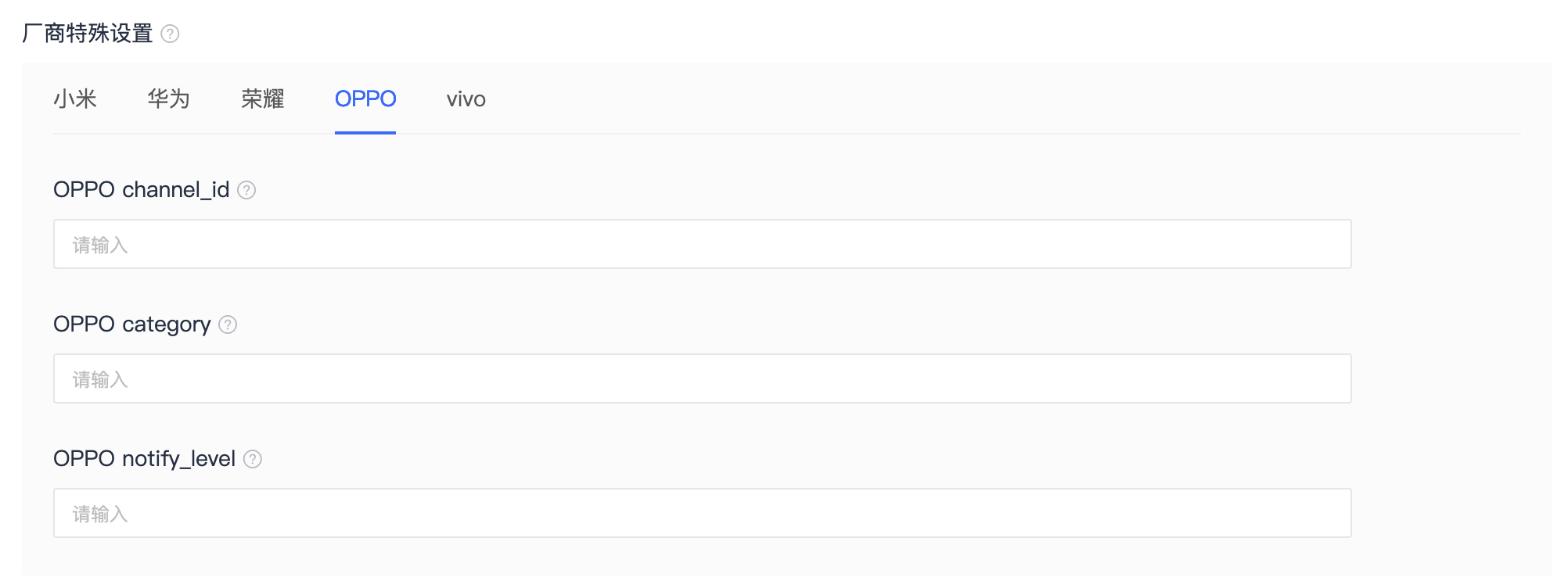
- Step1: Server attention (classification、channel_id、category、notify_level) 4 fields, detailed field descriptions are as follows, or viewJPush API document。
- Step2: When configuring push messages, carry the above fields, and the messages will be delivered in the corresponding reminder mode.
| Keywords | type | Options | meaning | Parent project | illustrate |
|---|---|---|---|---|---|
| classification | int | Optional | Message type classification | options | JiguangThe specified message type will not be judged or calibrated, and will be adapted to the message type specified by the developer. Android Manufacturer channel. If left blank, the default value is 0. |
| channel_id | string | Optional | android notify channel_id | options.third_party_channel.oppo | |
| category | string | Optional | Huawei,vivo、OPPO Vendor message scene identifier | options.third_party_channel.oppo | |
| notify_level | int | Optional | OPPONotification bar message reminder level | options.third_party_channel.oppo |
Examples are as follows:
          {
    "options": {
        "classification":1,
        "third_party_channel": {
            "oppo": {
                "channel_id": "OPPO 官网登记的通道 ID"
                "category": "IM"
                "notify_level": 16
            }
        }
    }
}
Console usage
- You need to select "System Message" for private messages. Please select the correct one based on the actual situation.
- fill in OPPO Message classification parameters, make sure the data is filled in correctly.
vivo Message Classification Usage Guide
vivo Message classification description
- Valid users with notification turned on: application integrated push-sdk The subscription is successful, and the device has been connected to the Internet within the past 14 days and the notification permission is enabled for the user.
- Number of effective users with notification enabled<10000, then the operational message level defaults to 10000。
- The number of valid users with enabled notifications and the magnitude of operational messages that can be sent can be queried in the push operation background.
- The push limit is calculated based on the "arrival amount". If the arrival amount exceeds the limit on the same day, it will be included in the control.
- Test messages are not limited by magnitude and frequency control. Please fill in the information when sending a test message pushMode=1 (0: official push; 1: test push; default is 0 if left blank). If not filled in, if the copywriting is the same, it will be regarded as a duplicate operation message and be deduplicated.
| Message type | System messages | Operational news |
|---|---|---|
| push content | Information that users need to know in a timely manner, such as instant messages, emails, reminders set by users, logistics and other notifications. | Messages that users pay less attention to, such as content recommendations, activity recommendations, social updates and other notifications. |
| Notification bar permissions | ||
| Push quantity limit | ||
| Limit on the number of users receiving | Unlimited | |
| Configuration method | set up options.classification is 1 | set up options.classification is 0 |
vivo System message usage
1. pass API Pass in the corresponding parameters
Special Note: Pass API The interface supports message classification and delivery classification parameter, which is in options under the optional parameters field. There are 2 complete classification fields, as explained below:
| Keywords | type | Options | meaning | Parent project | illustrate |
|---|---|---|---|---|---|
| classification | int | Optional | Message type classification | options | JiguangThe specified message type will not be judged or calibrated, and will be adapted to the message type specified by the developer. Android Manufacturer channel. If left blank, the default value is 0. |
| category | string | Optional | Vendor message scene identifier | options.third_party_channel.vivo | in order to adapt vivo Mobile phone manufacturer messages are used to identify message types, determine message reminder methods, and speed up the sending of specific types of messages. Corresponding values and their descriptions refer to:vivo Classification criteria。 |
Examples are as follows:
          {
    "options": {
        "classification":1,
        "third_party_channel": {
            "vivo": {
                "distribution": "secondary_push",
                "category":"IM"
            }
        }
    }
}
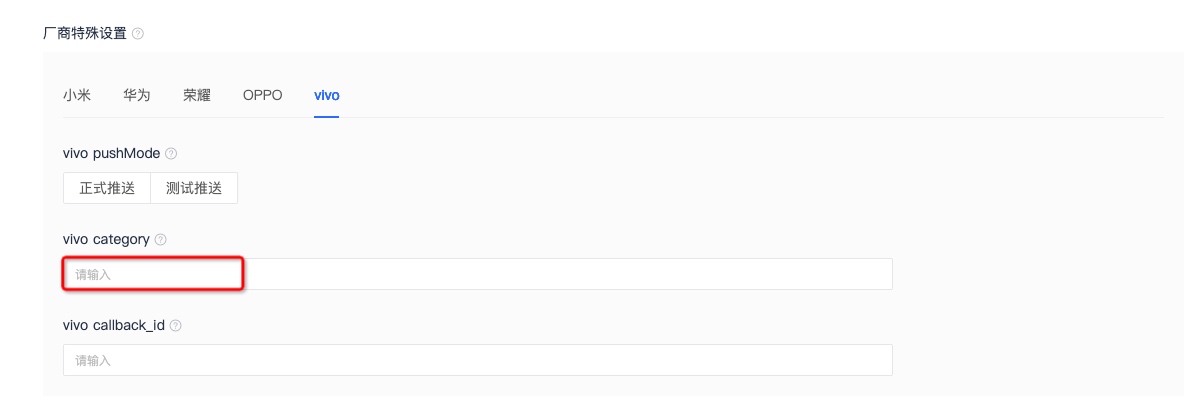
Console usage: For system messages, you need to select "System Messages".
Configuration complies with vivo taxonomic category。
2. Intelligent classification secondary correction
- Passing "0" in the parameter represents operational messages, which will be directly deducted from the total amount of operational messages without secondary correction by intelligent classification, and are subject to frequency control limited by the number of messages received by the user.
- Passing "1" in the parameter represents a system message. After secondary correction by intelligent classification, if the intelligent classification identifies that it is not a system message, it will be automatically corrected as an operating message, and the operating message quota will be deducted; if it is identified as a system message, the quota will be deducted from the total system message.
vivo local notification
- Official regulations reference: vivo local notification
- According to official regulations, through App long connectionJiguangRemotely delivered by channel Push also belongs to vivo Local notification scope, developers must pay attention to it, throughJiguangWhen the channel is issued, the specified channel_id The value needs to be inAppThe code layer is created and needs to be passed vivo Open platform review.
This parameter is in notification.android under the field. As follows:
| Keywords | type | Options | meaning | Parent project | illustrate |
|---|---|---|---|---|---|
| channel_id | String | Optional | android notify channel_id | notification.android |
Examples are as follows:
          {
    "notification" : {
        "android" : {
             "alert" : "hello, JPush!",
             "title" : "JPush",
             "channel_id" : "活动提醒",
             "category":"category001",
             "intent": {
                "url": "intent:#Intent;component=com.jiguang.push/com.example.jpushdemo.SettingActivity;end"
             }
        }
    }
}
Meizu message classification usage guide
Meizu message classification description
according to"Meizu’s new push message rules》,⾃2025Starting from May 7, 2019, Meizu Push will divide messages into two categories: "Private message" and "Public message", allowing developers to classify messages themselves according to Meizu Push message classification specifications. The platform will daily inspect the access status of message classification. If push content is found to be inconsistent with the corresponding scenario, it will be strictly dealt with.
| Message type | Public information | private message |
|---|---|---|
| Principle of division | Users are not expecting to receive such messages and are less concerned about them. | Users have expectations for receiving such messages, or need to know messages in a timely manner. If missed, it may cause adverse effects. |
| Limit on the number of users receiving | Single application, single device, single day 3-5 Article, see details Meizu Push Message Limitation Instructions | Unlimited |
| API call | use API When delivering, set options.classification is 0, see details REST API document。 | use API When delivering, set options.classification Is 1, see details REST API document。 |
Meizu message classification usage
pass API docking use
Special Note: Pass API The interface supports message classification and delivery classification parameter, which is in options under the optional parameters field. There are 2 complete classification fields, as explained below:
| Keywords | type | Options | meaning | Parent project | illustrate |
|---|---|---|---|---|---|
| classification | int | Optional | Message type classification | options | JiguangThe specified message type will not be judged or calibrated, and will be adapted to the message type specified by the developer. Android Manufacturer channel. If left blank, the default value is 0. |
Examples are as follows:
          {
    "options": {
        "classification":1,  // 请开发者特别注意正确设置此字段值
        "third_party_channel": {
            "meizu": {
                "distribution": "secondary_push"
            }
        }
    }
}
Console usage
- For system messages, you need to select "System Message".

