Notification Delivery Strategy
As vendor servers gradually tighten vendor quota and QPS limits, push arrival rate and delivery speed are also affected. To better improve arrival rate and delivery speed, JPush provides the notification delivery strategy feature. You can customize notification delivery strategies for different channels when sending pushes. See the details below.
Channel Description
The notification delivery strategy is valid only for Android devices that have integrated vendor channels. To integrate vendor channels, see Vendor Channel SDK Integration Guide.
| Channel | Description | Supported Phone Types |
|---|---|---|
| Jiguang channel | The Jiguang channel is a self-built channel and depends on a long connection to receive pushes. Messages are not delivered when the device is offline. | All models that can successfully register with the Jiguang channel. |
| Vendor channel | Xiaomi, Huawei, OPPO, vivo, Meizu, Honor, HarmonyOS, Google, NIO phones, and others. |
Usage
Server-Side Usage
When sending, configure the third_party_channel field under the options field, and configure strategy parameters under the corresponding vendor key to push according to the strategy.
options.third_party_channel: the key only supports users of thexiaomi,huawei,honor,meizu,oppo,vivo,fcm,nio,asus, andhmostypes. The key can be one or more of the above 10 types. Vendor keys that are not passed use the default delivery logic.Special note 1: If an
fcmkey is specified, the allowed strategy fields aredistributionanddistribution_fcm. Thedistributionfield applies to pure Google system devices (devices that can obtain only an FCM token). Thedistribution_fcmfield applies to Google + domestic vendor combined systems (devices that can obtain both an FCM token and a domestic Android vendor token). The specified strategy takes effect for both notification messages (notification) and custom messages (message). Special note 2: If anhmoskey is specified, the only allowed strategy field isdistribution. The value range of thedistributionfield is described below. Thedistributionfield takes effect for both HarmonyOS platform notification messages (notification) and custom messages (message). If no message delivery strategy is specified, the default strategy isfirst_ospush.Default delivery logic
Free users: the default value of
distributionissecondary_push, and the default value ofdistribution_fcmissecondary_fcm_push.VIP users: the default value of
distributionisfirst_ospush, and the default value ofdistribution_fcmisfcm.The three strategy parameters corresponding to each vendor-type KEY are as follows:
| Keyword | Type | Option | Meaning | Description |
|---|---|---|---|---|
| distribution | string | Optional | Notification bar message delivery logic | The value cannot be an empty string. Example: assume you push to the RegistrationID of a Xiaomi user, and specify "ospush" for Xiaomi, OPPO, and other vendor channels in the request. If the OPPO vendor channel quota has already been used up, the push will also return error 1012, indicating that the vendor quota is insufficient. |
| distribution_fcm | string | Optional | Delivery logic for notification bar messages of the FCM + domestic vendor combined type | The value cannot be an empty string. |
| distribution_customize | string | Optional | Custom message delivery logic for domestic Android vendor types | Defines the logic for delivering custom messages to domestic Android vendor-type users. This feature supports only Huawei and Honor channels and requires Android Push SDK >= V3.9.0. Note: Xiaomi Push stopped providing passthrough message delivery service from 00:00 on September 12, 2022. From then on, you cannot send passthrough messages through the Xiaomi channel. Adjust the delivery strategy accordingly. For details, see the Xiaomi official announcement . |
API Example
          "third_party_channel":{
 "xiaomi":{
 "distribution":"jpush",
 "distribution_fcm":"fcm",
 },
 "huawei":{
 "distribution":"secondary_push",
 "distribution_fcm":"jpush",
 "distribution_customize":"first_ospush",
 },
 "honor":{
 "distribution":"secondary_push",
 "distribution_fcm":"jpush",
 "distribution_customize":"first_ospush"
 },
 "meizu":{
 "distribution":"jpush",
 "distribution_fcm":"pns"
 },
 "fcm":{ // This parameter does not support the distribution_fcm field.
 "distribution":"jpush"
 },
 "oppo":{
 "distribution":"ospush",
 "distribution_fcm":"secondary_fcm_push",
 },
 "vivo":{
 "distribution":"jpush",
 "distribution_fcm":"secondary_pns_push",
 },
 "hmos":{ // This parameter only supports the distribution field. The delivery strategy takes effect for both HarmonyOS platform notifications (notification) and HarmonyOS platform custom messages (message).
 "distribution":"jpush"
 }
}
Console Usage
Notification Message
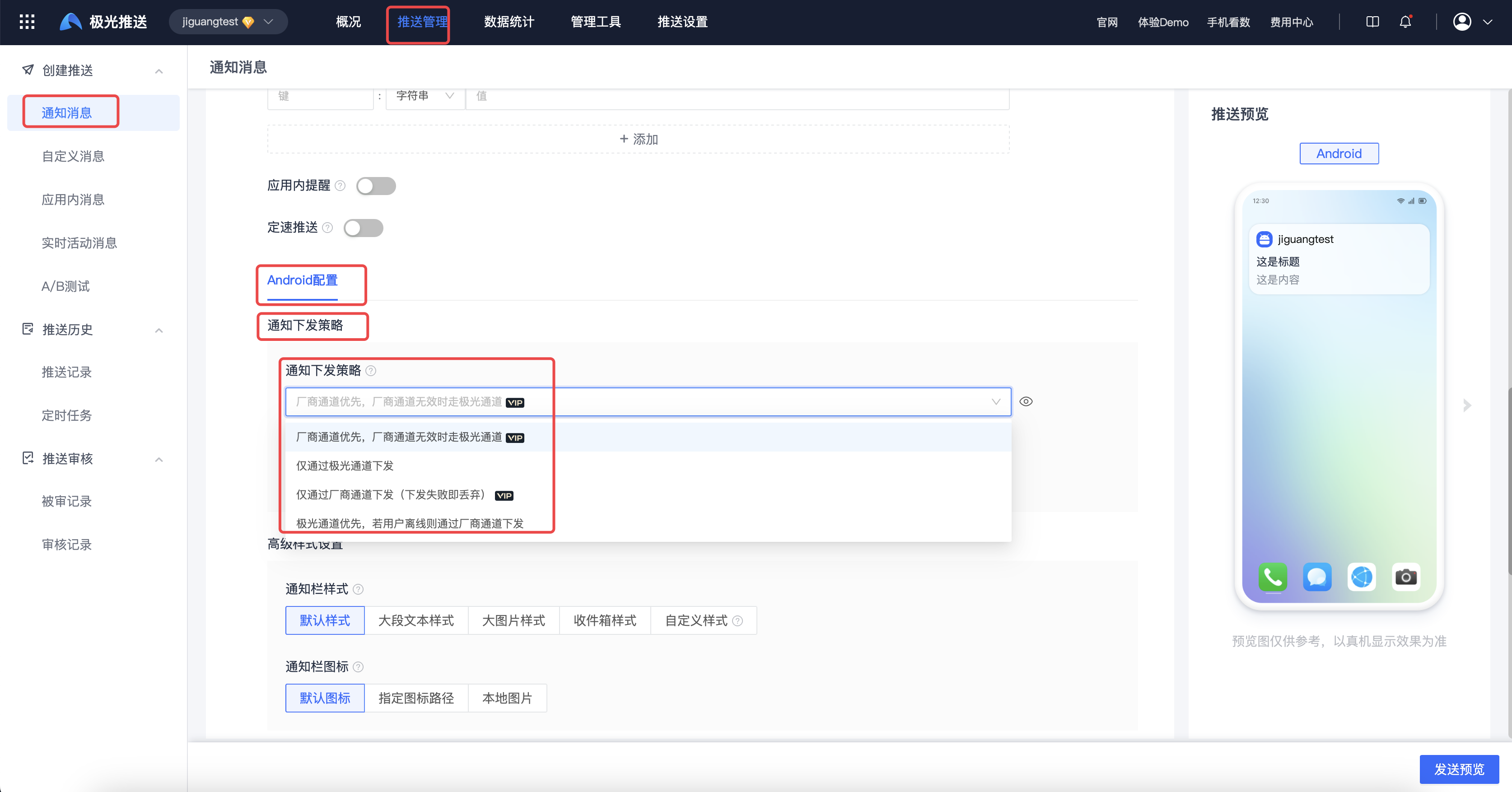
Go to [JPush] - [Create Push] - [Notification Message], click [Android Platform] - [Advanced Settings] - [Notification Delivery Strategy], and select the notification delivery strategy to configure.
The vendor channel status shows the current app's vendor channel activation and configuration status. The notification delivery strategy is valid only for devices that have integrated vendor channels.
Custom Message
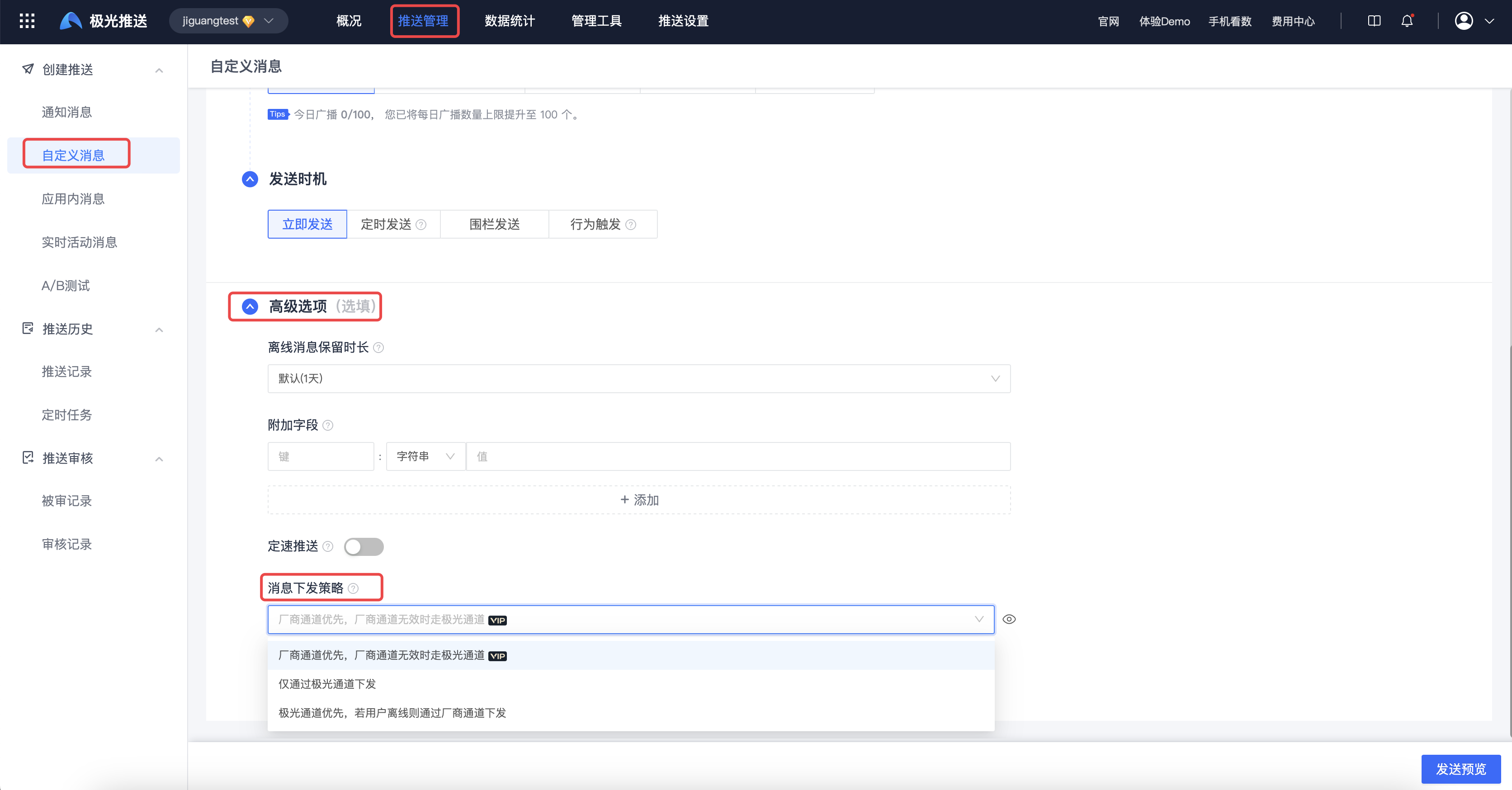
Go to [JPush] - [Create Push] - [Custom Message], click [Android Platform] - [Advanced Settings] - [Notification Delivery Strategy], and select the notification delivery strategy to configure.
The vendor channel status shows the current app's vendor channel activation and configuration status. The notification delivery strategy is valid only for devices that have integrated vendor channels.