


Weekly report settings
Last updated:2025-01-13
Weekly report settings
Description
After the weekly report is enabled, recipients who have completed the verification can receive the JiGuang push weekly report every Monday in their email address.
Settings
Enter the [JiGuang Console] - [Message Push] - [Push Settings] - [Weekly Report Settings] page, click "Enable Weekly Report", add your email address and complete activation, you can subscribe to the application push weekly report. 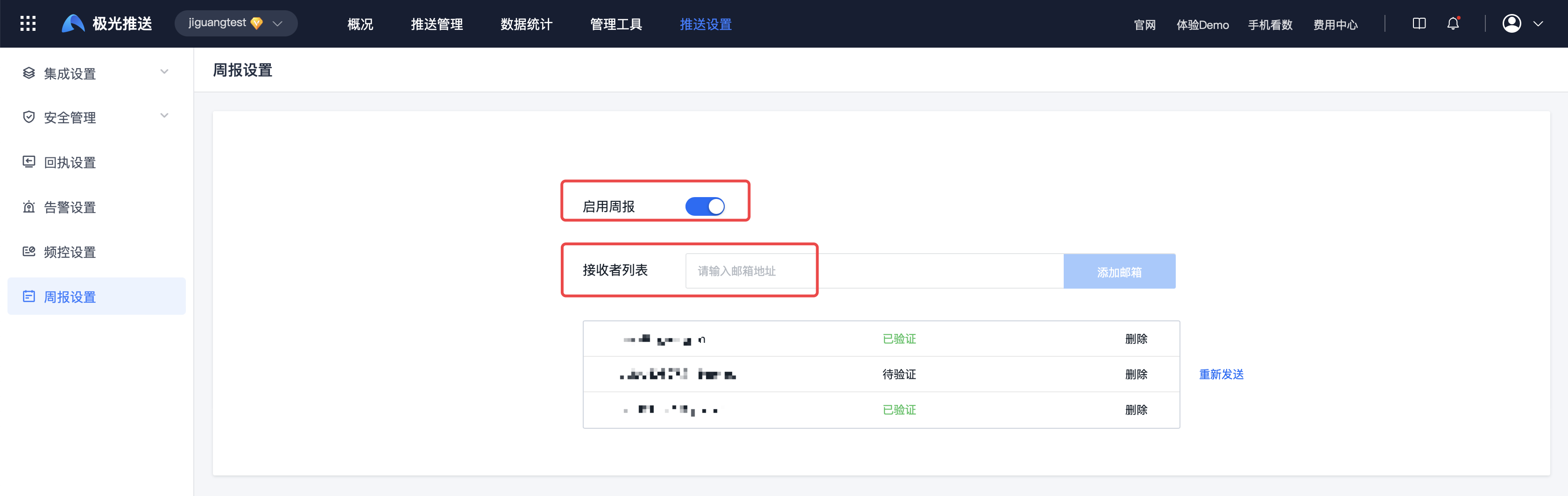
Query sending records
Weekly report email sending records can be viewed on the [JiGuang Console]-[Message Push]-[Data Statistics]-[Weekly Report Summary] page
Special note: If you are a VIP customer, you can also Contact Business to apply to experience the AI Intelligent Analysis function. Then your weekly email will have AI intelligent analysis data!

Was this document helpful?

