


iOS SDK Overview
JPush iOS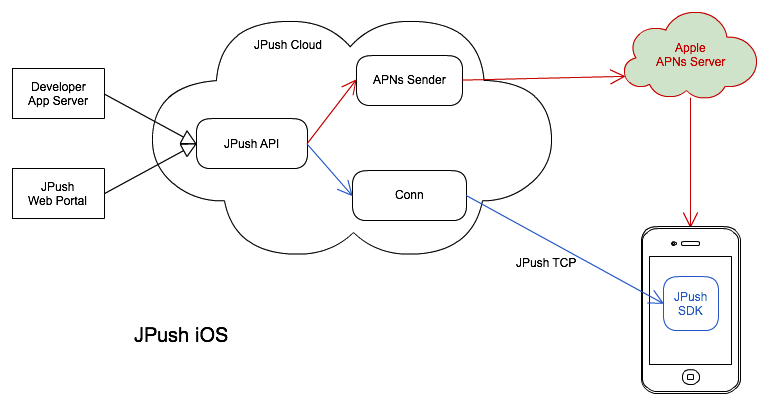
As shown above, JPush iOS Push has two parts: APNs push (proxy) and JPush in-app messages.
The red part is APNs push. JPush proxies your app (using your app certificate) and sends to Apple APNs, which delivers to iOS devices.
The blue part is JPush in-app push. When the app starts, the embedded JPush SDK opens a long connection to JPush Server so JPush can push messages into the app.
APNs notification
APNs notification: Send to Apple APNs, which delivers to iOS and is shown by the system. Users can enable or disable push per app under iOS Settings → Notifications.
The JPush iOS SDK does not render APNs notifications; it uploads Device Token to JPush Server, and JPush proxies delivery to Apple APNs.
In-app message
In-app message: Provided by the JPush iOS SDK when the app is in the foreground. The app can use it for in-app message handling.
This does not go through APNs; it is fully supported by JPush.
APNs vs in-app message
If you only need notifications, you can ignore in-app message handling. See the API section for both.
JPush API v3 supports sending APNs notification and in-app message in one call, which is useful in some scenarios.
| APNS | In-app message | |
|---|---|---|
| Delivery | JPush server → APNs server → device. | JPush delivers directly; each push is attempted. Online users receive immediately; otherwise stored offline. |
| Offline | Cached by APNs per Apple rules. | Stored on JPush server when offline, default 1 day, up to 5 offline messages. |
| Certificate environment | App certificate must match the iOS environment specified for push. | Custom messages are independent of APNs certificate environment. |
| Reception | Received when app is quit, in background, or foreground. | Requires app open and connection to JPush. |
| Display | System APNs alert when background or quit. No alert when app is foreground; iOS 10+ supports foreground display. |
Not APNs; not shown by default. Handle via APIs. |
| Handler | Apple: didReceiveRemoteNotification | JPush: networkDidReceiveMessage |
iOS SDK integration
See the following to integrate the iOS SDK.
iOS SDK notes
iOS version support
- iOS 6.0 and above.
- For iOS 10.0+:
- Notification Service Extension Bundle ID must differ from Main Target; certificate configured separately.
- Set Notification Service Extension Deployment Target to 10.0.
- In Xcode 7 or lower, remove the Notification Service Extension target.
- In Xcode 7 or lower, remove
UserNotifications.framework. - From JPush iOS SDK v4.9.0 and JCore iOS SDK v4.1.0, armv7 and armv7s are no longer supported.
- JPush SDK v4.9.0 and JCore SDK v4.1.0 require iOS 11.0+.
Components
Notes
Benefits of JPush APNs
On iOS, push notifications can only be delivered reliably through Apple's official APNs channel. Developers typically run their own server to push to APNs.
What are the benefits of JPush iOS push vs pushing directly to APNs?
- Lower development and maintenance cost:
- No need to build and maintain your own push server for APNs.
- After integrating JPush iOS SDK, you do not maintain device tokens yourself.
- Push via JPush Web Portal or HTTP API with much less work.
- Lower operating cost:
- One push to both Android and iOS with unified API and console.
- Tags, aliases, and fine-grained audience segmentation simplify operations.
- In-app push:
- Besides simpler APNs push, in-app messages are provided, useful for chat-like scenarios.
JPush APNs implementation
See the community article: APNs push principles and issues

