


How to implement icon settings
This article aims to guide users how to set small icons, right icons and large pictures in the notification bar.

iOS
small icon
Enter Images.xcassets-AppIcon,set up iPhone Notification icons, each sized 40 x 40px、60 x 60px。
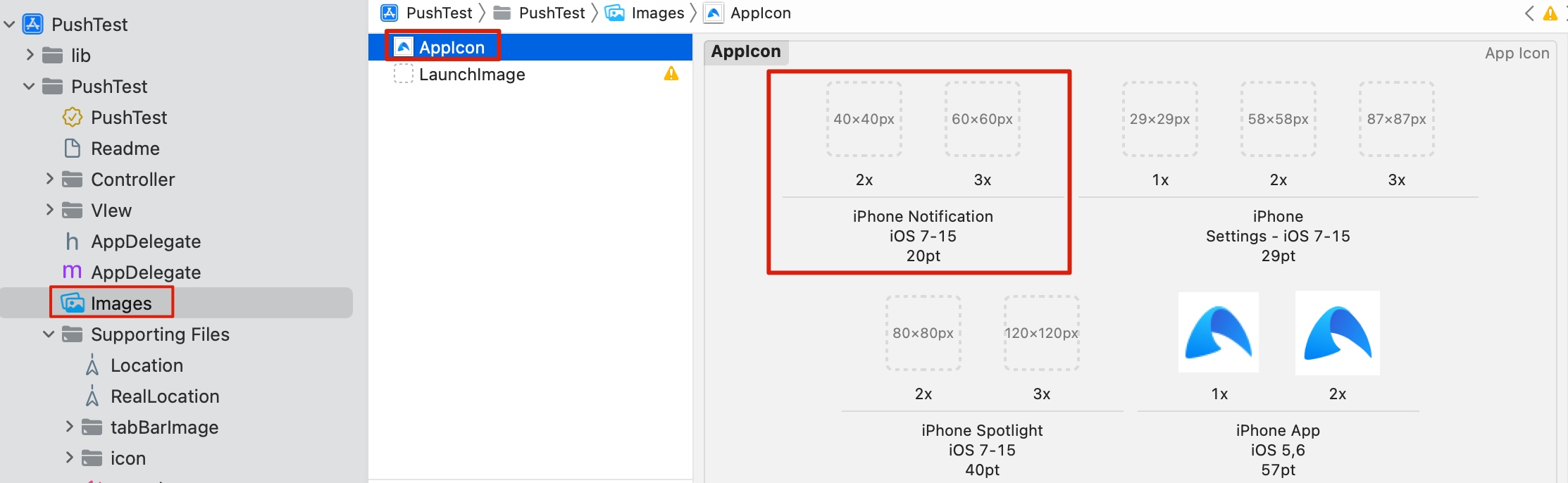
in addition,iOS You can also use the server to dynamically deliver relevant parameters and cooperate with client code operations to dynamically change the effect of small icons. Reference:iOSPush dynamic settings small icon。
Right icon/large picture
App When you are in the foreground, you will receive a push pop-up window. You can view the large picture by pulling down the message. In other cases, there is no large picture display.
Supported version
from JPush iOS SDK v2.1.9,iOS 10 starts support.
Client settings
- Create a Service Extension Services, please refer to the details iOS 10 Service Extension。
- Will jpush-extension-ios-xxx.xcframework file into your Service Extentsion Under construction. (Notice:jpush extension SDK 2.0.0 and below versions, please jpush-extension-ios-xxx.a and JPushNotificationExtensionService.h Import the two files into your Service Extentsion Under construction)
- Add to Framework:libz.tbd and libresolv.tbd。
- call [jpushSetAppkey:] method to set your appkey, please note here appkey should be with youJiguangapplied appkey same.
- exist [didReceiveNotificationRequest:] Obtain the image link in the callback method, please refer to the details SDK of demo, examples are as follows:
          - (void)didReceiveNotificationRequest:(UNNotificationRequest *)request withContentHandler:(void (^)(UNNotificationContent * _Nonnull))contentHandler {
  self.contentHandler = contentHandler;
  self.bestAttemptContent = [request.content mutableCopy];
  self.bestAttemptContent.title = [NSString stringWithFormat:@"%@ [NotificationService]", self.bestAttemptContent.title];

  NSString * attachmentPath = self.bestAttemptContent.userInfo[@"my-attachment"];
  //if exist
  if (attachmentPath) {
    //download
    NSURL *fileURL = [NSURL URLWithString:attachmentPath];
    [self downloadAndSave:fileURL handler:^(NSString *localPath) {if (localPath) {UNNotificationAttachment * attachment = [UNNotificationAttachment attachmentWithIdentifier:@"myAttachment" URL:[NSURL fileURLWithPath:localPath] options:nil error:nil];
        self.bestAttemptContent.attachments = @[attachment];
      }
      [self apnsDeliverWith:request];
    }];
  }else{[self apnsDeliverWith:request];
  }
}

- (void)downloadAndSave:(NSURL *)fileURL handler:(void (^)(NSString *))handler {NSURLSession * session = [NSURLSession sharedSession];
  NSURLSessionDownloadTask *task = [session downloadTaskWithURL:fileURL completionHandler:^(NSURL * _Nullable location, NSURLResponse * _Nullable response, NSError * _Nullable error) {
    NSString *localPath = nil;
    if (!error) {NSString * localURL = [NSString stringWithFormat:@"%@/%@", NSTemporaryDirectory(),fileURL.lastPathComponent];
      if ([[NSFileManager defaultManager] moveItemAtPath:location.path toPath:localURL error:nil]) {localPath = localURL;}
    }
    handler(localPath);
  }];
  [task resume];

}
Server settings
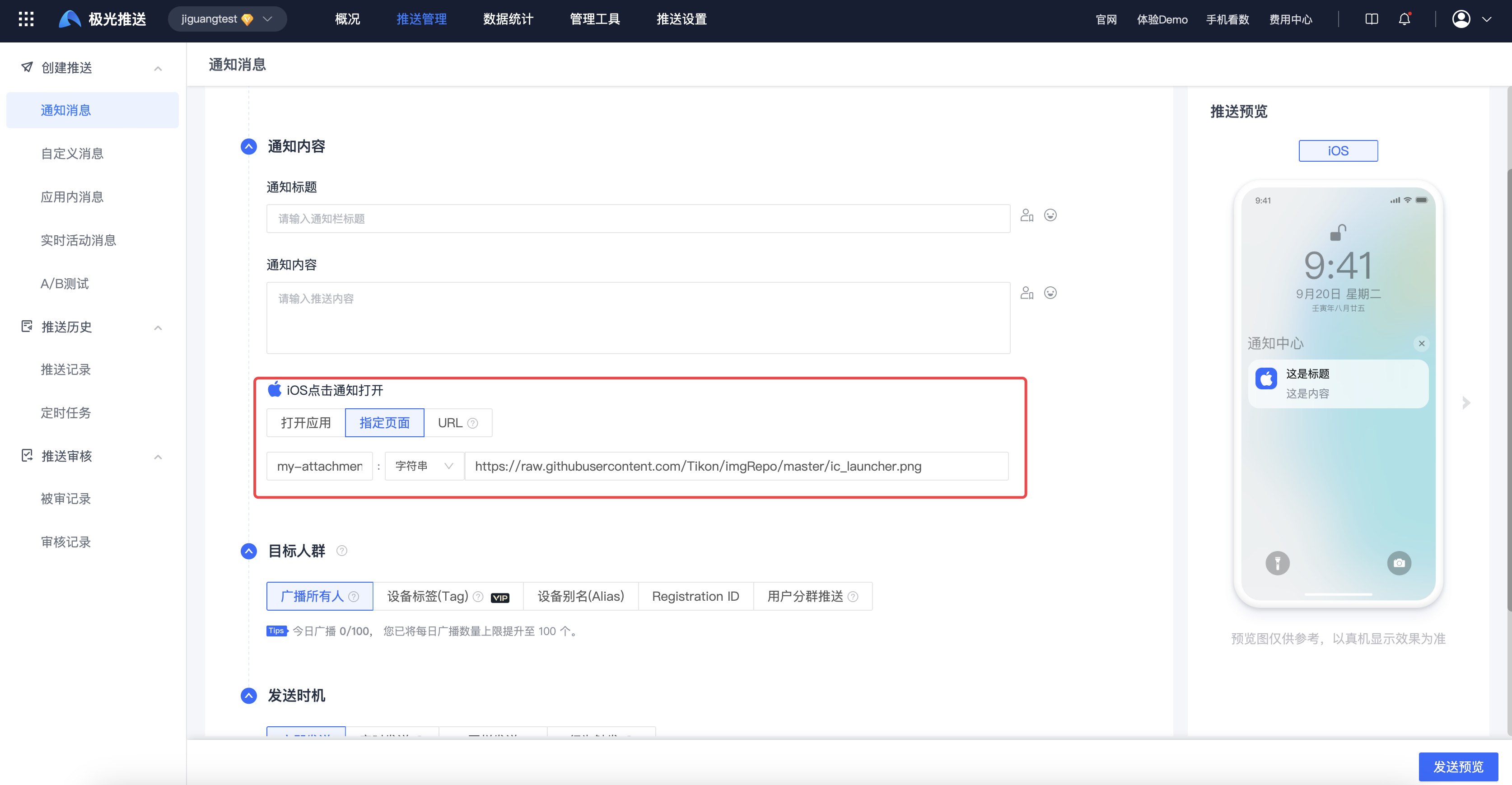
Picture display needs to be in ios Configure below mutable-content and extras field.
| Keywords | type | Options | Parent project | meaning | illustrate |
|---|---|---|---|---|---|
| mutable-content | boolean | Optional | notification.ios | notification extension | Carry it when pushing”mutable-content":true The description is support iOS 10 of UNNotificationServiceExtension, if this field is not carried, it is ordinary Remote Notification, for details, refer to:UNNotificationServiceExtension。 |
| extras | JSON Object | Optional | notification.ios | Additional fields | Customize here key / value information, this key(my-attachment) value needs to correspond to the value of the client, and the client project gets it key value corresponding to url The icon loads. |
          "notification": {
    "ios": {
        "alert": {
            "title": "title",
            "subtitle": "subtitle"
        },
        "mutable-content": true,
        "extras": {
            // 这个 key(my-attachment)值,需要与客户端的值对应,客户端工程拿到 key 值对应的 url 图标加载出来。
            "my-attachment": "https://raw.githubusercontent.com/Tikon/imgRepo/master/ic_launcher.png"
        }
    }
}
Console delivery
Android
Supported version
Jiguangchannel from JPush Android SDK v3.1.7 Starting to support, the vendor channel icon will be changed from JPush SDK 3.9.0 Start supporting.
Channel support
aisle |
Dynamically set small icons |
right icon | big picture |
|---|---|---|---|
| Jiguang | Support (depends on the support of the mobile phone system itself) | Support (depends on the support of the mobile phone system itself, Meizu mobile phone itself does not support) | Support (depends on the support of the mobile phone system itself) |
| Millet | Not supported | Not supported | Not supported |
| Huawei | Support (non-Hongmeng4.xsystem) | Supported (only service and information messages are supported) | Not supported |
| glory | Not supported | Supported (not supported by marketing messages) | Not supported |
| oppo | Not supported | support | support |
| FCM | Not supported | support | support |
| Meizu | Not supported | Not supported | Not supported |
| vivo | Not supported | Not supported | Not supported |
illustrate:
- Huawei Services and Information Application Reference Message classification (Channel ID)
- Huawei Hongmeng4.xThe system does not support custom notification icons.
- OPPO Single-point push does not support icons and large pictures on the right. If OPPO Push targets are less than 20,Jiguangbackground call OPPO Single point push interface to deliver messages, please refer to OPPO Documentation。
- OPPO Push targets are greater than 20 and ColorOS Version >5.0, in connection wifi In the status of the notification bar, the first message displays a large image, and the non-first message does not display a large image.
- Xiaomi from 2023.08 Initially, the official no longer supports the function of dynamically setting small icons, right icons, and large pictures when pushing on new devices/systems. Historical devices and applications are also gradually being covered, which means that the functions of dynamically setting small icons, right icons, and large pictures when pushing are no longer supported.
small icon
Client settings
- If the project has
res/drawable-xxxx/jpush_notification_iconresource, the default is to use jpush_notification_icon As a small notification icon. - If nothing jpush_notification_icon resource, the application icon is used by default.
- FCM Channel settings default small icon:
          <!-- Set custom default icon. This is used when no icon is set for incoming notification messages.
     See README(https://goo.gl/l4GJaQ) for more. -->
<meta-data
    android:name="com.google.firebase.messaging.default_notification_icon"
    android:resource="@drawable/jpush_notification_icon" />
<!-- Set color used with incoming notification messages. This is used when no color is set for the incoming
     notification message. See README(https://goo.gl/6BKBk7) for more. -->
<meta-data
    android:name="com.google.firebase.messaging.default_notification_color"
    android:resource="@color/colorAccent" />
Server settings
If you need to dynamically set the notification bar small icon, you can android Configure below small_icon_uri field, the vendor channel can be found in options.third_party_channel The following configuration corresponds to the manufacturer's small_icon_uri field, the manufacturer field is used first. If the manufacturer field is not filled in, use android down small_icon_uri field.
**Note:**Xiaomi from 2023.08 Initially, the official no longer supports the function of dynamically setting small icons, right icons, and large pictures when pushing on new devices/systems. Historical devices and applications are also gradually being covered, which means that the functions of dynamically setting small icons, right icons, and large pictures when pushing are no longer supported.
| Keywords | type | Options | Parent project |
meaning | illustrate |
|---|---|---|---|---|---|
| small_icon_uri | string | Optional | notification. android |
Notification bar small icon | |
| small_icon_uri | string | Optional | options. third_party_channel. Manufacturer |
Manufacturer message small icon style |
Examples are as follows:
          "notification": {
    "android": {
        "alert": "Hi, JPush!",
        "title": "Send to Android",
        // 此字段值,若是极光 media_id, 则对其它厂商通道也会使用这个 media_id 下发,若非 media_id,则对走华硕通道下发和极光自有通道下发生效,不影响请求走其它厂商通道。
        "small_icon_uri": "jgmedia-2-98dc326f-f2f4-48ab-bb6b-1b87a803d699"
    }
},
"options": {
    "time_to_live": 60,
    "third_party_channel": {
        "huawei": {
            "distribution": "ospush",
            "small_icon_uri": "/raw/icon_hw" // 后台指定的路径,在客户端工程需要有这个图片, 放置目录为 res/raw/xxx.png
        }
    }
}
Right icon/large picture
By issuing specified parameters from the server, the icons and large pictures on the right can be displayed.
**Note:**Xiaomi from 2023.08 Initially, the official no longer supports the function of dynamically setting small icons, right icons, and large pictures when pushing on new devices/systems. Historical devices and applications are also gradually being covered, which means that the functions of dynamically setting small icons, right icons, and large pictures when pushing are no longer supported.
Server settings
| Keywords | type | Options | Parent project | meaning | illustrate |
|---|---|---|---|---|---|
| style | int | Optional | notification. android |
Notification bar style type | |
| big_pic_path | string | Optional | notification. android |
Large picture notification bar style | |
| large_icon | string | Optional | notification. android |
Notification bar large icon | |
| style | int | Optional | options. third_party_channel. Manufacturer |
Manufacturer message large text /inbox/ large picture style | |
| big_pic_path | string | Optional | options. third_party_channel. Manufacturer |
Manufacturer large picture notification bar style | |
| large_icon | string | Optional | options. third_party_channel. Manufacturer |
Manufacturer news large icon style |
Examples are as follows:
          {
    "notification": {
        "android": {
            "alert": "Hi, JPush!",
            "title": "Send to Android",
            "large_icon": "jgmedia-2-98dc326f-f2f4-48ab-bb6b-1b87a803d699",
            "big_pic_path": "jgmedia-2-98dc326f-f2f4-48ab-bb6b-1b87a803d699",
            "style": 3
        }
    },
    "options": {
        "third_party_channel": {
            // 华为只支持右侧图标,不支持大图片
            "huawei": {
                "distribution": "ospush",
                "large_icon": "jgmedia-2-98dc326f-f2f4-48ab-bb6b-1b87a803d699",
                "style": 1
            },
            //oppo 单推不支持大图片和右侧图标,极光内部目前如果推送的 OPPO 目标小于 20 都会用 oppo 的单推接口下发推送,因此推送目标小于 20 个大图片和右侧图标是不生效的
            "oppo": {
                "distribution": "ospush",
                "large_icon": "jgmedia-2-98dc326f-f2f4-48ab-bb6b-1b87a803d699",
                "big_pic_path": "jgmedia-2-98dc326f-f2f4-48ab-bb6b-1b87a803d699",
                "style": 3
            }
        }
    }
}
HarmonyOS
Supported version
Vendor channel icon from JPush SDK 1.0.0 Start supporting.
Channel support
aisle |
Dynamically set small icons |
right icon | big picture |
|---|---|---|---|
| Hongmeng | Not supported | support | Not supported |
right icon
The icon on the right can be displayed by issuing specified parameters from the server.
Server settings
| Keywords | type | Options | Parent project | meaning | illustrate |
|---|---|---|---|---|---|
| large_icon | string | Optional | notification. hmos |
Notification bar large icon |
Examples are as follows:
          {
    "notification": {
        "hmos": {
            "alert":"hmos alert",
            "title":"hmos titile",
            "intent": {
                "url":"scheme://test?key1=val1&key2=val2"
            },
            "badge_add_num":1,
            "extras": {
                "age":18
            },
            "category":"IM",
            "test_message":false,
            "receipt_id":"abc1212",
            "large_icon":"https://www.jiguang.cn/largeIcon.jpg"
        }
    }
}
FAQ
small icon
1. The small icon is gray
- Google native Android 5.0 above ROM will be right target sdk greater than or equal to 21 App Process the small icon and add a layer of color, causing the icon to turn gray. We can define without shadows and gradients, hollow background icon Replacement project with the same name
res/drawable-xxxx/jpush_notification_iconFor this file, the small icon displayed in this way can be gray (but the icon has a shape). Please make pictures strictly in accordance with the requirements and place them res All under the folder icon File are replaced with their own icon files. - Due to some systems (OnePlus mobile phone,google cell phone android10 system, etc.) has restrictions on icons and cannot be processed currently.
- Xiaomi mobile phone launcher There may be cache. After configuring according to the above requirements, you need to restart the phone before testing again.
- Xiaomi mobile phone no matter where you goJiguangChannel or Xiaomi channel, you need to switch to the native style to take effect.

2. Client replacement icon The icon does not take effect
Since the system and the manufacturer's server cache icons, this phenomenon may occur on Xiaomi and Meizu phones. It is recommended to uninstall the application, restart the phone and reinstall the new package before testing.
Right icon/large picture
After doing the above processing when pushing, the icon/large picture on the right still cannot be displayed?
1.Jiguangaisle
if goJiguangThe channel does not take effect either. Please confirm whether the user has called it. Set the default notification bar style to build the class The interface has been changedJiguangDefault style. If there is a call, please delete this interface, uninstall and reinstall App Try again later.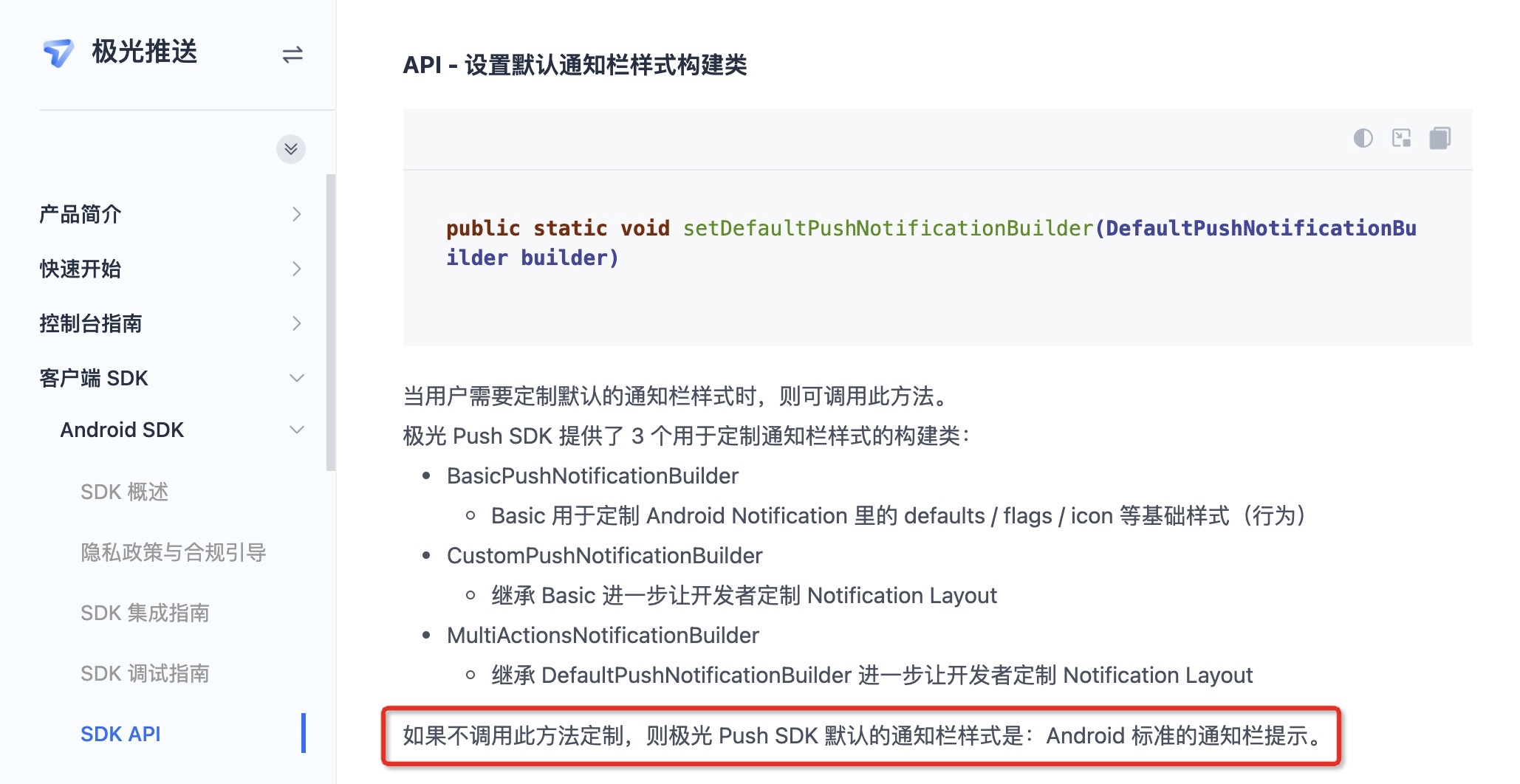
2.APNs aisle
iOS The icon and large picture on the right side are used for both purposes.App When you are in the foreground, you will receive a push pop-up window. Pull down the message to view the large picture. In other cases, it will only display the icon on the right.


3.FCM aisle
Firebase The icon and large picture on the right side of the official website are used for both purposes. Specify the icon on the right side and the large picture for push. When the message is not expanded, it will be displayed as the icon on the right side. After the message is expanded, it will be displayed as a large picture. The details are as follows.


