


iOS SDK FAQ
Why does a pure Objective-C project report a swiftCompatibilityConcurrency linker error with JPush 6.2.1 or later?
JPush iOS SDK 6.2.1 and later contain Swift code used for features such as Live Activity. If the project contains no .swift files, Xcode may not automatically link the Swift standard libraries, and the linker may report errors such as:
          ld: warning: Could not find or use auto-linked library 'swiftCompatibilityConcurrency'
Undefined symbols for architecture arm64:
  "__swift_FORCE_LOAD_$_swiftCompatibilityConcurrency"
This issue affects only pure Objective-C projects. Objective-C and Swift mixed projects are usually unaffected. To resolve it:
- Add a Swift file, such as
DummySwift.swift, to the App Target. The file can contain onlyimport Foundation. - When Xcode asks whether to create a Bridging Header, select Don't Create.
- If the error persists, verify that
Build Settings > Always Embed Swift Standard Librariesis set toYES.
For detailed instructions, see Link the Swift standard libraries in pure Objective-C projects in the iOS SDK Integration Guide.
iOS 9 Integration
iOS 9 Changes Affecting the SDK:
- The bitCode format was added. If the SDK does not support bitCode, users cannot enable the bitCode option during integration.
- Symptom: after integrating the SDK, the project cannot compile, and the error log contains bitCode-related errors.
- https connections are used by default. If the request is http, you need to manually configure plist to support http services. Currently, our server requests all use http services.
- Symptom: after integrating the SDK, all JPush-related http services report connection errors or connection timeouts. This may be the cause.
bitCode Solution
JPush iOS SDK v1.8.7 and later have added support for the iOS 9 bitCode feature. JMessage iOS SDK v2.0.0 and later support bitCode.
Https Solution
When the SDK does not provide an https address version:
- The user needs to actively add
NSAppTransportSecurityof type Dictionary to the current project'sInfo.plist. - Add
NSAllowsArbitraryLoadsof type Boolean underNSAppTransportSecurity, and set the value to YES.
How to Push a Custom Sound on iOS
The client needs to import the sound file into the project, then select the project Target -> Build Phrases -> Copy Bundle Resources.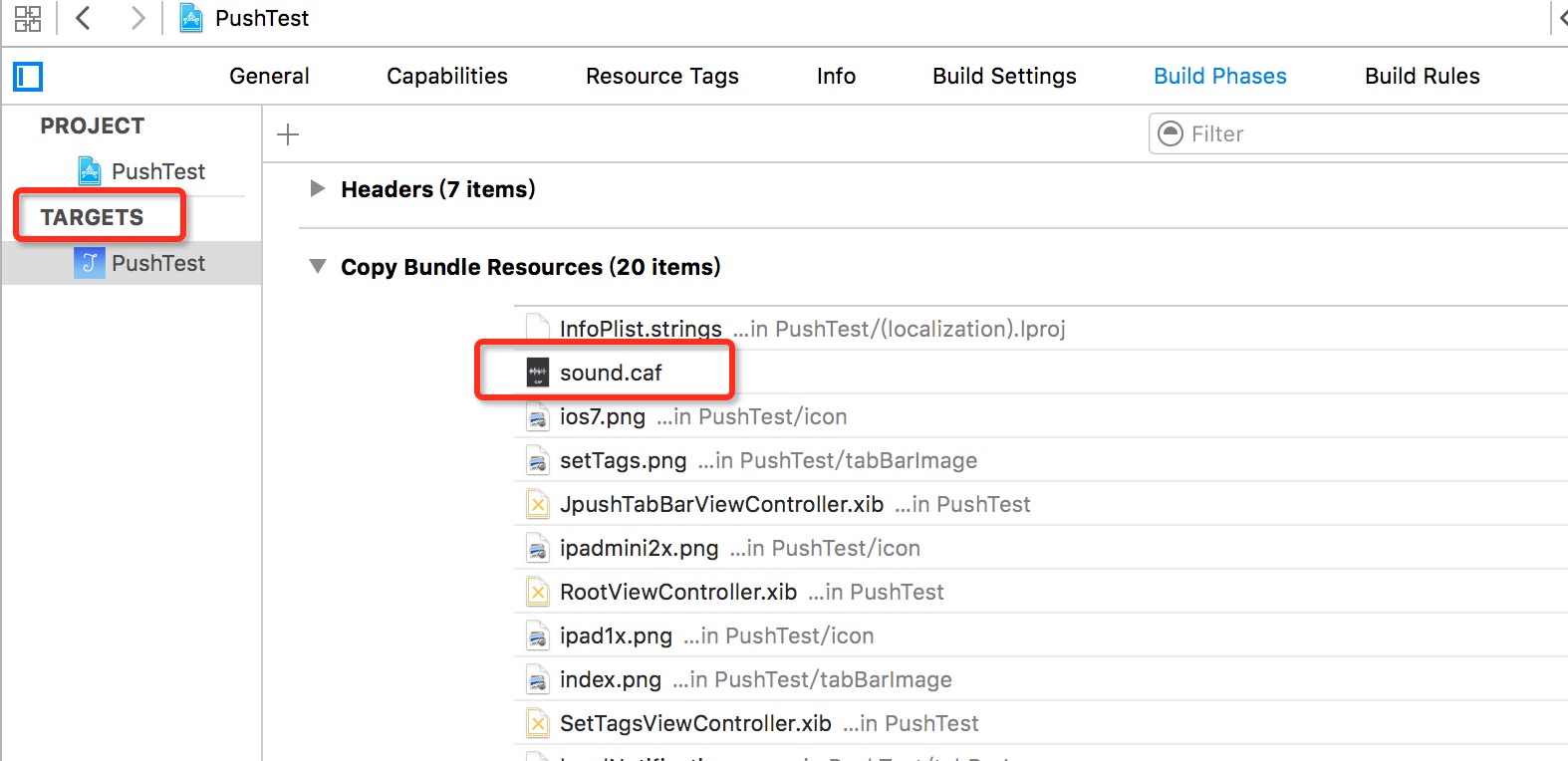
When pushing from the server, specify the sound parameter under the iOS platform. The value passed in is the sound file name plus suffix.
Why Can't iOS Receive Push Messages?
If you have confirmed that the AppKey configured in the SDK client is consistent with the AppKey on the Portal, and other steps have been completed correctly according to the documentation, but push messages still cannot be received, it is possible that the certificate uploaded on the Portal is not an APNs (Push) certificate. The iOS push environment specified during push must be the same environment as the app certificate.
See the iOS Certificate Setup Guide and check again whether the certificate selection is correct.
Note: the necessary condition for iOS to receive messages is that the app certificate must correspond to the certificate uploaded to the JPush portal. If your app is run directly from Xcode, the app deployment environment must be development in order to receive APNS messages.
Tip: when pushing through the API, you can specify the push environment through the apns_production parameter.
falseindicates the development environment, andtrueindicates the production environment. If the V3 API is called directly without this parameter, the default is production. If the official Jiguang SDK that wraps the V3 API is used without this parameter, the default is development. If the API passesapns_production, that value takes precedence.
Why Does "Did Fail To Register For Remote Notifications With Error" Appear at Startup?
The following error appears when the program runs:
did Fail To Register For Remote Notifications With Error: Error Domain=NSCocoaErrorDomain Code=3000 "No application found"aps-environment"Right String" UserInfo=0x1c55e000 {NSLocalizedDescription= application not foundaps-environmentRight string}
This is because your Provisioning Profile file does not have APNS capability. Log in to the Apple Developer website, configure the certificate, update the Provisioning Profile, and import it into Xcode again.
Or refer to this article for troubleshooting.
How to Get APN Message Content and Redirect or Respond When an APN Is Received?
How to Disable APN Push?
You can call the following code to enter your app's settings page, tap "Notification Settings", and let the user manually change the "Allow Notifications" status.
          // Available on iOS 8 and later
[[UIApplication sharedApplication] openURL:[NSURL URLWithString:UIApplicationOpenSettingsURLString]]
Or call the unregistration code to directly disable APNS:
[[UIApplication sharedApplication] unregisterForRemoteNotifications];
Note: on iOS 9 devices, after using this code to unregister APNs, calling the initialization code again to restore APNs registration requires killing the app and reopening it before the APNs prompt appears. This may be related to a system bug.
How to Change and Clear the App Badge Number?
When pushing iOS notifications on the JPush website, you can specify the value of the badge parameter in [Optional Settings], such as 1 or "+1".
For the badge parameter specified through the API, see Push API.
For the client API that reports badge to the JPush server, see Set badge.
For an introduction to badge +1, see APNs Notification badge.
How to Clear the Icon Badge Number:
- Specify badge number as 0 in the APN push content.
- Use the following code in client code to clear the local badge number:
[[UIApplication sharedApplication] setApplicationIconBadgeNumber:0];
Note:
Badge accumulation can only be pushed through the v3 API, and is supported only in version 1.7.4 and later.
After Pushing an APN, Why Does Tapping the APN Notification in Notification Center Open the App but the APN Notification Still Remains in Notification Center?
If Badge number is specified as 0 when pushing APN, it may happen that after the APN message is tapped in Notification Center, even though [[UIApplication sharedApplication] setApplicationIconBadgeNumber:0]; is called, the APN message is not deleted from Notification Center. In this case, call the following code to clear APN notifications in Notification Center.
          [[UIApplication sharedApplication] setApplicationIconBadgeNumber:1];
[[UIApplication sharedApplication] setApplicationIconBadgeNumber:0];
If there are still other messages, consider clearing local notification notifications. ([[UIApplication sharedApplication] cancelAllLocalNotifications])
How to Troubleshoot When the Error Log "Not get deviceToken yet. Maybe: your certificate not configured APNs?..." Appears?
If the above log appears, it means that the device token cannot be obtained for a period of time. Then:
Confirm that your app has configured APNs permission. If APNs permission is not configured, this error should appear.
Confirm that your app is running on a real iOS device instead of a simulator, and that the notification permission for the corresponding app in Notification Center is not completely disabled. At least one of alert/sound/badge must be enabled.
Confirm your network status. The connection to Apple's server uses TCP port 5223. Confirm whether the corresponding port on your network is available. You can use the following command to confirm this:
telnet 1-courier.push.apple.com 5223telnet 1-courier.push.apple.com 5223This code block is shown in the floating windowIn code, you can set breakpoints in the following two functions to confirm the device token acquisition status.
- (void)application:(UIApplication *)application didRegisterForRemoteNotificationsWithDeviceToken:(NSData *)deviceToken; - (void)application:(UIApplication *)application didFailToRegisterForRemoteNotificationsWithError:(NSError *)error;- (void)application:(UIApplication *)application didRegisterForRemoteNotificationsWithDeviceToken:(NSData *)deviceToken; - (void)application:(UIApplication *)application didFailToRegisterForRemoteNotificationsWithError:(NSError *)error;This code block is shown in the floating windowIf the app enters
didFailToRegisterForRemoteNotificationsWithError, it indicates an APNS permission issue for the app or that the app is running in a simulator. Refer to the certificate setup documentation.If the app enters
didRegisterForRemoteNotificationsWithDeviceToken, it indicates that it is running normally. Confirm that the code in this function passes the token to JPush:[JPUSHService registerDeviceToken:deviceToken];[JPUSHService registerDeviceToken:deviceToken];This code block is shown in the floating windowIf neither of the above two
registerRemoteNotificationfunctions is entered, confirm that your code includes a function call to register and apply for APNs:[JPUSHService registerForRemoteNotificationTypes:(UIUserNotificationTypeAlert | UIUserNotificationTypeBadge | UIUserNotificationTypeSound) categories:nil];[JPUSHService registerForRemoteNotificationTypes:(UIUserNotificationTypeAlert | UIUserNotificationTypeBadge | UIUserNotificationTypeSound) categories:nil];This code block is shown in the floating windowThe preceding code is a complete call to
registerForRemoteNotificationTypes:categories:. If the project uses the newer notification registration API, troubleshoot according to the registration flow in the Integration Guide.If all of the above has been confirmed and none of the callbacks in step 4 is entered, the reason the token cannot be obtained can be determined to be a network connectivity issue between the device and Apple. Note: a device only needs to interact with Apple's network to obtain a token if it has never applied for a token before. A device that has already obtained a token for a certain environment can obtain the token for that environment even without a network. The environments are development/production. In this case, switching networks can solve the issue in most cases.
If the issue persists, send the results of the above steps as email attachments to JPush support at support@jiguang.cn, and we will help you resolve it.
Why Can't the Version Uploaded to App Store Receive Pushes?
- Confirm that the production certificate selected in Xcode is consistent with the bundleid of the uploaded certificate.
- If pushing on the JPush website, confirm whether the push target selects the production environment when creating a notification.
- If pushing through the v3 API, confirm whether the
apns_productionparameter is used and whether its value istrue.
iOS Platform Certificate Upload Remains Unapproved
Common reasons for certificate upload failure include:
- Incorrect password.
- The uploaded APNs certificate environment is inconsistent.
- The certificate uploaded to the console must be an APNs certificate. Non-APNs certificates will cause errors. Other possible reasons include uploading a developer certificate or the private key exported from the APNs certificate.
For details, check the error output displayed after upload.
Why Does the Log Print: you still need to add "remote-notification" to the list of your supported UIBackgroundModes in your Info.plist.
          You've implemented -[ <UIApplicationDelegate\> application:didReceiveRemoteNotification:fetchCompletionHandler:],
but you still need to add "remote-notification" to the list of your supported UIBackgroundModes in your Info.plist.
This mainly reminds developers that if they want to support UIBackgroundModes, they need to enable Remote notifications. For specific steps, see iOS 7 Background Remote Notification.

