


How to implement a custom ringtone
Both notifications and custom messages support custom ringtones. The implementation is as follows:
| Message type | Implementation method | Things to note |
|---|---|---|
| notify | 1. The client creates a custom channel and sets a custom ringtone. 2. The server specifies the channel ID (channel_id) to send push. |
Only some manufacturer channels support custom ringtones. For details, please refer to Support channel description。 |
Custom message |
After receiving the custom message callback, the client handles the ringing logic on its own. | Custom message callback dependenciesJPushlong link,App You must be online to receive custom messages, otherwise the broadcast logic cannot be processed. |
Support channel description
| Message type | aisle |
Remark |
|---|---|---|
| notify | sound. |
|
Custom message |
Custom message callback dependenciesJPushlong link,App You must be online to receive custom messages, otherwise the broadcast logic cannot be processed. |
from Android 8.1(API Starting with level 27), apps cannot emit notification sounds more than once per second. If your app posts multiple notifications in one second, they all appear as expected, but only the first notification sounds each second.
Jiguang/OPPO/FCM Channel notification implementation
Client settings
- In project engineering src/main/res/raw Download the sound file. This file corresponds to the one specified by the server. sound Field (Adapt 8.0 following systems).
2.Create channel and set sound, please refer to NotificationChannel Configuration。
          private void initChannel(){if (Build.VERSION.SDK_INT >= Build.VERSION_CODES.O) {NotificationManager nm = (NotificationManager) getSystemService(Context.NOTIFICATION_SERVICE);
            if (nm != null){NotificationChannelGroup notificationChannelGroup = new NotificationChannelGroup("MyGroupId", "自定义通知组");
                nm.createNotificationChannelGroup(notificationChannelGroup);

                NotificationChannel notificationChannel = new NotificationChannel("m_channel123", "自定义通知 1", NotificationManager.IMPORTANCE_HIGH);
                notificationChannel.setGroup("MyGroupId");
                notificationChannel.enableLights(true);
                notificationChannel.enableVibration(true);
                notificationChannel.setSound(Uri.parse("android.resource:// 包名 /raw/ 铃声文件名称"), null);

                nm.createNotificationChannel(notificationChannel);
            }
        }
    }
Server settings
When pushing, you need to notification Configure below sound and channel_id fields,channel_id Need to communicate with client Created channel consistent.
| Keywords | type | Options | meaning | illustrate |
|---|---|---|---|---|
| sound | String | Optional | fill in Android Under construction /res/raw/ The name of the ringtone file under the path, no file name suffix is required | Note: for Android 8.0 above, when passed channel_id, this attribute does not take effect. |
| channel_id | String | Optional | Notification bar message classification | no more than 1000 byte,Android 8.0 It can be started NotificationChannel Configuration, here according to channel_id to specify the notification bar display effect. |
Examples are as follows:
          {
    "notification": {
        "android": {
            "alert": "message alert",
            "title": "title", // 如果 sound 和 channel_id 都有传,那么会以 channel_id 的铃声为准
            "sound": "coin", //传值要求请查看上述表格中字段说明
            "channel_id": "m_channel123"
        }
    }
}
Xiaomi channel notification implementation
since 2023 Starting from February 1, 2019, Xiaomi Push will divide messages into two categories: "private messages" and "public messages". Channel distinguish, and in Android 8.0 and above version notification effect is also based on Channel The effect in will prevail. Setting a custom ringtone when sending a message will not take effect. You need to create a new one. Channel Set a custom ringtone.
Apply Channel method
For application methods, please refer to Xiaomi’s official documentation. channel Application and access methods。
Server side processing
At the time of push notification Specify below channel_id fields are issued.
Specify when pushing options.third_party_channel.xiaomi.channel_id fields are issued.
| Keywords | type | Options | meaning | Parent project | illustrate |
|---|---|---|---|---|---|
| classification | int | Optional | Message type classification | options | JiguangThe specified message type will not be judged or calibrated, and will be adapted to the message type specified by the developer. Android Manufacturer channel. If left blank, the default value is 0. |
| channel_id | string | Optional | android notify channel_id | options.third_party_channel.xiaomi |
Examples are as follows:
          {
    "options": {
        "classification":1,
        "third_party_channel": {
            "xiaomi": {
                "channel_id": "小米推送平台登记的 channel id"
            }
        }
    }
}
Huawei channel notification implementation
Based on the message content, Huawei Push classifies notifications into two categories: service and communication, and information marketing, and differentiates the reminder methods and message styles of different categories of messages, as follows:
| Message type | Services and communications | Information marketing |
|---|---|---|
| push content | Including social communication messages and service reminder messages. | Including information messages and marketing messages, which refers to event information, content recommendations, information, etc. sent by carriers to users. |
| Reminder method (EMUI 10.0 and above) | Lock screen, ringtone, vibration | Silent notification, only display messages in the drop-down notification bar |
| Message style | Text + thumbnail | text only |
| Configuration method | You need to apply for self-classification rights from Huawei. After passing the review, the classification information provided by the developer will be trusted, and the messages will not be intelligently classified. | default |
**Notice:2021 Starting from November 2020, if the application data processing location you apply for on Huawei’s official website is in China,channel_id The field is invalid, so Huawei channels can only be used in overseas regions. channel_id Lysal custom ringtones. **
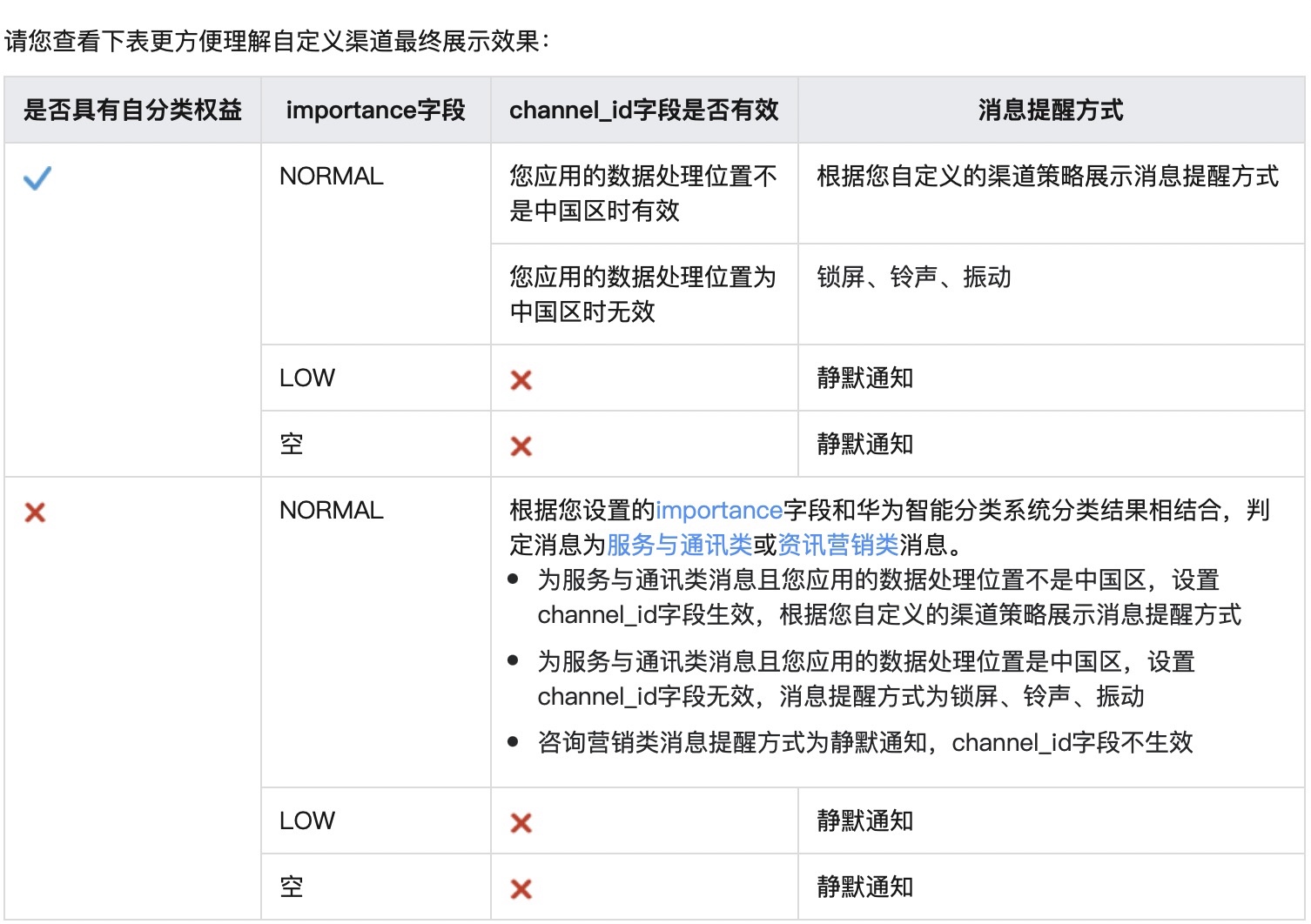
- The custom channels feature no longer works with Data processing location For applications in China, your push messages will be classified according to the message level confirmed by the intelligent classification system or the message self-classification rights. Services and communications or Information marketing information.
- Silent notifications refer to messages arriving at the terminal without vibrations, ringtones, status bar icons, pop-up windows and lock screens, and are only displayed on the drop-down notification bar interface.
- The switch control and reminder method of the corresponding channel on the user terminal determine the final reminder method of the message.
China area settings
If the application data processing location you applied for on Huawei's official website is in China, you can push it to the application for the first time through the server. Services and communications when, carry sound and default_sound fields to implement custom ringtones,sound、 default_sound and importance The parameters are all there option.third_party_channel.huawei under the field.
Note: Since the ringtone is a property of the notification channel, the ringtone is only used when the channel is first created (settings sound) is valid and cannot be modified later.
Server settings
| Keywords | type | Options | meaning | Parent project | illustrate |
|---|---|---|---|---|---|
| classification | int | Optional | Message type classification | options | JiguangThe specified message type will not be judged or calibrated, and will be adapted to the message type specified by the developer. Android Manufacturer channel. If left blank, the default value is 0. |
| sound | string | Optional | Huawei custom ringtone | options.third_party_channel.huawei | |
| default_sound | boolean | Optional | Huawei default ringtone control switch | options.third_party_channel.huawei | When setting a custom ringtone with sound fields, and default_sound The value is set to false. Note: Since the ringtone is a property of the notification channel, custom ringtones are only available when the channel is first created (settings sound) is valid and cannot be modified later. |
| importance | string | Optional | Intelligent classification of Huawei notification bar messages | options.third_party_channel.huawei |
          {
    "platform": "all",
    "audience": {
        "registration_id": ["1104a8979278ae64e75"]
    },
    "notification": {
        "android": {
            "alert": "message alert"
        }
    },
    "options": {
        "classification":1,//表示消息为服务与通讯类型
        "third_party_channel": {
            "huawei": {
                "sound":"******",  //传值要求请查看上述表格中字段说明
                "default_sound":false,
                "importance": "NORMAL"//表示消息为服务与通讯类型
            }
        }
    }
}
Overseas region settings
Client settings
If the application data processing location you applied for on Huawei's official website is in a non-China area, you can use custom channels to set custom ringtones. For details on client settings, refer to Create a custom channel。
Huawei self-categorization rights application
After creating a channel, you need to apply for service and communication type notifications. For application details, see Huawei message classification management solution。
- If an application does not have self-categorization rights, the application's push messages will be automatically classified through intelligent classification.
- If the application has self-classification rights, it will trust the classification information provided by the developer, and the messages will not be intelligently classified.
Server settings
After the application for message classification is approved, you can options.third_party_channel.huawei Specify under the field channel_id and importance Parameters are issued.
| Keywords | type | Options | meaning | illustrate |
|---|---|---|---|---|
| channel_id | string | Optional | Notification bar message classification | no more than 1000 byte,Android 8.0 It can be started NotificationChannel Configuration, here according to channel_id to specify the notification bar display effect. |
| importance | string | Optional | Intelligent classification of Huawei notification bar messages |
          {
    "platform": "all",
    "audience": {
        "registration_id": ["1104a8979278ae64e75"]
    },
    "notification": {
        "android": {
            "alert": "message alert"
        }
    },
    "options": {
        "third_party_channel": {
            "huawei": {
                "channel_id": "自定义 channel id"
                "importance": "NORMAL"//表示消息为服务与通讯类型
            }
        }
    }
}
HarmonyOS notification implementation
For HarmonyOS notifications, the sound field takes effect for both the JPush channel (JPush HarmonyOS SDK v1.3.0 or later) and the HarmonyOS vendor channel. Note that even when the notification is delivered through the JPush channel, the notification category still needs to be set to a service-category message. Otherwise, the custom ringtone may not take effect.
Client settings
Place the sound file under the application's /resources/rawfile path, and make sure the file name exactly matches the server-side sound value.
Server settings
Configure category and sound under notification.hmos when sending the push:
| Keywords | type | Options | meaning | illustrate |
|---|---|---|---|---|
| category | string | Required | Notification bar message category entry | Fill in the official HarmonyOS service-category category value that has been applied for and approved. The IM value in the sample is only an example for a service scenario. Use the actual value that matches your business scenario and vendor entitlement. |
| sound | string | Optional | Custom notification ringtone | The sound file must be placed under the application's /resources/rawfile path, and the value must include the file extension, for example service_notice.wav. Do not pass only the file name without an extension. |
| sound_duration | int | Optional | Custom notification ringtone duration | Takes effect only for the HarmonyOS vendor channel. It must be used together with sound. Unit: seconds. Value range: [1, 60]. |
Example:
          {
    "platform": ["hmos"],
    "audience": {
        "registration_id": ["1104a8979278ae64e75"]
    },
    "notification": {
        "hmos": {
            "alert": "You have a new service notification",
            "title": "Service Reminder",
            "category": "IM",
            "sound": "service_notice.wav",
            "intent": {
                "url": "scheme://test?key1=val1&key2=val2"
            }
        }
    }
}
Note: Android
soundusually does not require a file extension, while iOS and HarmonyOS require the complete sound file name with the extension. When you reuse one push template across platforms, configure separate notification bodies for each platform to avoid mixing field rules.
APNs Channel notification implementation
Format requirements
- The format must be Linear PCM、MA4(IMA/ADPCM)、alaw,μLaw A kind of, and the time requirement is 30s The following, otherwise it is the system default ringtone. For details, see Official developer documentation。
Client settings
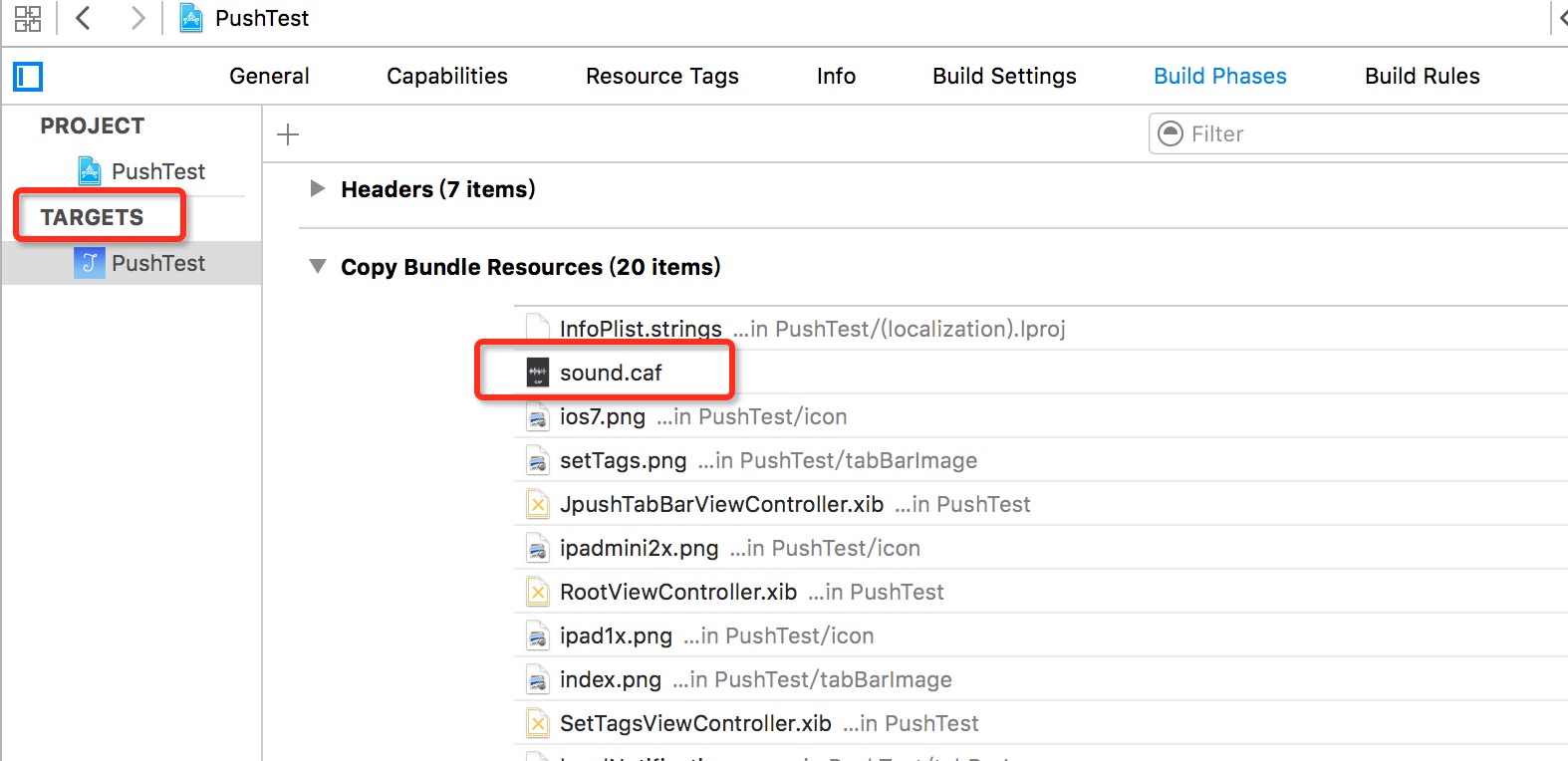
The client needs to import the sound file into the project. Steps: Select the project. Target -> Build Phrases -> Copy Bundle Resources
Server settings
Need to specify iOS under the platform sound Parameters, the specific value passed in is the sound file name + suffix.
| Keywords | type | Options | meaning | illustrate |
|---|---|---|---|---|
| sound | string or JSON Object | Optional | ring | Notification sound or warning notification. The specific instructions are as follows: |
          {
    "platform": "all",
    "audience": {
        "registration_id": [
            "1104a8979278ae64e75"
        ]
    },
    "notification": {
        "ios": {
            "alert": "hello, JPush!",
            "sound": "sound.caf",
        }
    },
    "options": {
        "apns_production": false
    }
}
Custom message implementation
If you need to dynamically broadcast a custom ringtone, you can send a custom message, and the client will handle the playback logic in the custom message callback.
Android platform:
          import cn.jpush.android.service.JPushMessageService;

public class PushMessageService extends JPushMessageService {
    private static final String TAG = "PushMessageService";
    @Override
    public void onMessage(Context context, CustomMessage customMessage) {Log.e(TAG,"[onMessage]"+customMessage);
        // 在此回调中处理播报

  }
iOS platform:
get iOS The push content needs to be in delegate Register notifications and implement callback methods in the class.
in method-(BOOL)application:(UIApplication _)application didFinishLaunchingWithOptions:(NSDictionary _) launchOptions Add the following code:
          NSNotificationCenter *defaultCenter = [NSNotificationCenter defaultCenter];
[defaultCenter addObserver:self selector:@selector(networkDidReceiveMessage:) name:kJPFNetworkDidReceiveMessageNotification object:nil];
Implement callback method networkDidReceiveMessage
          - (void)networkDidReceiveMessage:(NSNotification *)notification {
    NSDictionary * userInfo = [notification userInfo];
    NSString *content = [userInfo valueForKey:@"content"];
    NSString *messageID = [userInfo valueForKey:@"_j_msgid"];
    NSDictionary *extras = [userInfo valueForKey:@"extras"];
    NSString *customizeField1 = [extras valueForKey:@"customizeField1"]; //服务端传递的 Extras 附加字段,key 是自己定义的
}

