


How to Use Alias and Tags
Alias and Tags
Alias: can roughly be considered the nickname in a user account. Pushing by alias means pushing messages to a specific user.
Tag: similar to tagging articles in a blog, used to classify a resource. Pushing by tag means pushing messages to a group of people.
Why Use Alias and Tags
When pushing messages, you need to specify the push target: all users, one person, or a group of people.
All users means "broadcasting to everyone" for an app. Both the console and API support broadcasting messages to a specified AppKey.
Specifying one particular person or a particular group of people is relatively more complex. For JPush, a person is a Registration ID. This Registration ID has no relationship with the developer's app, or is meaningless to the developer's app.
If you want to push messages to a specific user who is meaningful to the developer's app, you need to bind the JPush registered user to the developer app user.
There are two basic approaches to this binding:
- Save the binding relationship on the JPush server.
- Save the binding relationship on the developer's app server.
The former is the alias and tag feature described here. This mechanism is simple and easy to use, and is suitable for most developers.
The latter is another Registration ID mechanism provided by JPush. This mechanism requires developers to maintain binding relationships with an app server, and is not suitable for ordinary developers. It has been supported since Android SDK 1.6.0.
Usage
The alias and tag mechanism works as follows:
- The client developer app calls the
setAliasorsetTagsAPI to set the relationship between registered users and app users. - The JPush SDK saves the relationship settings to JPush Server.
- When pushing messages on the server side, specify the alias or tag that was previously set.
Client Settings
For the Alias and Tags APIs supported by the SDK, see the corresponding documents: Alias and Tags API (Android), Tags and Alias API (iOS). Some APIs are as follows:
Set Alias
This API uses overwrite logic, not append logic. Calling this API overwrites the previously set alias.
Android API:
public static void setAlias(Context context, int sequence, String alias);
iOS API:
          + (void)setAlias:(NSString *)alias
 completion:(JPUSHAliasOperationCompletion)completion
 seq:(NSInteger)seq;
Set Tags
This API uses overwrite logic, not append logic. Calling this API overwrites all previously set tags.
Android API:
public static void setTags(Context context, int sequence,Set<String> tags);
iOS API:
          + (void)setTags:(NSSet<NSString *> *)tags
 completion:(JPUSHTagsOperationCompletion)completion
 seq:(NSInteger)seq;
Notes
- The old tag and alias setting APIs provided since version 1.5.0 are no longer maintained. Developers are advised to use the new tag and alias APIs provided since version 3.0.7, which support adding, deleting, modifying, and querying aliases and tags.
- Calling set directly after init is highly likely to fail, and callback codes such as 6022 and 6002 may be returned. During testing, you can add a delay of 7 or 8 seconds. In formal business scenarios, it is generally used together with user registration, and the delay is usually sufficient.
- If 6002 (timeout) or 6014 (service busy) is returned in the callback result, retrying is recommended. For specific error code definitions, see Error Code Definitions.
- On 2020/03/10, Jiguang limited the upper bound of "alias setting" to a maximum of 10 bound devices. If you need a higher limit, contact business support. For details, read the announcement.
- JPush Android v3.5.8 and later and JPush iOS v3.3.2 and later return error code: 6027.
- JPush Android versions earlier than v3.5.8 and JPush iOS versions earlier than v3.3.2 return error code: 6017.
- When pushing to an alias or tag through the console or API, an error may occur: error code "1011" is displayed or the message "no push target meets the conditions" is shown. This error indicates that JPush Server does not yet have a user binding relationship for the alias or tag you are pushing to, so there is no push target. In this case, developers should check and confirm whether the developer app correctly called the alias and tags APIs, and whether poor network conditions caused the JPush SDK to fail to save the settings temporarily.
Query Binding Status
Console Query
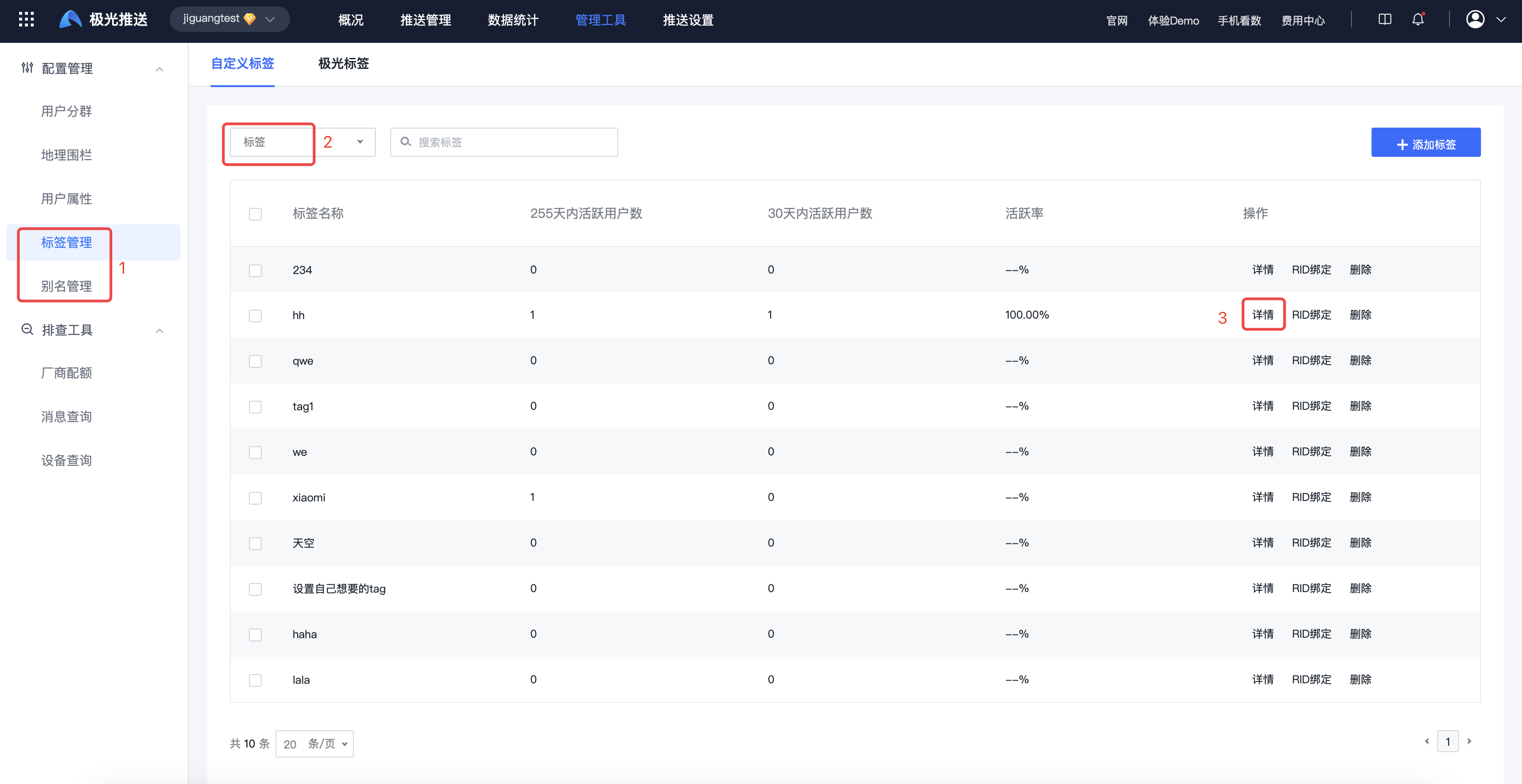
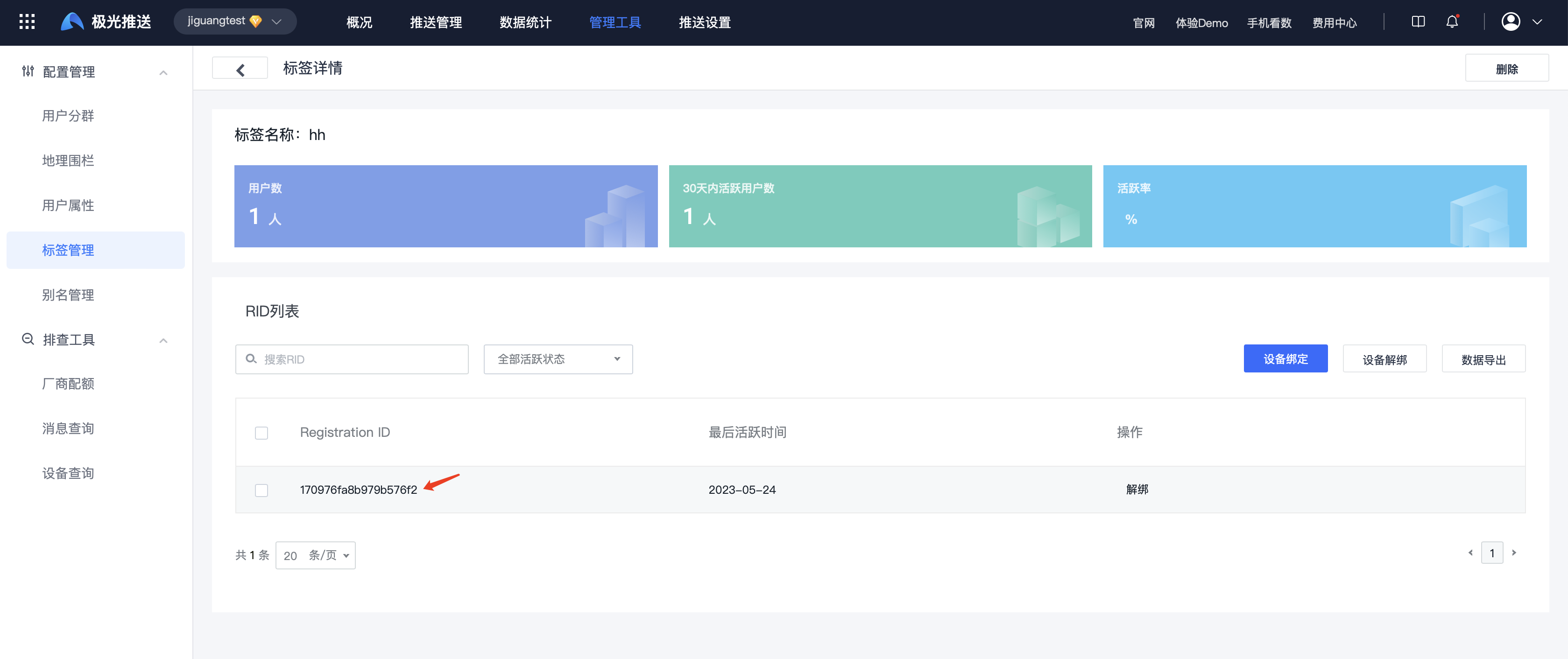
Query alias: go to [JPush] - [Alias Management], select "Alias/Registration ID", select the corresponding alias, and click "Details" to check whether the current Registration ID is bound to the alias.
Query tag: go to [JPush] - [Tag Management], select "Tag/Registration ID", select the corresponding tag, and click "Details" to check whether the current Registration ID is bound to the tag.
REST API Query
Call address: https://device.jpush.cn
This API can obtain all attributes of the current device, including tags, alias, and mobile number. For details, see Query Device Alias and Tags.
Request Header
          GET /v3/devices/{registration_id}
 Authorization: Basic (base64 auth string)
 Accept: application/json
Response Data
          {
 "tags": [
 "1122"
 ],
 "alias": "112233",
 "mobile": "13333333333"
}
Push by Alias/Tag
Console Push
Alias push: select "Device Alias (Alias)" as the target audience, add the alias, and press Enter to finish.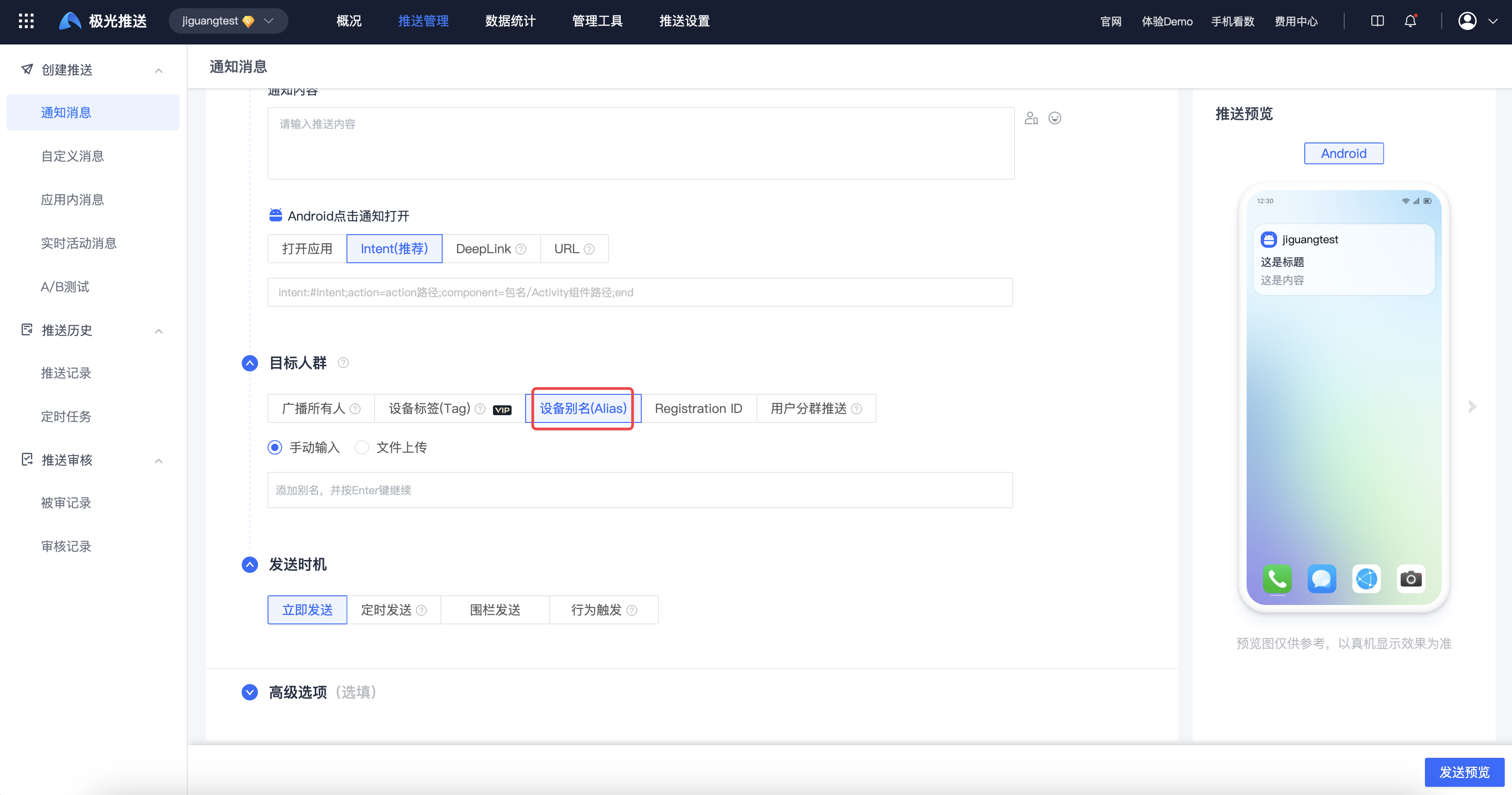
Tag push: select "Device Tag (Tag)" as the target audience, select the tag rule and add tags, then press Enter to finish.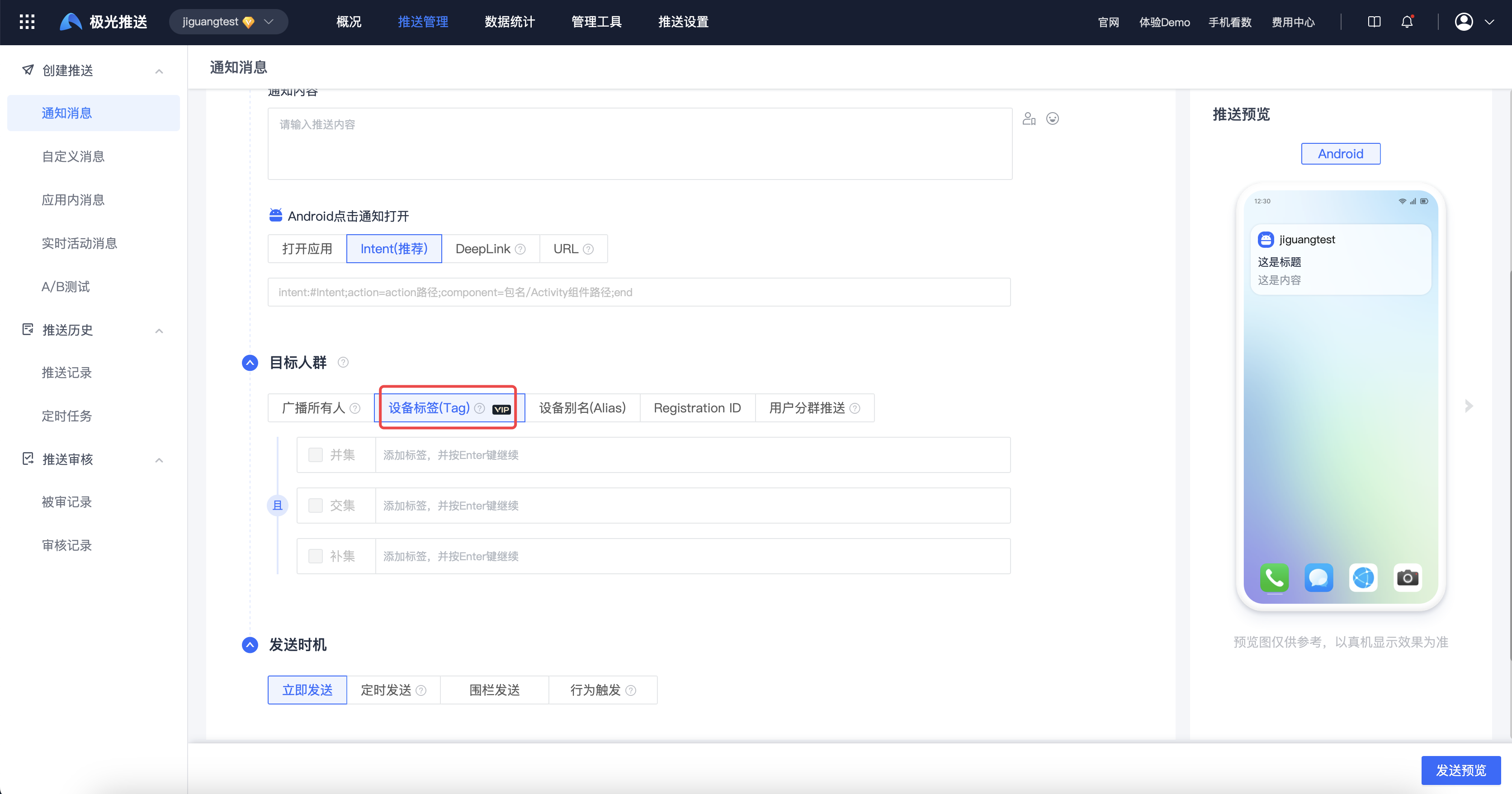
REST API Push
When using API Push, fill in tags/aliases in the audience field as the push target. Detailed parameter descriptions are as follows:
| Keyword | Type | Meaning | Description | Remarks |
|---|---|---|---|---|
| tag | JSON Array | Tag OR | Array. Multiple tags have an OR relationship, meaning the union is taken. | |
| tag_and | JSON Array | Tag AND | Array. Multiple tags have an AND relationship, meaning the intersection is taken. | |
| tag_not | JSON Array | Tag NOT | Array. For multiple tags, the union of multiple tags is taken first, then the complement of that result is taken. | |
| alias | JSON Array | Alias | Array. Multiple aliases have an OR relationship, meaning the union is taken. |
- Push to multiple tags (as long as the user is within any tag range): in Shenzhen, Guangzhou, or Beijing
          {
 "audience": {"tag": [ "深圳", "广州", "北京"]
 }
}
- Push to multiple tags (must be within multiple tag ranges at the same time): in Shenzhen and "female"
          {
 "audience": {"tag_and": [ "深圳", "女"]
 }
}
- Push to multiple aliases:
          {
 "audience": {"alias": [ "4314", "892", "4531"]
 }
}
Advanced Scenarios
Dynamic Tags
The tag setting API provided by JPush is on the client side. How can developers dynamically set groups on their own server side? For example, an enterprise OA system often needs to change department personnel groups. The general idea is as follows:
Design a custom message format (business protocol). After parsing it, the app can call the JPush SDK
setTagsAPI to reset tags (groups). Refer to the Android API, iOS API, and HarmonyOS API for the supported versions of each platform's tag APIs. Do not treat one platform's version number as a common requirement for all platforms.{ "action": "resetTags", "newTags": [ "dep_level_1_CompanyA", "dep_level_2_Engineering", "dep_level_3_AndroidDevelopment", "address_Shenzhen", "lang_en" ] }{ "action": "resetTags", "newTags": [ "dep_level_1_CompanyA", "dep_level_2_Engineering", "dep_level_3_AndroidDevelopment", "address_Shenzhen", "lang_en" ] }This code block is shown in the floating windowactionandnewTagsare application-defined business fields; the SDK does not automatically execute this instruction. After the client parses thenewTagsstring array, convert it to the tag collection required by the target platform. For example, Android usesSet<String>when callingsetTags. If the business needs to preserve key-value relationships such as department hierarchy, pass a separate JSON object and explicitly convert it to tag strings on the client. Do not place key-value pairs directly in array elements.When you need to dynamically set groups, push this custom message to specified users.
Use the alias mechanism to push to specified users.
The client app calls the JPush SDK API to set new tags.
Handling Alias and Tag Setting Exceptions
Due to unstable network connections, there is a certain probability that JPush SDK alias and tag settings will fail.
If app developers handle setting failures properly, occasional failures have limited impact on the app's normal use of JPush.
The following uses the Android SDK as an example. For more details, see the example.
Basic idea:
- When setting succeeds, write the status to SharePreference, so it does not need to be set again later.
- When 6002 timeout occurs, retry after a short delay.
          // This is code from the alias-setting Activity in the JPush Example. For a more detailed example, see JPush Example. In general apps, the setting call entry can be called from any convenient place.
private void handleAction(int sequence,TagAliasBean tagAliasBean) {
    if(tagAliasBean == null){
        Log.w(TAG,"tagAliasBean was null");
        return;
    }
    if(tagAliasBean.isAliasAction){
        switch (tagAliasBean.action){
            case ACTION_GET:
                JPushInterface.getAlias(getApplicationContext(),sequence);
                break;
            case ACTION_DELETE:
                JPushInterface.deleteAlias(getApplicationContext(),sequence);
                break;
            case ACTION_SET:
                JPushInterface.setAlias(getApplicationContext(),sequence,tagAliasBean.alias);
                break;
            default:
                Log.w(TAG,"unsupport alias action type");
                return;
        }
    }else {
    //tag operation
    }
}

