


iOS Summary of new feature updates
iOS 16 New Features
notification style
Lock screen notification view: You can choose to view notifications on the lock screen as an expanded list, stack, or number view. Gently pinch your fingers to change the layout of notifications when they appear.
Notification animation: Notifications and notification summaries will scroll from the bottom of the lock screen, making them easy to view at a glance.
The new look of notifications: Notifications use bold text and images, making the visual presentation intuitive and eye-catching.
Focus mode filter
When setting focus mode, you can add App Filter conditions for notifications. Only notifications that meet the filter conditions can be displayed. Developer use AppIntents frame let App Support focus mode filter conditions.
UNMutableNotificationContent The following attributes have been added to the class to set filter conditions for focus mode. In focus mode, notifications matching the filter criteria field will be displayed.
@property (NS_NONATOMIC_IOSONLY, readwrite, copy, nullable) NSString *filterCriteria API_AVAILABLE(macos(13.0), ios(16.0), watchos(9.0)); // default nil
Remote push notifications also support this field:

LiveActivity(real-time activity)
LiveActivityyesiOS16.1Features launched.
With the help of ActivityKit Frame, you can launch a live activity to see live updates from your apps on Smart Island and the lock screen. For example, sports apps allow users to initiate live events, where information updates can be seen at a glance during the game.
On the lock screen, your live activity is displayed at the bottom of the screen. In support Dynamic Island on the device,Live Activity will also appear in Dynamic Island middle.
In your application, use ActivityKit to configure, start, update and terminate Live Activity, and useSwiftUIandWidgetKitwidget extension to create your Live Activity user interface. This makes Live Activity The demo code is similar to the widget code and supports your widget and Live Activity code sharing between.
However, unlike widgets, which update using the timeline mechanism,Live Activity use ActivityKit Receive updated data from your application or via remote push notifications.
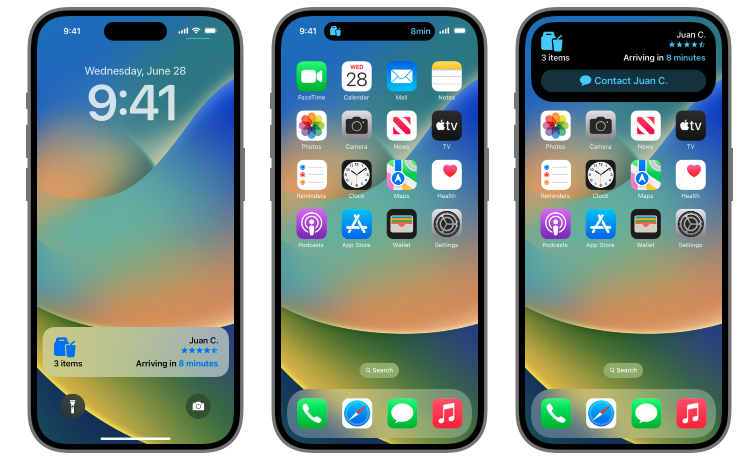
In addition, it is also important to note: Apple sends hourly LiveActivity There will be a limit on the number of push notifications. If you update frequently LiveActivity The requirement for push notifications needs to be in info.plist Add to file NSSupportsLiveActivitiesFrequentUpdates entry and set its boolean value to YES(For more information please refer to iOS LiveActivity )。
iOS 15 New Features
iOS The new features of 15 include: mainly grading notifications, that is, parameters interruptionLevel, by setting different levels for notifications to achieve different response effects.
refer toAPIFields:interruption-level
iOS 14 New Features
iOS 14’s new features mainly include APP Clip, clipboard, and privacy protection. There are no new features related to notifications.
iOS 13 New Features
iOS 13’s new features mainly include Drak Mode、Swift There are no new features related to notifications such as UI.
iOS 12 New Features
Push group
iOS Notifications of the same type in 12 will be combined into a notification group. Users can click on the notification group to expand all notifications in the group.
Notification grouping uses two grouping methods: automatic grouping (Automatic grouping) and thread identification (Thread identifier). Developers do not need to do additional operations for automatic grouping, the system will App of bundleId Group pushes. If you need to group notifications in more detail, you need to use thread identifiers.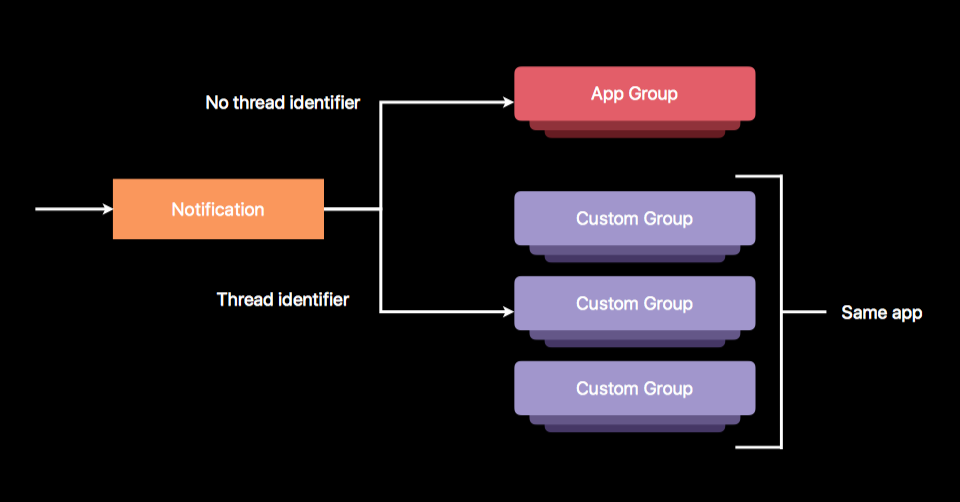
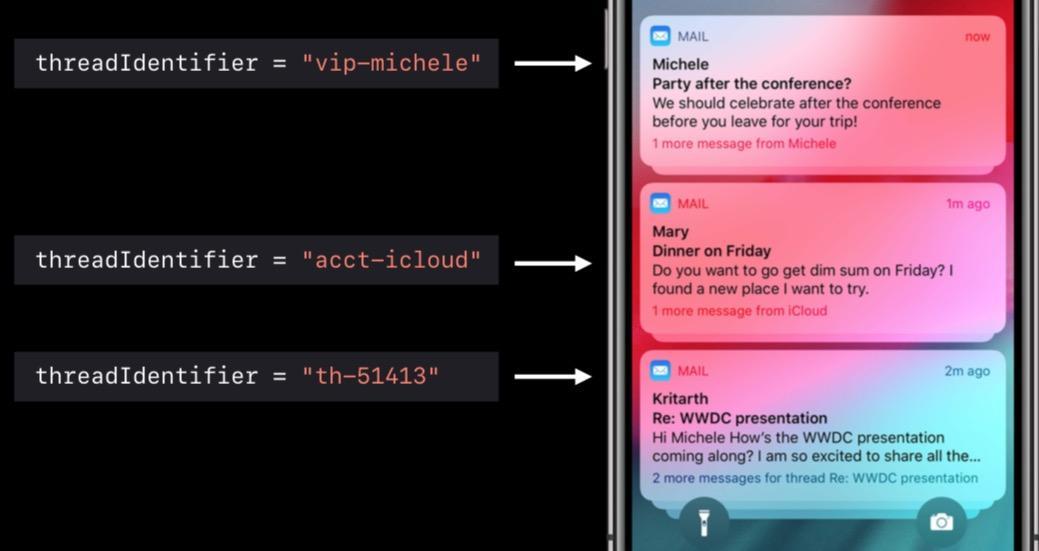 Users can set the grouping (automatic, by application, closed)
Thread ID (Thread identifier)This attribute is in iOS10 already existed, but in iOS12 Only then can the grouping function be truly realized.
          // The unique identifier for the thread or conversation related to this notification request. It will be used to visually group notifications together.
@property (NS_NONATOMIC_IOSONLY, copy) NSString *threadIdentifier __TVOS_PROHIBITED;
Summary formatting
After the notifications are automatically grouped, there will be a message summary at the bottom. The default format is: There are n notifications left. This format is customizable. Type 1: Pass UNNotificationCategory Customize the format
          + (instancetype)categoryWithIdentifier:(NSString *)identifier
                               actions:(NSArray<UNNotificationAction *> *)actions
                     intentIdentifiers:(NSArray<NSString *> *)intentIdentifiers
         hiddenPreviewsBodyPlaceholder:(nullable NSString *)hiddenPreviewsBodyPlaceholder
                 categorySummaryFormat:(nullable NSString *)categorySummaryFormat
                               options:(UNNotificationCategoryOptions)options __IOS_AVAILABLE(12.0) __WATCHOS_PROHIBITED;
Second type: pass UNNotificationContent Customize
          /// The argument to be inserted in the summary for this notification.
@property (NS_NONATOMIC_IOSONLY, readonly, copy) NSString *summaryArgument __IOS_AVAILABLE(12.0) __WATCHOS_PROHIBITED __TVOS_PROHIBITED;

/// A number that indicates how many items in the summary are represented in the summary.
/// For example if a podcast app sends one notification for 3 new episodes in a show,
/// the argument should be the name of the show and the count should be 3.
/// Default is 1 and cannot be 0.
@property (NS_NONATOMIC_IOSONLY, readonly, assign) NSUInteger summaryArgumentCount __IOS_AVAILABLE(12.0) __WATCHOS_PROHIBITED __TVOS_PROHIBITED;
Notification management
Apple has added a "Manage" button for messages, which can appear by swiping left.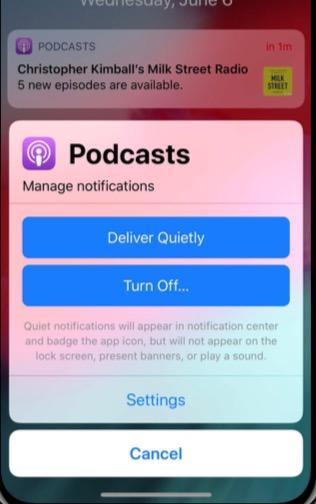
temporary authorization
The main manifestation of temporary authorization is that when a push message comes, there will be two buttons, which will actively allow users to choose.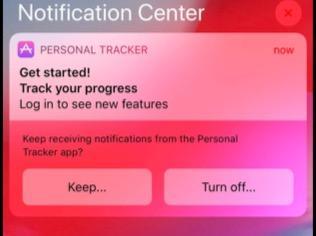
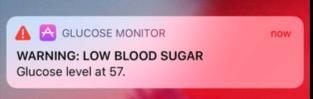
warning notification
Such as family safety, health, public safety and other factors. This message requires action from the user. The simplest scenario is that a camera is installed at home and we go to work. If there is someone at home, the camera will push a message to us. This type of notification requires application for a special certificate.
iOS 10 New Features
illustrate
iOS 10 Added a lot of new features about notifications, please refer toJiguangofficial Blog。
Please jump to:iOS 10 new features
iOS 10 Service Extension
illustrate
iOS 10 added Service Extension
The official illustration is as follows: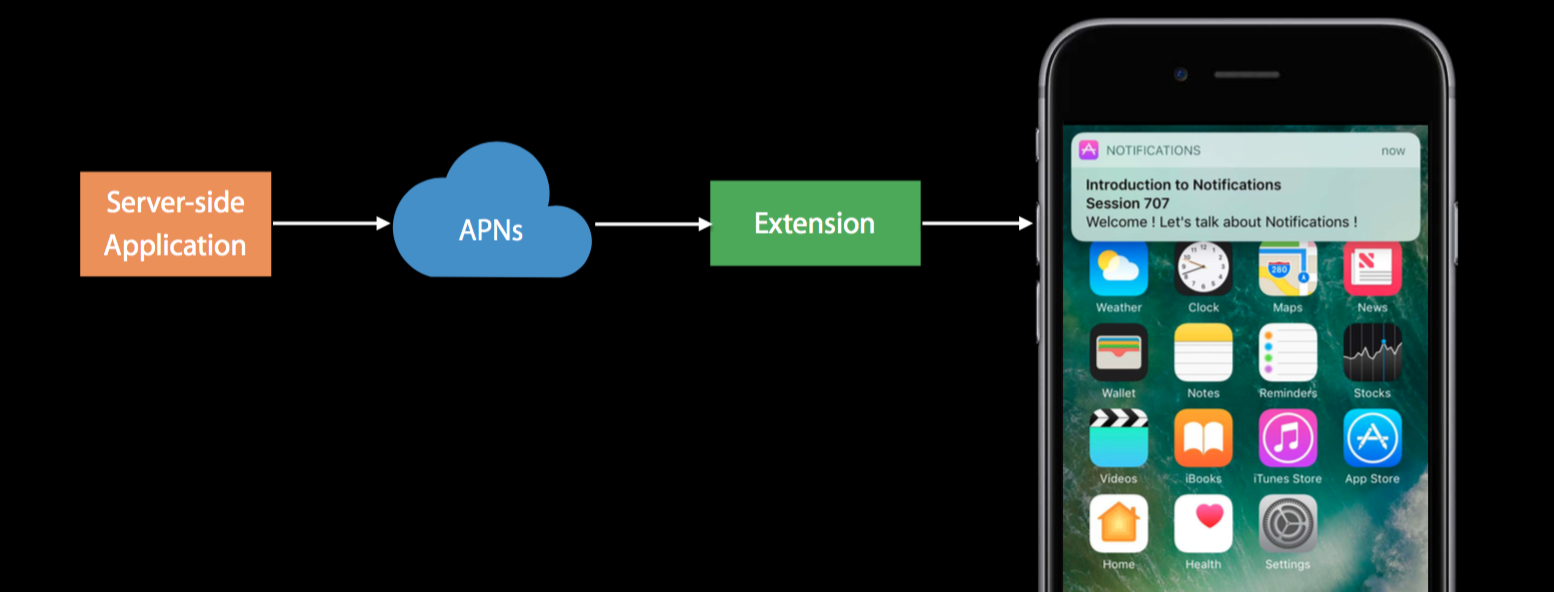
This means in APNs Before reaching our device, it will also go through a layer that allows users to set it up independently. Extension service is processed for APNs Increased variety.
How to use
Service Extension It's easy to get started, first we need to create a Service Extension Service, as shown below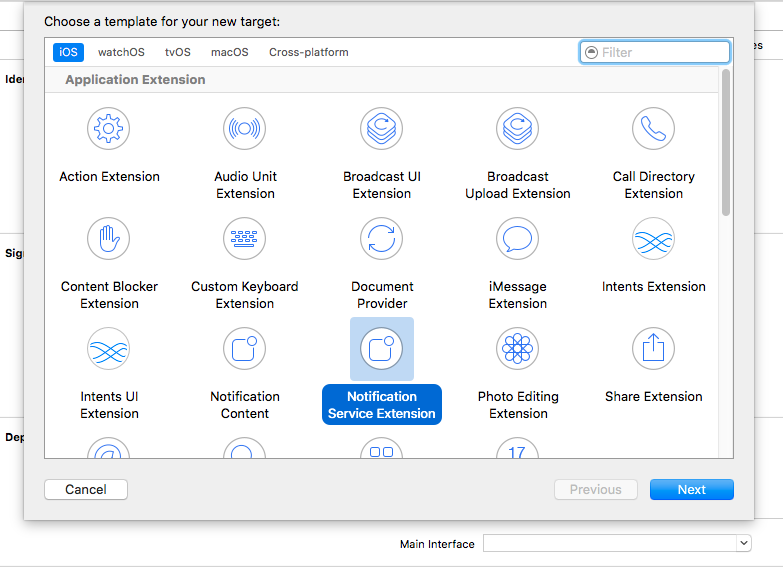
Then there are a few points that need to be noted here
- Service Extension of Bundle Identifier Can't be reconciled Main Target(i.e. your own App Target)of Bundle Identifier The same, otherwise it will be reported BundeID Repeated errors.
- Service Extension of Bundle Identifier need to be in Main Target under the namespace, for example Main Target of BundleID for io.jpush.xxx,So Service Extension of BundleID should be similar to io.jpush.xxx.yyy Such format. If you don't do this, you may encounter an error.
So now your Service Extension The service has been created successfully and you have successfully used it. Service Extension, but it seems that we haven't done anything with it yet. Looking at your project, you got a class that contains two methods.
- didReceiveNotificationRequest:(UNNotificationRequest *)request withContentHandler:(void (^)(UNNotificationContent *contentToDeliver))contentHandler
- serviceExtensionTimeWillExpire
Let’s take a look at the official explanation of the first method:Call contentHandler with the modified notification content to deliver. If the handler is not called before the service's time expires then the unmodified notification will be delivered。 Just explain it briefly,APNs This method will be called when it arrives. At this time, you can process the pushed content and then use contentHandler Complete this processing. But if it takes too long,APNs will be displayed as is. In other words, we can handle our notifications in this method and display them to the user in a personalized way. The second method is a remedy for the first method. The second method will call back before expiration. At this time, you can APNs The message is handled urgently.
iOS 9 Integration
iOS 9 Impact of changes SDK part:
- added bitCode encoding format, when SDK Not supported bitCode, it cannot be turned on during user integration bitCode options.
- Phenomenon: User integration SDK Afterwards, it failed to compile, and the error log contained bitCode related error messages
- Used by default https connection, if the request is http, requires manual configuration plist to support http Service, currently all our server requests go http Serve.
- Phenomenon: User integration SDK after all JPush relevant http The service prompts a connection error or connection timeout, which may be the problem.
bitCode Solution
- JPush iOS SDK v1.8.7 and above versions SDK, has been added to iOS 9 new features bitCode support.JMessage iOS SDK v2.0.0 Supported by and above versions bitCode。
Https Solution
JPush 2.1.9 Versions of and above do not need to configure this step.
- Requires the user to take the initiative in the current project Info.plist Add in NSAppTransportSecurity type Dictionary。
- exist NSAppTransportSecurity Add under NSAllowsArbitraryLoads type Boolean, the value is set to YES
iOS 9 UIUserNotificationActionBehaviorTextInput
Supported version
v1.8.0 version start
- This time iOS 9 The biggest change in push is the modification of push Category type, in the original push categories On the basis of, an additional text Action Type, the purpose of this parameter is to register matters entered through notification shortcut text.
- this categories by a series of UIUserNotificationCategory composition. each UIUserNotificationCategory Object allows adding a group UIMutableUserNotificationAction Type parameters to add items on the notification bar. now iOS9 in the original UIMutableUserNotificationAction Type added Text input type (UIUserNotificationActionBehaviorTextInput), pass behavior to set (only iOS9 attributes only possessed).
- callback method iOS9 Two new callback methods are used to handle button click events:
          - (void)application:(UIApplication *)application handleActionWithIdentifier:(nullableNSString *)identifier forLocalNotification:(UILocalNotification *)notification withResponseInfo:(NSDictionary *)responseInfo completionHandler:(void(^)())completionHandler NS_AVAILABLE_IOS(9_0)

- (void)application:(UIApplication *)application handleActionWithIdentifier:(nullableNSString *)identifier forRemoteNotification:(NSDictionary *)userInfo withResponseInfo:(NSDictionary *)responseInfo completionHandler:(void(^)())completionHandler NS_AVAILABLE_IOS(9_0)
illustrate:
when Action for UIUserNotificationActionBehaviorTextInput when, it is necessary to pass responseInfo of UIUserNotificationActionResponseTypedTextKey To get the input text content,UIUserNotificationTextInputActionButtonTitleKey Get the clicked button type.
when Action for UIUserNotificationActionBehaviorDefault hour,responseInfo for nil, pass identifier To distinguish what is clicked on the button for processing.
Client settings
Set notifications with quick reply content
          # ifdef __IPHONE_9_0
 UIMutableUserNotificationAction *replyAction = [[UIMutableUserNotificationAction alloc]init];
 replyAction.title = @"Reply";
 replyAction.identifier = @"comment-reply";
 replyAction.activationMode = UIUserNotificationActivationModeBackground;
 replyAction.behavior = UIUserNotificationActionBehaviorTextInput;

 UIMutableUserNotificationCategory *category = [[UIMutableUserNotificationCategory alloc]init];
 category.identifier = @"reply";
 [category setActions:@[replyAction] forContext:UIUserNotificationActionContextDefault];
# endif
Use callback function
          - (void)application:(UIApplication *)application handleActionWithIdentifier:(nullable NSString *)identifier forRemoteNotification:(NSDictionary *)userInfo withResponseInfo:(NSDictionary *)responseInfo completionHandler:(void(^)())completionHandler NS_AVAILABLE_IOS(9_0) {if ([identifier isEqualToString:@"comment-reply"]) {NSString *response = responseInfo[UIUserNotificationActionResponseTypedTextKey];
 // 对输入的文字作处理
 }
 completionHandler();}
Server settings
Server payload Format:aps Increase category field, when the field is related to the client UIMutableUserNotificationCategory of identifier When matching, trigger the set action and button show.
          payload example:
{"aps":{"alert":"example", "sound":"default", "badge": 1, "category":"reply"}}
iOS 8 UILocalNotification
This time iOS 8 UILocalNotification Three parameters were added: region、regionTriggersOnce、category。
- region: Used to control when a user enters or leaves a certain geographical location, triggering notifications. To use this feature, users need to have CoreLocation of "when-in-use"Permissions.
- regionTriggersOnce(BOOL): as YES When, the notification will only be triggered once. When it is NO, the notification will be triggered every time you enter or leave.
- category: if localNotification via +[UIUserNotificationSettings settingsForUserNotificationTypes:userNotificationActionSettings:] registered, through the category Registration for this notification is available category.
Client settings
use UILocalNotification
          // set localNotification
  CLLocationCoordinate2D coordinate2D;
  coordinate2D.latitude = 100.0;
  coordinate2D.longitude = 100.0;
  CLRegion *currentRegion =
      [[CLCircularRegion alloc] initWithCenter:coordinate2D
                                        radius:CLLocationDistanceMax
                                    identifier:@"test"];

  [APService setLocalNotification:[NSDate dateWithTimeIntervalSinceNow:120]
                        alertBody:@"test ios8 notification"
                            badge:0
                      alertAction:@"取消"
                    identifierKey:@"1"
                         userInfo:nil
                        soundName:nil
                           region:currentRegion
               regionTriggersOnce:YES
                         category:@"test"];
iOS 8 UIUserNotificationSettings
Supported version
v1.8.0 version starts.
- This time iOS 8 The biggest change in push is the modification of the push registration interface. type On the basis of, an additional categories Parameter, the purpose of this parameter is to register a group associated with notifications button events.
- this categories by a series of UIUserNotificationCategory composition. each UIUserNotificationCategory object contains your app Messages used to respond to local or remote notifications. for each object title As a notification on every button of title displayed to the user. When the user clicks on a button, the system will call the callback function in the application application:handleActionWithIdentifier:forRemoteNotification:completionHandler: 。
Client settings
use UIUserNotificationCategory
          if ([[UIDevice currentDevice].systemVersion floatValue] >= 8.0) {NSMutableSet *categories = [NSMutableSet set];

 UIMutableUserNotificationCategory *category = [[UIMutableUserNotificationCategory alloc] init];

 category.identifier = @"identifier";

 UIMutableUserNotificationAction *action = [[UIMutableUserNotificationAction alloc] init];

 action.identifier = @"test2";

 action.title = @"test";

 action.activationMode = UIUserNotificationActivationModeBackground;

 action.authenticationRequired = YES;

 //YES 显示为红色,NO 显示为蓝色
 action.destructive = NO;

 NSArray *actions = @[action];

 [category setActions:actions forContext:UIUserNotificationActionContextMinimal];

 [categories addObject:category];
}
use UIUserNotificationType
          if ([[UIDevice currentDevice].systemVersion floatValue] >= 8.0) {[APService registerForRemoteNotificationTypes:(UIUserNotificationTypeBadge | UIUserNotificationTypeSound | UIUserNotificationTypeAlert)                      categories:categories];
}else{[APService registerForRemoteNotificationTypes:(UIUserNotificationTypeBadge | UIUserNotificationTypeSound | UIUserNotificationTypeAlert)                      categories:nil];
}
Use callback function
          // Called when your app has been activated by the user selecting an action from
// a remote notification.
// A nil action identifier indicates the default action.
// You should call the completion handler as soon as you've finished handling
// the action.
- (void)application:(UIApplication *)application handleActionWithIdentifier:(NSString *)identifier forRemoteNotification:(NSDictionary *)userInfo
  completionHandler:(void (^)())completionHandler {}
Server settings
Server payload Format:aps Increase category field, when the field is related to the client UIMutableUserNotificationCategory of identifier When matching, trigger the set action and button show.
          payload example:
{"aps":{"alert":"example", "sound":"default", "badge": 1, "category":"identifier"}}
iOS 7 Background Remote Notification
This time iOS 7 The biggest change in push is to allow the application to receive notifications in the background (background) state, which can be used to obtain content updates from the server. Function usage scenarios: (multimedia) chat,Email Updates, notification-based subscription content synchronization and other features enhance the end-user experience.
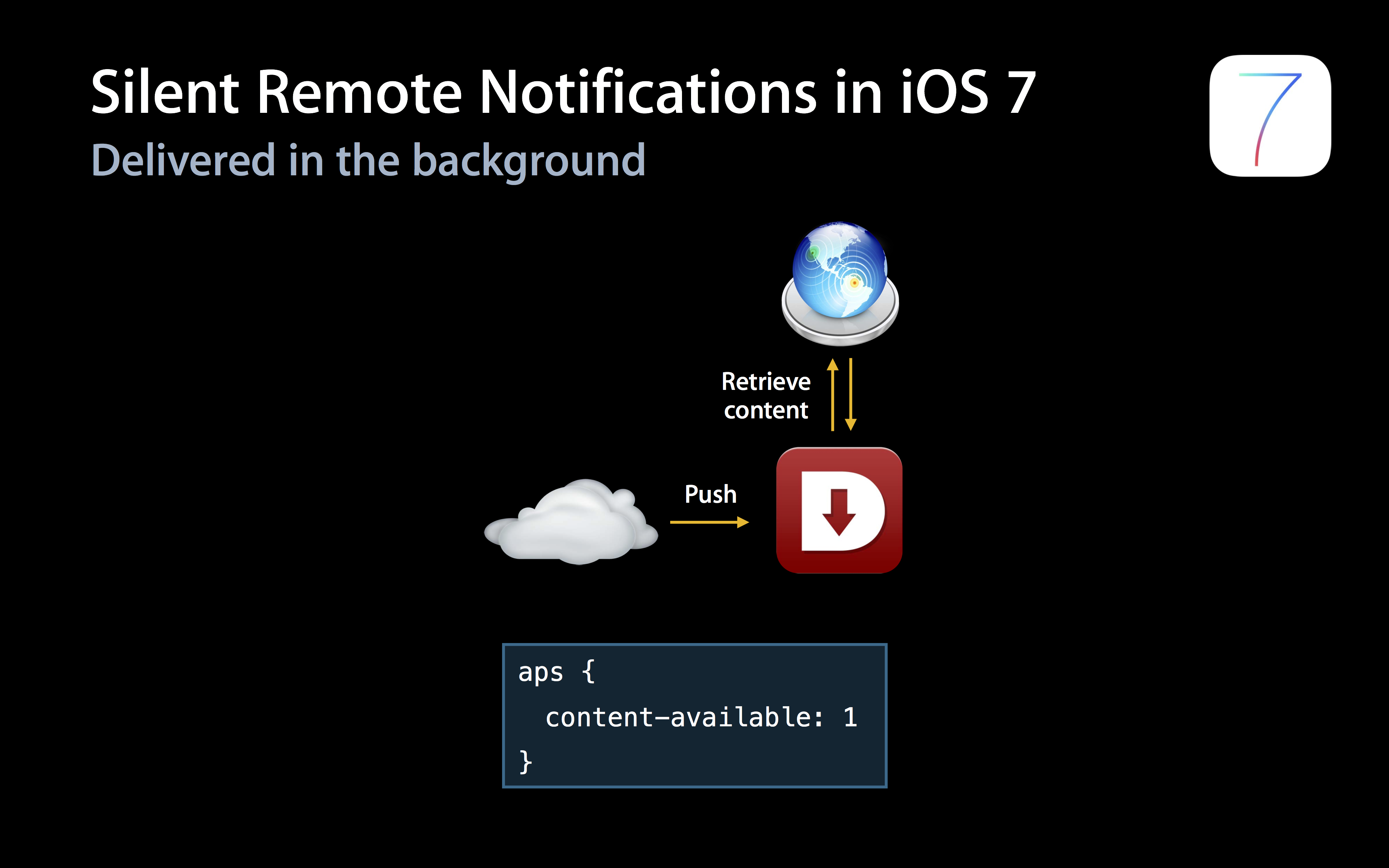
Remote Notifications For comparison with previous versions, please refer to the following two pages: Apple The official pictures can be seen at a glance.

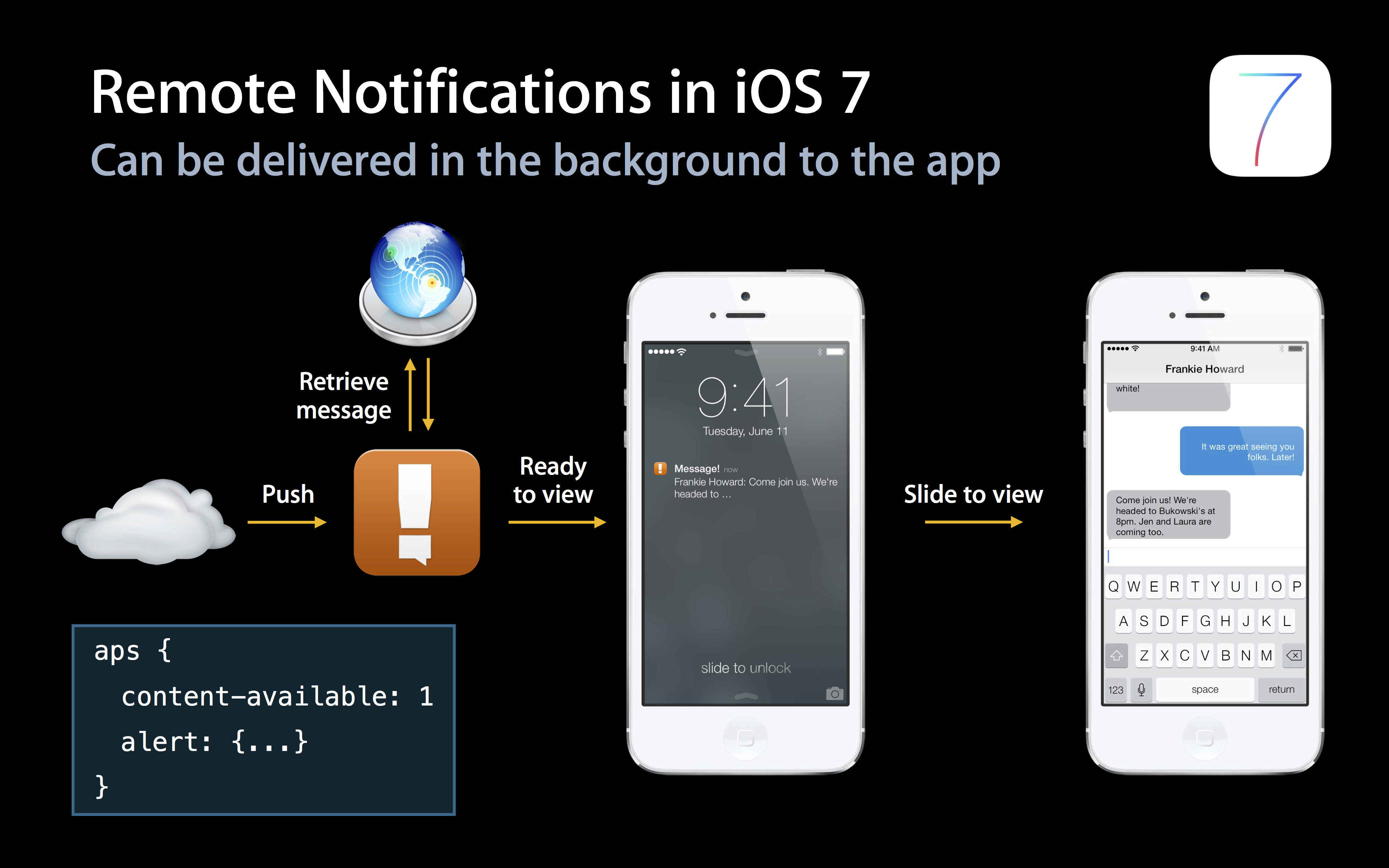
If you only carry content-available: 1 Do not carry any badge,sound and message content and other parameters, you can perform content updates and other operations without disturbing the user, that is, "Silent Remote Notifications”。
Client settings
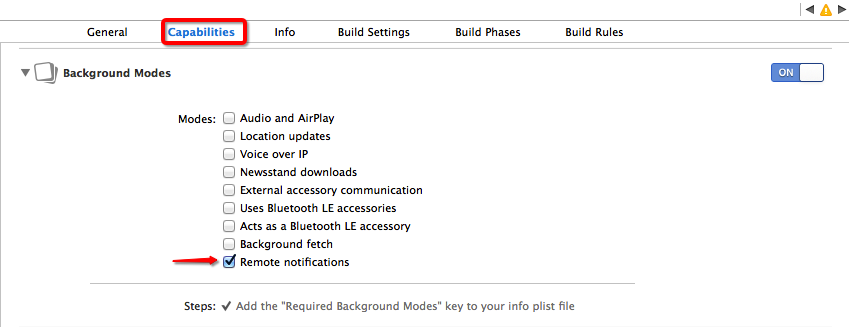
turn on Remote notifications
need to be in Xcode modified in application Capabilities turn on Remote notifications, please refer to the figure below:
Modify notification handler function
When registered Backgroud Modes -> Remote notifications back,notification The processing function is always switched to the following function, and the background push code is also called in this function.
- (void)application:(UIApplication *)application didReceiveRemoteNotification:(NSDictionary *)userInfo fetchCompletionHandler:(void (^)(UIBackgroundFetchResult))completionHandler;
Server push settings
Push message carrying content-available: 1 is Background Required parameters for operation. If this field is not carried, it will be the same as iOS7 The same as the normal push of the previous version.
use Web Portal Push
Select the corresponding parameters in "Optional Settings".
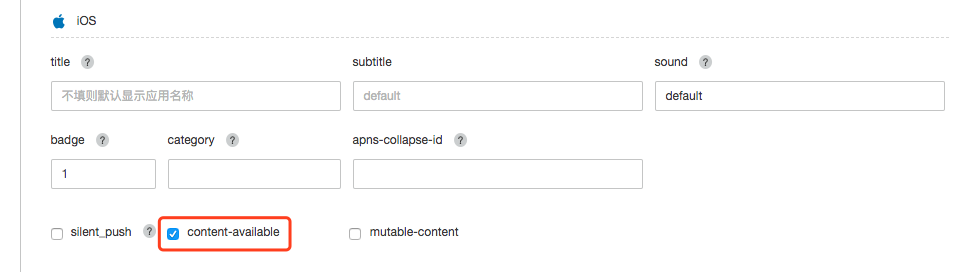
use API Push
Just in Push API v3 of ios internal append content-available":true field
Restrictions and Notes
- “Silent Remote Notifications"It's Apple There is a certain frequency control under the limit, but the specific frequency is unknown. So not all “Silent Remote Notifications” can reach the client trigger function as expected.
- “Background"The running time window provided to the application is limited. If you need to download a larger file, please refer to Apple of NSURLSession introduction.
- “Background Remote Notification” The premise is that the client is required to be in Background or Suspended status if the user passes App Switcher Remove the app from the background Kill Dropping the application will not wake up the application processing background code.
For more detailed information, please refer to Apple official iOS Development documentation.

