Vendor VoIP Integration Guide
This guide explains how to integrate the Jiguang Vendor VoIP Service Kit and implement outgoing calls, incoming calls, and call-state synchronization. Before integration, verify that the device, vendor push services, and VoIP entitlements meet all requirements.
Prerequisites
1. Device and system versions
| Brand | System version requirement |
|---|---|
| vivo | OriginOS 6.0 or later |
| Xiaomi | HyperOS 3.1 or later |
| OPPO | ColorOS 16.0 or later |
| Honor | MagicOS 10.0 or later |
Note: Currently, only mobile phones sold in Mainland China are supported. Tablets and other device types are not supported.
2. Vendor system push services
VoIP messages depend on vendor system push channels for delivery. First enable and integrate the Xiaomi, Honor, vivo, and OPPO system push services. For details, see the Vendor Channel Parameter Application Guide and Vendor Channel SDK Integration Guide.
3. Vendor VoIP entitlements
VoIP entitlements are controlled by each vendor and must be requested by the app developer. An app without approval cannot launch the system incoming call UI even when the system version meets the requirement. See the following vendor documentation:
- Xiaomi: Xiaomi HyperOS VoIP documentation
- OPPO: The VoIP audio/video call category is not currently open for application. For special requirements, contact OPPO online support. See the OPPO documentation.
- vivo: vivo VoIP documentation
- Honor: See the Honor VoIP FAQ.
Configure the New or Legacy Honor VoIP API
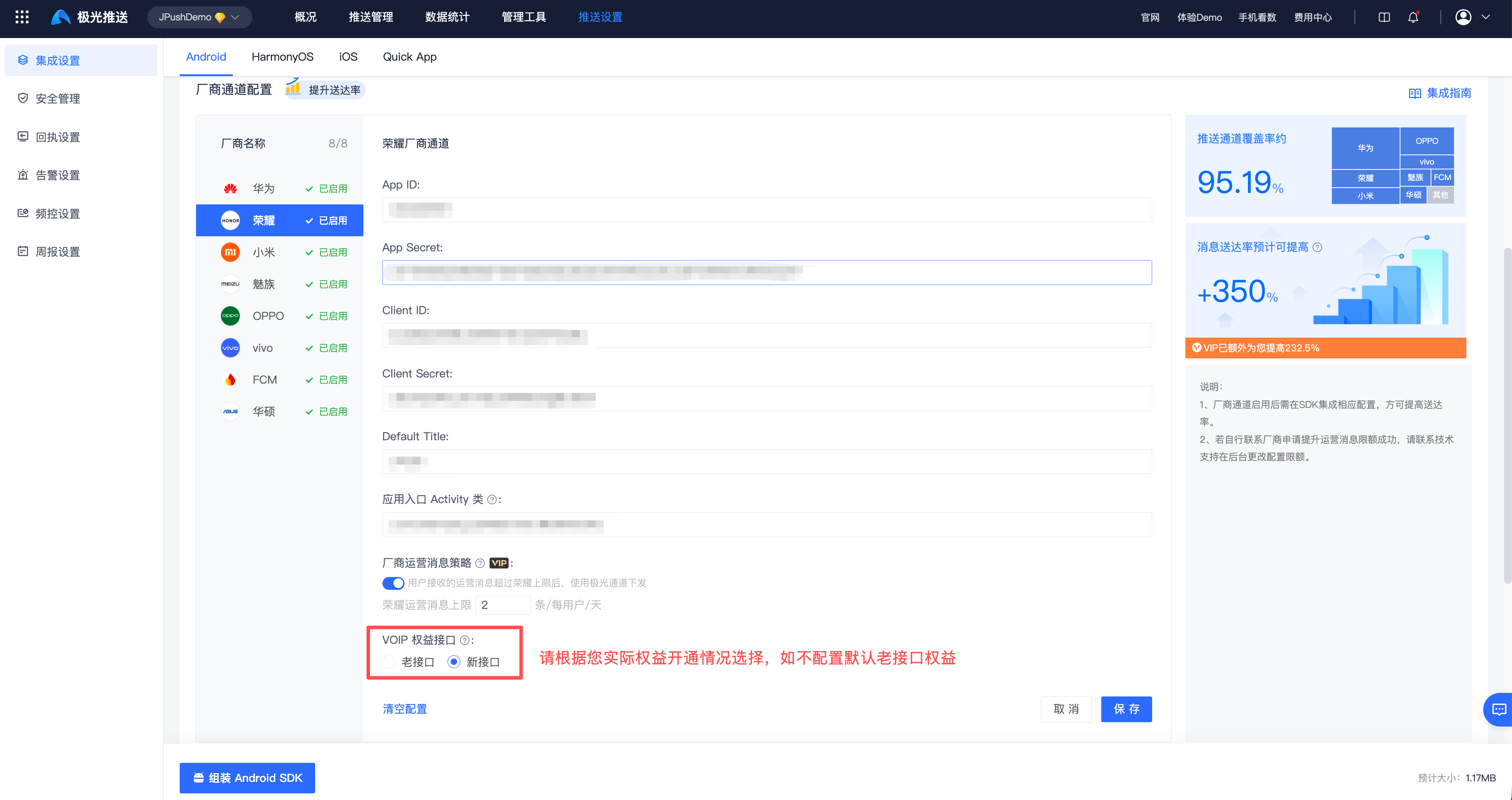
Honor may enable either the new or legacy API for an app. Identify the entitlement from the request URL provided by Honor, then select the matching VoIP API Entitlement under Message Push > Push Settings > Integration Settings > Android in the JPush console. If this setting is not configured, the legacy API is used by default.
| Entitlement | Honor request URL | Push API parameters |
|---|---|---|
| New API | https://push-api.cloud.honor.com/api/v1/projects/{appId}/sendMessage | options.classification=1, honor_push_type=3, and voip_extraData |
| Legacy API | https://push-api.cloud.hihonor.com/api/v1/{appId}/sendMessage | category=VOIP; use category=PLAY_VOICE for voice announcements |
Important: The console selection must match the API actually enabled by Honor. Do not mix new-API and legacy-API fields.
PLAY_VOICErequires the corresponding special permission from Honor. For complete request examples, see Honor VoIP API Selection.
Important: If any of the 3 conditions above are not met,
on()returnsERROR_FEATURE_UNSUPPORTED, and the module does not display the system incoming call UI. The app must implement subsequent call handling and a fallback UI.
Integrate dependencies
Add the following dependency to your project's build.gradle:
implementation 'cn.jiguang.sdk.plugin:voip-service-kit:6.2.1'
This dependency is sufficient. No additional repository configuration or adaptation is required.
Note: The VoIP Service Kit SDK is downloaded automatically with the Jiguang
voip-service-kitdependency. For offline integration or version verification, download the VoIP Service Kit SDK.
If you need to use a specified version of the VoIP Service Kit SDK, use the following configuration so the matching SDK is no longer pulled automatically:
          implementation ('cn.jiguang.sdk.plugin:voip-service-kit:6.2.1') {
    // Do not automatically pull the matching VoIP Service Kit SDK.
    exclude group: 'cn.jiguang.sdk.plugin', module: 'voip_service_kit_th'
}
// Use a specified VoIP Service Kit SDK version.
implementation files('libs/callService-1.0.0.2.aar')
After excluding the dependency, you must provide the VoIP Service Kit SDK yourself. Otherwise, the app will crash at runtime because classes are missing.
Usage guide
Outgoing calls
API description
| API | Description |
|---|---|
on(Application context) |
Checks whether the current device supports the system incoming call UI. |
register(JCallUiListener listener) |
Registers VoIP call callback events. |
off() |
Unregisters VoIP call callback events. |
reportOutgoingCall(JCallUiInfo call) |
Reports an outgoing call message. |
reportCallAudioRouteEvent(String callId, int currentRoute, int supportRoute) |
Reports audio events during a call. |
updateCallState(String callId, int callState) |
Reports in-app call state changes. |
updateCallType(String callId, int callType) |
Reports in-app call type changes. |
reportCallError(String callId, int errorCode, String errorMessage) |
Reports call failure. |
For detailed API descriptions, see VoIP Call API.
Development steps
Step 1: Register VoIP call callback events
          // Check whether the device is supported.
int workable = JCallUiManager.getInstance().on(application);

// Register callbacks.
JCallUiListener mCallUiListener = new JCallUiListener() {
    @Override
    public void answerCall(String callId) {
        Log.i(TAG, "answerCall callId " + callId);
    }

    @Override
    public void answerCallWithType(String callId, int callType) {
        Log.i(TAG, "answerCallWithType callId " + callId + ", type " + callType);
    }

    @Override
    public void rejectCall(String callId) {
        Log.i(TAG, "rejectCall callId " + callId);
    }

    @Override
    public void changeCallType(String callId, int callType) {
        Log.i(TAG, "changeCallType callId " + callId + ", type " + callType);
    }

    @Override
    public void disconnectCall(String callId) {
        Log.i(TAG, "disconnectCall callId " + callId);
    }

    @Override
    public void mute(String callId, boolean mute) {
        Log.i(TAG, "mute callId " + callId + ", mute " + mute);
    }

    @Override
    public void changeAudioRoute(String callId, int route) {
        Log.i(TAG, "changeAudioRoute callId " + callId + ", route " + route);
    }

    @Override
    public void onCallKitEvent(int event, Bundle extras) {
        Log.i(TAG, "onCallKitEvent: " + event + " , extras " + extras);
    }
};

if (workable == JCallUiConstants.ERROR_NONE) {
    JCallUiManager.getInstance().register(mCallUiListener);
}
Return values:
ERROR_NONE: supported.ERROR_FEATURE_UNSUPPORTED: not supported.
Step 2: Report an outgoing call event
After the app establishes an internal call connection, report the outgoing call with call information. For fields, see JCallUiInfo in the API document.
          JCallUiInfo call = new JCallUiInfo();
call.setCallId("123456789");
call.setUserName("Mark");
call.setPackageName(getPackageName());
call.setActivityName(this.getClass().getName());
call.setVoipCallType(JCallUiConstants.VOIP_CALL_TYPE_VOICE);
call.setVoipCallState(JCallUiConstants.VOIP_CALL_STATE_DIALING);
call.setDirection(JCallUiConstants.DIRECTION_OUTGOING);

// Report the outgoing call event.
JCallUiManager.getInstance().reportOutgoingCall(call);
Step 3: Report call state
After the peer answers, report the call state:
JCallUiManager.getInstance().updateCallState(callId, JCallUiConstants.VOIP_CALL_STATE_ACTIVE);
Step 4: Report audio events during the call
During a call, users can choose different audio routes as needed, including earpiece, speaker, Bluetooth device, and wired headset. When the audio route is switched, the app receives the changeAudioRoute callback. After completing the switch, the app must call the API to report the current audio route.
          String callId = "123456789";
int currentRoute = JCallUiConstants.ROUTE_SPEAKER;
int supportRoute = JCallUiConstants.ROUTE_EARPIECE | JCallUiConstants.ROUTE_BLUETOOTH | JCallUiConstants.ROUTE_SPEAKER;

JCallUiManager.getInstance().reportCallAudioRouteEvent(callId, currentRoute, supportRoute);
Step 5: Report in-app call type changes
Call types include video calls and voice calls. For scenarios such as answering a video incoming call as voice, downgrading video to voice during a call, or upgrading voice to video, the app must call the API to report the call type change.
          String callId = "123456789";
JCallUiManager.getInstance().updateCallType(callId, JCallUiConstants.VOIP_CALL_TYPE_VOICE);
Step 6: Report call end
When the user taps the hang-up button on the notification, the app receives the disconnectCall callback. After handling the hang-up in the app, immediately call the API to report the call-ended state.
Important: To ensure system status synchronization and resource release, always call this API to report the ended state after a call ends.
JCallUiManager.getInstance().updateCallState(callId, JCallUiConstants.VOIP_CALL_STATE_DISCONNECTED);
Step 7: Unregister
Unsubscribe after the call ends:
JCallUiManager.getInstance().off();
Note: After unsubscribing, callbacks must be registered again before the next use.
Step 8: Report call errors
When an exception occurs during a call, the app must report the failure reason through the API:
JCallUiManager.getInstance().reportCallError(callId, errorCode, errorMessage);
Incoming calls
API description
| API | Description |
|---|---|
on(Application context) |
Checks whether the current device supports the system incoming call UI. |
register(JCallUiListener listener) |
Registers VoIP call callback events. |
off() |
Unregisters VoIP call callback events. |
reportIncomingCall(JCallUiInfo call) |
Reports an incoming call message. |
reportCallAudioRouteEvent(String callId, int currentRoute, int supportRoute) |
Reports audio events during a call. |
updateCallState(String callId, int callState) |
Reports in-app call state changes. |
updateCallType(String callId, int callType) |
Reports in-app call type changes. |
reportCallError(String callId, int errorCode, String errorMessage) |
Reports call failure. |
Development steps
Step 1: Detect a VoIP incoming call
Detect VoIP incoming calls through JPushMessageReceiver#onVoipMessage:
          public class MyReceiver extends JPushMessageReceiver {
    @Override
    public void onVoipMessage(Context context, VoipDataMessage message) {
        // message.getVoipSupportStatus() indicates the device's VoIP capability for this delivery:
        //   VOIP_STATUS_SUPPORTED   = 2  Supported
        //   VOIP_STATUS_UNSUPPORTED = 1  Unsupported
        //   VOIP_STATUS_UNKNOWN     = 0  Unknown
        // message.getExtraData() is the business-defined JSON payload.
    }
}
Important: For devices that do not support the system incoming call UI, the integrator must decide how to display incoming calls.
Step 2: Register VoIP call callback events
          int workable = JCallUiManager.getInstance().on(application);

JCallUiListener mCallUiListener = new JCallUiListener() {
    @Override
    public void answerCall(String callId) {
        Log.i(TAG, "answerCall callId " + callId);
    }

    @Override
    public void answerCallWithType(String callId, int callType) {
        Log.i(TAG, "answerCallWithType callId " + callId + ", type " + callType);
    }

    @Override
    public void rejectCall(String callId) {
        Log.i(TAG, "rejectCall callId " + callId);
    }

    @Override
    public void changeCallType(String callId, int callType) {
        Log.i(TAG, "changeCallType callId " + callId + ", type " + callType);
    }

    @Override
    public void disconnectCall(String callId) {
        Log.i(TAG, "disconnectCall callId " + callId);
    }

    @Override
    public void mute(String callId, boolean mute) {
        Log.i(TAG, "mute callId " + callId + ", mute " + mute);
    }

    @Override
    public void changeAudioRoute(String callId, int route) {
        Log.i(TAG, "changeAudioRoute callId " + callId + ", route " + route);
    }

    @Override
    public void onCallKitEvent(int event, Bundle extras) {
        Log.i(TAG, "onCallKitEvent: " + event + " , extras " + extras);
    }
};

if (workable == JCallUiConstants.ERROR_NONE) {
    JCallUiManager.getInstance().register(mCallUiListener);
}
Step 3: Report an incoming call event
After the app completes internal call connection setup, report the incoming call with call information. For fields, see JCallUiInfo in the API document:
          JCallUiInfo call = new JCallUiInfo();
call.setCallId("123456789");
call.setMsgId("msg78680bjbp680");
call.setUserName("Mark");
call.setPackageName(getPackageName());
call.setActivityName(this.getClass().getName());
call.setVoipCallType(JCallUiConstants.VOIP_CALL_TYPE_VOICE);
call.setVoipCallState(JCallUiConstants.VOIP_CALL_STATE_RINGING);
call.setDirection(JCallUiConstants.DIRECTION_INCOMING);

// Report the incoming call event.
JCallUiManager.getInstance().reportIncomingCall(call);
If the app is in the background, the system displays an incoming call banner notification.
Step 4: Report call state
Answer:
JCallUiManager.getInstance().updateCallState(callId, JCallUiConstants.VOIP_CALL_STATE_ACTIVE);
Recommendation: Network conditions can introduce a delay of about one second between the user tapping Answer and the call actually connecting. During this delay, the notification remains in the incoming-call state and may appear unresponsive. Report
VOIP_CALL_STATE_ANSWEREDonce while answering so the system UI can provide immediate feedback.
Reject:
After rejection succeeds, report VOIP_CALL_STATE_DISCONNECTED; the system cancels the call banner notification.
Step 5: Report audio events during the call
During a call, users can choose different audio routes as needed. When the audio route is switched, after completing the switch, the app must call the API to report the current audio route.
The implementation is the same as the outgoing call scenario. See Outgoing calls: Step 4.
Step 6: Report in-app call type changes
For scenarios such as answering a video incoming call as voice, downgrading video to voice during a call, or upgrading voice to video, the app must call the API to report the call type change.
The implementation is the same as the outgoing call scenario. See Outgoing calls: Step 5.
Step 7: Report call end
When the user taps the hang-up button on the notification, the app receives the hang-up callback. After handling the hang-up in the app, immediately call the API to report the call-ended state.
Important: To ensure system status synchronization and resource release, always report the ended state after a call ends. See Outgoing calls: Step 6.
Step 8: Unregister
Unsubscribe after the call ends.
See Outgoing calls: Step 7 for the implementation.
Step 9: Report call errors
When an exception occurs during a call, the app must report the failure reason through the API.
See Outgoing calls: Step 8 for the implementation.
App-side responsibilities
Pay attention to the following items during integration:
| Item | Description |
|---|---|
Report VOIP_CALL_STATE_DISCONNECTED when the call ends |
Missing this report causes the system incoming call UI to remain and resources not to be released. This is the most common production issue for this type of integration. |
| Ringing timeout handling | When no one answers, have the app report VOIP_CALL_STATE_DISCONNECTED on a timer. |
Cleanup before off() |
If a call is still in progress, report VOIP_CALL_STATE_DISCONNECTED before calling off(). |
ERROR_SERVICE_BINDER_DIED in onCallKitEvent |
The system call service is disconnected. End the call yourself. |
| Avatar compression | Avatar data is transferred through Binder. Oversized data may be rejected or even throw TransactionTooLargeException. Recommended: <=256px and <=200KB. |
| Push payload parsing | The module does not parse extraData. |
| Keep-alive during a call | If a foreground service is required, implement it yourself and declare foregroundServiceType and permissions. |
Known limitations
- The system incoming call page is drawn by each ROM and cannot be customized. Pixel-level consistency across vendors is not guaranteed.
- On unsupported devices, the module does not display the system incoming call UI. The app must provide a fallback incoming call UI.
- If vendor push services are not enabled or VoIP entitlements are not approved,
on()is still rejected even if the device model and system version meet the requirements.