


Use of WeChat open tags
Function introduction
JMLinkIt integrates the "open label" function officially provided by WeChat. Developers can directly invoke it on the WeChat H5 page as long as they configure it as required. App。
When successfully opened via WeChat open tab App hour,JMLink"One-click direct access, uncensored invitation" and other functions can take effect at the same time. When the WeChat open label does not take effect due to various reasons (such as encountering non-WeChat environments, version number requirements, configuration errors, etc., all call failures),JMLinkWill use its other abilities to evoke App. Therefore, compared with directly accessing WeChat open tags, throughJMLinkIt will be more versatile to access.
1. Configuration of WeChat platform
1.1 WeChatOfficial Account
RequirementsWeChatOfficial AccountIt is a service account and has been authenticated. The authentication subject is AAA
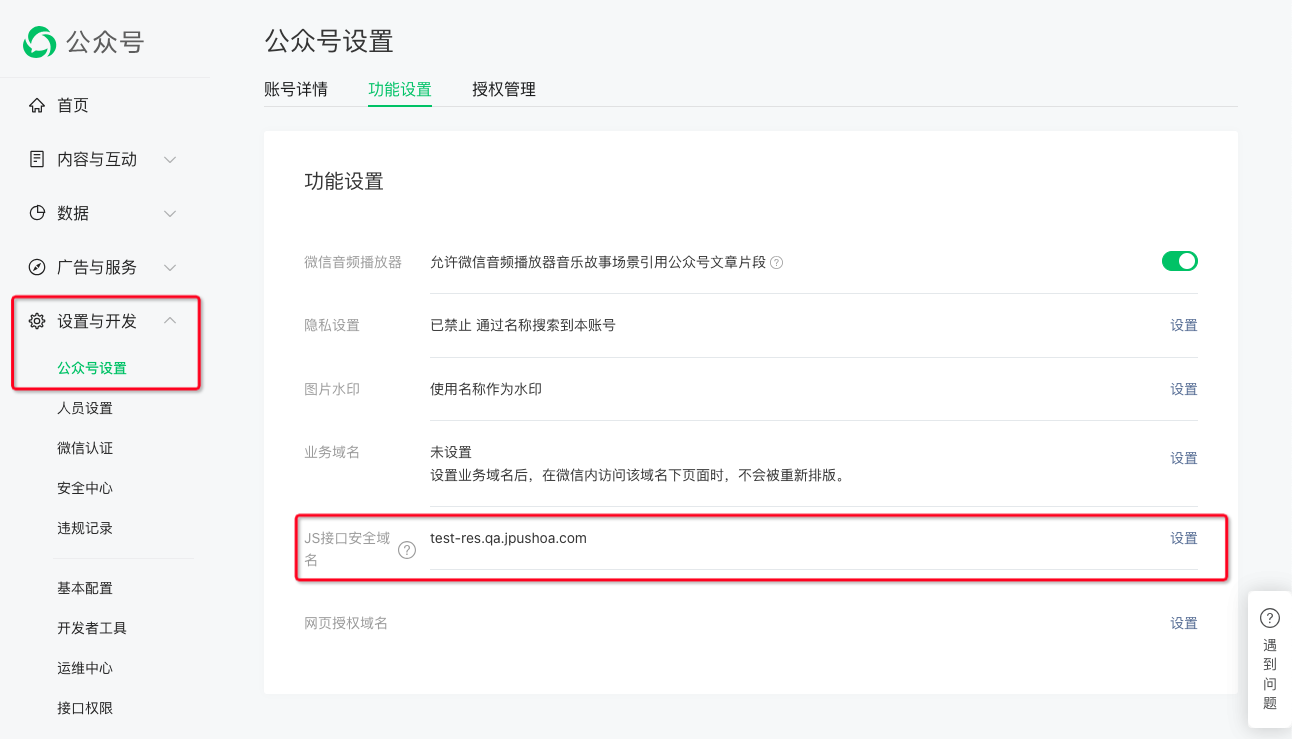
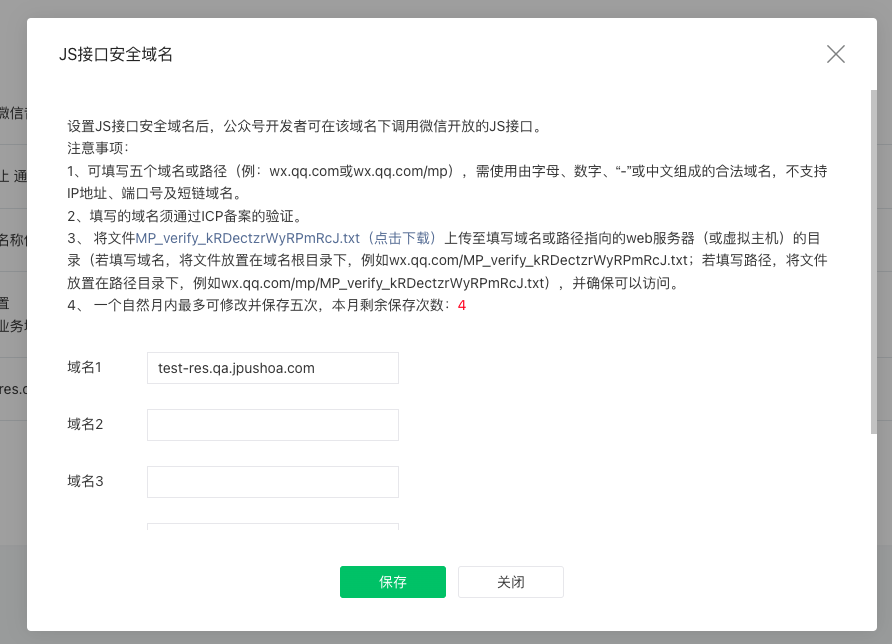
In "Settings and Development"-"Official AccountSettings" - "Function Settings" - "JS Interface Security Domain Name" Settings "Developer's Web Domain name on the web page"
- One service account can be configured with 5 domain names. **It can only be modified 5 times in a month. Please pay special attention. **
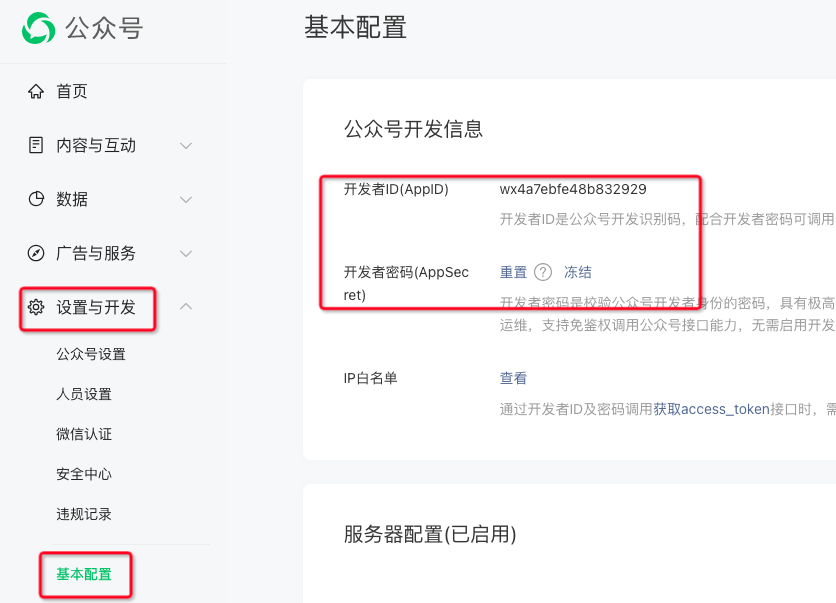
- On WeChatOfficial AccountBackstage "Settings and Development" - "Basic Configuration" - "Official AccountDevelopment Information"-"Developer ID(AppID)" can be obtained atOfficial Accountof AppID、AppSecret, this information will be included in the following "Point 3: Implementing WeChat signature on the developer server" and "Point 4: IntegrationJMLink Web SDK” used in.
1.2 WeChat Open Platform - Mobile Application Configuration
RequirementsWeChat open platformThe account has been authenticated, and the authentication subject and 1.1 The subject of the service account is the same, both are AAA
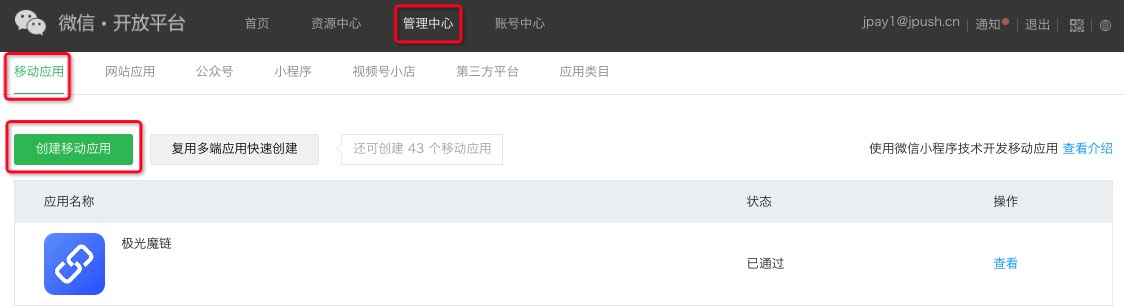
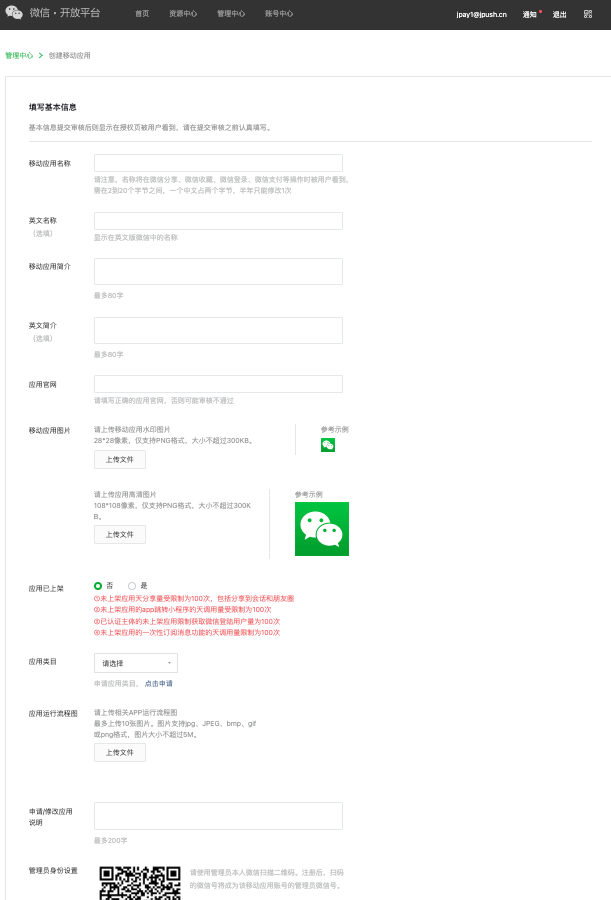
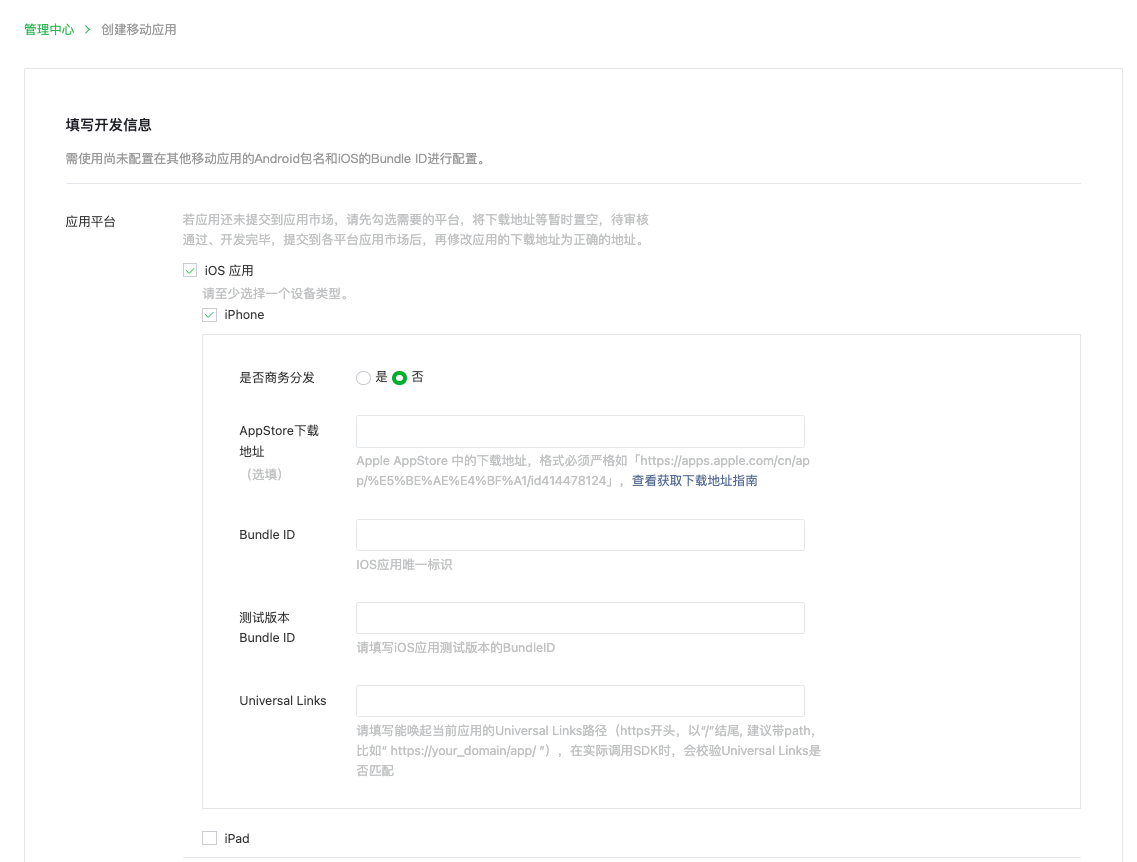
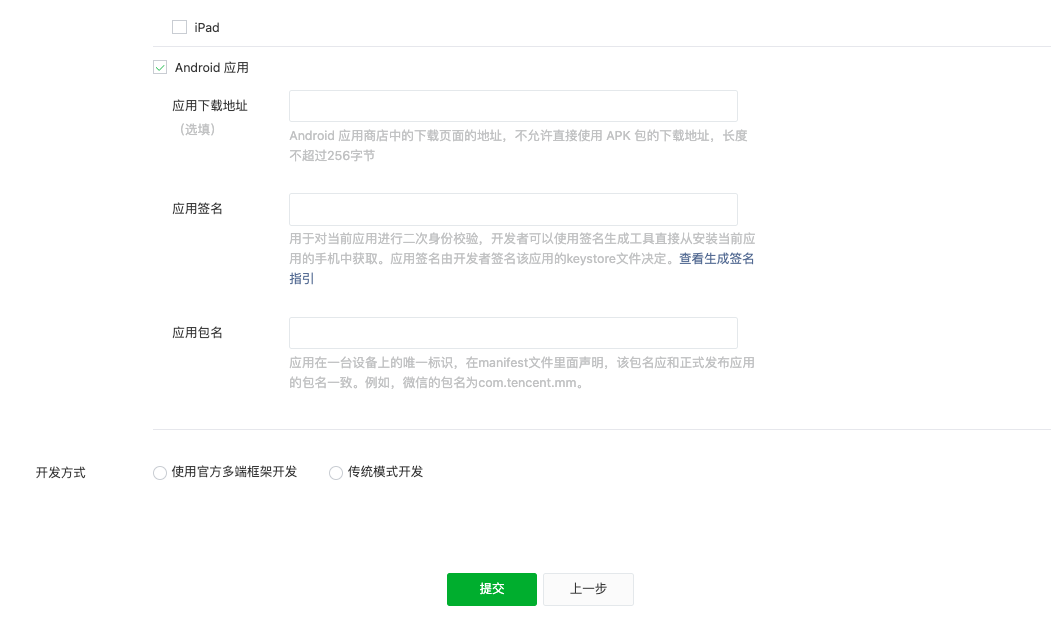
To create a mobile application, just fill in the basic information according to WeChat requirements + the actual situation of the application. The development information precautions are as follows:
- iOS Bundle ID 、Android The value of the package name andJMLinkApply configured values, apply actual Bundle The values of ID and package name must be consistent
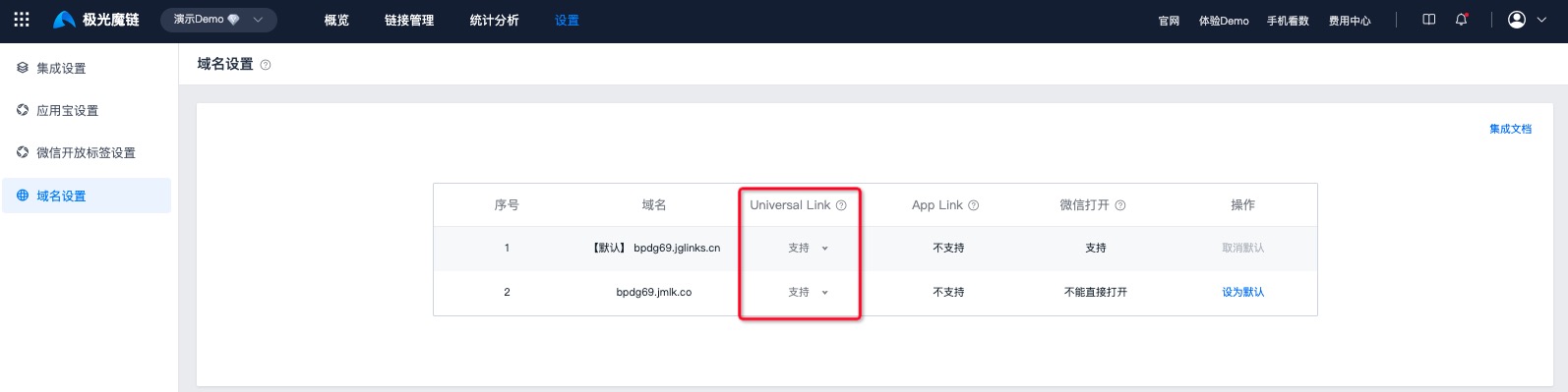
- iOS Universal Links fill in:JMLinkThe domain name of the short link address, and the domain name needs to be inJMLinkturn on UniversalLink function
- Basic information needs to be re-examined after being revised again after passing the review;Android and iOS The development information can be directly modified and saved after passing the review.
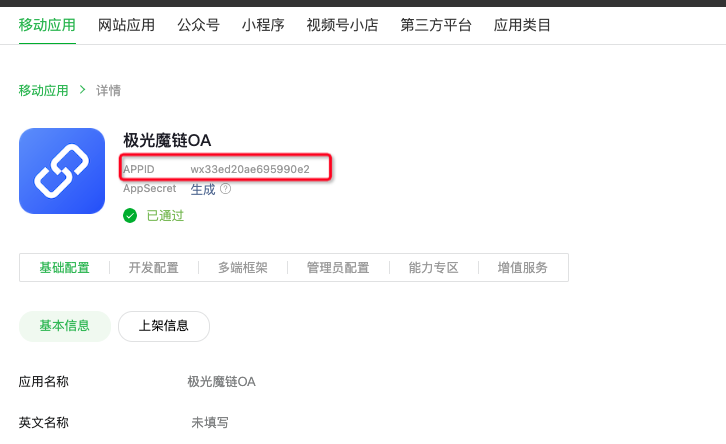
- After the application is successfully created, you will get a mobile application AppID, need to wait for WeChat review and approval

1.3 WeChat open platform - Official Accountassociated with app
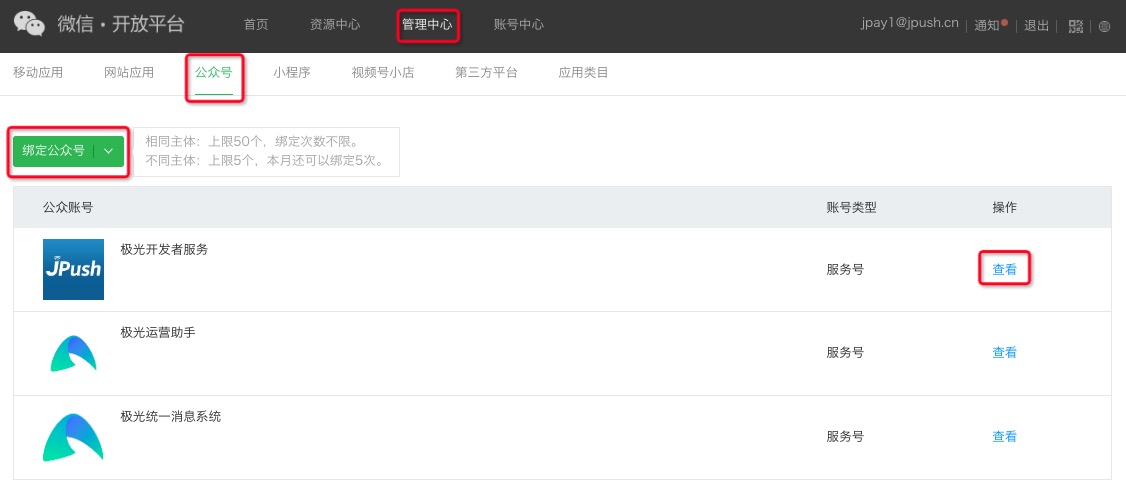
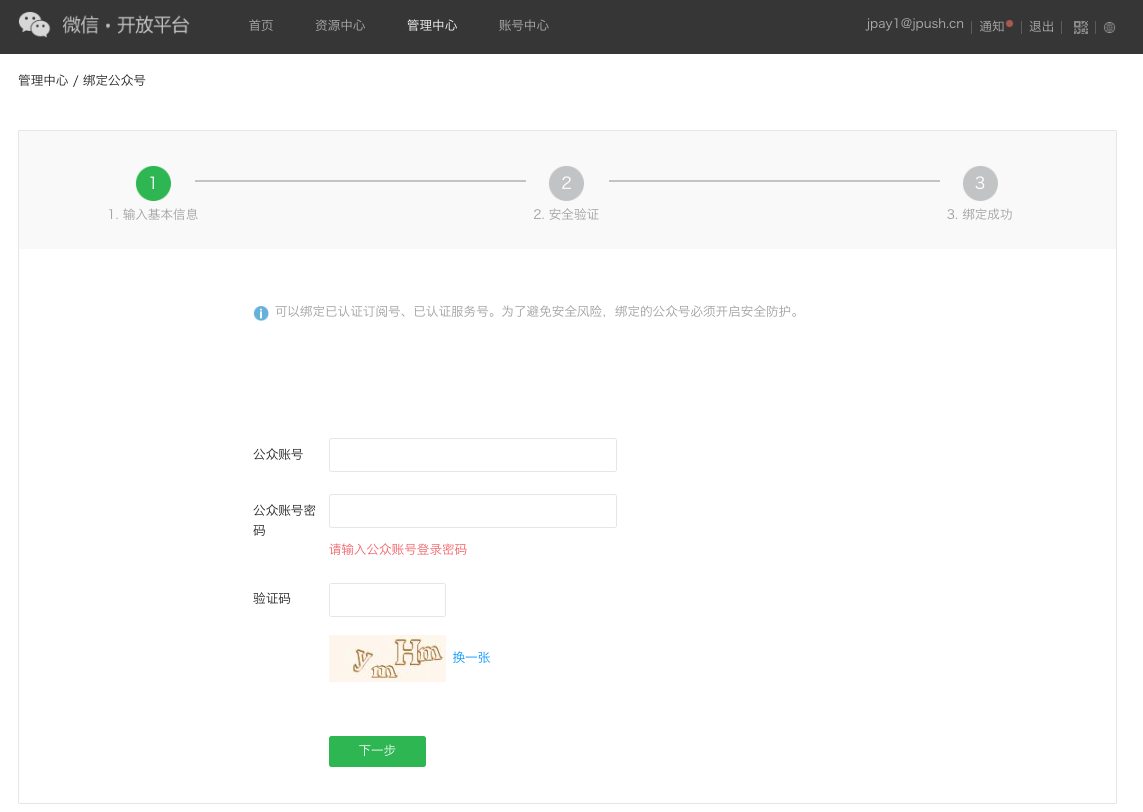
Use 1.2 Open platform account, bind 1.1 ofOfficial Account, after the binding is successful, click "TheOfficial AccountAction - View"
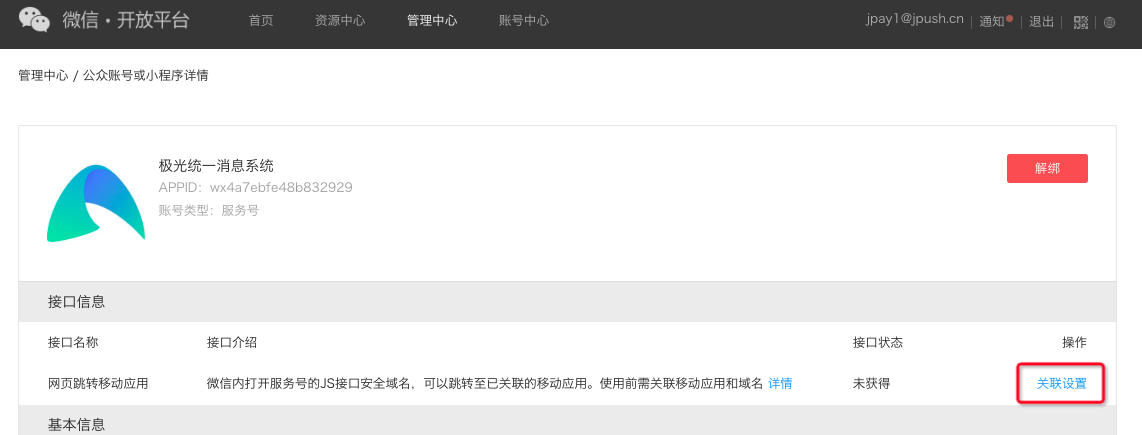
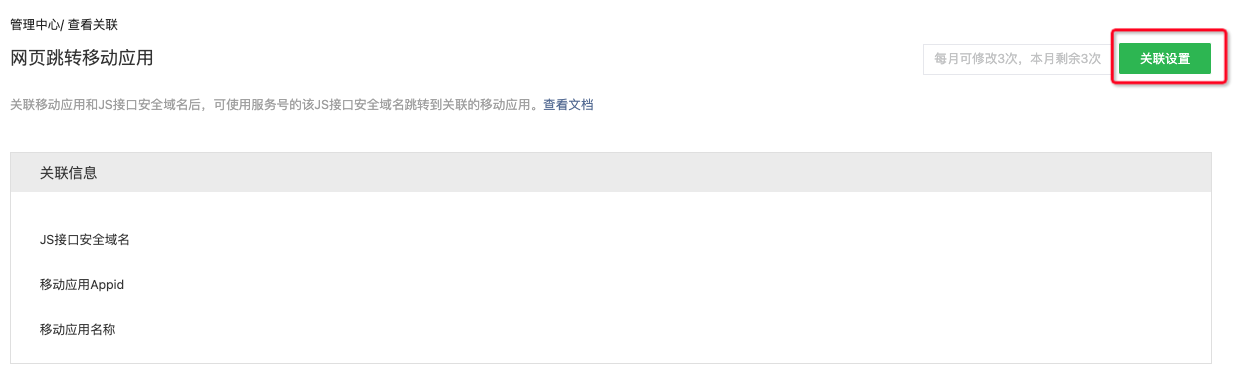
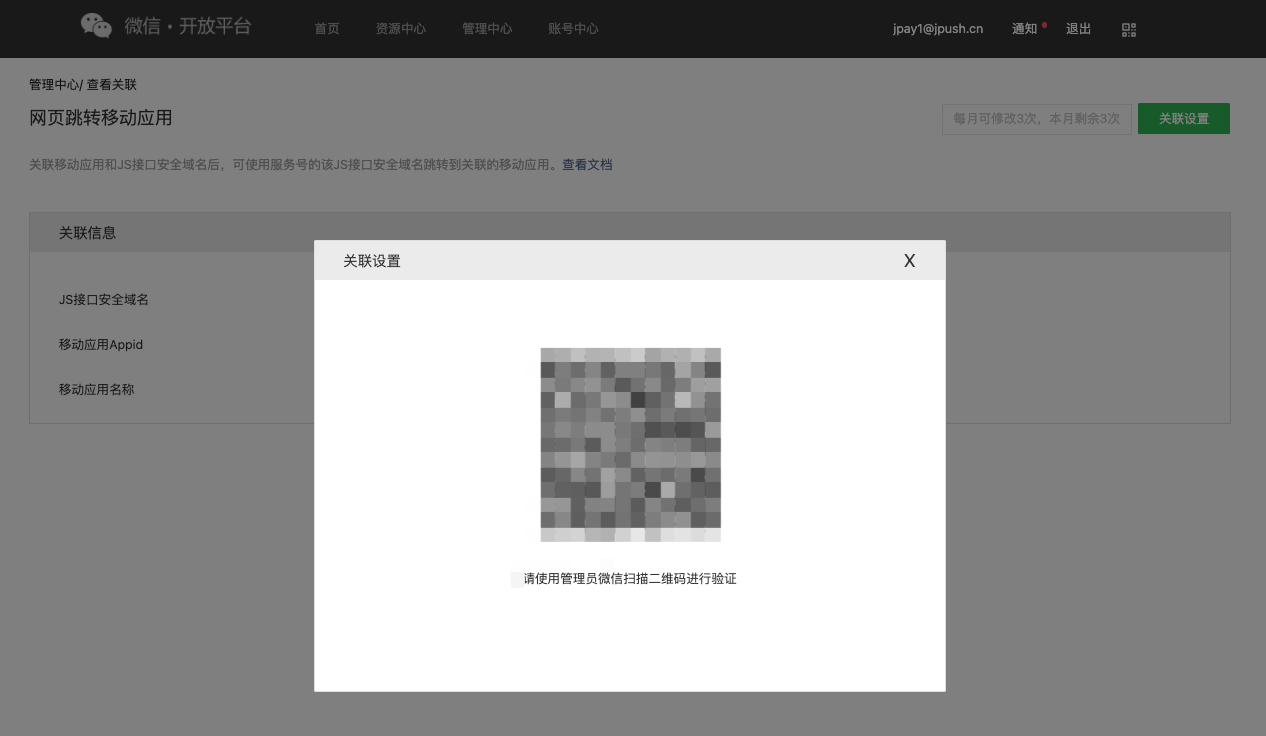
inOfficial AccountIn the details, click "Association Settings" under "Web Page Jump Mobile Application", and click "Association Settings" again on the new page.
- Administrators who need to open a platform account scan the QR code on WeChat
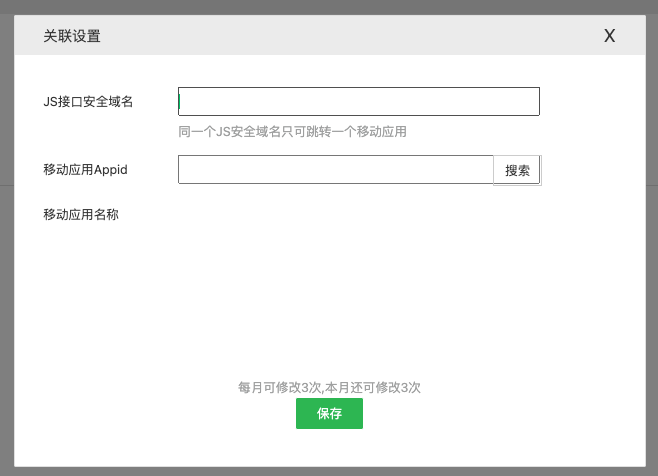
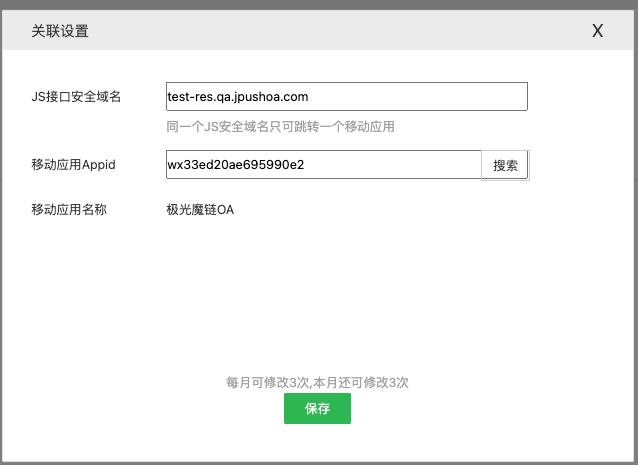
- Scan the code and enter "1.1 JS secure domain name configured in the service account" and "1.2 Created mobile app obtained by AppID(Requires review and approval)", click to search to get the application name, and then save it.
- **Please note: 1 domain name can only be bound to 1 mobile application and can only be modified 3 times in a month. **
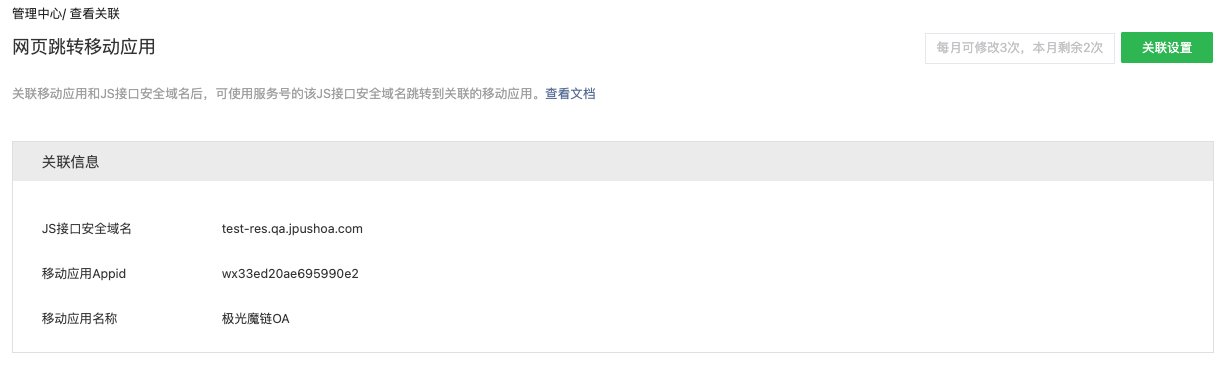
two,Android、iOS App Integrated with WeChat Open SDK
Developers need to Android、iOS App Integrated with WeChat Open SDK(Android、iOS), and then process WeChat data.
- Open SDK used in AppID please contact 1.2 mobile application AppID Be consistent.
- Please note that this is the WeChat open tab. App For the final processing method, developers still need to support direct opening of the magic link. App The usage logic!
- The developer uses the received url By making a distinction, it can be compatible with two scenarios: WeChat jump App, webpage (non-WeChat) jump App。
2.1 Android App
Please click on "WeChat" SDK "In the callback", obtain the "jump link used by the JMLink" and then perform one-click direct access, example:
           //WXEntryActivity回调接口
 @Override
 public void onReq(BaseReq req) {
 ShowMessageFromWX.Req sr = (ShowMessageFromWX.Req) req;
 //极光魔链链接会存储在messageExt参数中,类似于url=jiguang://xxxxxxx
 String uris = sr.message.messageExt.substring(4);
 Uri uri = Uri.parse(uris);
 //取出uri后调用routerV2进行直达即可,在此之前sdk需要进行初始化
 JMLink API.getInstance().routerV2(uri);
 }
2.2 iOS App
Please click on "WeChat" SDK "In the callback", obtain the "jump link used by the JMLink" and then perform one-click direct access, example:
          //在AppDelegate中处理微信请求
- (BOOL)application:(UIApplication *)app openURL:(NSURL *)url options:(NSDictionary<UIApplicationOpenURLOptionsKey,id> *)options{

 return [WXApi handleOpenURL:url delegate:[WXApiManager sharedManager]];
}
// universal link
- (BOOL)application:(UIApplication *)application continueUserActivity:(NSUserActivity *)userActivity restorationHandler:(void (^)(NSArray<id<UIUserActivityRestoring>> * _Nullable))restorationHandler{

 return [WXApi handleOpenUniversalLink:userActivity delegate:[WXApiManager sharedManager]];
}
==============================================
//在微信代理中处理信息,这里以WXApiManager为例:
 - (void)onReq:(BaseReq *)req {
 LaunchFromWXReq * lreq = (LaunchFromWXReq *)req;
 NSString * info = lreq.message.messageExt;
 //从messageExt中取出极光url,
 if ([info hasPrefix:@"url="]) {
 info = [info stringByReplacingOccurrencesOfString:@"url=" withString:@""];
 //使用极光API路由
 [JMLinkService routeMLink:[NSURL URLWithString:info]];
 }
}
3. Developer server implements WeChat signature
For security reasons, the WeChat signature needs to be generated on the developer server and then notified to the developer. Web end.
Please read how to generate a signatureWeChat official documents, a brief description is as follows:
Use 1.1 ofOfficial Accountof AppID 、AppSecret get AccessToken, then use AccessToken to get jsapi_ticket
According to the WeChat signature algorithm, use noncestr(random string), valid jsapi_ticket,timestamp(timestamp), url(The current page'sURL, excluding # and its following parts), this information is used to generate a signature. Examples are as follows:
Example values for each parameter:
noncestr=Wm3WZYTPz0wzccnW jsapi_ticket=sM4AOVdWfPE4DxkXGEs8VMCPGGVi4C3VM0P37wVUCFvkVAy_90u5h9nbSlYy3-Sl-HhTdfl2fzFy1AOcHKP7qg timestamp=1414587457 url=http://mp.weixin.qq.com?params=valuenoncestr=Wm3WZYTPz0wzccnW jsapi_ticket=sM4AOVdWfPE4DxkXGEs8VMCPGGVi4C3VM0P37wVUCFvkVAy_90u5h9nbSlYy3-Sl-HhTdfl2fzFy1AOcHKP7qg timestamp=1414587457 url=http://mp.weixin.qq.com?params=valueThis code block is shown in the floating windowStep 1. For all parameters to be signed according to the field name ASCII After sorting the codes from small to large (lexicographic order), use URL The format of key-value pairs (i.e. key1=value1&key2=value2...) concatenated into a string string1:
jsapi_ticket=sM4AOVdWfPE4DxkXGEs8VMCPGGVi4C3VM0P37wVUCFvkVAy_90u5h9nbSlYy3-Sl-HhTdfl2fzFy1AOcHKP7qg&noncestr=Wm3WZYTPz0wzccnW×tamp=1414587457&url=http://mp.weixin.qq.com?params=valuejsapi_ticket=sM4AOVdWfPE4DxkXGEs8VMCPGGVi4C3VM0P37wVUCFvkVAy_90u5h9nbSlYy3-Sl-HhTdfl2fzFy1AOcHKP7qg&noncestr=Wm3WZYTPz0wzccnW×tamp=1414587457&url=http://mp.weixin.qq.com?params=valueThis code block is shown in the floating windowStep 2. Right string1 conduct sha1 sign, get signature:
0f9de62fce790f9a083d5c99e95740ceb90c27ed0f9de62fce790f9a083d5c99e95740ceb90c27edThis code block is shown in the floating window
- Will generate the signature,noncestr、timestamp inform requested Web end,Web The client needs to pass this information toJMLinkof Web SDK, as mentioned in point 4 below.
Four,Web Page integrationJMLinkof Web SDK
Developers at Web Integrated in the pageJMLinkof Web SDK,existCall initialization API interfaceWhen passing the following parameters, the information comes from the content used by the third point developer server to generate the signature:
          new JMLink({
 jmlink: "短链",
 button: document.querySelector('a#btnOpenApp'),
 autoLaunchApp: false,
 downloadWhenUniversalLinkFailed: true,
 inapp: false,
 params: {},
 appId: "wx4a7ebfe48b832929",//以下四个字段在使用微信开放标签时需要设置
 timestamp: 1713773225,
 nonceStr: "Wm3WZYTPz0wzccnt",
 signature: "ad9ee4f6c1824d8393693127e62677e3fe5c51b8",
 });
| parameter | type | describe |
|---|---|---|
| appId | String | WeChat service account AppID |
| timestamp | Number | The timestamp that generated the signature |
| nonceStr | String | Generate a signed random string |
| signature | String | WeChat signature generated by developer server |
five,JMLinkof Portal Configuration
existJMLinkof Portal, configure it in "Settings"-"WeChat Open Label"1.2 Need to jump in App of AppID”, and can control whether this function takes effect.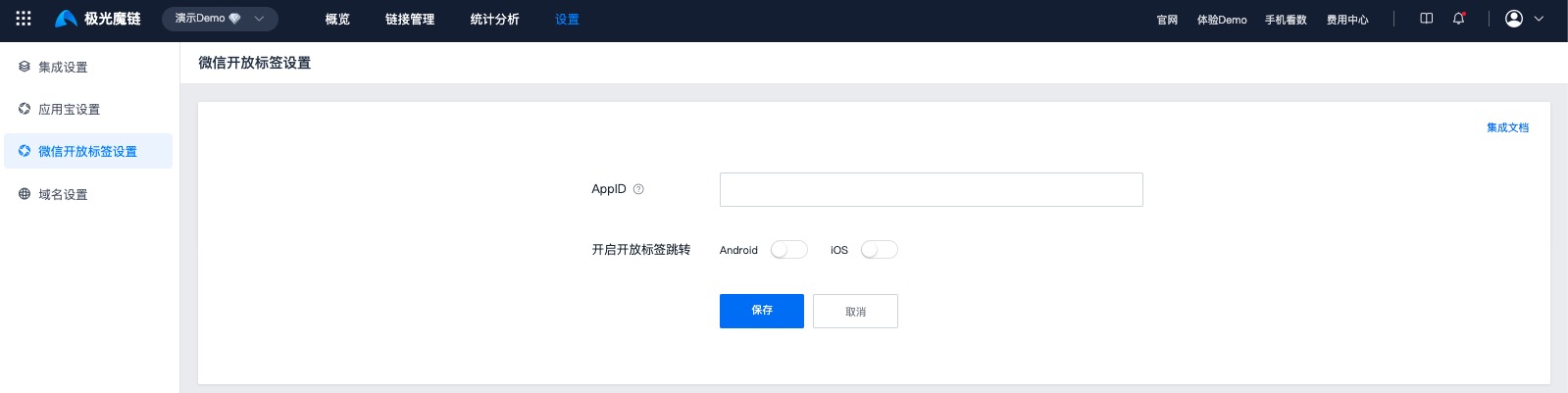
6. Precautions
- WeChat open label has minimum WeChat version requirements and minimum system version requirements
- WeChat version requirements are:7.0.12 and above
- The system version requirements are:iOS 10.3 and above,Android 5.0 and above
Must use real machine for testing
Text links cannot use the open label function and need to use sharing cards.
- Text link: Copy the link address and send it directly to WeChat chat, then click the link to open it
- Share card: Move the link from your browser,App Share to WeChat, and WeChat will parse it into a card. When you click on the card to open it in WeChat, you can use the open label.
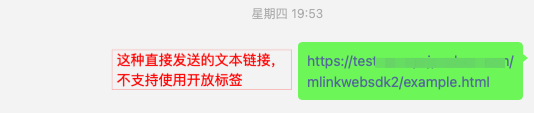
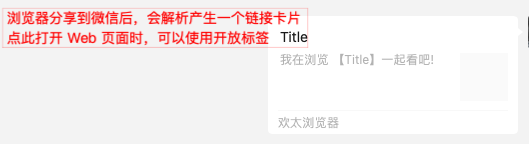
When the WeChat open label function is not available,JMLinkwill use its other abilities to awaken you App, therefore, it is recommended to completeJMLinkConfiguration of other jump logic.
In the above process, there are some necessary conditions and access thresholds for enabling "WeChat Open Label". Please be sure to follow the guide to apply and set up. The summary is as follows:
- Service account has been certified
- Open platform account has been authenticated
- The service account and the open platform account have the same entity
- The service account is bound to the open platform
- The mobile application in the open platform account has been approved
- Bind "Mobile Application" and "Service Account" in "Open Platform"Web The domain name of the web page
- The domain name must be the JS secure domain name of the current service account or its subdomain name
- The domain name can only be bound to one mobile application at the same time, so you must ensure that the domain name is not bound to other mobile applications.

