


JMLink Web SDK Integrated Guide
Usage Notes
This document is the standard integration guide for JMLink Web SDK integration guide。
- JPushDocument website with all relevant guidelines,API, tutorials, etc., all documents. An updated version of this document will be posted on the website in a timely manner.
Product Overview
According to your presence Portal Application information for end-to-end configuration, using integration to activate applications,JMLink In different devices and Try the best way to use it under different browsers.
Create Application
Create Jiguang Developer Account
Please visit.Jiguang Official website RegistrationYours.Jiguang Account number.
Portal Create Applications Up
UseRegistrationAccountLoginGet in.Jiguang After the console, click the Create Application button to enter the interface for creating the application. Fill in the name of your application, and then click on the bottom of the "Create My Application" button to create the application.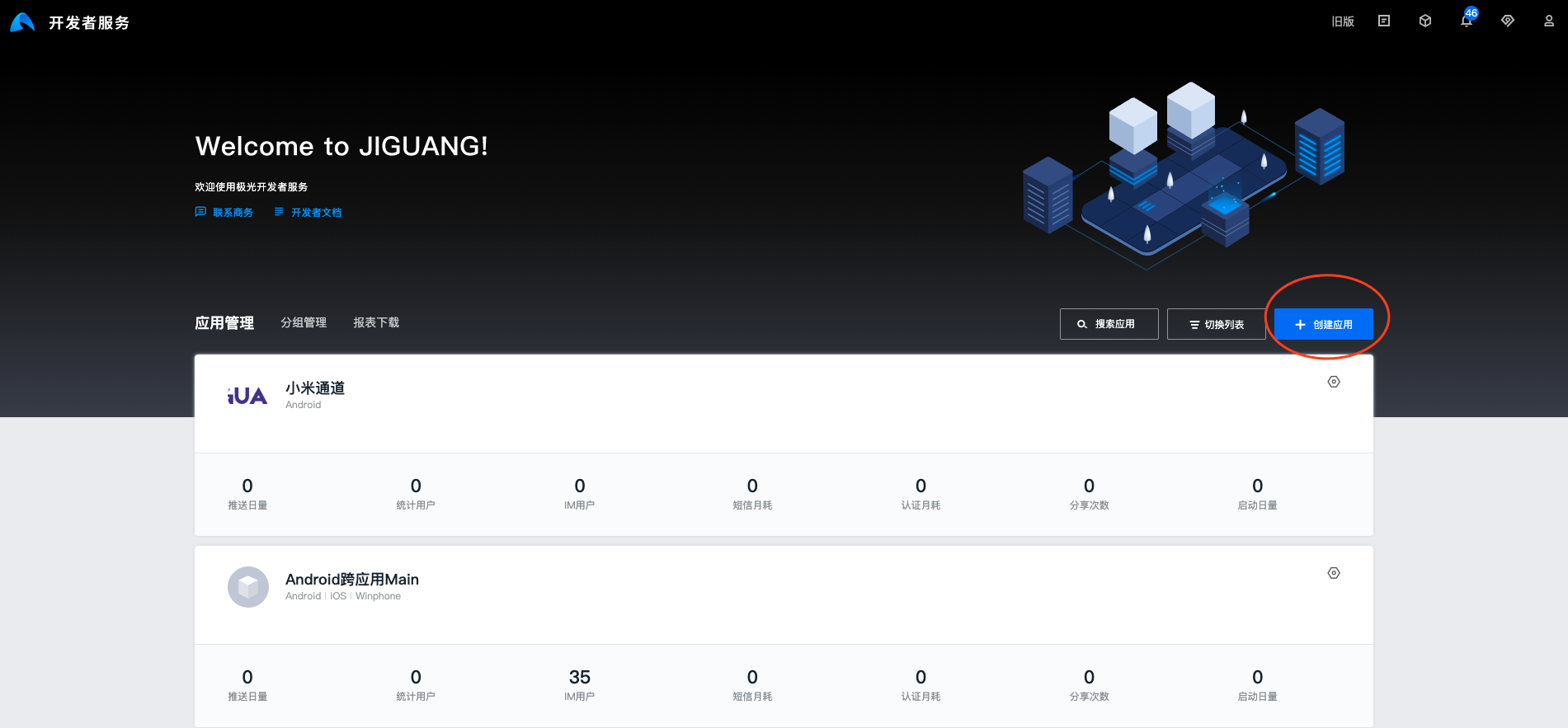
Configure Application Information
You can see the application list by clicking on the application you created to view the application information. & Configure JMLink Required parameters.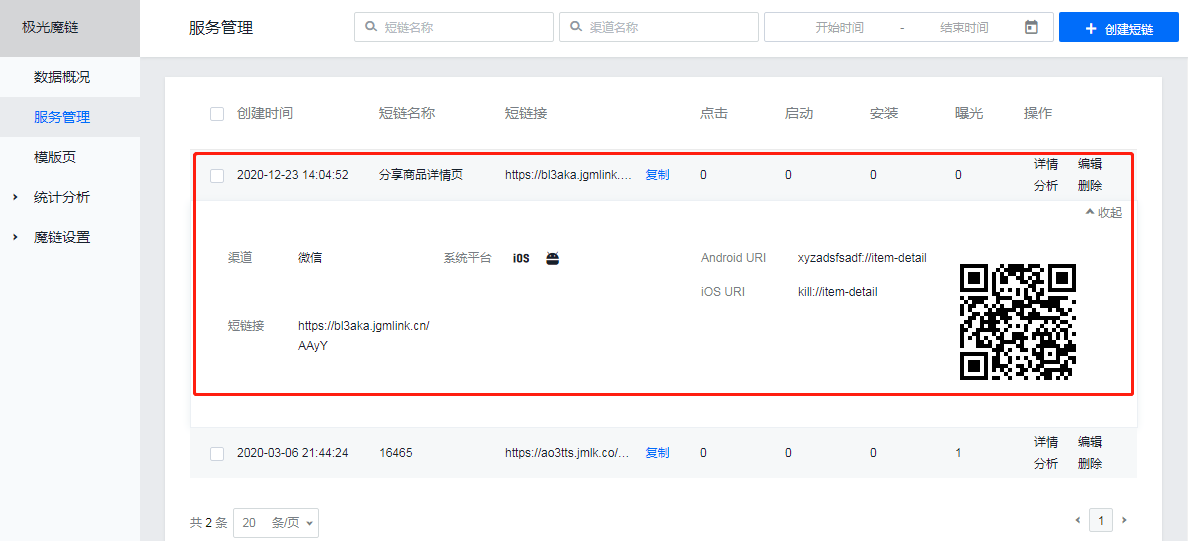
Short Connection
Backstage configuration complete. JMLink Required parameters, you will get similar https://a.jmlk.co/ABCD, where ABCD is the short link suffix.
SDK Access
<script src="https://static.jmlk.co/scripts/dist/jmlink.min.js"></script>
Once this JS is introduced, you can use it Window Up Global Object JMLink
          Tips:

请直接使用此链接, 不要将此文件下载到您项目中, 否则, 我们在更新数据结构或 API 接口后有可能会导致功能失效。
SDK Initialize
Yes. HTML prepare one or more of the pages for opening APP an element
General developers will use CSS Style resets the look of this link to make it look like a button and suggests using Open APP"In APP in which to purchase APP, and so on, please avoid using Download APP, we found the use of Downloads in past user usage habits APP. Link comparison with Open APP"The number of hits of the link will be several times lower;
<a id="btnOpenApp">打开APP</a>
Initialization of individuala labels
          new JMLink({
 jmlink:'https://arguys.jmlk.co/AAlq',// 短链地址
 button:document.querySelector('a#btnOpenApp')
});
** Special tip**
In short link fusion parameters, if URL contains special characters that need to be included URL. Encoding (%)URL Encoding)
Start multiple a Label
          var link='https://arguys.jmlk.co/AAlq';// 短链地址
var btn_1=document.querySelector('a#btnOpenApp1');
var btn_2=document.querySelector('a#btnOpenApp2');
var btn_3=document.querySelector('a#btnOpenApp3');

var configs = [
 {
 jmlink: link+'?name=1',
 button: btn_1
 }, {
 jmlink:link+'?name=2',
 button: btn_2
 }, {
 jmlink: link+'?name=3',
 button: btn_3
 }
];

new JMLink(configs);
SimpleIntegration Methods
          <a
 href="https://arguys.jmlk.co/AAlq?a=1&b=2"
 data-jmlink="true"
 data-auto="false"
 data-params="{name: 1}">
 打开app
</a>
- data-jmlink: Set Astrue It means it's a chain.htmlLabel.
- href: Short links
- data-auto: autoLaunchApp See for instance. Web SDK API
- data-params: Custom ArgumentsparamsSee in particular. Web SDK API
More API
Other API for the use of the interface document:Web SDK API
Technical Support
Email:support@jiguang.cn

