


JMLink MiniProgram SDK Integration Guide
Usage tips
This article is JMLink WeChatMini-program SDK Standard integration guide document.
matching SDK The version is:1.0.0 and later versions.
- If you want to test quickly, please refer to this article to run through it in a few minutes. Demo。
- JPushOn the documentation website, there are all relevant guides,API, tutorials and all other documents. Updated versions, including those of this document, will be posted to this website in a timely manner.
Get scene value
Developers can obtain scene values in the following ways:
- forMini-program, can be found in App of onLaunch and onShow,orwx.getLaunchOptionsSync Get the above scene value.
- For small games, you can wx.getLaunchOptionsSync and wx.onShow Get the above scene value in
It can be opened in the following situationsAPP
- whenMini-programfrom 1069 When the scene is open, you can open APP
- whenMini-programfrom App Share message card (scene value1036) is open, you can openAPP。
- whenMini-programWhen opening from the following scene, keep the last openingMini-programopen when App Capability status:
- from otherMini-programreturnMini-program(scene value1038) time (basic library 2.2.4 and above version support)
- Mini-programScene from chat top (scene value1089) in "Recently used" when opening
- Long pressMini-programThe menu in the upper right corner calls up recent usage history (scene value1090) when open
Product Description
According to your Portal For application information configured on the client, use Magic LinkMini-programSDKCan be obtained fromMini-programCall up the application, pass parameters, and jump to the specified page
jmlink-mp-1.x.y-release.zip Integrated compressed package contents
- libs/jmlink-mp-1.x.x.js
- SDK jmlink development kit
- example
- is a completeMini-programproject, passed this demonstration JMLink SDK The basic usage can be used as a reference.
Local project configuration
- Unzip the compressed package and put libs Place the following files into the project, customize the directory, and copy it to the project utils under.
- jmlink-mp-1.x.x.js
import JMlink from '../../utils/jmlink-mp-1.x.y.js'
Configuration request Legal domain name
need to be inWeChat public platformIn development settings, add the following: request Legal domain name:
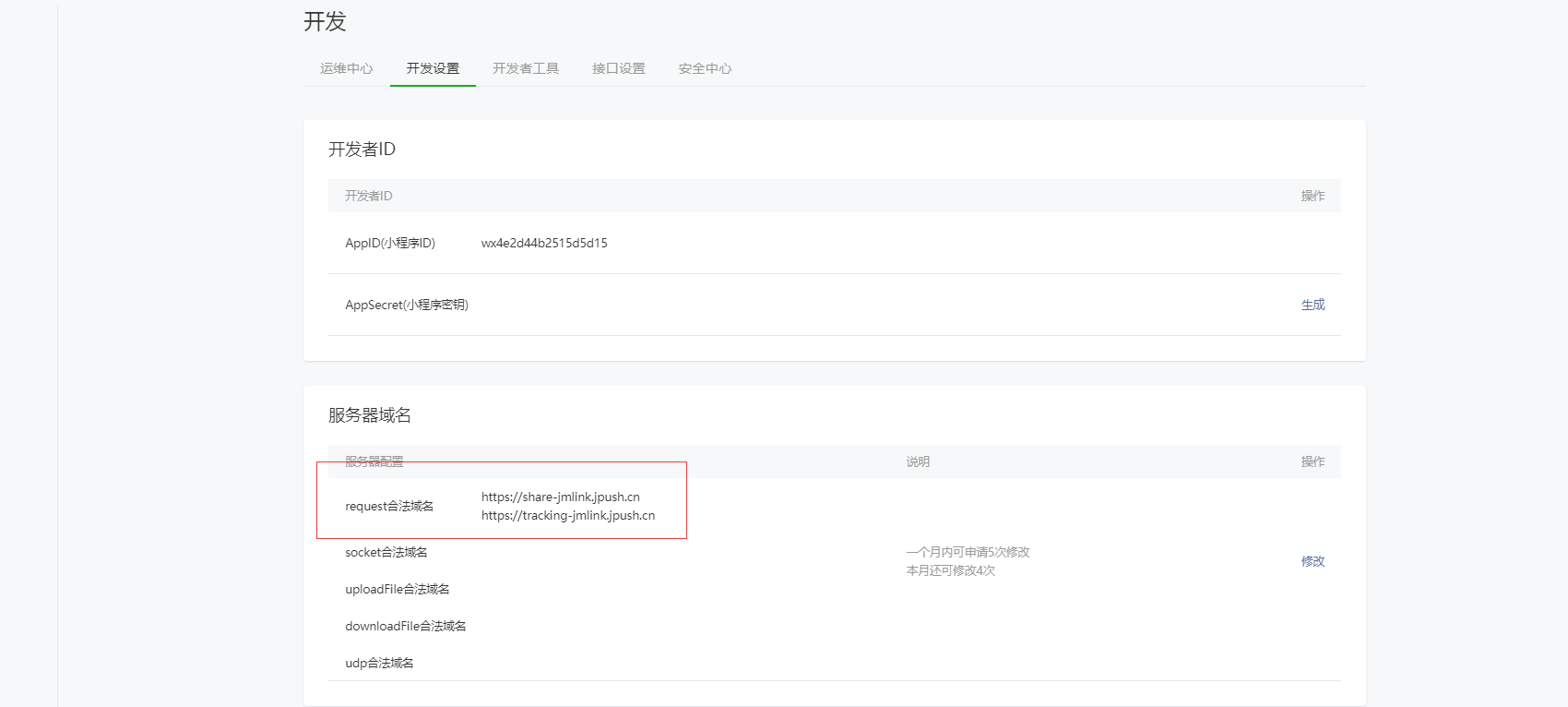
existWHTMLPrepare one or more pages for openingAPPofbuttonelement
<button open-type="launchApp" app-parameter="{{parameter}}" bindtap="click" binderror="launchAppError">打开APP</button>
ps:Need to addbindtap,existclickcall inSDKofclick
More API
other API Please refer to the interface documentation for usage:MiniProgram SDK API
run demo
Comes with compressed package example is a API Demonstration example. You can run it directly to test. Operation can refer toMini-programOfficial documentation
Technical support
Email contact:support@jiguang.cn

