


iOS SDK Integrated Guide
If you use it for the first time JMLink, suggest integration SDK Before you know it. Access Guide
I.SDK Annotations
Applicable version
Text Matches SDK Version:v1.2.0 Later. ViewLatest UpdatesGet up to date. SDK Update.
Resource File
Package Name jmlink-ios-{version number}-release
- Libs Folder: Contain headers JMLinkService.hStatic library file jmlink-ios-x.x.x.a,jbasic-ios-x.x.x.xcframework
- Jiguang Demo Folder: Example
DEMO Use
Enter Jiguang Demo Directory, Implementation pod install Command Install sdkOpen Jiguang Demo.xcworkspace Run just fine.
Jiguang Demo为多个SDK拼接组装而成的Demo,使用cocoapods进行管理,如需手动集成请参考[手动导入]部分。
Creating applications
Yes. JMLink Management Portal Up-create application, automatically generated after successful creation AppKey To mark the application.
Applying Settings iOS module configuration if universal link Not really. Please refer to:Console UL Settings Module
Detailed diagrams can be found in the introductory guideCreate Application
III. configuring
3.1. Import SDK
Option 1: Cocoapods Import
          pod 'JCore', '4.2.8-jbasic'    //必选项,使用 JCore 的 jbasic 版本(x.x.x-jbasic)
pod 'JMLink' // 必选项

注:如果无法导入最新版本,请执行 pod repo update master 这个命令来升级本机的 pod 库,然后重新 pod 'JMLink'
If integrated at the same time transfer/certification/analysis, use JCore Standard version or none IDFA Version.
- Standard version: pod 'JCore', '4.2.8'
- None IDFA Version: pod 'JCore', '4.2.8-noidfa'
Select 2: Manual Import
- Yes.Jiguang Network of officialsDownload Update SDK
- After decompression, Lib Folder import project (check for import)Copy items if needed" )
3.2 Basic Configuration
3.2.1 Configure Scheme
Yes.XcodeSelection Rule Target -> Info -> URL TypesI'll fill you in.Jiguang Consolesettings Scheme,xcode Lee. and Console. scheme It must be consistent, as shown in the figure: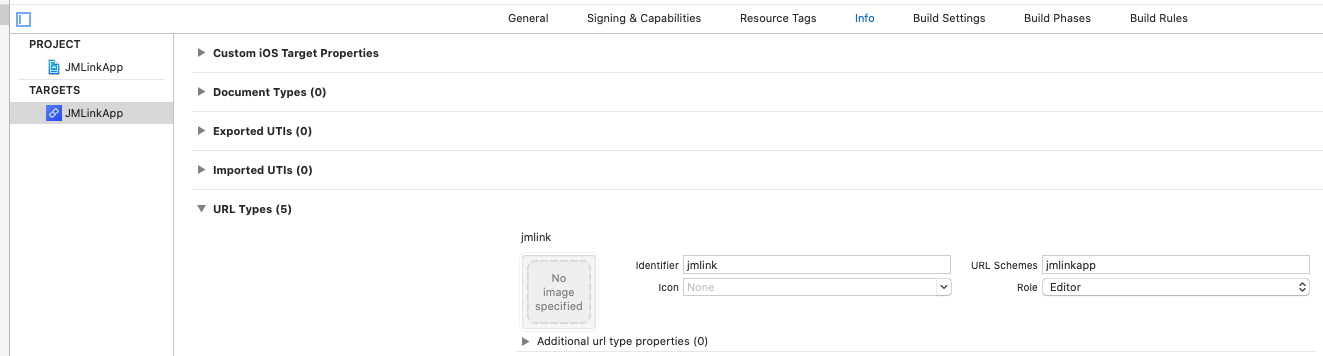
3.2.2 Configure universal link
Yes. Xcode Selection Target -> Capablities -> Associated Domainsfill inJMLinkDistribution of domain names inControl Domain Name Settings ModuleView, put support universal link the domain name is filled in the project. As shown: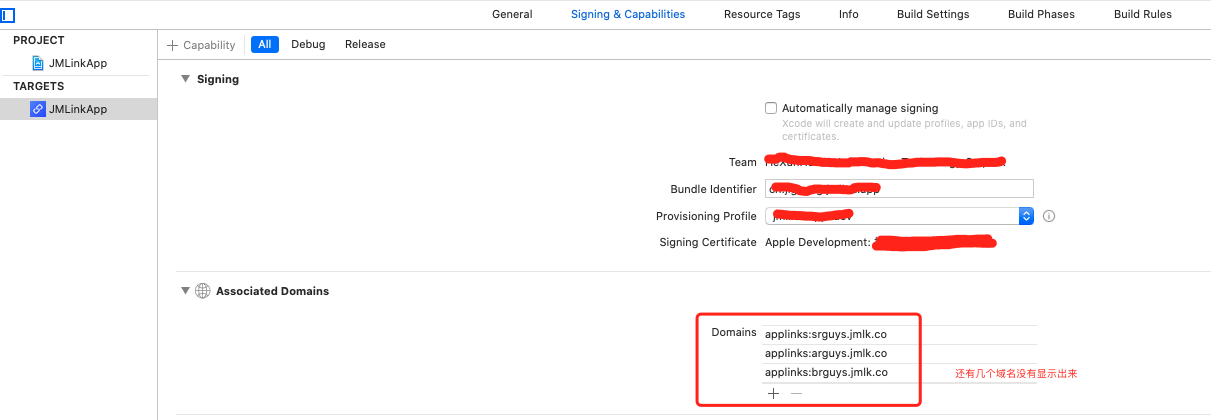
Not familiar. universal link The configuration process can be viewed Access Guide-iOS Basic Configuration。
Note:
- There's got to be support.
universal linkAll the domain names are filled in for the project. applinks: - It is recommended that all domain names in domain name management be configured to the project so as to avoid non-support at the front and back. universal link Domain name not configured, resulting in jump failure
IV.SDK Initialize
Yes.AppDelegate, add header references:
# import "JMLinkService.h"
Yes.application: didFinishLaunchingWithOptionsCall in MethodsetupWithConfigMethod to Initialize SDKas follows:
          - (BOOL)application:(UIApplication *)application didFinishLaunchingWithOptions:(NSDictionary *)launchOptions {
    //如需使用 IDFA 功能请添加此代码并在初始化配置类中设置 advertisingId
 NSString *idfaStr = [[[ASIdentifierManager sharedManager] advertisingIdentifier] UUIDString];

 JMLinkConfig *config = [[JMLinkConfig alloc] init];
 config.appKey = @"your appkey";
 config.advertisingId = idfaStr;
 [JMLinkService setupWithConfig:config];
}
Functional integration
5.1 One chain to pull.
Yes. app Draw from platforms, browsers where installed app and transmit dynamic parameters.
5.1.1 Add Scheme and universal link Route code
          //iOS9以下,通过url scheme来唤起app
- (BOOL)application:(UIApplication *)application openURL:(NSURL *)url sourceApplication:(NSString *)sourceApplication annotation:(id)annotation {
 [JMLinkService routeMLink:url];
 return YES;
}
//iOS9+,通过url scheme来唤起app
- (BOOL)application:(UIApplication *)app openURL:(NSURL *)url options:(nonnull NSDictionary *)options{
 [JMLinkService routeMLink:url];
 return YES;
}
//通过universal link来唤起app
- (BOOL)application:(UIApplication *)application continueUserActivity:(NSUserActivity *)userActivity restorationHandler:(void (^)(NSArray * _Nullable))restorationHandler{
 [JMLinkService continueUserActivity:userActivity];
 return YES;
}
          // 处理 JMLink 一键唤起APP时传递的数据
[JMLinkService routeMLink:url];
//其他第三方回调
return YES;
5.1.2 Retrieving one-chain stretching parameters
The recommendation is to start APP, add a way to retrieve parameters
          - (BOOL)application:(UIApplication *)application didFinishLaunchingWithOptions:(NSDictionary *)launchOptions{
 // SDK初始化
 ···

 // 注册通用的的获取参数回调方法
 [JMLinkService registerHandler:^(JMLinkResponse * _Nullable respone) {
 dispatch_async(dispatch_get_main_queue(), ^{
 // 拿到参数后,根据自身项目参数协议解析,处理跳转逻辑
 });
 }];
}
5.2 Deferred Deep LinkingFunctions
Yes. app In the absence of installation, click short chains from platforms, browsers Load APP, click to open during active time app.
5.2.1 AccessDeferred Deep LinkingParameters
The recommendation is to start APP, add a way to retrieve parameters
          - (BOOL)application:(UIApplication *)application didFinishLaunchingWithOptions:(NSDictionary *)launchOptions{
 // SDK初始化
 ···

 // 注册通用的的获取参数回调方法
 [JMLinkService registerHandler:^(JMLinkResponse * _Nullable respone) {
 dispatch_async(dispatch_get_main_queue(), ^{
 // 拿到参数后,根据自身项目参数协议解析,自行处理跳转逻辑
 });
 }];
}
5.3 Codeless InviteFunctions
In the scene, the invitation code is waived, the impact of the cumbersome user operation is circumvented and the conversion rate is increased. For example:APP Parameters/playrooms need to be installed to invite good friends/grow activities/establish a top-down relationship, and incentives to open up the application for completion of business need to be installed quickly.
5.3.1 AccessCodeless InviteParameters
          // 获取无码邀请中传回来的相关值
[JMLinkService getMLinkParam:nil handler:^(NSDictionary * _Nullable params) {
    dispatch_async(dispatch_get_main_queue(), ^{
            // 拿到参数后,根据自身项目参数协议解析
    });
}];
Note:
- This interface can be called anywhere
- Repeatable calls return several times and follow-up does not want to be triggered again, so that you can set a mark on your own when the business calls are successful.
VI. More API
Other API for the use of the interface document:iOS SDK API
VII. Scenes presentation Demo
- JMLink APP A relatively complete chain demonstration.Scanning of officials、Download Source。

