Real-Name Authentication
Jiguang real-name authentication is divided into individual real-name authentication and enterprise real-name authentication. Different authentication methods support different SMS service product capabilities.
Individual real-name authentication: indicates that the account user is an individual. According to regulatory requirements, individually authenticated customers do not support SMS functionality.
Enterprise real-name authentication: indicates that the account belongs to an organization. The organization can be an enterprise, government agency, public institution, group, or organization.
If your current account is individually authenticated but you need to use SMS functionality, you can upgrade to an enterprise real-name authenticated account in Developer Authentication.
Differences Between Individual and Enterprise Authentication Rights
In addition to all capabilities of individually authenticated accounts, enterprise real-name authenticated accounts also support extended features such as marketing SMS. See the table below for detailed differences.
| Category | Individual Authentication | Enterprise Authentication |
|---|---|---|
| Voice SMS | Not supported | Supported |
| Industry SMS | Not supported | Supported |
| Marketing SMS | Not supported | Supported |
| Online SMS sending | Not supported | Supported |
How to Complete Real-Name Authentication
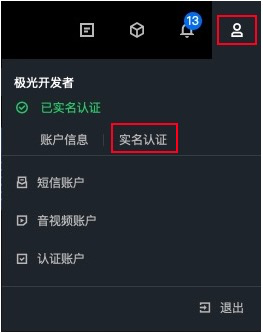
As shown below, log in to the Jiguang Developer Service Console, hover over the user icon, and click Real-Name Authentication in the personal information drop-down menu to go to the authentication page. Then choose the corresponding authentication type according to your needs.