


SMS Signature API
Last updated:2026-04-23
Expand all
SMS Signature API
- Supports creating, modifying, querying, and deleting SMS signatures
HTTP Authentication
Access authorization uses HTTP Basic Authentication. This allows the entire API request to be completed with common HTTP tools such as curl and browser plugins.
Add a field (Key/Value pair) to the HTTP Header:
Authorization: Basic base64_auth_string
Authorization: Basic base64_auth_string
This code block is shown in the floating window
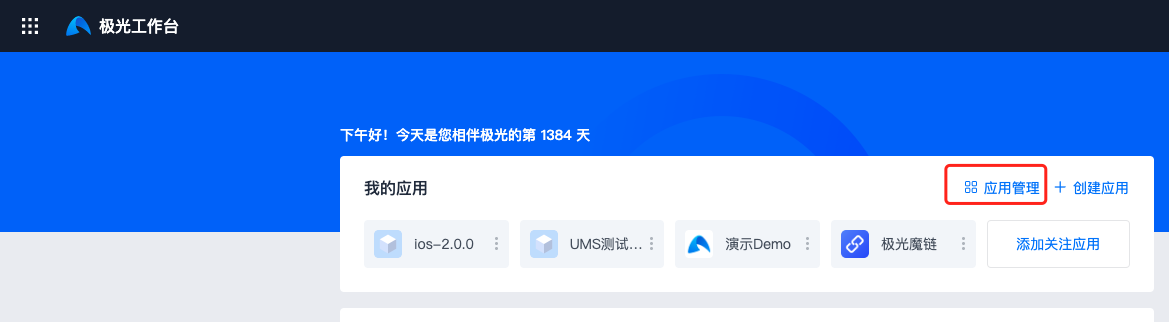
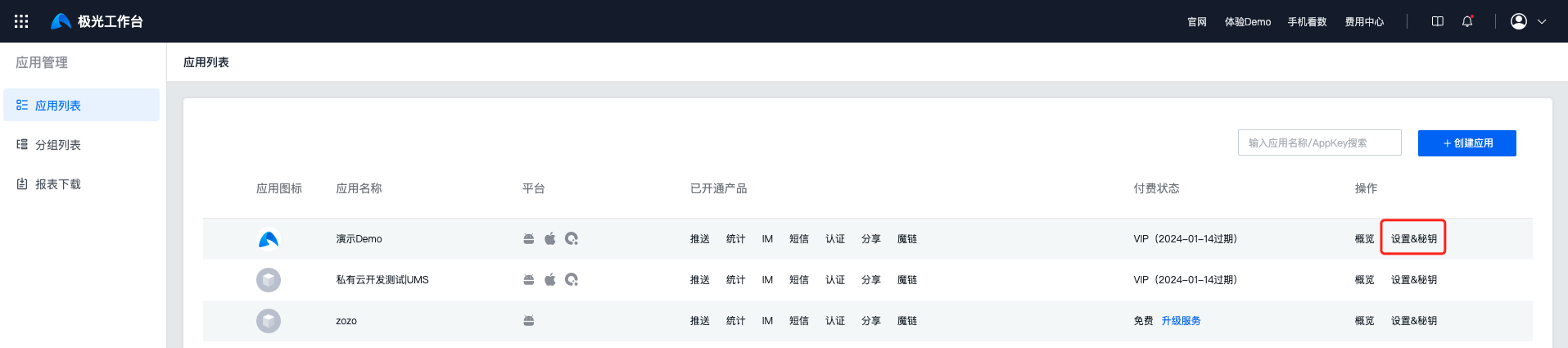
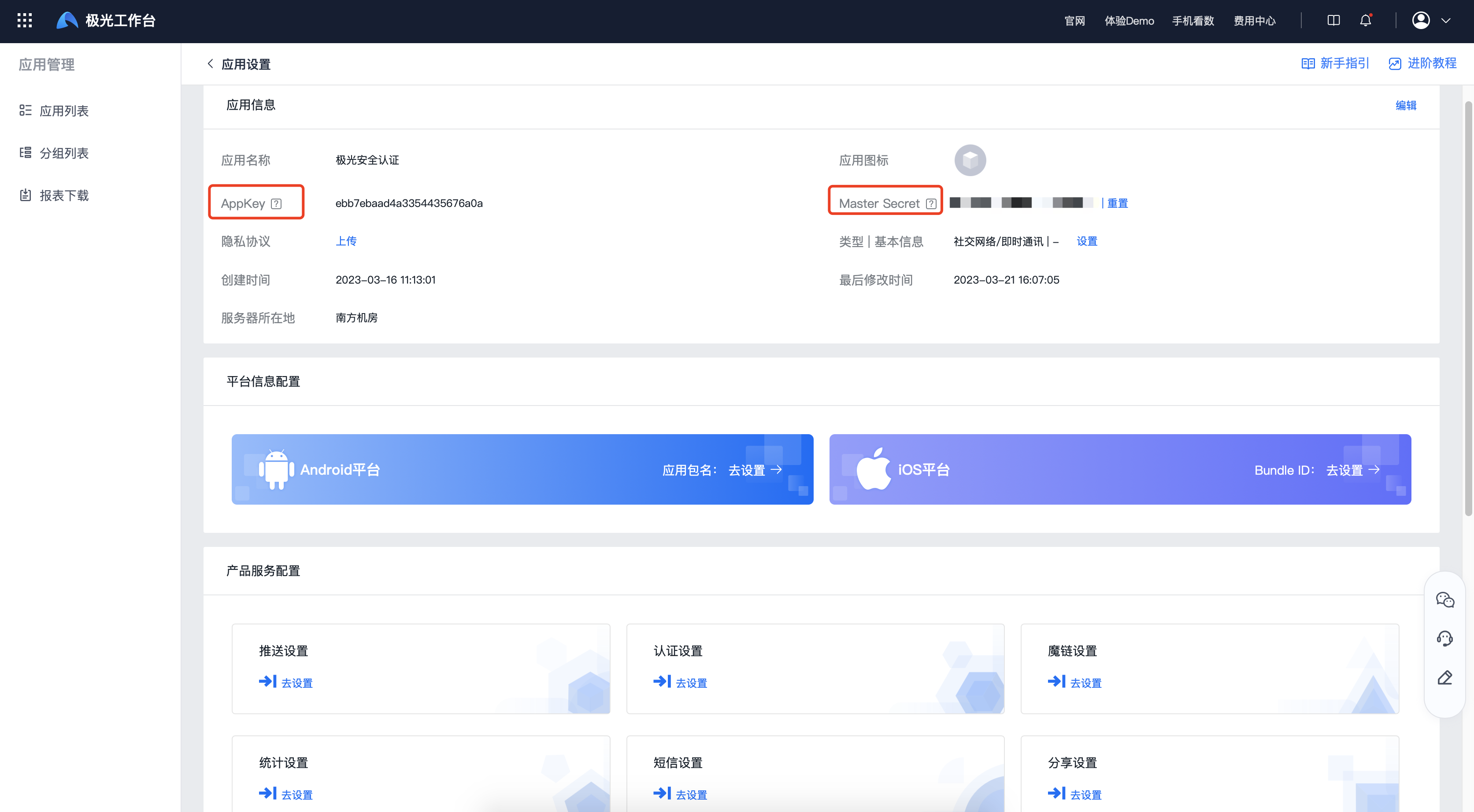
The generation algorithm for base64_auth_string is base64(appKey:masterSecret): concatenate the appKey, a colon, and the masterSecret, then Base64-encode the resulting string. The appKey and masterSecret can be viewed in Jiguang Workbench -> Application Management -> Settings & Keys.
Create Signature API
Function Description
- Create an SMS signature.
Request URL
Request Example
Note that content-type is multipart/form-data.
          curl -X POST \
 https://api.sms.jpush.cn/v1/sign \
 -u '7d431e42dfa6a6d693ac2d04:5e987ac6d2e04d95a9d8f0d1' \
 -H 'content-type: multipart/form-data' \
 -F 'sign=极光推送' \
 -F 'type=1' \
 -F 'idCardImage=@/path/to/idcard.jpg' \
 -F 'businessLicenseImage=@/path/to/business_license.jpg'
curl -X POST \
https://api.sms.jpush.cn/v1/sign \
-u '7d431e42dfa6a6d693ac2d04:5e987ac6d2e04d95a9d8f0d1' \
-H 'content-type: multipart/form-data' \
-F 'sign=极光推送' \
-F 'type=1' \
-F 'idCardImage=@/path/to/idcard.jpg' \
-F 'businessLicenseImage=@/path/to/business_license.jpg'
This code block is shown in the floating window
Parameters
| KEY | REQUIRE | DESCRIPTION |
|---|---|---|
| sign | TRUE | Signature content Only Chinese, English, and digits are supported, with a length of 2 to 8 characters. No symbols such as 【】, [], or () are needed. Example: JPush |
| type | TRUE | Signature type. Fill in the numeric code. Supported type values: • Full or abbreviated company name (business license image required): 1 • Full or abbreviated brand name (trademark registration certificate image required): 6 • Other type (third-party authorization letter image required): 7 |
| legalPersonName | TRUE | Legal representative name Required parameter and will be verified |
| legalPersonIdNumber | TRUE | Legal representative ID card number Required parameter and must be a valid 18-digit ID card number |
| idCardImage | TRUE | Legal representative ID card image PNG, JPG, and JPEG formats are supported, and the file size must not exceed 2 MB |
| socialCreditCode | TRUE | Unified social credit code Required parameter and must be a valid 18-character unified social credit code |
| thirdPartyCompanyName | FALSE | Third-party company name |
| businessLicenseImage | Required | Business license image Required when type=1 PNG, JPG, and JPEG formats are supported, and the file size must not exceed 2 MB |
| trademarkImage | Conditionally required | Trademark registration certificate image Required when type=6 PNG, JPG, and JPEG formats are supported, and the file size must not exceed 2 MB |
| thirdPartyAuthImage | Conditionally required | Third-party authorization letter image Required when type=7 PNG, JPG, and JPEG formats are supported, and the file size must not exceed 2 MB |
| otherImage | FALSE | Other related image PNG, JPG, and JPEG formats are supported, and the file size must not exceed 2 MB |
| remark | FALSE | Application description Briefly describe your business usage scenario, no more than 100 Chinese characters |
Response Example
Successful Request
{ "sign_id": 37582 }
{ "sign_id": 37582 }
This code block is shown in the floating window
Failed Request
          {
 "error": {
 "code": *****,
 "message": "*****"
 }
}
{
"error": {
"code": *****,
"message": "*****"
}
}
This code block is shown in the floating window
Modify Signature API
Function Description
- Modify a rejected signature and resubmit it for review.
Request URL
Request Example
          curl -X POST \
 https://api.sms.jpush.cn/v1/sign/37582 \
 -u '7d431e42dfa6a6d693ac2d04:5e987ac6d2e04d95a9d8f0d1' \
 -H 'content-type: multipart/form-data' \
 -F 'sign=修改名称' \
 -F 'type=1' \
 -F 'idCardImage=@/path/to/new_idcard.jpg' \
 -F 'businessLicenseImage=@/path/to/new_business_license.jpg' \
 -F 'legalPersonName=张三' \
 -F 'legalPersonIdNumber=110101199001011234' \
 -F 'socialCreditCode=91110000000000000A' \
 -F 'thirdPartyCompanyName=修改后的公司名称' \
 -F 'remark=修改后的业务说明'
curl -X POST \
https://api.sms.jpush.cn/v1/sign/37582 \
-u '7d431e42dfa6a6d693ac2d04:5e987ac6d2e04d95a9d8f0d1' \
-H 'content-type: multipart/form-data' \
-F 'sign=修改名称' \
-F 'type=1' \
-F 'idCardImage=@/path/to/new_idcard.jpg' \
-F 'businessLicenseImage=@/path/to/new_business_license.jpg' \
-F 'legalPersonName=张三' \
-F 'legalPersonIdNumber=110101199001011234' \
-F 'socialCreditCode=91110000000000000A' \
-F 'thirdPartyCompanyName=修改后的公司名称' \
-F 'remark=修改后的业务说明'
This code block is shown in the floating window
Parameters
| KEY | REQUIRE | DESCRIPTION |
|---|---|---|
| sign | TRUE | Signature content Only Chinese, English, and digits are supported, with a length of 2 to 8 characters. No symbols such as 【】, [], or () are needed. Example: JPush |
| type | TRUE | Signature type. Fill in the numeric code. Supported type values: • Full or abbreviated company name (business license image required): 1 • Full or abbreviated brand name (trademark registration certificate image required): 6 • Other type (third-party authorization letter image required): 7 |
| legalPersonName | TRUE | Legal representative name Required parameter and will be verified |
| legalPersonIdNumber | TRUE | Legal representative ID card number Required parameter and must be a valid 18-digit ID card number |
| idCardImage | TRUE | Legal representative ID card image PNG, JPG, and JPEG formats are supported, and the file size must not exceed 2 MB |
| socialCreditCode | TRUE | Unified social credit code Required parameter and must be a valid 18-character unified social credit code |
| thirdPartyCompanyName | FALSE | Third-party company name |
| businessLicenseImage | Required | Business license image Required when type=1 PNG, JPG, and JPEG formats are supported, and the file size must not exceed 2 MB |
| trademarkImage | Conditionally required | Trademark registration certificate image Required when type=6 PNG, JPG, and JPEG formats are supported, and the file size must not exceed 2 MB |
| thirdPartyAuthImage | Conditionally required | Third-party authorization letter image Required when type=7 PNG, JPG, and JPEG formats are supported, and the file size must not exceed 2 MB |
| otherImage | FALSE | Other related image PNG, JPG, and JPEG formats are supported, and the file size must not exceed 2 MB |
| remark | FALSE | Application description Briefly describe your business usage scenario, no more than 100 Chinese characters |
Response Example
Successful Request
{ "sign_id": 37582 }
{ "sign_id": 37582 }
This code block is shown in the floating window
Failed Request
          {
 "error": {
 "code": *****,
 "message": "*****"
 }
}
{
"error": {
"code": *****,
"message": "*****"
}
}
This code block is shown in the floating window
Query Signature API
Function Description
- Query an SMS signature.
Request URL
Request Example
curl --insecure -X GET -v https://api.sms.jpush.cn/v1/sign/37582 -H "Content-Type: application/json" -u "7d431e42dfa6a6d693ac2d04:5e987ac6d2e04d95a9d8f0d1"
curl --insecure -X GET -v https://api.sms.jpush.cn/v1/sign/37582 -H "Content-Type: application/json" -u "7d431e42dfa6a6d693ac2d04:5e987ac6d2e04d95a9d8f0d1"
This code block is shown in the floating window
Response Example
Successful Request
          {
 "sign_id": 37582,
 "sign": "极光推送",
 "status": 1, // Signature review status. 1 means approved, 2 means rejected.
 "is_default": 1, // Signature usage status. 1 means default signature.
 "use_status": 1 // Signature usage status. 1 means in use, 0 means not in use.
}
{
"sign_id": 37582,
"sign": "极光推送",
"status": 1, // Signature review status. 1 means approved, 2 means rejected.
"is_default": 1, // Signature usage status. 1 means default signature.
"use_status": 1 // Signature usage status. 1 means in use, 0 means not in use.
}
This code block is shown in the floating window
Failed Request
          {
 "error": {
 "code": *****,
 "message": "*****"
 }
}
{
"error": {
"code": *****,
"message": "*****"
}
}
This code block is shown in the floating window
Delete Signature API
Function Description
- Delete an SMS signature.
Request URL
Request Example
curl --insecure -X DELETE -v https://api.sms.jpush.cn/v1/sign/37582 -H "Content-Type: application/json" -u "7d431e42dfa6a6d693ac2d04:5e987ac6d2e04d95a9d8f0d1"
curl --insecure -X DELETE -v https://api.sms.jpush.cn/v1/sign/37582 -H "Content-Type: application/json" -u "7d431e42dfa6a6d693ac2d04:5e987ac6d2e04d95a9d8f0d1"
This code block is shown in the floating window
Response Example
Successful Request
          HTTP/1.0 200
 Content-Type: application/json
 Content-Length: 0
HTTP/1.0 200
Content-Type: application/json
Content-Length: 0
This code block is shown in the floating window
Failed Request
          {
 "error": {
 "code": *****,
 "message": "*****"
 }
}
{
"error": {
"code": *****,
"message": "*****"
}
}
This code block is shown in the floating window
Response Codes
Was this document helpful?

