


Message Callback Settings vip
To obtain the sending status of one message for all targets, configure a callback URL in Advanced Features -> Callback Settings, select the required callback status types, and enable callbacks.
This feature is available only to Jiguang VIP users. It provides 9 message statuses: target valid/invalid, submission success/failure, delivery success/failure, click, retraction success/failure. The required callback statuses must be configured in the official console.
To enable this feature, contact business support.
Console Configuration Instructions
The first callback URL added is automatically set as the default URL, and the default URL cannot be deleted. For details, see the Console Operation Guide.
When calling the REST API to send messages, you can set a temporary callback URL. This URL must be configured in the console to take effect. The console allows up to 5 callback URLs to be added. When no temporary callback URL is set for message sending, callback messages are sent to the default URL.
When the callback switch is turned off, message callbacks are no longer performed.
You can test callback URL validity, delete callback URLs, and set a callback URL as the default.
Callback URL Validity Verification
The callback URL must start with http:// or https://; custom ports are not supported. After entering the URL, click Test. It can be used only after verification passes.
Verification rule: Jiguang initiates a GET request to the callback URL with a random string parameter echostr. The developer needs to output the value of echostr exactly as-is in the Response Body.
Request example: curl -X GET http://callback2pc.com/my/callback/api/sd\?echostr\=571fd1bfaadc4919a652d56d13925e0f -u 'channelkey:MasterSecret'
After the test passes, the URL is automatically added to the callback URL list.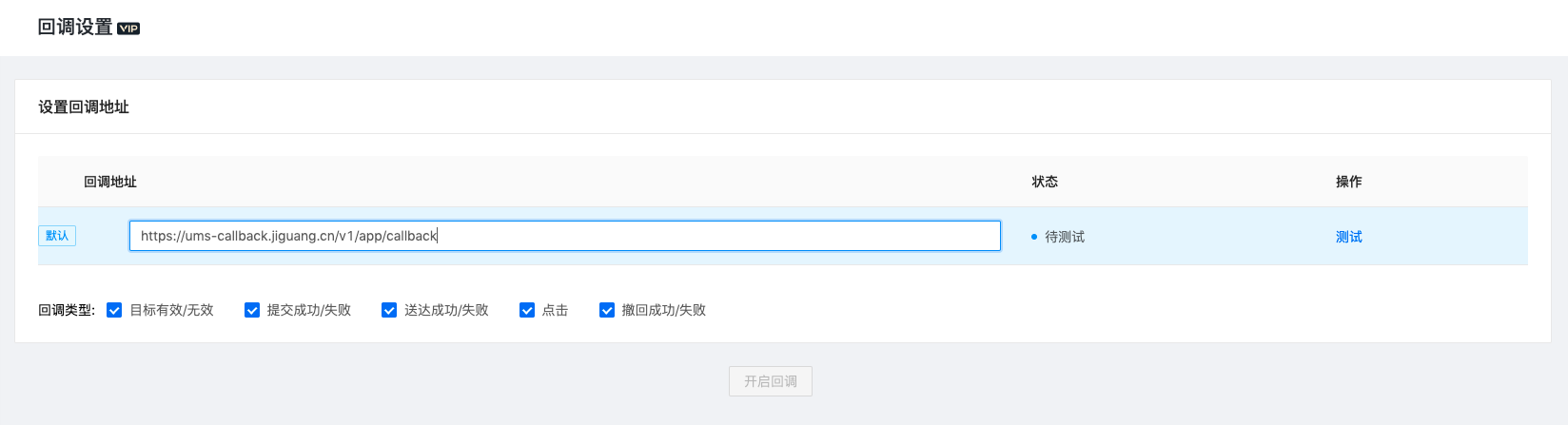
Callback Method
When there is a callback message, an HTTP POST request is used to submit the notification message to the callback URL entered by the developer. Note that if the callback fails, Jiguang retries after a certain interval. The retry interval is 50 seconds, with up to 3 retries. If all 3 retries fail, the callback is discarded.
If the developer callback service returns HTTP code 200, the callback is considered successful. Otherwise, it is considered failed.
Data is sent in batch callbacks: one callback is made for every 100 records. If 100 records are not reached within 10 seconds, a callback is still made.
Callback Security Verification
If developers need to verify whether callback information comes from Jiguang, the developer server can verify the Authorization information in the Jiguang request header (HTTP Header). Details are as follows:
Format:
Authorization: Basic ${base64_auth_string}.The generation algorithm for
base64_auth_stringis:base64(Channelkey:MasterSecret).Channelkey and MasterSecret can be obtained from channel information. Developers compare the received Authorization with the Authorization generated by their local code using the same rule. If they match, the callback can be considered to come from Jiguang.
Callback Parameters
| Field Name | Field Type | Field Description |
|---|---|---|
| type | int | Type. Values: 0 target valid / 1 target invalid / 2 submission success / 3 submission failure / 4 delivery success / 5 delivery failure / 6 click / 7 retraction success / 8 retraction failure |
| channelkey | String | channelKey of the channel corresponding to this record |
| msgid | String | msgid corresponding to this record |
| userid | String | User userid corresponding to this record. Empty when sending with a custom channel ID. |
| sender_id | String | Channel registration ID corresponding to this record. It has a value for all records generated after messages are sent through a channel, and also when sending with a custom channel ID. For example, if it is an App channel, sender_id is the App registrationID. |
| sender | int | Delivery channel/processing module corresponding to this record. Values: 0 UMS system / 1 App / 2 WeChat Official Account / 3 WeChat Mini Program / 4 Email / 5 SMS / 6 DingTalk / 7 Alipay Life Account / 9 5G Message |
| wechatwk_sender | int | Channel category for the WeCom channel. Has a value when sender=10 (WeCom). Values: 0 WeCom internal API (default), 1 WeCom connected enterprise sending API |
| app_platform | int | Operating system of the device corresponding to App message delivery. Has a value when sender=1 (App). Values: 0 Android / 1 iOS / 2 Web / 3 QuickApp |
| app_sender | int | App vendor channel. Has a value when sender=1 (App). Values: 0 Jiguang / 1 Huawei / 2 OPPO / 3 vivo / 4 Xiaomi / 5 Meizu / 6 FCM / 8 APNS |
| sent_time | long | Time when this record was generated, in seconds-level timestamp |
| error | JSON Object | Reason for invalid target/submission failure/delivery failure. Has a value when type=1, 3, 5, or 8. Format: {"code":,"message":""} |
| params | JSON Object | Custom parameters specified by the user in callback when sending the message request |
Callback message body example:
          [{
    "type": 3,
    "channelkey":"xxxxxxx",
    "msgid":  "11111",
    "userid": "xxxxxxx",
    "sender": 1,
    "app_platform": 0,
    "app_sender": 0,
    "sent_time": 1557133599,
    "error": {"code":1014,"message":""},
    "params": {
        "name":"joe",
        "age":26
    }
},{
    "type": 3,
    "channelkey":"xxxxxxx",
    "msgid":  "11111",
    "user_id": "xxxxxxx",
    "sender": 1,
    "app_platform": 0,
    "app_sender": 0,
    "sent_time": 1557133599,
    "error": {"code":1014,"message":""},
    "params": {
        "name":"joe",
        "age":26
    }
}]
Test Demo
For callback security and validity verification, Jiguang provides a demo. You can use this tool on the enterprise server to implement verification, or refer to the code and implement it yourself.

