Console Operation Guide
In order to facilitate carriers to better understand and use UMS, this article will introduce in detail UMS functions on the console.
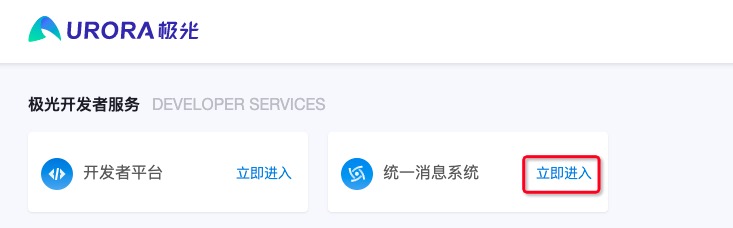
Log in firstJiguangOfficial website,Enterservice center, click to enter the unified messaging system
Channel management
Channels, that is, message access channels, are used to connect with the developer's upstream message production system or personnel. If the developer has multiple business lines and the message sending of each business line needs to be managed separately, it is recommended to create different channels to distinguish them.
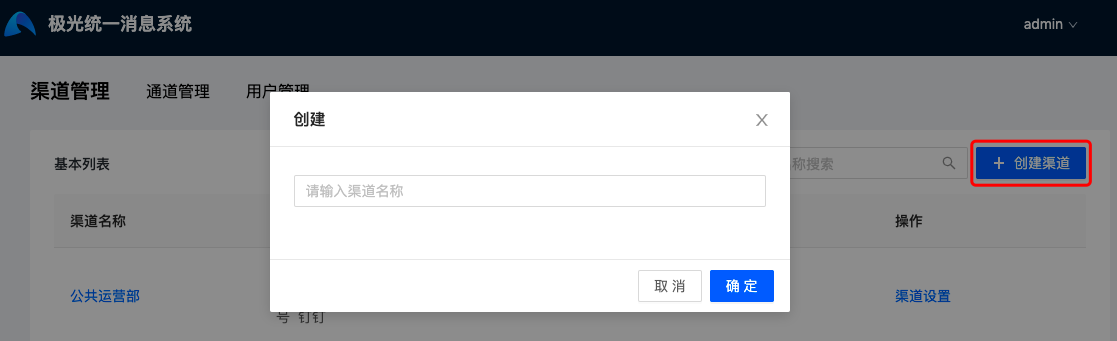
On the channel management page, click "Create Channel" and enter the channel name to create a channel.
Click "Basic Settings" to enter the channel information page, where:Channel Key and Master Secret will be used to call rest API When authenticating, please keep it properly to prevent leakage.
Channel management
Channel, that is, the message delivery channel, is used for docking App,WeChatOfficial Account,WeChatMini-program, SMS, email, Alipay Life Account, DingTalk, Enterprise WeChat and other channels for developers to establish contact with users.
Developers can configure the authentication information required for the above channels in UMS In the system, they can be freely combined and assigned to any channel for use, thereby achieving unified management of channels.
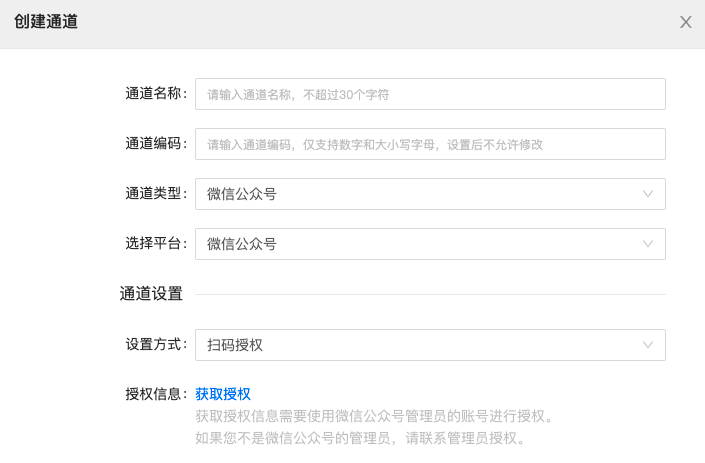
On the channel management page, click "Create Channel" to display the channel configuration page. The channel information includes: channel name, channel code, channel type, service provider platform and corresponding authentication information. The description is as follows:
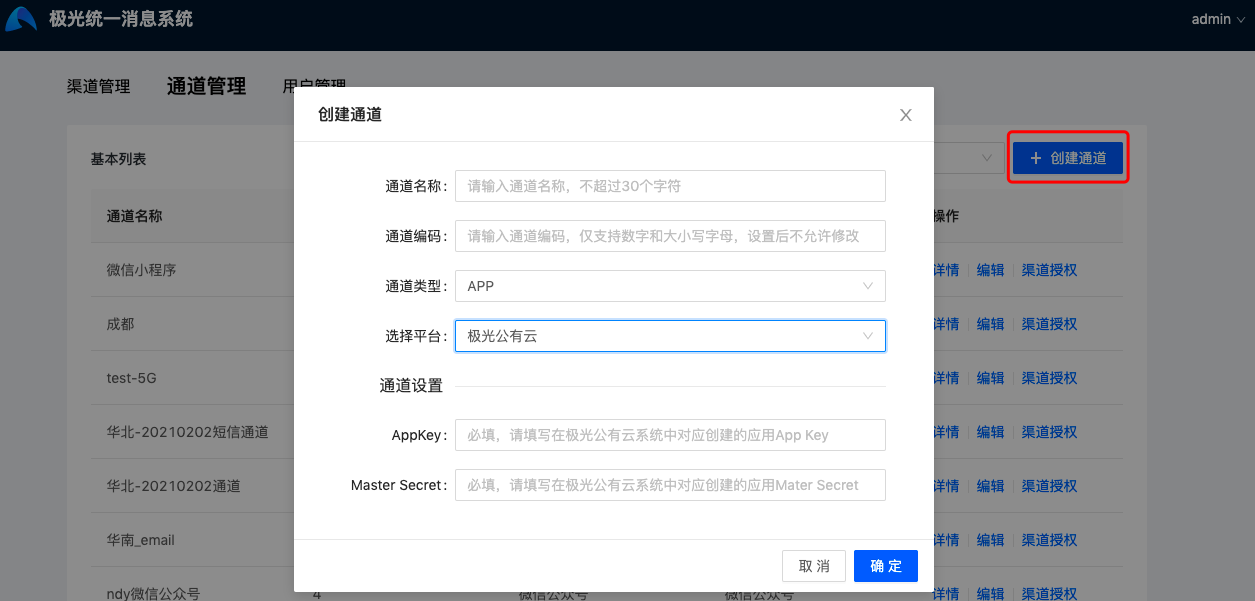
- Channel name: Name the channel, which is globally unique and requires no more than 30 characters. Chinese, English and special characters are supported.
- Channel encoding: The binding ID of the channel, which is globally unique and will be used when uploading user information. Only numbers and uppercase and lowercase letters are supported. Modification is not allowed after setting.
- Service provider platform: When there are different service providers under certain channel types, a choice will be provided. If not, the value will be consistent with the channel type.
- Channel settings: After selecting the platform, you will need to enter the corresponding authentication information. The platforms and authentication information supported by each channel type are described below.
| Channel type | platform | Authentication information | illustrate |
|---|---|---|---|
| App | JPushpublic cloud | AppKey | Please fill inJiguangApplications created corresponding to public cloud platforms Appkey |
| MasterSecret | Please fill inJiguangApplications created corresponding to public cloud platforms MasterSecret | ||
| JPushprivate cloud | Request address | Please fill inJiguangPrivate cloud system REST API request address, if the port in the request address is not 80,443、25、465 One of these 4, you need to contact the business description port | |
| AppKey | Please fill inJiguangCorresponding applications created in the private cloud system Appkey | ||
| MasterSecret | Please fill inJiguangCorresponding applications created in the private cloud system MasterSecret | ||
| WeChatOfficial Account | WeChatOfficial Account | AppID | Please obtain it from the "WeChat Public Platform-Development-Basic Configuration" page |
| AppSecret | Please obtain it from the "WeChat Public Platform-Development-Basic Configuration" page | ||
| WeChatMini-program | WeChatMini-program | AppID | Please get on the “Weblin Public Platform - Development - Development Settings” page |
| AppSecret | Please get on the “Weblin Public Platform - Development - Development Settings” page | ||
| Short message | JSMS | AppKey | Please fill inJSMSApplications created corresponding to the platform Appkey |
| MasterSecret | Please fill inJSMSApplications created corresponding to the platform Mater Secret | ||
| CMPPprotocol | supplier | Please fill in the SMS platform supplier | |
| Gateway IP | Please fill in the SMS platform CMPP IP address of the interface | ||
| gateway port | Please fill in the SMS platform CMPP The port of the interface, if the port is not 80,443、25、465 One of these 4, you need to contact the business description port | ||
| account | Please fill in the account number applied for on the SMS platform | ||
| password | Please fill in the password applied for on the SMS platform | ||
| access number | Please fill in the access number applied for on the SMS platform | ||
| Number of connections | Please fill in the maximum number of connections applied for on the SMS platform | ||
| business code | Optional, please fill in the business code applied for on the SMS platformService_id | ||
| SMTPprotocol | account | Please fill in the email service account | |
| password | Please fill in the password for the email service | ||
| Sender address | The sender’s email address displayed when the recipient views the email | ||
| Sending server address | Please fill in the sending address of the mail service | ||
| Sending port | Please fill in the sending port of the mail service. If the sending port filled in is not 80,443、25、465 One of these 4, you need to contact the business description port | ||
| Encryption method | Three options: None,SSL/TLS、STARTTLS | ||
| Alipay Life Account | Alipay Life Account | AppID | Please get it at "Alipay Life Account Platform-Home Page-Upper Right Corner" |
| PrivateKey | Please use "Alipay Open Platform Development Assistant" to generate a secret key and fill in the application private key | ||
| DingTalk | DingTalk | AgentId | Please get it in DingTalk Developer Backend-Application Development-Application Information |
| AppKey | Please get it in DingTalk Developer Backend-Application Development-Application Information | ||
| AppSecret | Please get it in DingTalk Developer Backend-Application Development-Application Information | ||
| Enterprise WeChat | Enterprise WeChat | Enterprise ID | Please obtain it on the "Enterprise WeChat Management Backend-My Business-Business Information" page |
| AgentId | Please obtain it on the "Enterprise WeChat Management Backend-Application Management-Application-Details" page | ||
| Secret | Please obtain it on the "Enterprise WeChat Management Backend-Application Management-Application-Details" page |
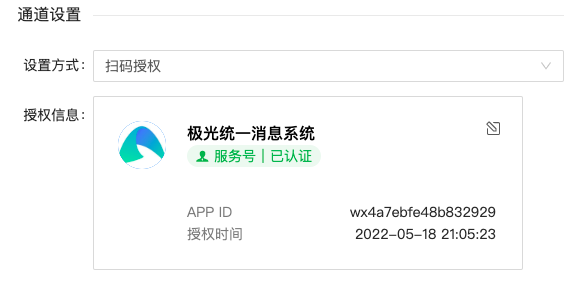
- WeChatOfficial Accountand WeChatMini-programSupports adding by scanning QR code for authorization. You need to use WeChat to obtain authorization information.Official AccountThe administrator's account is used. After the authorization is successful, the relevant information will be displayed.Official AccountorMini-program。
If the company’s business system has already connected to WeChatOfficial Account/Mini-programbusiness, hope UMS Using WeChatOfficial Account/Mini-programDo not conflict with the business system (token, obtain statistical data), it is recommended to use this code scanning authorization method to create the channel.
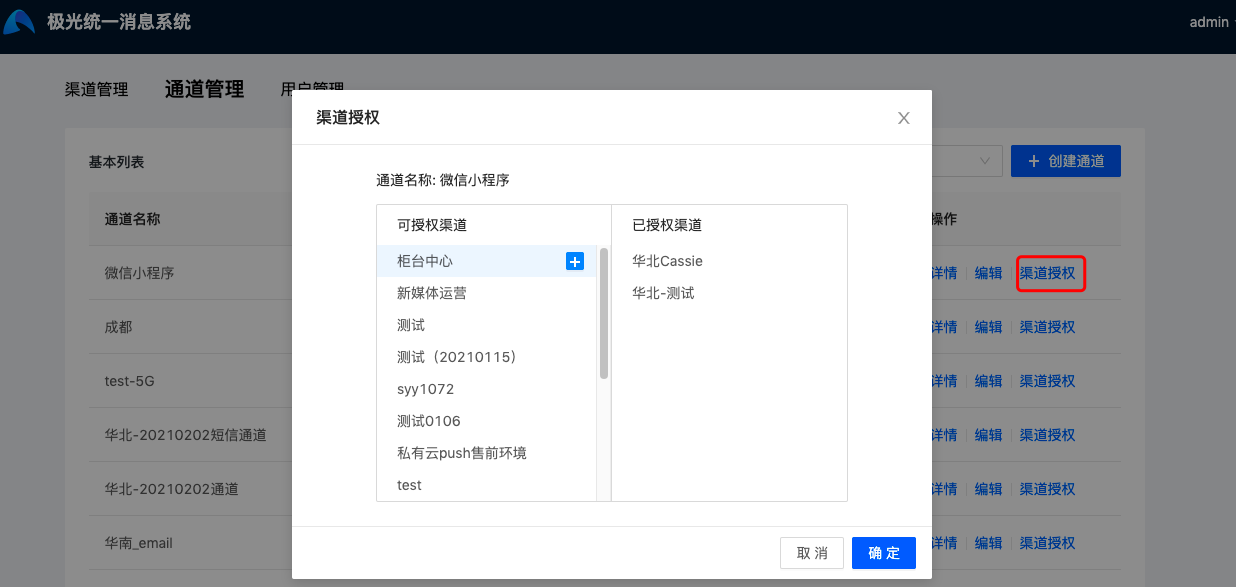
After the channel is successfully created, the channel can be authorized to a specific channel. Click "Channel Authorization" to authorize and cancel the authorization of the channel. After authorization, the channel will be able to send messages to the channel.
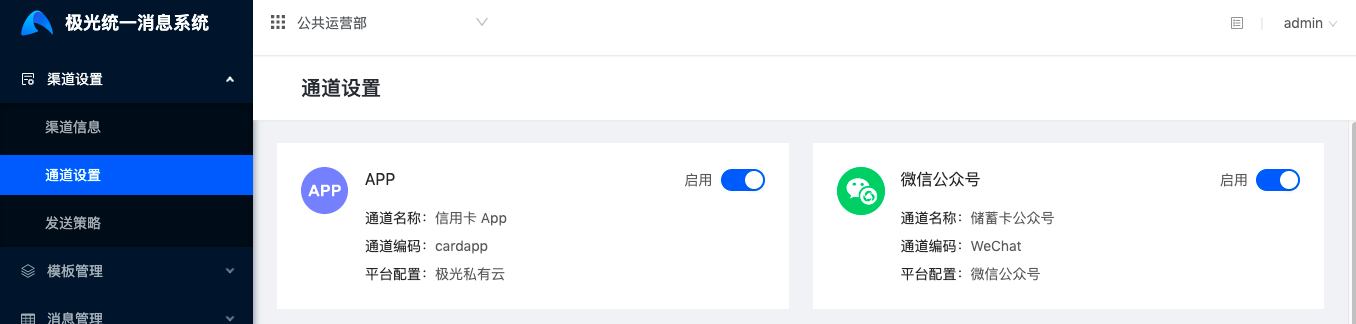
After successful authorization, the channel will appear in the channel's "Channel Settings" - "Channel Settings" page. To prevent information leakage, this page only displays the channel name, channel code and platform configuration, and the authentication information will not be displayed.
User management
Users, that is, registered users obtained by the enterprise through various channels,UMS It will help enterprises build a unified management user system.
UMS use userID As a user's unique identifier, the Key The value of is defined by the enterprise itself, and the user code that has been set in the current business system can be assigned to userID, can also be set separately.
- Generally speaking, enterprises will generate a unique identifier for registered users, and all information generated by the user will be bound to this identifier. If not, the enterprise can also take this opportunity to integrate user information.
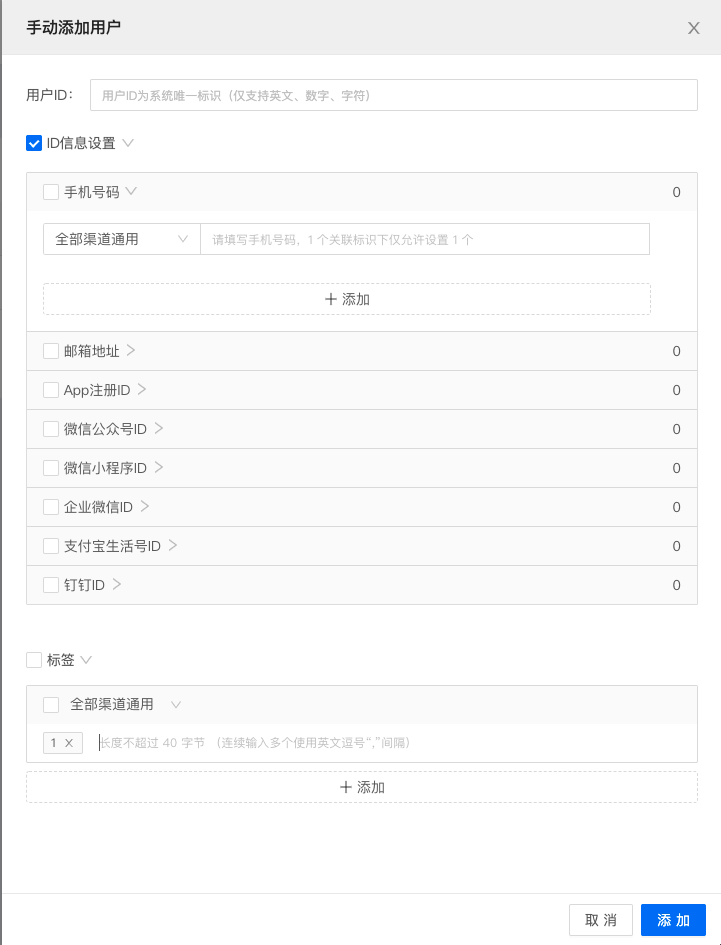
On the user management page, two methods are supported: "manual addition" and "file upload". Click "Manual Add" and a visual editing page will appear.
Click "File Upload" to support Excel The format file uploads user information. It supports a maximum of 50,000 pieces of data at a time. The file size does not exceed 30 M. For the format requirements of imported data, please refer to the sample template.
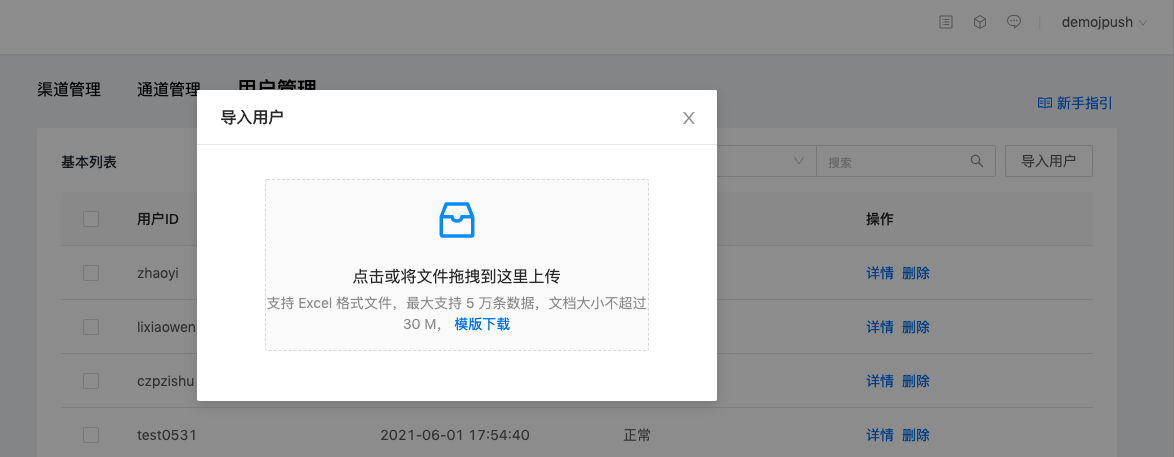
Importing userID When corresponding to each channel, an important key field is bind_id(Binding ID), which can take the value all, channel encoding, channel Key
- all That is, global settings, common to all channels and channels, valid for tags, mobile phone numbers, email addresses, DingTalk IDs, Enterprise WeChat IDs, and Enterprise WeChat Interconnect enterprise IDs. Note: Only the associated identifiers of DingTalk ID, Enterprise WeChat ID, and Enterprise WeChat Interconnect enterprise IDs are allowed to be transmitted. all
- specific ChannelKey, this value can be obtained in channel information, and is valid for tags, mobile phone numbers, and email addresses. If you need to set exclusive information for a certain channel, you can use Channel Key Make a mark, if not needed, pass it all
- The specific channel code can be obtained in the channel details (set by the carrier when creating the channel). userID binding App Registration ID, WeChatOfficial Account ID, WeChatMini-program ID, Alipay life account ID must specify the channel code
In addition to page import,UMS Also available REST API Import user information,Click to view API document。
API There are two authentication methods for uploading user information:
- channel key and key authentication
- Only supports uploading/modifying the binding ID of: this channel ChannelKey、 all, the coded information of the authorized channel.
- overall situation key and key authentication, this information can be obtained at the end of the user management page.
- Supports uploading user information of all channels and channels
- Support deleting users
Note: use UMS When the system sends a message, it is not necessary to upload user information. It is enough to pass the ID information of the corresponding channel when sending. However, if you want to use the sending strategy for reissue, it is necessary to upload the user information in advance. The sending strategy only takes effect when the user ID is sent.
Channel settings
Click Channel Settings - Channel Settings to enable or close the channel authorized to the channel.
The channel is enabled by default after authorization. Closing the channel will have the following effects:
- Scheduled tasks containing this channel will fail to be sent at the scheduled time point.
- The sending strategy and general template containing this channel will become invalid and cannot be used.
- You will not be able to select the channel when sending a message
Re-enabling the channel will make the invalid sending policies and templates containing this channel become normally available.
Send policy
Click Channel Settings-Sending Strategy to create different sending strategies for the channel. Specify them when sending to have messages delivered according to the specified strategy.
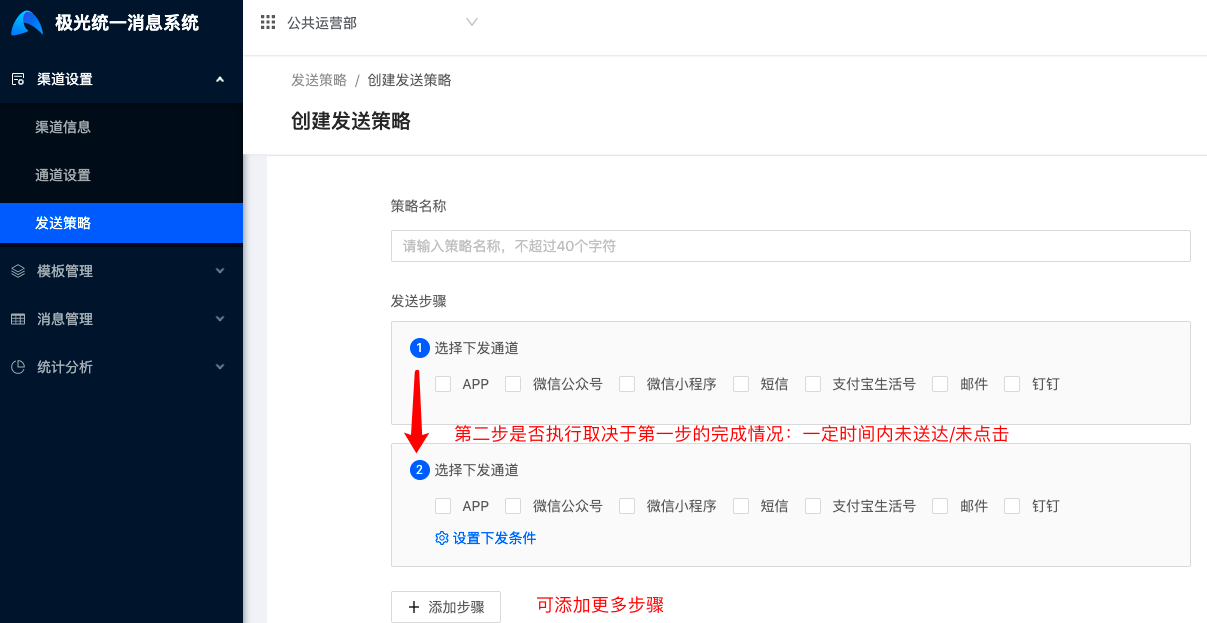
The main logic of the sending strategy is: within a certain period of time, if the message is not delivered/not clicked in the channel of the previous step, then the next step is executed.
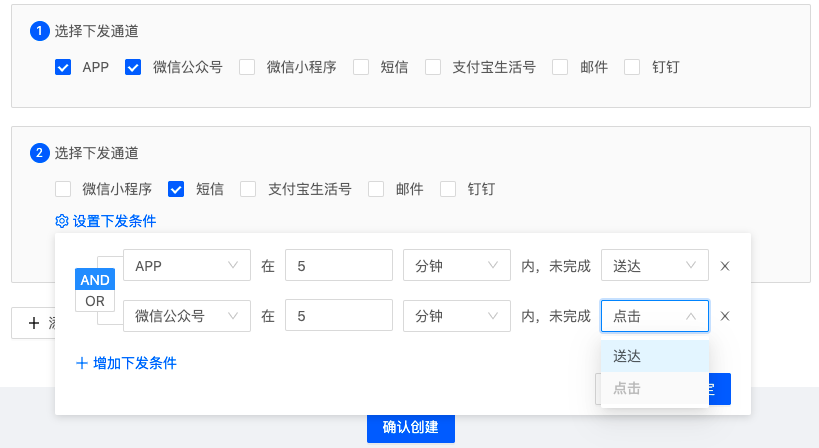
- In the sending step, each channel is only allowed to be selected once.
- The sending policy must be set in 2 steps. If you only need concurrency, there is no need to create a sending policy.
- Starting from step 2, the purpose of setting the release conditions is: when the condition is triggered in the previous step, execute this step
- Since channel receipts have a certain delay, it is recommended that the time set in the delivery conditions not be too small.
Examples of sending policy settings and actual sending effects:
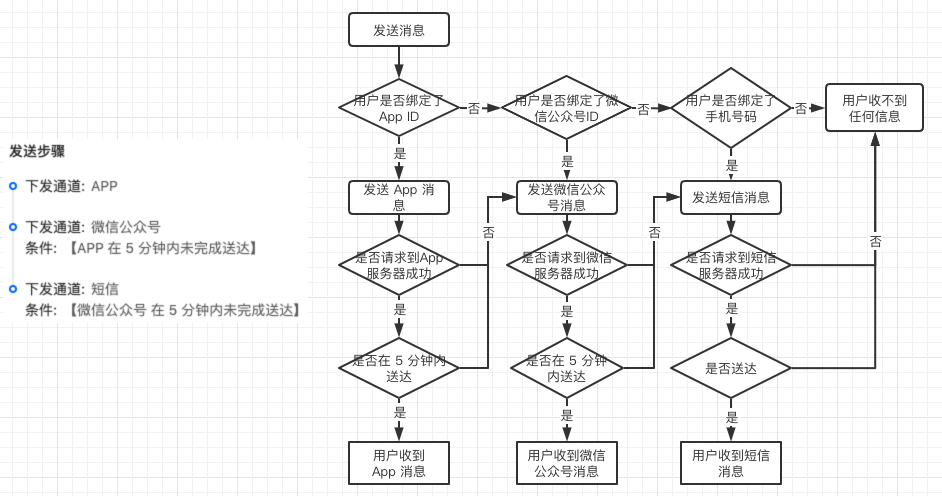
in sending conditions AND, OR relationship description:
- AND: The next step will be executed only when all conditions are triggered. For example:【APP Delivery not completed within 5 minutes]AND【WeChatOfficial Account Send a text message when the click is not completed within 10 minutes, then if App If delivered within 5 minutes, no further text messages will be sent
- OR: If any condition is triggered, the next step will be executed. On the other hand, if all conditions are not triggered, the next step will not be executed. For example:【APP Delivery not completed within 5 minutes] OR [WeChatOfficial Account If you send a text message when the click is not completed within 10 minutes, even if App Delivered within 5 minutes, but WeChatOfficial AccountIf not clicked within 10 minutes, a text message will also be sent.
Whether each channel supports detection of delivery and click status, and related configuration requirements are explained as follows:
| Channel type | message status | Whether to support | illustrate |
|---|---|---|---|
| App | service | yes | 1. Detect the status of actual delivery to the mobile phone. 2. It is necessary to UMS callback address:https://ums-callback.jiguang.cn/v1/app/callback configured toJiguangGo to the delivery callback settings for public cloud and private cloud. |
| Click | yes | 1. Detect the actual click status of the notification bar message. 2. It is necessary to UMS callback address:https://ums-callback.jiguang.cn/v1/app/callback configured toJiguangGo to the click callback settings for public cloud and private cloud. |
|
| WeChatOfficial Account | service | yes | 1. UseAppIDTo create a channel using a secret key, please set the server address on the "WeChat Public Platform-Development-Basic Configuration" page https://ums-callback.jiguang.cn/v1/wechatoa/callback 2. Channels created using QR code authorization do not need to configure addresses. |
| Click | yes | 1. When jump links are configured, detection is supported. 2. Configuration jumpMini-programDetection is not supported. |
|
| WeChatMini-program | service | yes | 1. UseAppIDThe channel created by secret key will be delivered when the request is successful. 2. Channels created using QR code authorization do not need to configure addresses. |
| Click | no | Mini-programDetecting click status is not supported | |
| Short message | service | yes | 1. Detect the actual delivery status of SMS messages 2. Please beJSMS-SMS settings - callback settings - sending status callback, configure UMS callback address https://ums-callback.jiguang.cn/v1/sms/callback |
| Click | yes | When the text message content contains url variables, and supports detection when a jump link is passed | |
| service | yes | It is delivered when the receiving server returns a successful reception instruction. | |
| Click | yes | No configuration required | |
| Alipay Life Account | service | yes | It only supports detecting whether sending to the Alipay Life Account server is successful, and cannot detect whether it is actually delivered to the user. |
| Click | yes | The template message of Alipay Life Account must fill in the jump link, so it supports the detection of click status. | |
| DingTalk | service | yes | Supports detection of real delivery, no configuration required |
| Click | yes | Currently only clicks are supported for card messages | |
| Enterprise WeChat | service | yes | It only supports detecting whether the sending to the enterprise WeChat server is successful, and cannot detect whether it is actually delivered to the user. |
| Click | yes | For "withURLtext messages,MarkdownMessages" "graphic messages, external link graphics and texts, and text cards" support click detection, "Mini-programNotification messages, pictures, voices, video messages, file messages" do not support detection |
Template management
Click Channel Management-Function Module-Template to enter the template management page. Currently, it supports the creation of single- and multi-channel general templates, and the creation and import of templates from third-party platforms, such as WeChat.Official Account/Mini-program, Alipay Life Account,JSMSetc. templates.
Multi-channel universal template
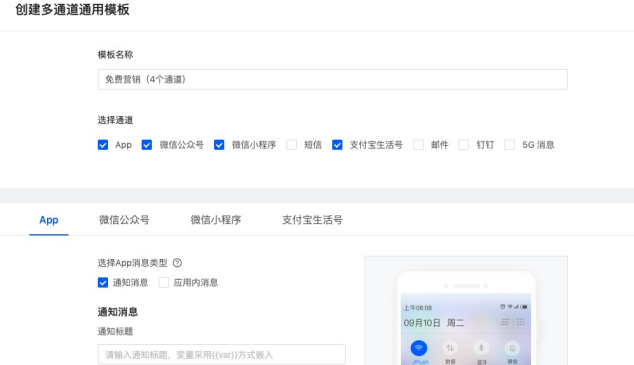
UMS Supports creating multi-channel general templates before sending messages. When creating a template, you can select the corresponding channel, that is, you can choose to create a single or multi-channel template.
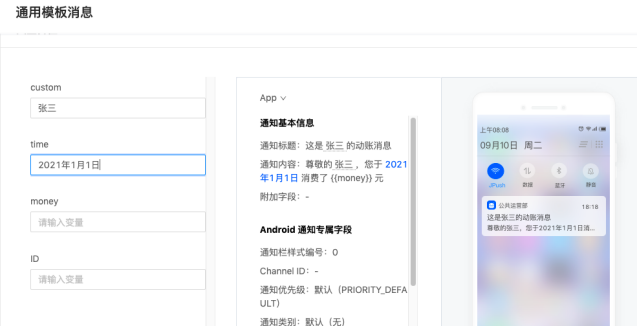
The content of each channel can be embedded in variables, and the format is:{{var}}, the content of different channels can be set to the same variable. After the creation is successful, when using the general template to send messages, you only need to assign a value to the variable. Passing a variable can adapt to multiple channels. It facilitates enterprises to control message formats and saves operation time when delivering messages through multiple channels.
WeChatOfficial Account
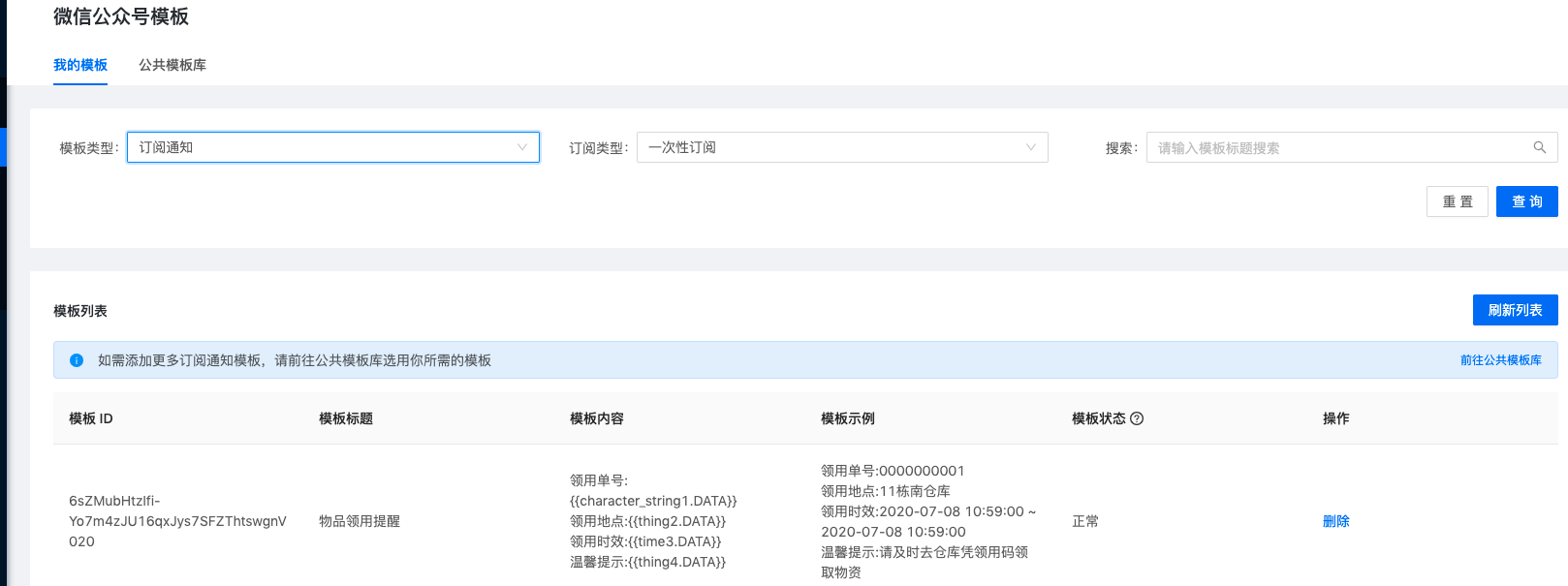
WeChatOfficial AccountMessages are divided into template messages and subscription notifications. Correspondingly, templates are also divided into two categories.
After deleting the template on the WeChat public platform, in order to avoid the operation being a mistake,UMS The corresponding stored template will not be deleted directly, only the template status will be changed to invalid. If the enterprise confirms that the template is no longer used, it can UMS Click Delete on the page to clear the stored information.
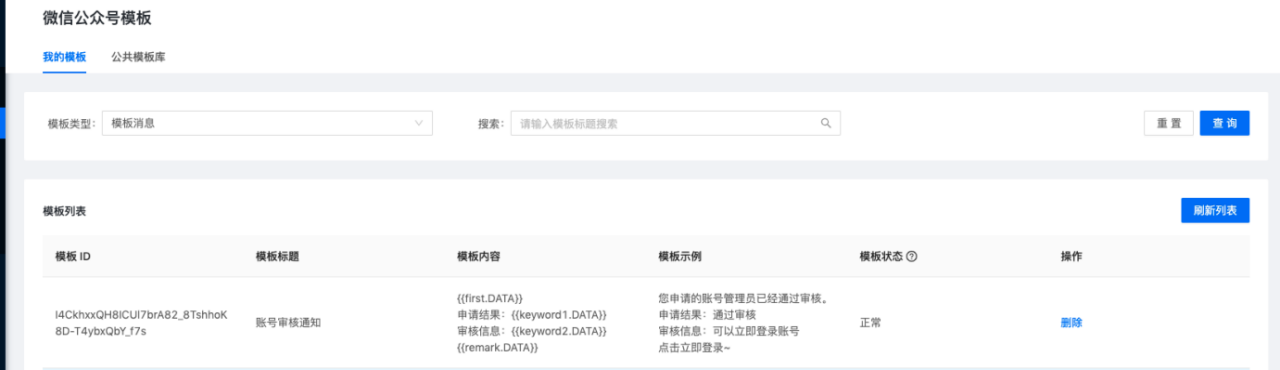
- Template message
Templates for template messages need to be added or created on the WeChat public platform-template message page. then in UMS WeChatOfficial AccountOn the template page, click Refresh to obtain the added template information.
- Subscribe to notifications
Subscription notifications can be added or created on the WeChat public platform - subscription notification page, and then UMS Click Refresh to obtain it; you can also select it directly on the public template library page.
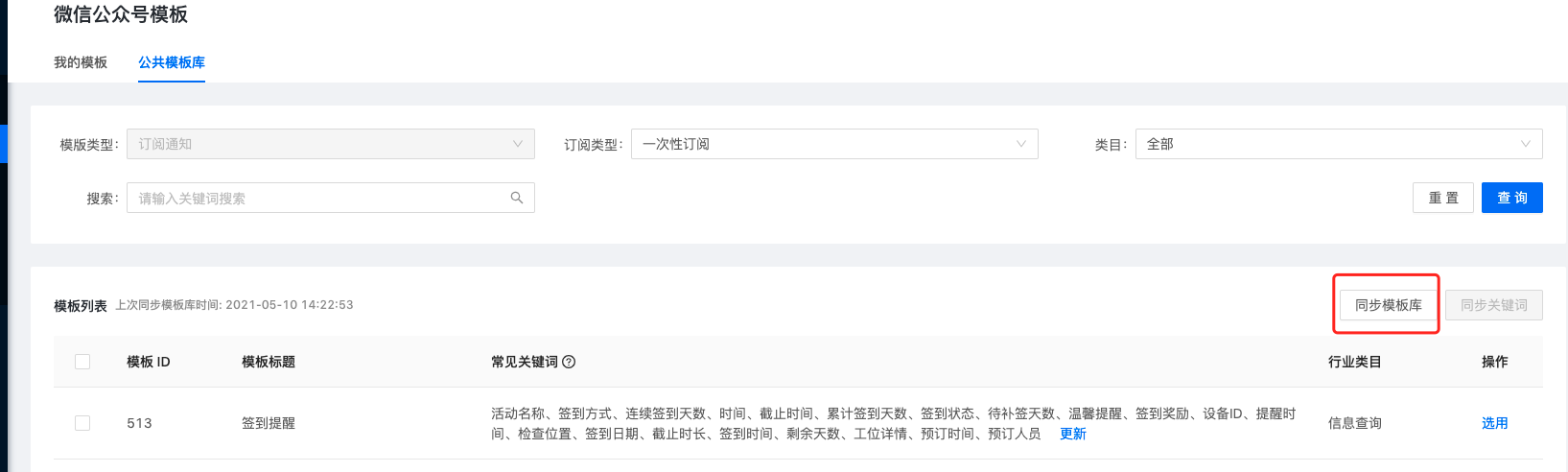
- Public template library
Click Sync Template Library in the public template library to synchronize the template ID and template title. After searching for the template you want, click Update Keywords to obtain the optional keywords for the template.
The number of synchronized template libraries and keywords is limited. If it is not enough, you can go toWeChat official communityApply to increase the frequency.
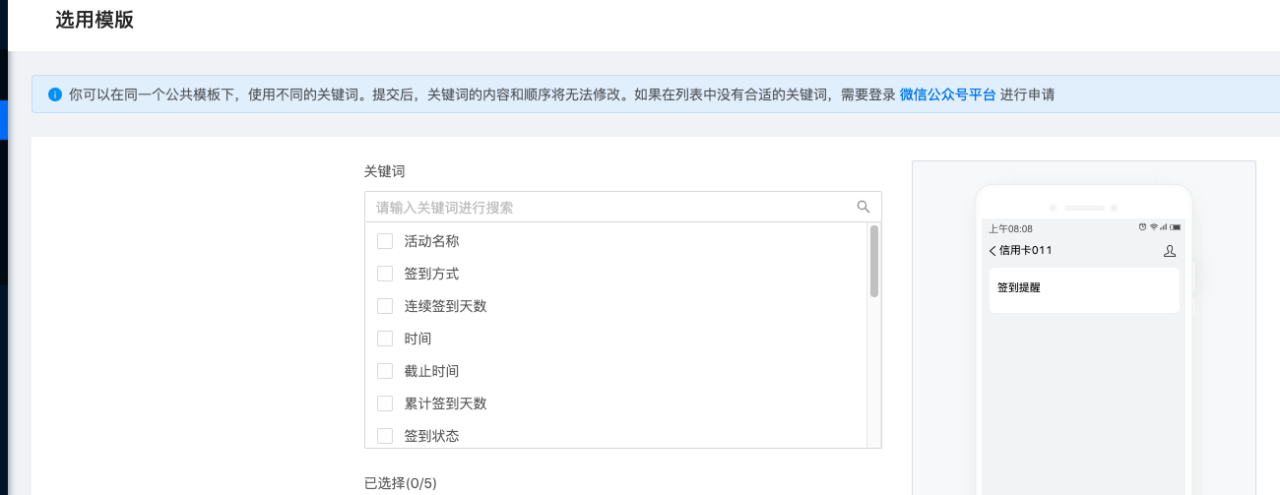
Click Select to select keywords in the template to generate your own template. This operation is consistent with the selection operation on the WeChat public platform. Successful creation will be recorded on the WeChat platform.
WeChatMini-program
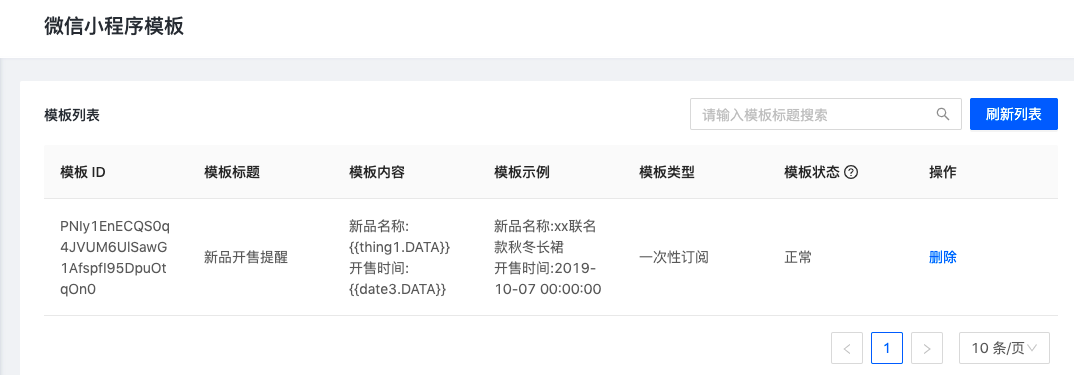
WeChatMini-programTemplates need to be added or created on the WeChat public platform-template message page, and click refresh to get the list.
Short message
UMS Default docking supportJSMS, and supports standard CMPP protocol.
one,JSMS
SMS templateThe management is divided into "text template management" and "signature management". When sending, the signature and the text template are combined, and the final display of the text message = signature + text. useJSMSNeed to be completed firstReal name authentication
1、SMS templateIt is divided into three types: "Verification Code", "Notification" and "Marketing". You need to select the type when creating.
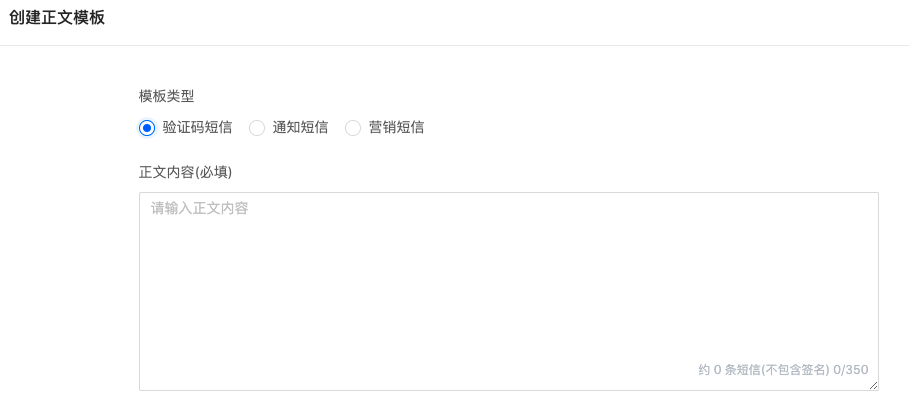
After creation, you need to wait for review, which is generally expected to be completed within three hours. Review working hours: Monday to Friday,9:00 ~ 11:30,13:00 ~ 18:00(Legal holidays are postponed).
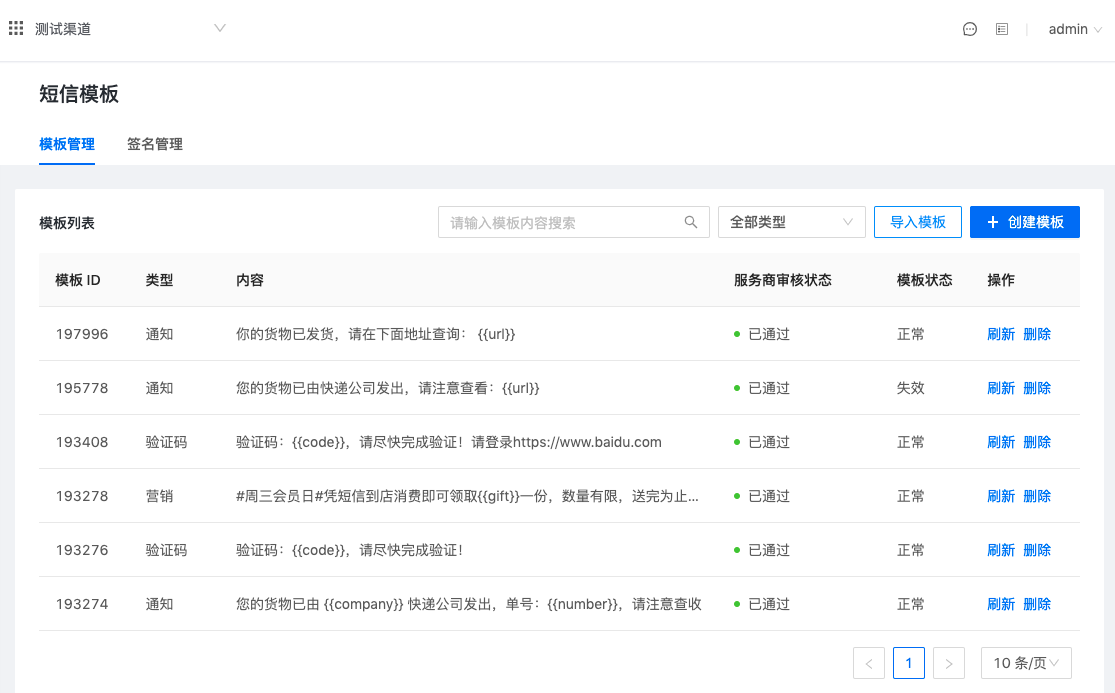
- The review status will be displayed in the list, and you need to manually click Refresh to obtain the latest review status.
- Unpassed templates are allowed to be edited, while templates that have passed and are under review are not allowed to be edited.
- Click Delete to deleteJSMSPlatform templates
- There are three template states: normal, invalid, and unknown.
- If the template can be queried normally after refreshing, it is considered normal.
- if inJSMSThe platform has deleted the template. Click Refresh to change the status of the template to invalid.
- After successful creation, if the SMS channel of this channel is deauthorized or a SMS channel is changed, the status will be displayed as unknown. At this time, if you confirm that the operations of canceling authorization and changing channels are correct, you can delete these templates. If you do it by mistake, you can re-authorize, and you can continue to use these templates after refreshing the template status.
In addition to creating new templates, it also supports importing existingJSMSFor the template created by the platform, just enter the template ID.
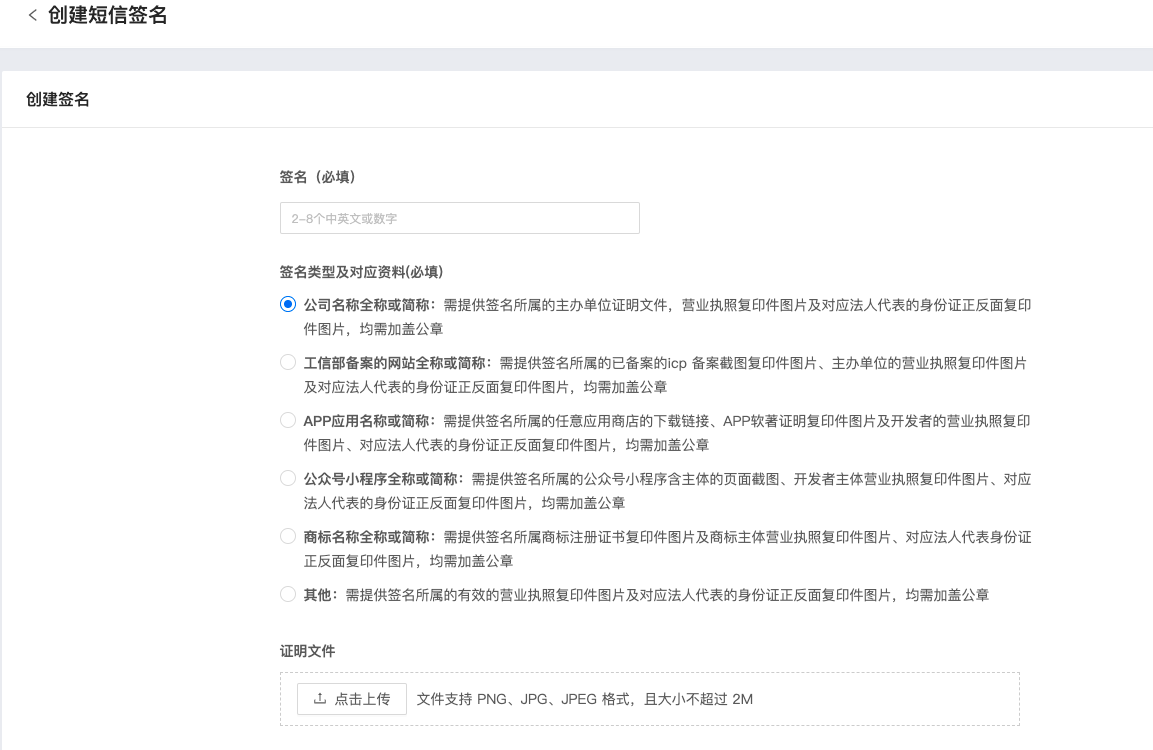
2、SMS signatureSupported in UMS Create a signature in the system, or you can choose to firstJiguangworkbench-JSMS-Apply for a signature on the signature template page, and then import the approved signature ID UMS in the system.
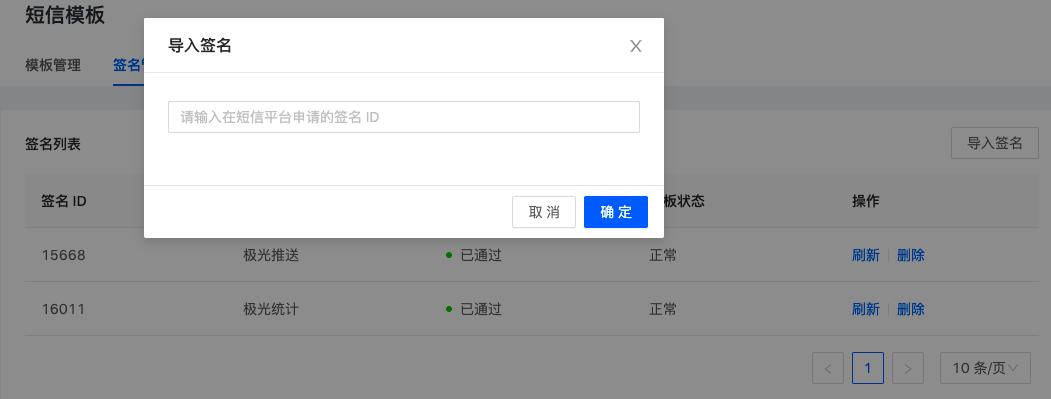
There are also three signature statuses: normal, invalid, and unknown.
- If the signature can be queried normally after refreshing, it is considered normal.
- if inJSMSThe platform has deleted the signature. If you click refresh, the signature status will change to invalid.
- After successful creation, if the SMS channel of this channel is deauthorized or a SMS channel is changed, the status will be displayed as unknown. At this time, if you confirm that the operations of canceling authorization and changing channels are correct, you can delete these signatures. If it is a mistaken operation, you can re-authorize, and you can continue to use these signatures after refreshing the signature status.
two,CMPP protocol
Support through CMPP The SMS platforms connected to the agreement generally do not need to create/do not provide interfaces for creating templates and signatures. Therefore, if you need to report templates and signatures in advance, you must go to its official platform to apply for creation.UMS It is also impossible to display the created template simultaneously.
Alipay Life Account
The template of Alipay Life Account requires loginLife account backstage, apply on the template message page. After applying, click Template Details, copy the entire "Template ID", "Template Name" and "Key Fields" and paste them into UMS。
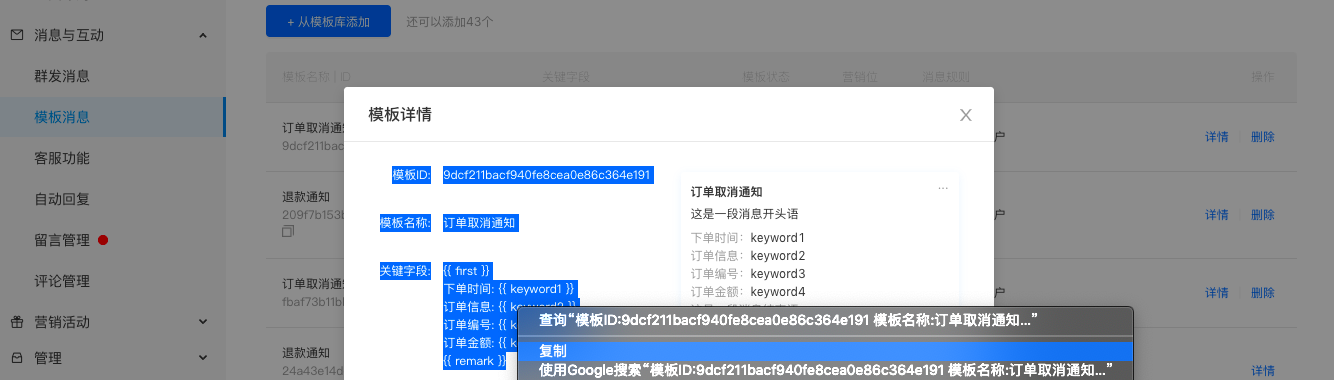
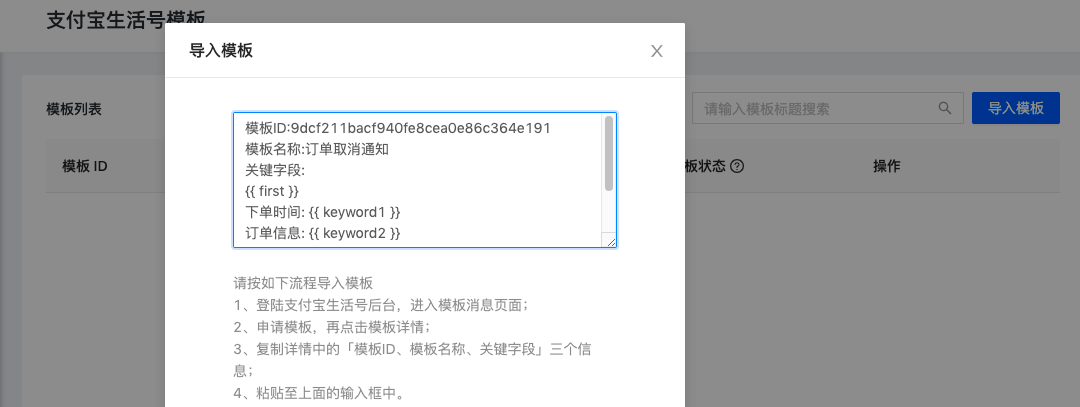
Because Alipay does not provide a way to query and obtain template list information API, so after deleting the template on the Alipay platform,UMS Unable to detect state changes, only when UMS When using this template to push messages, if the Alipay platform feedback template does not exist, the status of the template will be changed to invalid.
Message management
Click Push on the channel management page to enter the message management page. Under this module, you can send messages, view history records and scheduled tasks.
Push message
There are two types of message sending: ordinary messages and general template messages. It supports multiple strategies such as immediate, scheduled, concurrent, reissue, filtering blacklist, filtering whitelist, and setting message priority.
Message priority
The message priority is divided into 3 types: medium, medium and low. The default is medium when not transmitted. Message processing queues of different priorities are different.
The message priority function can be used to distinguish broadcast and point-to-point messages to prevent broadcast push from affecting the speed of instant push.
General news
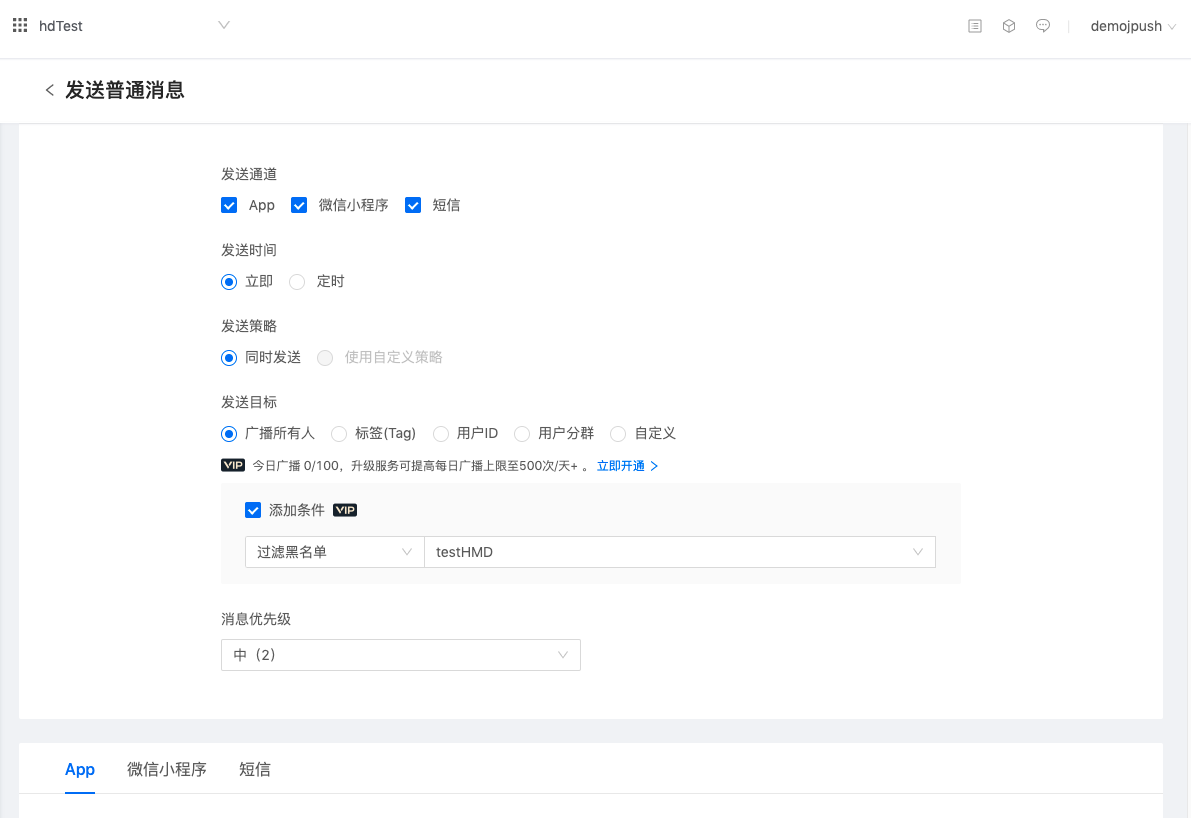
On the ordinary message sending page, carriers can freely choose to send single-channel or multi-channel messages, and all message contents can be filled in freely.
Message sending is divided into the following steps: Select the push channel → Set the sending time (immediate, scheduled) → Select the sending strategy (send simultaneously, customized strategy) → Set the push target (broadcast, label, user ID,user segment, Customize the delivery channel ID) → Choose whether to filter the blacklist/whitelist (needs to be created in advance) → Set the message priority (divided into 3, medium and low, the default is medium) → Fill in the message content of each channel.
Generic template message
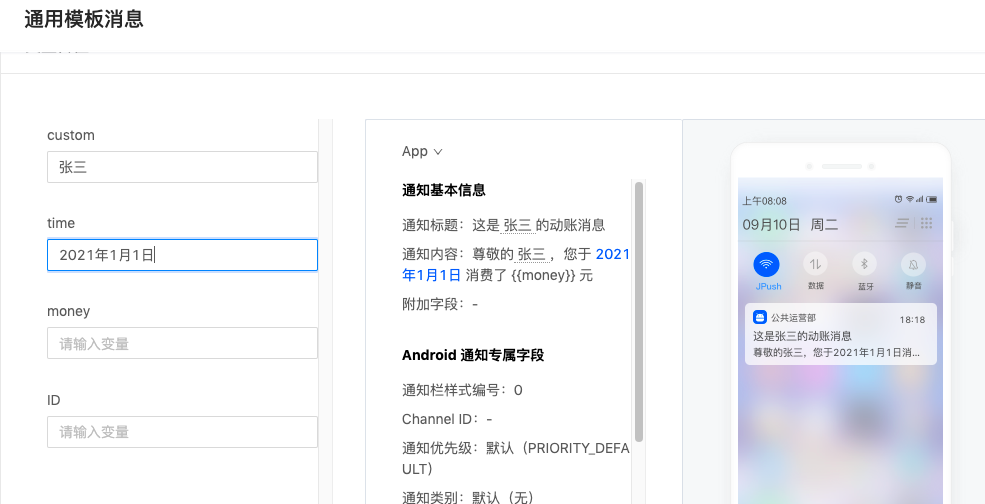
On the general template message sending page, carriers can select the created template to pass variable values, and then select send. The sending channel is determined by the template.
Message sending is divided into the following steps: Select the message template → Set the sending time (immediate, scheduled) → Select the sending strategy (send simultaneously, customized strategy) → Set the push target (broadcast, label, user ID,user segment, Customize the delivery channel ID) → Choose whether to filter the blacklist/whitelist (needs to be created in advance) → Set the message priority (divided into 3 categories: medium, medium and low, the default is medium) → fill in the template variables.
Push history
Push history will record all message history generated. The free version will save it for 7 days by default.VIP Can be upgraded to save for up to 60 days.
You can view message details, forward messages, delete message records, and recall messages sent within 24 hours.
Message list
The list will display "message content, sending channel, number of effective users, number of sending users, delivery rate, click rate, sending status, sending time" and support filtering.
The delivery rate and click-through rate in the list are user-dimensional data. The indicator is defined as follows
          有效用户数:经过极光过滤机制筛选后的最终发送目标用户数量
发送用户数:用户的任一通道返回了发送成功 code 码,则对该用户来说即为提交成功。
送达用户数:用户的任一通道有实际送达回执,对该用户来说即为送达。
点击用户数:用户的任一通道有实际点击的用户数,对该用户来说即进行了点击动作。
送达率:送达用户数/发送用户数。
点击率:点击用户数/送达用户数。
注:在选择自定义通道 ID 推送时,1 个通道注册 ID 均计为 1 个用户
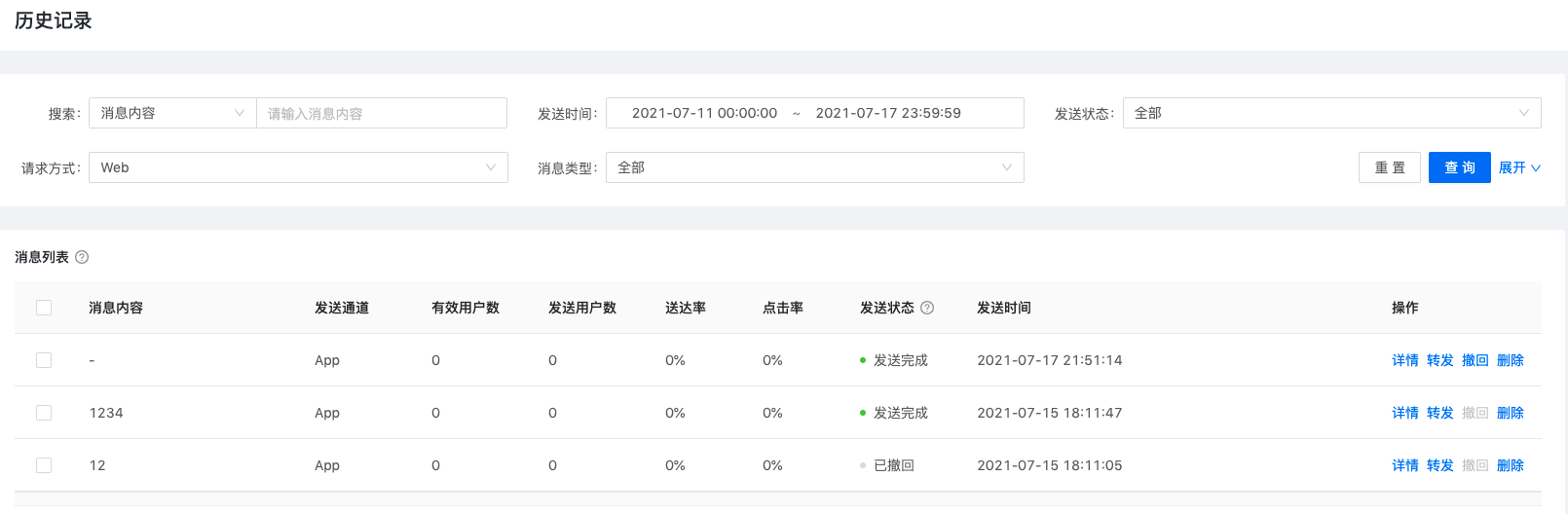
Message List-Withdraw Message
You can choose to recall messages sent within 24 hours in the message list. Messages older than 24 hours cannot be withdrawn. The sending status of withdrawn messages will be updated to "Withdrawn". A withdrawal status for each user is also added in the message life cycle.
Message details-data analysis
Click Details to enter the message details-data analysis page. On this page, you can view the funnel and loss analysis of a single message in the user and channel dimensions, as well as the mean comparison data in the channel dimension.
- Basic information
Important message content is extracted here for display. Please click "Task Details" to view the detailed message content.
- User data analysis
Here the data analysis revolves around users, i.e. userID, used to observe how many users (natural persons) have received this message (regardless of which channel it is received through). The data indicators of the conversion funnel are defined as follows:
          计划用户数:通过各种条件所圈定的初始发送目标用户数量
有效用户数:经过极光过滤机制筛选后的最终发送目标用户数量
发送用户数:用户的任一通道返回了发送成功 code 码,则对该用户来说即为提交成功。
送达用户数:用户的任一通道有实际送达回执,对该用户来说即为送达。
点击用户数:用户的任一通道有实际点击的用户数,对该用户来说即进行了点击动作。
送达率:送达用户数/发送用户数。
点击率:点击用户数/送达用户数。
注:在选择自定义推送时,1 个通道注册 ID均计为 1 个用户
User loss analysis only analyzes the loss from "planned users" to "effective users". From the beginning of sending, the losses are all generated on the channel side, so the losses in subsequent stages are recorded in the channel losses.
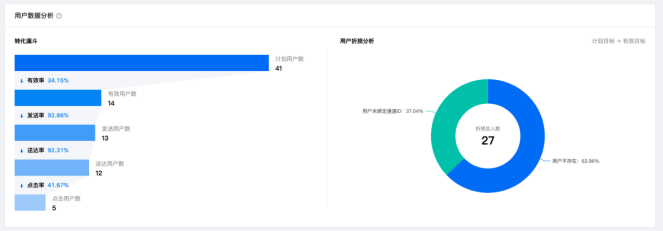
- Channel data analysis
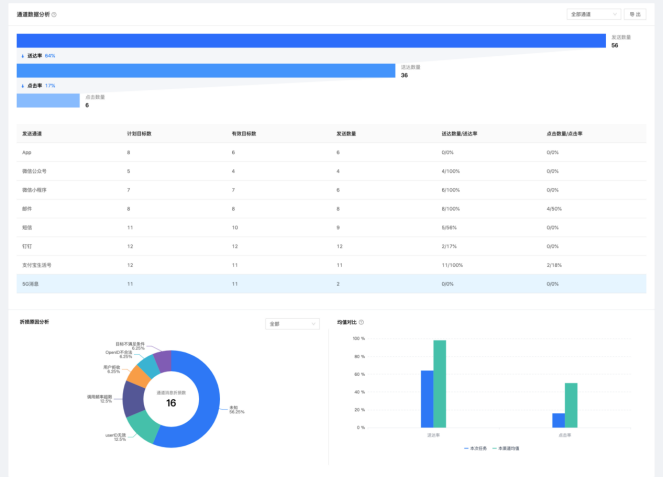
The data analysis here focuses on channels, that is, whether the registration ID of each channel bound by the user has received or clicked messages. Contains 3 reports: conversion funnel, loss analysis, and average comparison.
The data indicators of the conversion funnel are defined as follows:
          计划目标数:UMS系统将要提交到下游通道服务器的通道ID总数
有效目标数:经过下游通道过滤机制筛选后的最终发送目标数量
发送数量:在有效目标中,各通道服务器成功提交下发的目标数量
送达数量:在发送数量中,通过通道的回执判断已成功送达至用户的目标数量,7 天之后的送达数量不被计算在内
点击数量:消息送达后,成功被用户点击打开的目标数量,7 天之后的点击数量不被计算在内
送达率:送达数量/发送数量。
点击率:点击数量/送达数量。
Loss cause analysis is to classify and summarize the causes of failures and errors returned by each channel. The damage can be viewed in three stages: "planned target → effective target", "effective target → sent quantity" and "sent quantity → delivered quantity".
Note: Due to the possibility of no data and delay in the receipts of each channel, the number of channel message losses is not equal to the difference between the target number, the number of sends, and the number of deliveries.
The average comparison is to compare the delivery rate and click-through rate of this task with the average delivery rate and click-through rate of all messages in this channel within 30 days to observe the range of the sending effect of this message.
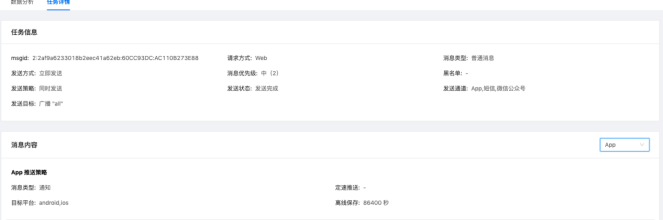
Message details - task details
This page displays all the message content of the message, which can be viewed by channels.
timed message
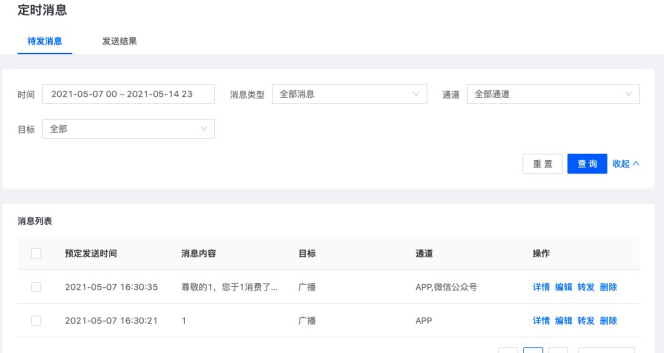
The scheduled message page is divided into pending messages and sending results.
The created scheduled tasks will be displayed in the messages to be sent. You can filter the scheduled sending time, message type, channel, and target, and you can also edit, forward, and delete scheduled messages.
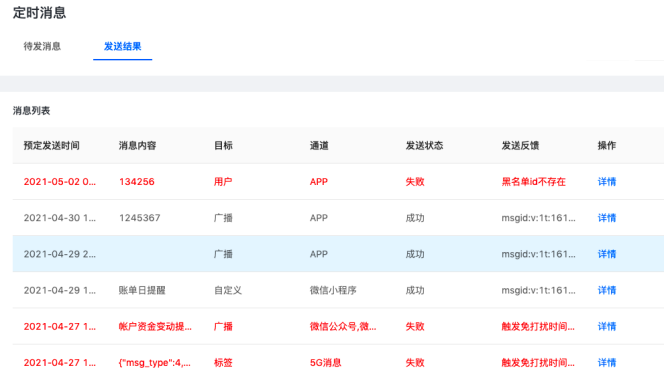
The sending result page is added to facilitate carriers to check the processing results of scheduled messages. On this page, you will see whether the scheduled message is successful and the reason for failure (for example, the message failed due to the channel being deauthorized, etc.)
Audit management
Audit settings
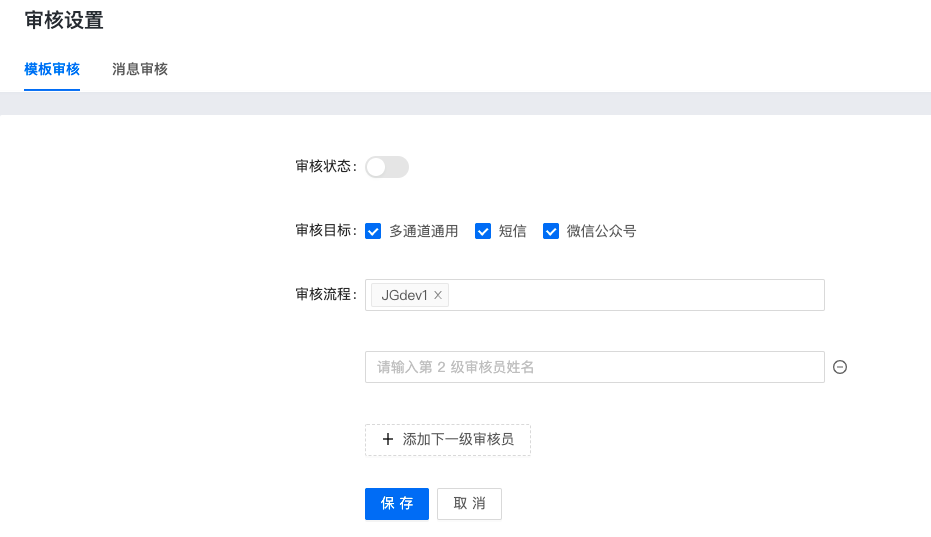
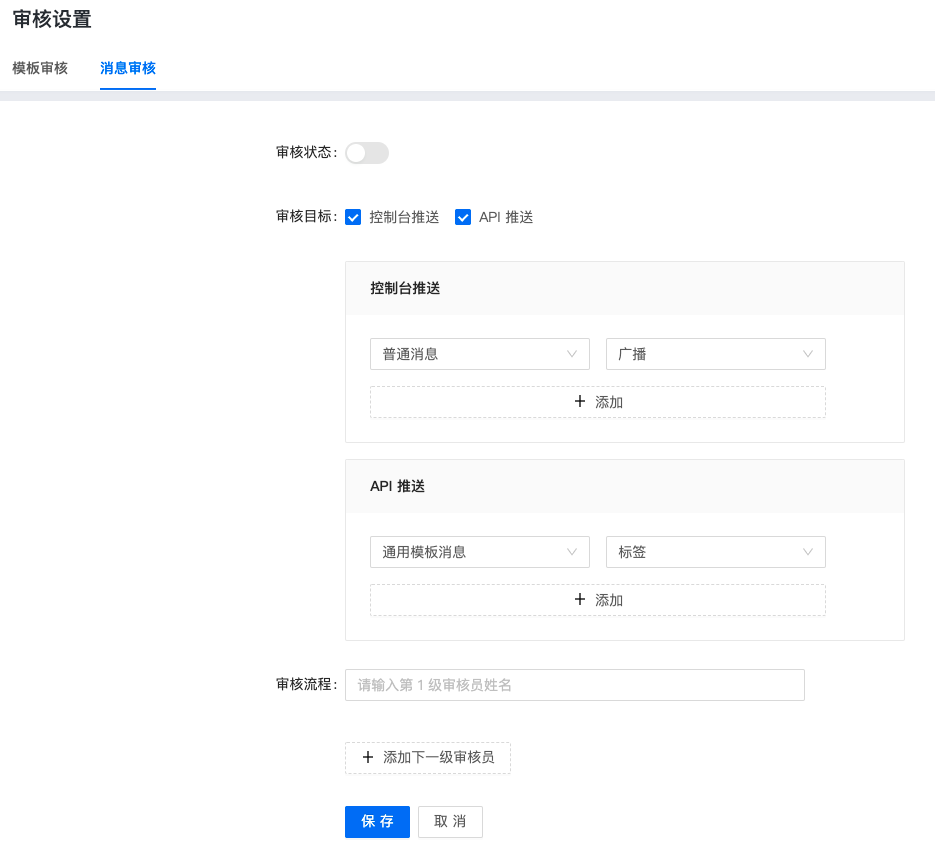
There are two types of template auditing and message auditing, which can be set separately. The setting items are divided into: audit status (on, off), audit target, audit process (multi-level auditors).
- All members can be set as auditors, and multiple auditors can be set at each level. Anyone at each level can proceed to the next process.
- The review objectives of the template include "multi-channel universal, SMS, WeChatOfficial Account” 3 options are available. Only for those who canUMSTemplates created on the platform are subject to review, and templates created by third-party platforms are not within the scope of review.
- The audit targets of messages can be divided into "console push" and "API"Push" to set, you can choose to set different message types and sending targets, for example, you can set APIOrdinary messages pushed by broadcasts need to be reviewed, while template messages sent point-to-point through user IDs do not need to be reviewed, making management and control more flexible.
Audit records
The audit record displays all templates and messages that need to be reviewed by me (login account), and can be passed or rejected.
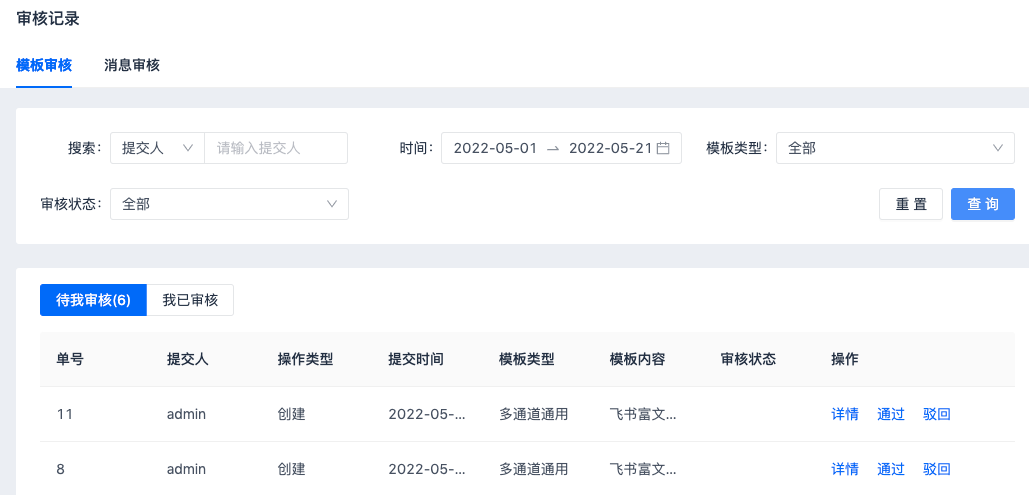
trial records
The reviewed record shows all the approval orders initiated by me (login account). You can modify the rejected approval orders and initiate the application again.
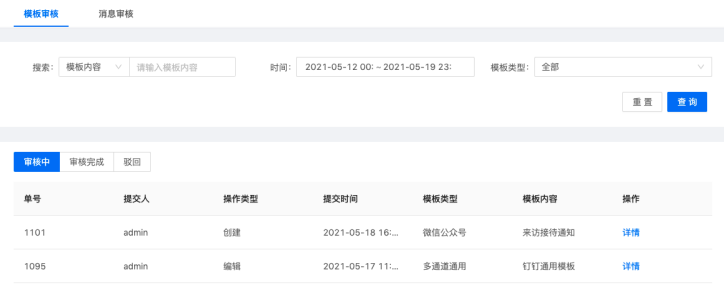
Statistical analysis
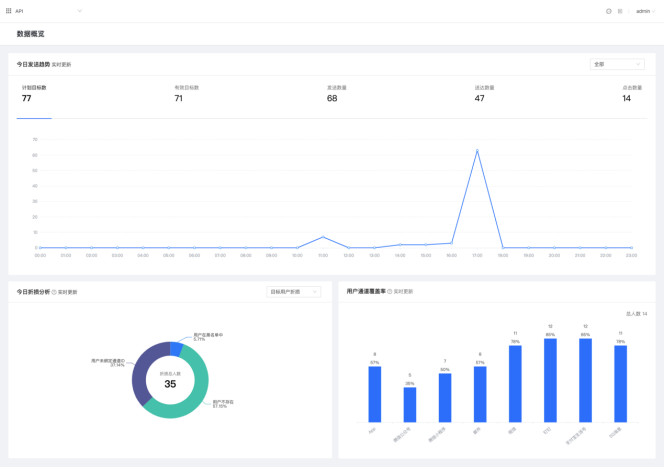
Data overview
Today's sending trend: The "planned target, effective target, sending quantity, delivery quantity, and click quantity" generated by the messages sent on the day. The delivery clicks here are all recorded at the reporting time point, which is used to observe the message trend.
Today's loss analysis: All causes and proportions of losses from 0 o'clock to the current time point today, divided into "target user losses" and "channel message losses"
User channel coverage rate: the proportion and number of users with ** channel registration ID among the total channel users, making it easy to observe the completeness of user assets
Message statistics
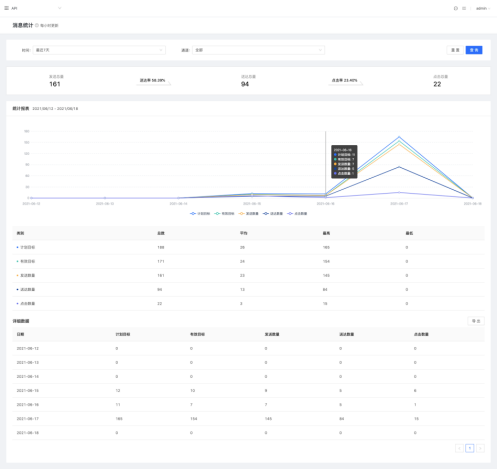
All messages sent to the channel are summarized and counted according to the time dimension, and five indicators can be observed: "planned target, effective target, number of sent, number of delivered, and number of clicks".
No matter what day the delivery or clicks are reported, they will be counted at the time when the message is sent to form a funnel. Detailed data can be exported.
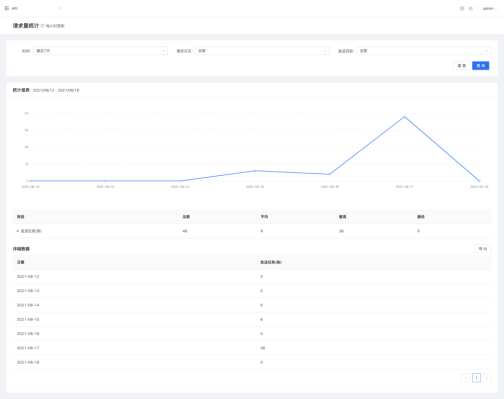
Request volume statistics
Displays the number of sending tasks issued within a period of time to facilitate carriers to observe the rationality of message sending on this channel.
Click distribution
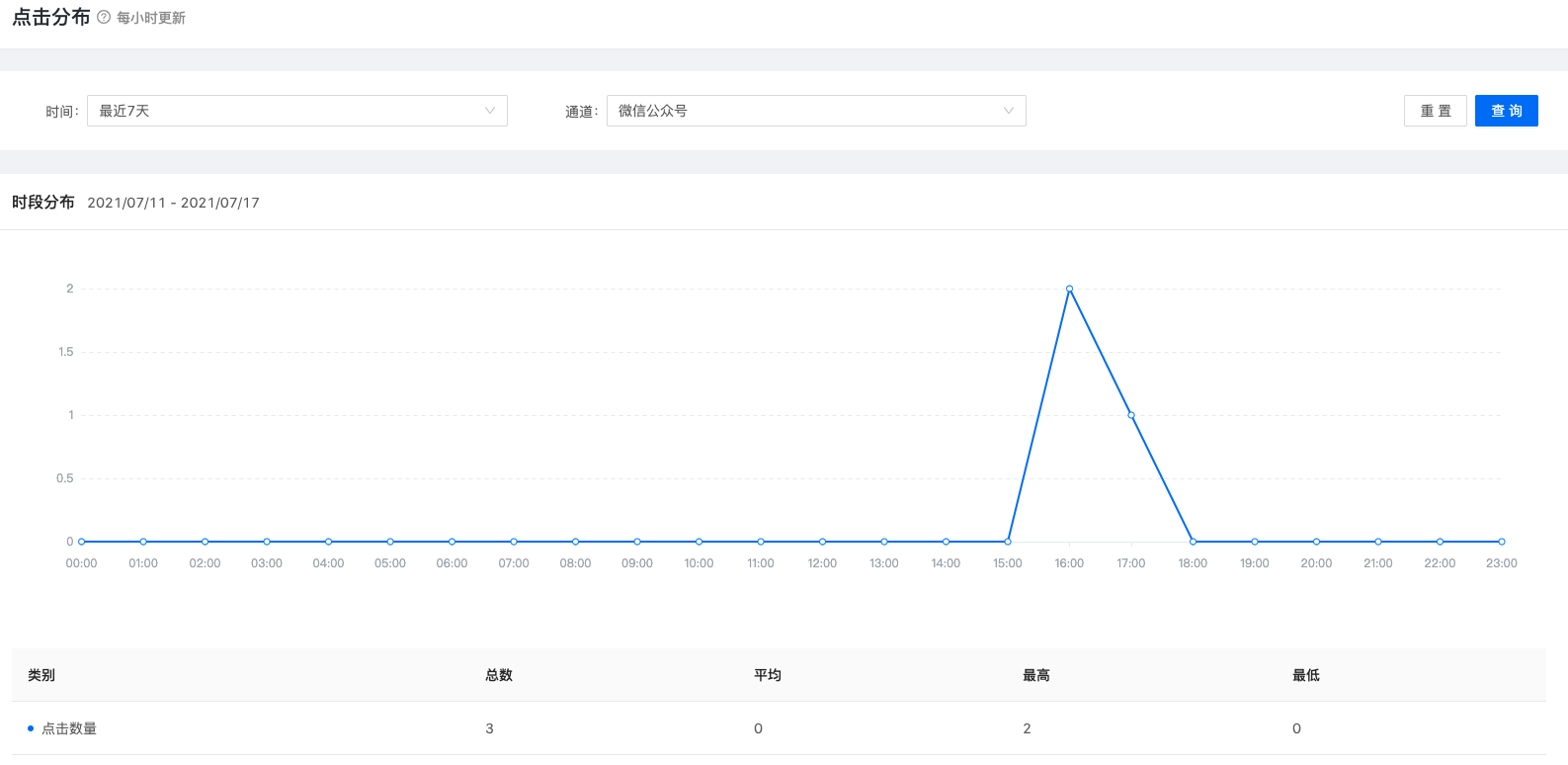
This statistical report accumulates the hourly click data for 24 hours a day in the selected time period. It is used to observe the tendency of users to click on messages at various times of the day, which is helpful for companies to choose the sending time.
user segment
Group management
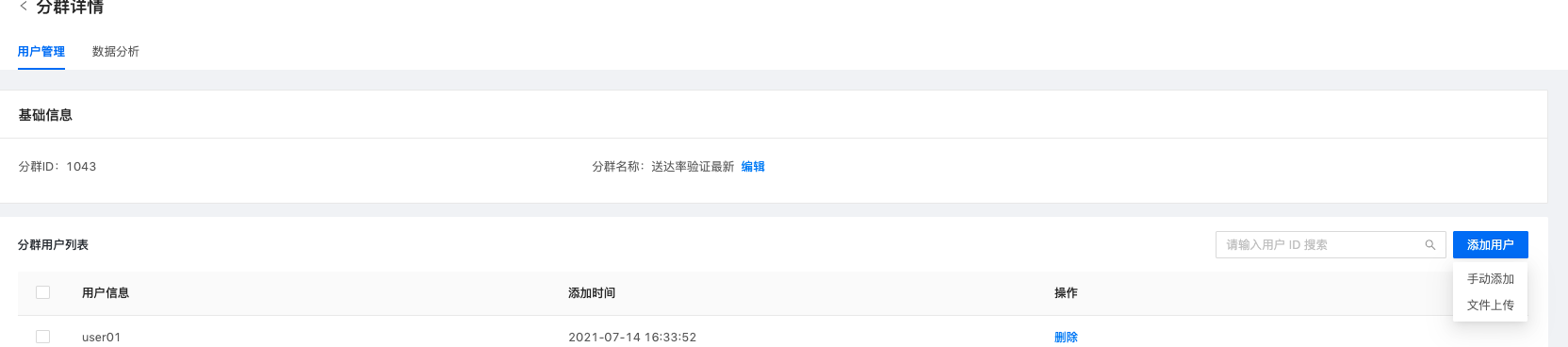
user segment, enterprise users can be divided into different groups of people, user IDs can be imported manually or by file upload, and the group can be selected for sending when sending messages.

Group data analysis
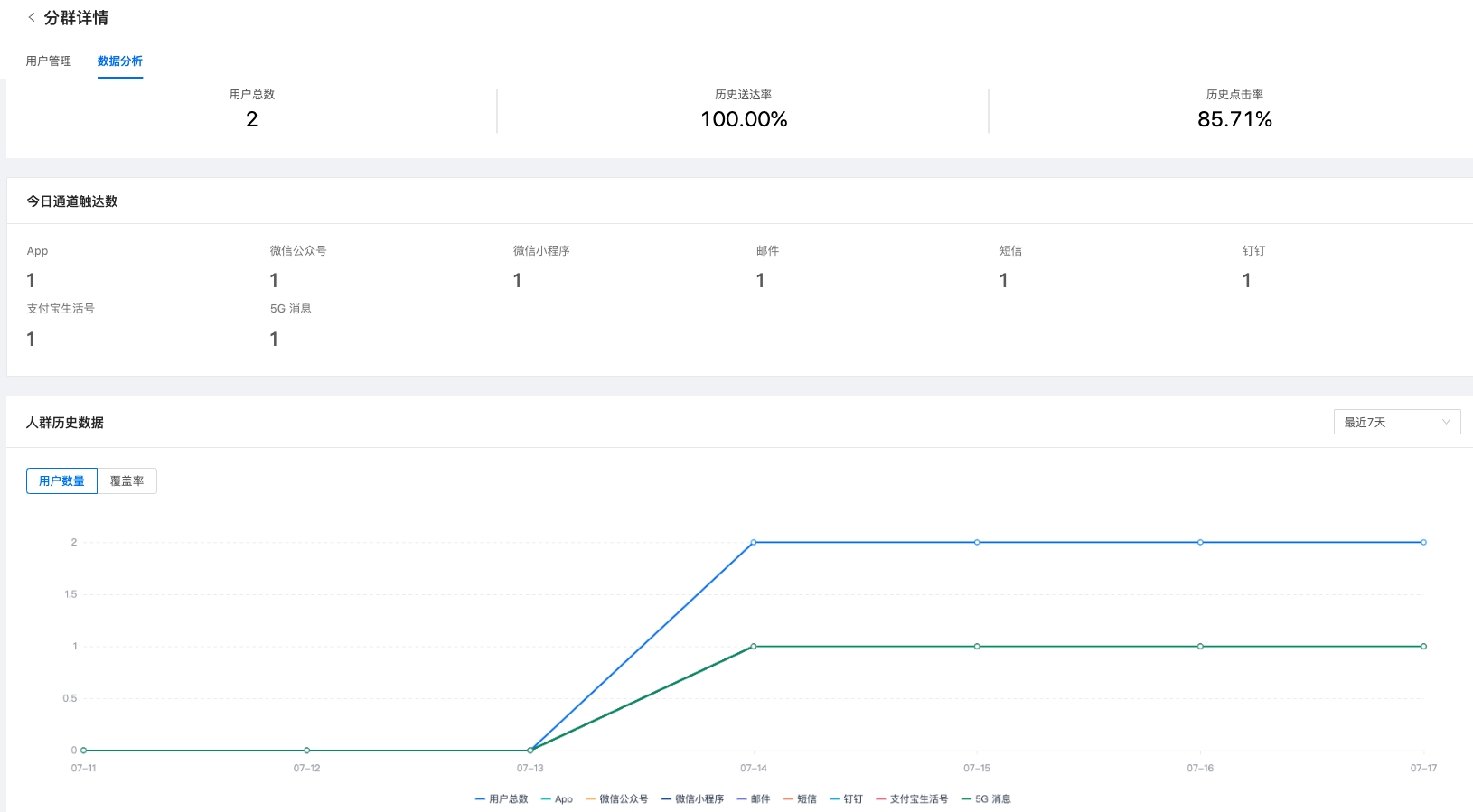
Provide data analysis functions for a single group, including: the total number of users, the number of contacts in each channel, historical data of the group, historical delivery rate, and historical click rate.
Historical delivery rate and historical click rate are statistical analyzes of data on all messages sent to this group.
Advanced features
Provides more configuration functions, including: security settings - sensitive words, do not disturb settings, user blacklist, user whitelist, message life cycle, callback settings.
Except for the message life cycle, everything else is VIP function, if you need to activate this function, please contact:Business customer service
Sensitive words
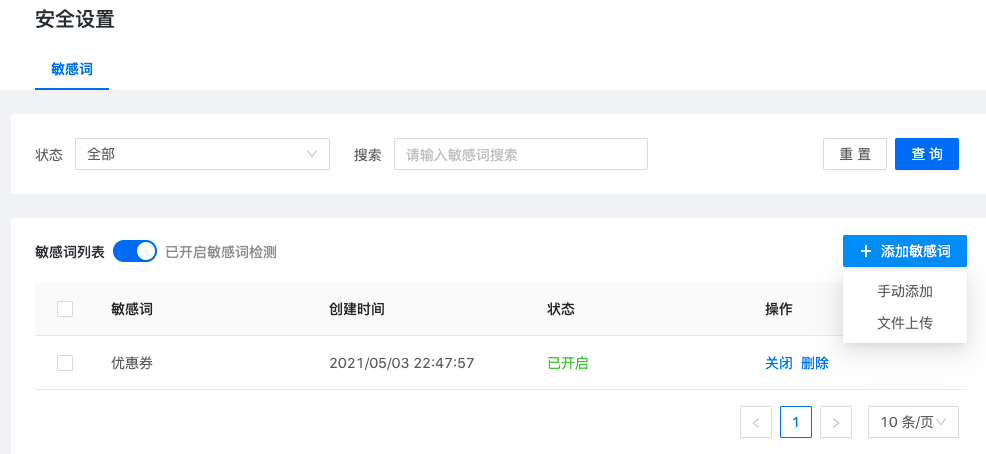
After sensitive word detection is turned on, sensitive word detection will be performed when sending messages and creating templates to ensure the security of information content.
The method of adding sensitive words supports manual addition and file upload (Excel). When adding sensitive words, you can set the status of this batch of sensitive words to on or off. Only sensitive words in the on state will be detected.
When the sensitive word detection switch is turned off, no matter what state a single sensitive word is in, it will not be detected.
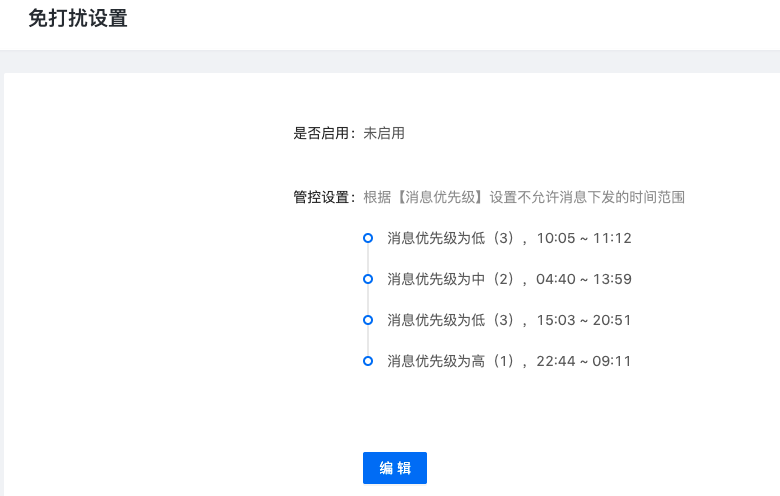
Do not disturb settings
Do not disturb settings can be controlled based on message priority, and a total of 15 time periods can be set. After turning on the Do Not Disturb setting, if the message sent is within the control range, an error will be reported and failed.
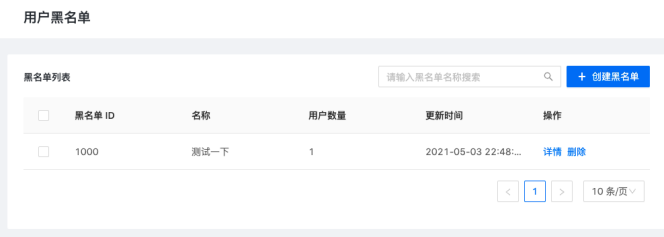
User blacklist
Multiple blacklists can be created for each channel. When sending a message, you can select the specific blacklist that needs to be filtered. Users in the blacklist can be added manually or uploaded files (Excel) 2 ways to import.
User whitelist
Each channel can create multiple whitelists. When sending messages, select the specific whitelist that needs to be filtered. They are mutually exclusive with the user blacklist (you can only select one when sending messages).
Users in the whitelist can be added manually or uploaded files (Excel) 2 ways to import.

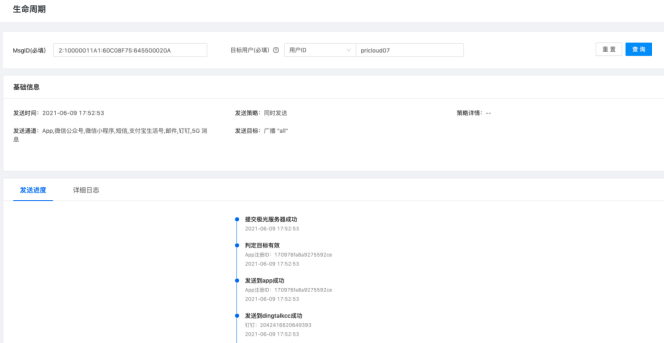
Message life cycle
Here you can query the sending status of a specific target under a message. Contains sending progress (concerned by operations staff) and detailed logs (concerned by R&D)
Callback settings
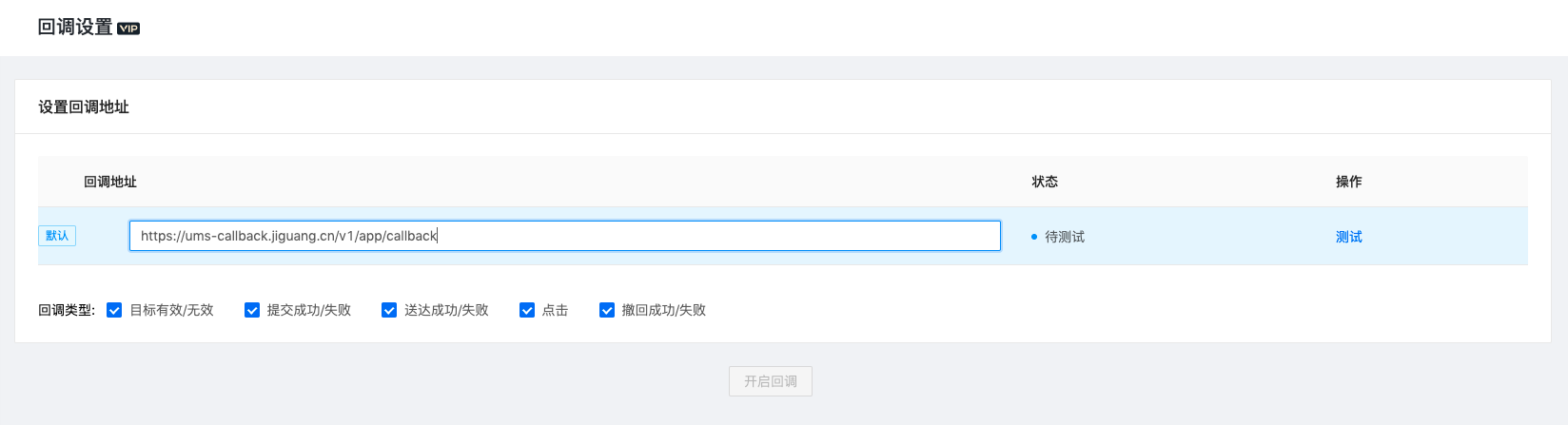
If you need to get the sending status of a message for all targets, you can configure a callback address in Advanced Functions - Callback Settings, check the status type of the required callback, and turn on the callback.
calling rest API Temporary can be set when sending a message callback Address, this address must be configured in the console to be effective. The console allows adding up to 5 callback addresses. When sending message without setting temporary callback address, the callback message will be called back to the default address.
After turning off the callback switch, message callback will no longer be performed. The callback address can be tested for validity, deleted, and set as the default address. The default address is not allowed to be deleted.
For detailed instructions, seeCallback settings