


User Management v1
API Overview
Functional description
User Management API For adding, deleting, modifying user information at the server end
Call Address
Batch addition, update user information:POST https://api.ums.jiguang.cn/v1/user/optBatchremoval of user information:POST https://api.ums.jiguang.cn/v1/user/delete
Call Authentication
HTTP Header(head) Key/Value Yes:
Authorization: Basic base64_auth_string
of which base64_auth_string The generation algorithm is:base64(ChannelKey:MasterSecret) That's right. ChannelKey Add a colon and add MasterSecret Collapse string. Do it again. base64 Convert.
Critical Key
User Management API There are two types of key:
Channels ChannelKey And key recognition
- Only upload/modify binding markings to: ChannelKey, all, information on the code of the authorized channel.
Global AccessKey, which is available on the user management page.
- Support upload of user information on all channels, channels
- Supports the deletion of users
Batch Add & Update API
POST https://api.ums.jiguang.cn/v1/user/opt
Support the batch to add and update user information if userid Exists, updates, if none, adds
Importing userID An important key field for each channel to register ID is bind_idIt takes value. all, channel code, channel Key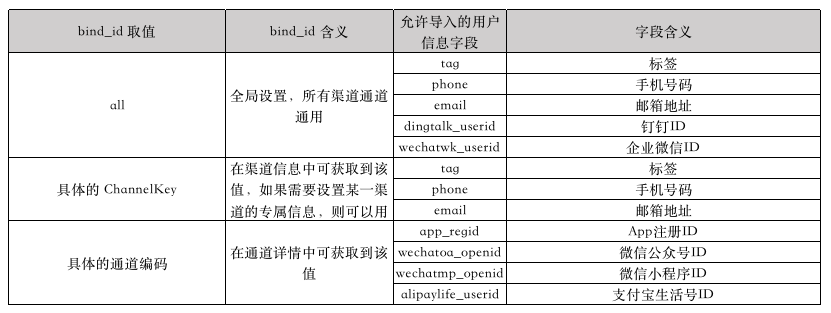
all That is, the global setting, all channels, channels are common, and the tags, cell phone numbers, mailboxes, addresses, nail IDs, micro-intelligence IDs, micro-intelligents IDs are valid. Note: the connection tags for nailing IDs are only allowed. Pass all
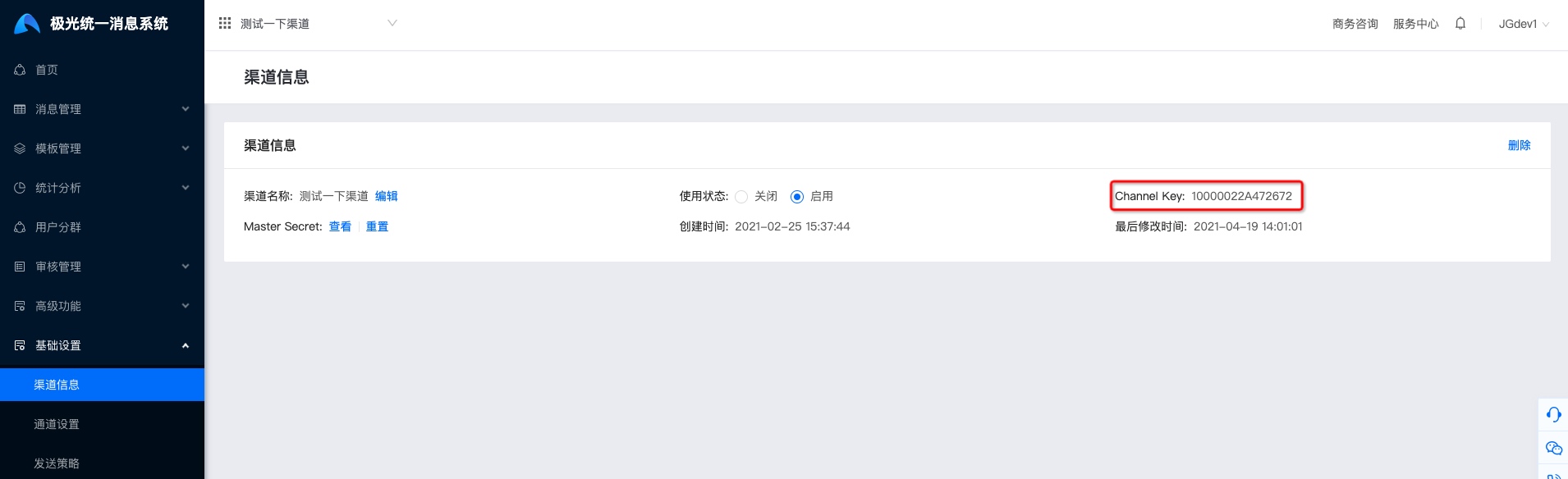
Specific ChannelKey, the value can be obtained in the channel information, valid for labels, cell phone numbers, mailbox addresses, and can be used if you need to set up a channel-specific information Channel Key Mark and if you don't need it, pass it on. all
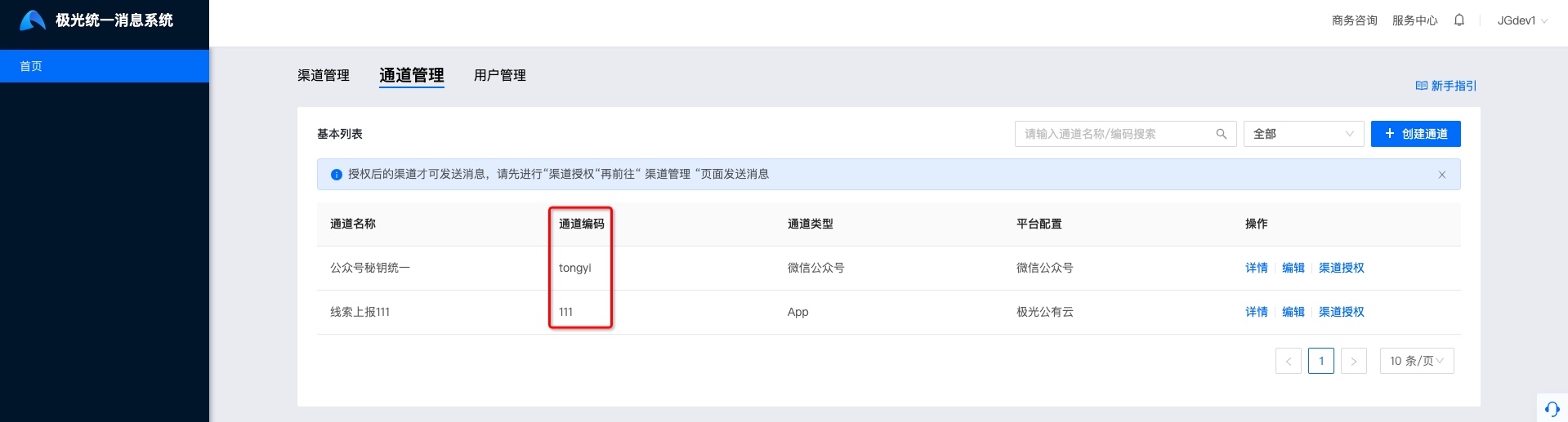
The specific channel code, which can be obtained in the channel details (set by the carrier when creating the channel), is userID Tie App Registration ID, TwitterOfficial Account ID, WisdomMini-program ID, paid life ID must be coded
Request parameters
Ben. API description Array Object, the parameters are as follows:
| Parameters | Type | Options | Annotations |
|---|---|---|---|
| userid | String | Required | Only user identifier |
| add | JSON Object | Optional | To labels,App Register ID, Microintelligent ID for additional operations |
| set | JSON Object | Optional | Set up or overwrite tags, IDs for each channel and IDs for micro-intelligents |
| del | JSON Object | Optional | Delete tags, channel IDs |
| tag | JSON Object | Optional | Label, with multiple settings under the same associated identifier |
| phone | JSON Object | Optional | Cell phone number, only one under the same correlation mark is allowed |
| JSON Object | Optional | Mailbox, only 1 under the same association mark is allowed | |
| app | JSON Object | Optional | App Channel registration ID, with multiple settings under the same correlation mark |
| wechatoa | JSON Object | Optional | Wesson. Official Accountid of the channel, only 1 under the same correlation mark is allowed |
| wechatmp | JSON Object | Optional | Wesson. Mini-programid of the channel, only 1 under the same correlation mark is allowed |
| alipaylife | JSON Object | Optional | IID for payment of the Treasure Life Channel, only 1 under the same correlation mark is allowed |
| dingtalkcc | String | Optional | ID of the nail channel, only 1 is allowed |
| wechatwk | String | Optional | id for enterprise microlinks, only 1 is allowed |
| wechatwk_linkedcorp | List | Optional | User ID of the Enterprise Micro-Intelligence Interconnection Enterprise can set multiple values. Please note that if the user is in the name of an interconnected enterprise, the user ID needs to collide the enterprise ID and upload it to CorpId1/userid1 |
Example request
           [{
 "userid": "具体userid",
 "add": {
 "tag": {
 "具体channel_key": ["具体tag_value"]
 }
 "app": {
 "具体sender_code": ["具体app_regid"]
 },
 "wechatwk_linkedcorp": ["具体wechatwk_linkedcorp_userid1","具体wechatwk_linkedcorp_userid2"]
 },
 "set":{
 "tag": {
 "具体channel_key": ["具体tag_value"]
 }
 "phone": {
 "具体channel_key": "具体phone_number"
 },
 "email": {
 "具体channel_key": "具体email_value"
 },
 "app": {
 "具体sender_code": ["具体app_regid"]
 },
 "wechatoa": {
 "具体sender_code":"具体wechatoa_openid"
 },
 "wechatmp": {
 "具体sender_code":"具体wechatmp_openid"
 },
 "alipaylife": {
 "具体sender_code":"具体alipaylife_userid"
 },
 "dingtalkcc":"具体dingtalk_userid",
 "wechatwk": "具体wechatwk_userid",
 "wechatwk_linkedcorp": ["具体wechatwk_linkedcorp_userid1","具体wechatwk_linkedcorp_userid2"]
 },
 "del":{
 "tag": {
 "具体channel_key": ["具体tag_value"]
 }
 "phone": {
 "具体channel_key": "具体phone_number"
 },
 "email": {
 "具体channel_key": "具体email_value"
 },
 "app": {
 "具体sender_code": ["具体app_regid"]
 },
 "wechatoa": {
 "具体sender_code":"具体wechatoa_openid"
 },
 "wechatmp": {
 "具体sender_code":"具体wechatmp_openid"
 },
 "alipaylife": {
 "具体sender_code":"具体alipaylife_userid"
 },
 "dingtalkcc":"具体dingtalk_userid",
 "wechatwk": "具体wechatwk_userid",
 "wechatwk_linkedcorp": ["具体wechatwk_linkedcorp_userid1","具体wechatwk_linkedcorp_userid2"]
 }
}]
Return parameters
| Parameters | Type | Options | Annotations |
|---|---|---|---|
| code | int | Required | Business Return Code, 0 at success |
| data | String/JSON Object | Required | Detailed data for operation success/failure, empty when request failed |
| message | string | Required | Business returns details, when successful success, when failure returns to the specific cause of failure |
data Data
When the request fails,data It's empty.
When uploading success or partial success, detailed data on success/failure will be returned, with detailed parameters as follows:
| Parameters | Type | Options | Annotations |
|---|---|---|---|
| success | Object Array | Required | Operation success data |
| fail | Object Array | Required | Operation failed data |
| userid | string | Optional | Only user identifier |
| errcode | string | Optional | Returns specific failure errors when failed data is available Code |
| errmsg | string | Optional | Returns specific cause of failure when failed data is available |
Returns Example
Returns successfully
          {
 "code":0,
 "data":{
 "success": ["具体userid"],
 "fail": [{"userid": "具体userid", "errcode":"","errmsg":""}]
 },
 "message":"success"
}
Failed to return
          {
 "code":5000,
 "data":"",
 "message":"错误信息"
}
Batch Delete API
POST https://api.ums.jiguang.cn/v1/user/deleteBen.api Please be careful to remove the user's only ID and all information that it binds. This operation must be used AccessKey (c) Carry out forensics.
Ben. API description Array String
Request parameters
| Parameters | Type | Options | Annotations |
|---|---|---|---|
| userid | String | Required | Only user identifier |
Example request
["userid1","userid2"]
Return parameters
| Parameters | Type | Options | Annotations |
|---|---|---|---|
| code | int | Required | Business Return Code |
| data | String/JSON Object | Required | Detailed data for operation success/failure, empty when request failed |
| message | string | Required | Business returns details, when successful success, when failure returns to the specific cause of failure |
data Data
When the request fails,data It's empty.
When uploading success or partial success, detailed data on success/failure will be returned, with detailed parameters as follows:
| Parameters | Type | Options | Annotations |
|---|---|---|---|
| success | Object Array | Required | Operation success data |
| fail | Object Array | Required | Operation failed data |
| userid | string | Optional | Only user identifier |
| errcode | string | Optional | Returns specific failure errors when failed data is available Code |
| errmsg | string | Optional | Returns specific cause of failure when failed data is available |
Returns Example
Returns successfully
          {
 "code":0,
 "data":{
 "success": ["具体userid"],
 "fail": [{"userid": "具体userid", "errcode":"","errmsg":""}]
 },
 "message":"success"
}
Failed to return
          {
 "code":5000,
 "data":"",
 "message":"错误信息"
}
Call Back
Call API Please refer to the return code.Business Return Code

