


Technical FAQ
The log shows that initialization failed.appkey, the signature, the application of the name of the package is invalid.
- InspectionProject ConfigurationYes. appkey with Jiguang The consistency shown on the console [application settings] - [application information].
- InspectionProject Configurationand the application name,Bundle ID and Jiguang On the console.JVerification]-[Accreditation Settings]-[Integration Settings] show consistency.
- Install App Signature Tool, will get Android Apply signature and Jiguang On the console.JVerification]-[Accreditation Settings]-[Integration Settings] show consistency.
One-Tap LoginBack 6004 Error CodeHow?
Problem scene:
- Need to jump from authorized page to other custom page (e.g. authentication code)Loginreturns the authorized page. Call for permission once again when returning to authorized pageLoginInterface, return now. 6004 Error Code。
Problem analysis:
- The problem was due to the fact that the request for authorization was called again after the authorization page had not yet been closedLoginInterface.
Solutions (option one):
Do not need to call again when returning an authorized page from a custom page without closing the authorized pageLogininterface to close the current page and return to the authorized page.
If you have to close the authorized page, you need to call before jumping from the defined page dismissLogin The interface closes the authorized page and then recalls the requested permission on the custom pageLoginInterface.
Call loginTokenVerify API 9021/9020 How?
Check Client and Backstage configuration appkey Is it consistent?
If appkey Align configuration. Check. loginToken Right or not, attention. loginToken It's not a number. token。loginToken Access to methodological references:Android SDK Pull up authorized pages、iOS SDK Pull up authorized pages 。
If backstage is used PHP Develop, please confirm the transmission from the backstage. loginToken Accessed with client loginToken Is it consistent? If the client gets it backstage loginToken is the value "+",PHP By default, replace "+" with a space, resulting in loginToken Validation failed.
Number authentication and One-Tap LoginYes. token is Use periodand each token It can only be used once.
Do not set the certificate password when generating a key pair, set the key format to PKCS#8 。
RSA Private key decryption failed. How?
- First use local OpenSSL commands to check whether the public and private keys are readable, whether the format is correct, and whether the public key is exported from the same private key:
          # Verify that the private key is readable
openssl pkey -in private_key.pem -text -noout

# Export the public key from the private key for comparison with the public key configured in the console
openssl rsa -in private_key.pem -pubout -out public_key.pem

# Verify that the public key is readable
openssl pkey -pubin -in public_key.pem -text -noout
- Check if the decryption parameter is loginTokenVerify API Get the encrypted cell phone number.
- Perform a minimal local decryption test with the private key. If local verification succeeds, focus on the private key format, padding mode, character encoding, and Base64 handling in your business code.
- Do not enter production private keys or real encrypted phone numbers into third-party online tools.
H5 Number Authentication Return 2002 Error CodeHow?
On production. https Visiting,https Requesting cross-domain will lead to reporting. referer It's empty, please. head, and add the code:
<meta content="always" name="referrer">If there's a strong turn https, the settings need to be removed.
How do we solve the white word problem in the status bar?
In some cases, the status bar appears in white, which can be addressed by the following code:
          // 在application onCreate方法中调用如下代码
@Override
public void onCreate() {
    super.onCreate();

 registerActivityLifecycleCallbacks(new ActivityLifecycleCallbacks() {
        @Override
 public void onActivityCreated(@NonNull Activity activity, @Nullable Bundle savedInstanceState) {
            String activityName = activity.getClass().getSimpleName();
 if ("GenLoginAuthActivity".equals(activityName)
 || "CtLoginActivity".equals(activityName)
 || "LoginAuthActivity".equals(activityName)) {
     if (Build.VERSION.SDK_INT >= 21) {
     // 修改状态栏字体颜色,用AndroidX官方兼容API
 WindowInsetsControllerCompat wic = WindowCompat.getInsetsController(activity.getWindow(),
 activity.getWindow().getDecorView());
 // true表示Light Mode,状态栏字体呈黑色,反之呈白色
 wic.setAppearanceLightStatusBars(true);
 }
 }
 }......
 });
}
How to address the UI resource load anomaly?
ProblemDescription:
- UI resource loading anomaly,debug It's normal.release The pattern is abnormal.
Problem analysis:
- Use automatic integration, and all resource files are imported.
- The user opens the confusion and the coding is normal.
- Guess. shrinkResources Set As true It will lead to confusion of resources and will shrinkResources Set As false The issue of reporting errors was resolved.
Solutions (option one):
- Will shrinkResources Set As false。
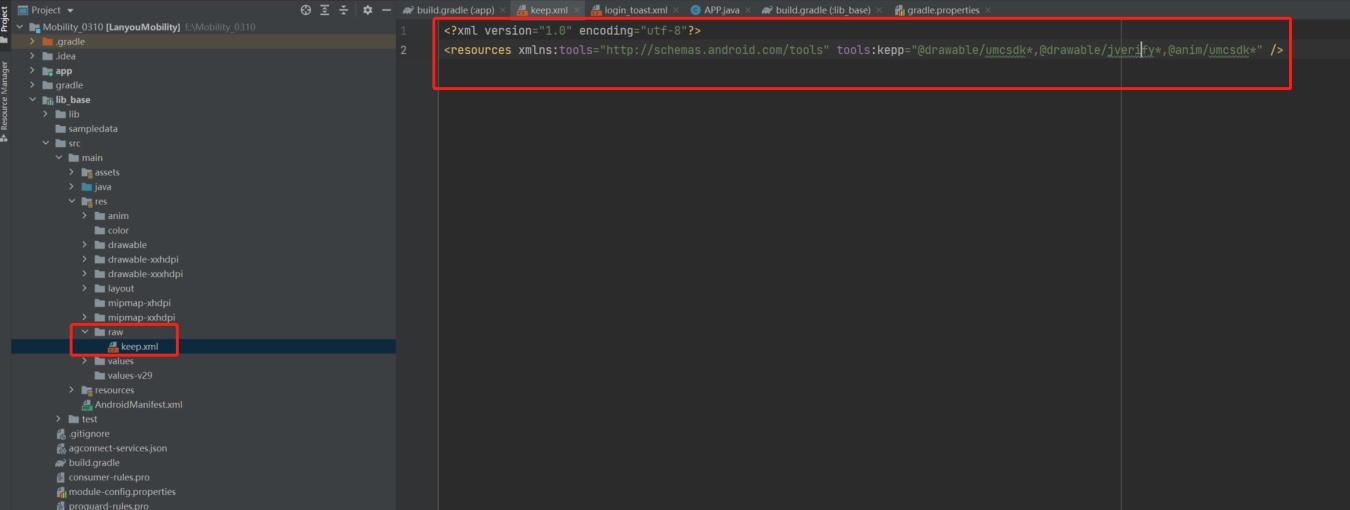
- Yes. res Create Down raw Folder, Add keep.xml Documentation requires that the following resources be allocated to prevent confusion:
@drawable/umcsdk*,@drawable/jverify*,@anim/umcsdk*
```
LoginThe photographic resources used on the page need to be added to prevent confusion. For example, through setLogoImgPath It's set. logo Pictures, the corresponding picture also needs to add a confusion-proof configuration when opening the resource confusion.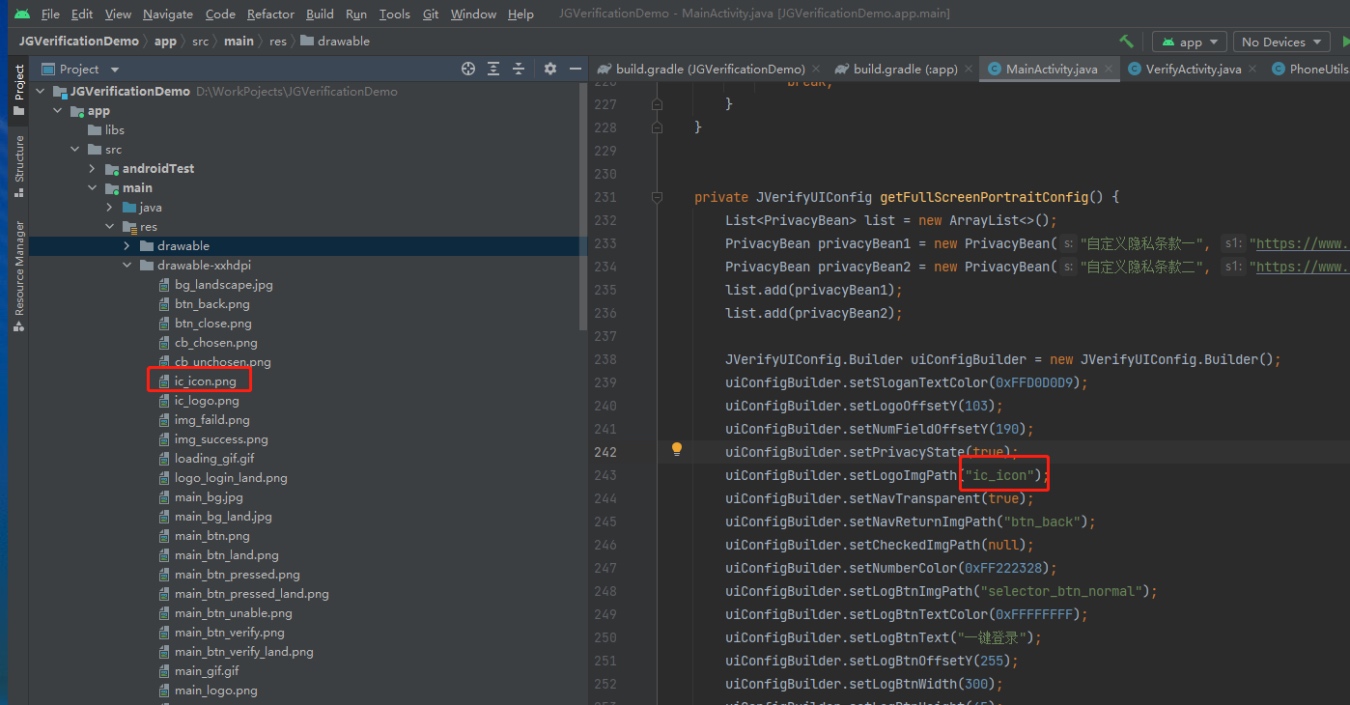
For example, the icon set in the above chart is ic_icon, the final confusion prevention configuration is as follows:
## How in OneLoginBlasting windows on authorized pages?
sceneDescription:<br/>
In one.LoginOn the authorized page, add a custom control to the bullet window by clicking on the custom control in the following form:<br />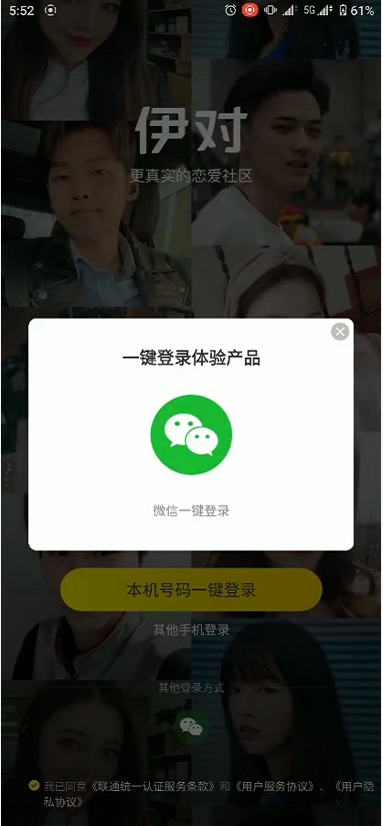
Solutions:<br/>
Since this authorized page isCarrierDirectly returned, the developer cannot get the right copy. activityAs a result, windows could not be loaded directly on the authorized page, with the following solutions:
- Use Application Yes. registerActivityLifecycleCallbacks Retrieval, listening to everything. activity(Details can be monitored 100 degrees)carrier is activity activity(context)。
- When clicking on custom controls, on top activity A bullet window was fired, as follows:
```java
// 在application onCreate方法中调用如下代码
public class MyApplication extends Application {
private static WeakReference<Activity> TOP_ACTIVITY;
public static WeakReference<Activity> getTopActivity() {
return TOP_ACTIVITY;
}
@Override
public void onCreate() {
super.onCreate();
registerActivityLifecycleCallbacks(new ActivityLifecycleCallbacks() {
@Override
public void onActivityCreated(@NonNull Activity activity, @Nullable Bundle savedInstanceState) {
TOP_ACTIVITY = new WeakReference<>(activity);
}......
});
}
}
          public class MainActivity extends AppCompatActivity {
 List<View> views;
 boolean isChecked = false;

 LoginSettings settings = new LoginSettings();
 settings.setAuthPageEventListener(new AuthPageEventListener() {
     @Override
 public void onEvent(int i, String s) {
     Log.i("jiguang-log", "[login] code = " + i + " result = " + s);
 if (i == 2) { //进入登录页后添加监听
 isChecked = false;
     addDialogIfUnCheck();
 } else if (i == 6) { //用户勾选后移除监听
 isChecked = true;
 removeDialogIfChecked();
 } else if (i == 7) { //用户取消勾选后添加监听
 isChecked = false;
 addDialogIfUnCheck();
 }
 }
 });

    /
 * 客户未勾选隐私条款需要添加监听
 */
    private void addDialogIfUnCheck() {
     if (isChecked) return;

     new Handler(Looper.getMainLooper()).post(new Runnable() {
     @Override
 public void run() {
     if (views!= null) views.clear();
 views = getAllChildViews();
 views.get(13).setOnClickListener(new View.OnClickListener() {
 @Override
 public void onClick(View v) {
 Activity activity = MyApplication.getTopActivity().get();
 dialog(activity);
 }
 });

 ViewGroup vp = (RelativeLayout) views.get(12);
 int high = vp.getHeight();
 int width = vp.getWidth();
 ((TextView) views.get(13)).setWidth(width);
 ((TextView) views.get(13)).setHeight(high);
 ((TextView) views.get(13)).setGravity(Gravity.CENTER);

 views.get(13).setClickable(true);
 views.get(13).setFocusable(true);
 views.get(13).setEnabled(true);
 }
 });
    }

    /
 * 客户勾选隐私条款后需要移除监听
 */
    private void removeDialogIfChecked() {
     if (!isChecked) return;
 new Handler(Looper.getMainLooper()).post(new Runnable() {
 @Override
 public void run() {
 views.get(13).setOnClickListener(null);
 views.get(13).setClickable(false);
 views.get(13).setFocusable(false);
 views.get(13).setEnabled(false);
 }
 });
 }

 /
 * 获取该activity所有view
 */
 public List<View> getAllChildViews() {
 Activity activity = MyApplication.getTopActivity().get();
 View view = activity.getWindow().getDecorView();
 return getAllChildViews(view);
 }

 private List<View> getAllChildViews(View view) {
 List<View> allchildren = new ArrayList<View>();
     if (view instanceof ViewGroup) {
     ViewGroup vp = (ViewGroup) view;
     for (int i = 0; i < vp.getChildCount(); i++) {
     View viewchild = vp.getChildAt(i);
     allchildren.add(viewchild);
          allchildren.addAll(getAllChildViews(viewchild));
     }
     }
     return allchildren;
 }

    private void dialog(Context context) {
 AlertDialog.Builder alertDialogBuilder = new AlertDialog.Builder(context);
 alertDialogBuilder.setMessage("请同意页面底部隐私条款");
 AlertDialog alertDialog = alertDialogBuilder.create();
 alertDialog.show();
 }
}

