


iOS SDK Integrated Guide
SDK Annotations
Resource File
Package Name jverification-ios-{version number}-release
- Libs Synchronising folder jverification-ios-x.x.x.xcframework,jcore-ios-x.x.x.xcframework,OAuth.xcframework,TYRZUISDK.xcframework,EAccountApi SDK.xcframeworkNote: Simulator does not support APNs)
- Libs-noidfa Folder: Contains static library files jcore-noidfa-ios-x.x.x.xcframework
- Jiguang Demo Folder: Example
(LibsThere's an old version in the folder.JVERIFICATIONService.h and jverification-ios-x.x.x.aDocuments. No files. and jverification-ios-x.x.x.xcframeworkLet's import the project together. One or two. Starting from SDK version 3.2.3 and later, the SDK package will no longer contain the JVERIFICATIONService.h file and jverification-ios-x.x.x.a file.)
DEMO Use
Enter Jiguang Demo Directory, Implementation pod install Command Install sdkOpen Jiguang Demo.xcworkspace Run just fine.
Jiguang Demo is a sample application assembled from multiple SDKs and managed via CocoaPods. For manual integration, please refer to the [Manual Import] section。
Usage Notes
This document is the standard integration guide for JVerification iOS SDK integration guide。
Supported SDK version::v2.0.0 and later。
- To quickly test, follow this guide to run the Demo in minutes。
- All guides, APIs, tutorials, and updated versions are published on the JVerification documentation site An updated version of this document will be posted on the website in a timely manner.
Product Overview
JVerification integrates gateway authentication from China's three major carriersA key for the developerLogin, number authentication, business risk function, optimize usersRegistration / Login, number validation experience to improve security.
Main Scenarios
- Registration
- Login
- Secondary verification
Obtain Application Info
After creating an app on the console(/jverification/guideline/provisioning#%E5%88%9B%E5%BB%BA%E5%BA%94%E7%94%A8open Authentication Settings → Integration Settings to obtain the AppKey。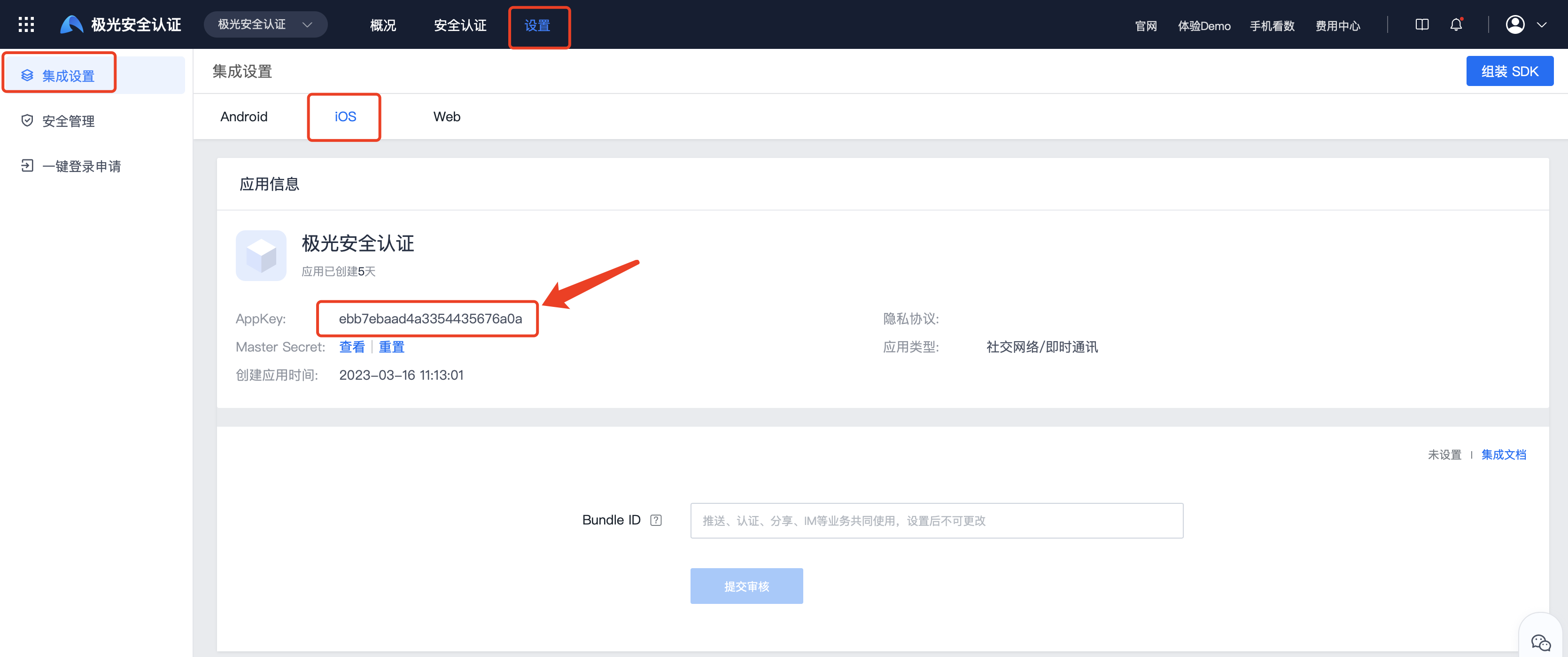
iOS SDK Version
Current SDK Support only iOS 8 More version of mobile phone system.
Integration Configuration
IDFA
From JVerification v2.5.0 Here we go.Jiguang Provision idfa and noidfa Two versions, please note the selection of the version integration. idfa Version is standard, automatic collection by default IDFA Data, noidfa Version is not automatically collected.Jiguang Suggested to developer idfa Version. Of course, if the developers don't want to use IDFA Or worried about collecting. IDFA And no advertising services were integrated. Apple Refuse, please. noidfa Version.
Note
App When submitting Apple Audit, App Whether or not to use an advertising identifier (IDFA)? ), need to choose “Yes” and need to be based on App The following options are selected for the use of advertising:
- Yes. App It's an internal ad -- check if it's confirmed.
- Mark here App Install specific ads from previous placements -- check if yes
- Mark here App The operation that took place came from a previous advertisement -- a check if it was confirmed.
Add SDK To Project
Option 1: Cocoapods Import 2.9.3
If standard version is used (from 2.5.0 Version Starts Default Collection IDFA)
           pod 'JCore'    // Optional,can also be automatically pulled via pod 'JVerification'
 pod 'JVerification' // Mandatory
Note: If the latest version cannot be imported, please execute pod repo update master This is an order to upgrade the machine. pod Coop, reset. pod 'JVerification'
If you need to install a specified version, use the following (in 2.9.3 Example:
           pod 'JCore', '3.2.9'    // Optional,can also be automatically pulled via pod 'JVerification'
 pod 'JVerification', '2.9.3'    // Mandatory
If None IDFA Version
If used JCore 2.1.4 and above, as follows: JVerification 2.9.3 The version is a case in point and requires strict code order:
              pod 'JCore', '3.2.9-noidfa'    // Mandatory
    pod 'JVerification', '2.9.3'    // Mandatory
If used JCore 2.1.4 Version as follows: JVerification 2.7.1 The version is a case in point and requires strict code order:
              pod 'JCore', '2.1.2'    // Mandatory
    pod 'JVerification', '2.7.1'    // Mandatory
Select 2: Import via Swift Package Manager
When integrating via SPM , you need to add JCore and JVerification and link both App Target simultaneously.
In Xcode , go to File -> Add Package Dependencies...,then add the following Packages respectively:
          https://github.com/jpush/jcore-sdk.git
https://github.com/jpush/jverification-sdk.git
Check the two Products below on the Product selection page:
          JCore
JVerification
Notes:
- JVerification does not embed JCore internally; the App must add and link JCore on its own.
- If JCore has already been integrated via other Jiguang SDKs in your App, ensure only one copy of JCore is linked in the final App.
- After integrating with SPM for Swift projects, do not directly write import JVerification in Swift files. Import the SDK header files via the Objective-C Bridging Header instead。
You need to create a bridging header file for Swift projects, for example:
YourApp/YourApp-Bridging-Header.h
Add the import statement inside the bridging header:
#import "JVERIFICATIONService.h"
Next,configure the Objective-C Bridging Header under Build Settings of your App Target with the path below:
YourApp/YourApp-Bridging-Header.h
If you manage dependencies via Package.swift, refer to the following configuration snippet:
          dependencies: [
    .package(url: "https://github.com/jpush/jcore-sdk.git", from: "5.4.0"),
    .package(url: "https://github.com/jpush/jverification-sdk.git", from: "3.4.7")
],
targets: [
    .target(
        name: "YourAppTarget",
        dependencies: [
            .product(name: "JCore", package: "jcore-sdk"),
            .product(name: "JVerification", package: "jverification-sdk")
        ]
    )
]
Select 3: Manual Import
Yes.Jiguang The official network downloads the latest. SDK
Add corresponding to project Frameworks, add to the item Frameworks As follows:
AdSupport.frameworkAccess IDFA required;if not used IDFA, please do not add)
- CoreLocation.framework
- CFNetwork.framework
- CoreFoundation.framework
- libresolv.tbd
- libz.tbd
- libc++.1.tbd
- CoreTelephony.framework
- SystemConfiguration.framework
- Security.framework
- CoreGraphics.framework
- libsqlite3.tbd
- MobileCoreServices.framework
- AVFoundation.framework
- jcore-ios-x.x.x.xcframework jcore Version 2.1.6 and above
- jverification-ios-x.x.x.xcframework
- TYRZUISDK.xcframework
- OAuth.xcframework
- EAccountApi SDK.xcframework
Note:*** jcore-ios-x.x.x.xcframework 、jverification-ios-x.x.x.xcframework 、OAuth.xcframework,TYRZUISDK.xcframework and EAccountApi SDK.xcframework Yes. Libs Folder iOS12 The following needs support HTTPS Retrieval number to add Network library, add as follows: Support required iOS12 The following system needs to be added to the dependency library in the project settings target - > tab Build Phase -> Linked Binary with Libraries Add the following dependency library:Network.frameworkand will status Set As Optional.
Project Configuration
Configure -ObjC
Set Project TARGETS -> Build Settings -> Other Links FlagsSettings -ObjC
Configure Support Http Transfer
Right-click to open project plist File, add the following code
           <key>NSAppTransportSecurity</key>
    <dict>
        <key>NSAllowsArbitraryLoads</key>
        <true/>
    </dict>
Allocation of resources
Please... Jiguang Demo Medium Resource Adds your own project directory to the photo resource used for authentication.
Integration Code
Objective-C Access
Please add the following code to the reference: JVERIFICATIONService.h in the relevant category of header files
           // Import the JVERIFICATIONService.h header file
 #import "JVERIFICATIONService.h"
 // Header file required for idfa functionality (optional)
    #import <AdSupport/AdSupport.h>
Access JVerification SDK, must be initialised JVERIFICATIONService, otherwise it will not work properly, add the following code to the appropriate position
           // Add this code if you need to use the IDFA capability, and set advertisingId in the initialization configuration class
 NSString *idfaStr = [[[ASIdentifierManager sharedManager] advertisingIdentifier] UUIDString];
 JVAuthConfig *config = [[JVAuthConfig alloc] init];
 config.appKey = @"your appkey";
 config.advertisingId = idfaStr;
 [JVERIFICATIONService setupWithConfig:config];
Swift Access
- Create Bridge File
If you're... Swift The project has not been introduced. Objective-C File needs to be created to 工程名称 -Bridging-Header.h Documentation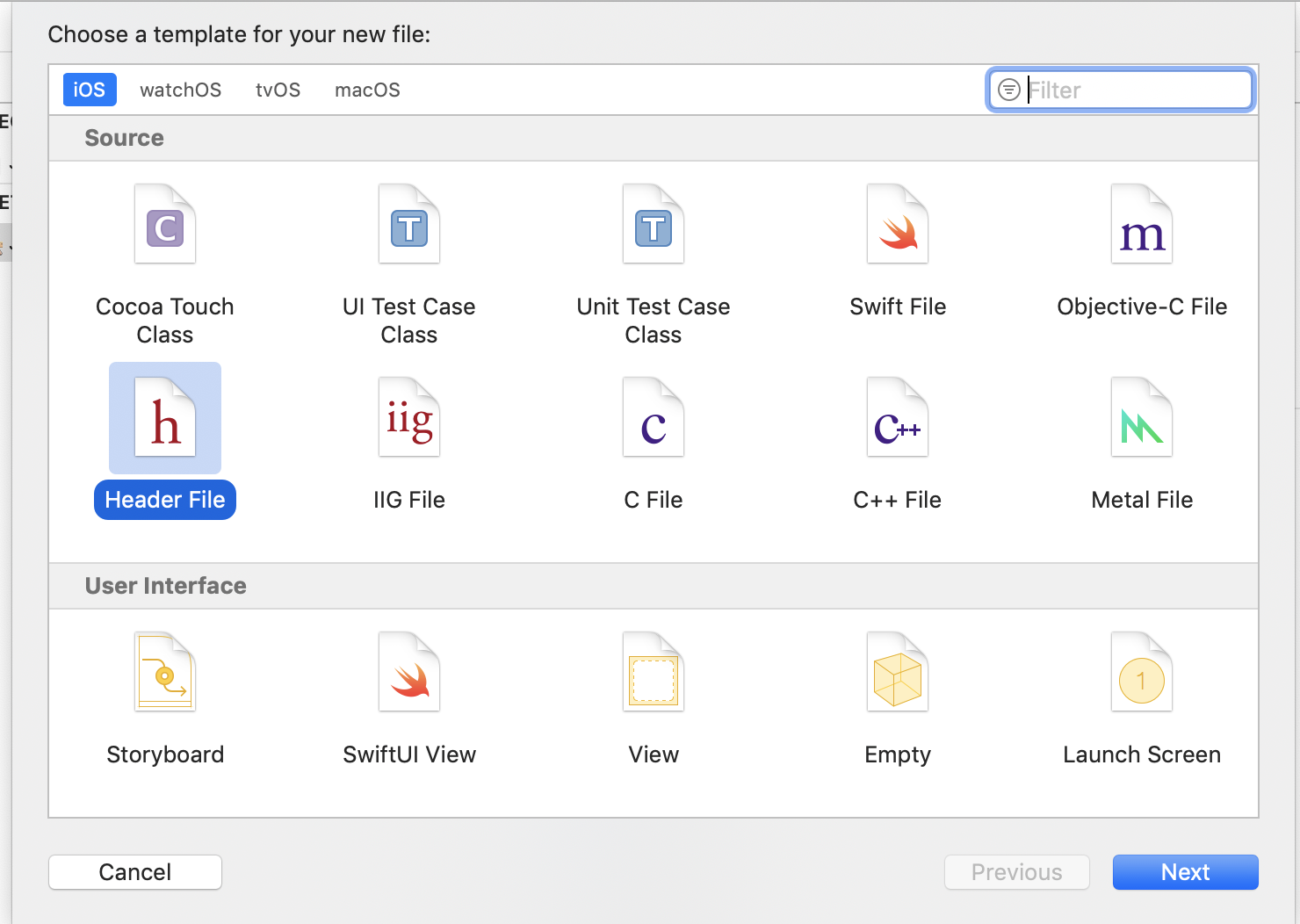
- Configure Path
Set Project TARGETS -> Build Settings -> Objective-C Bridging HeaderSet the bridge file 工程名称 -Bridging-Header.h Relative Path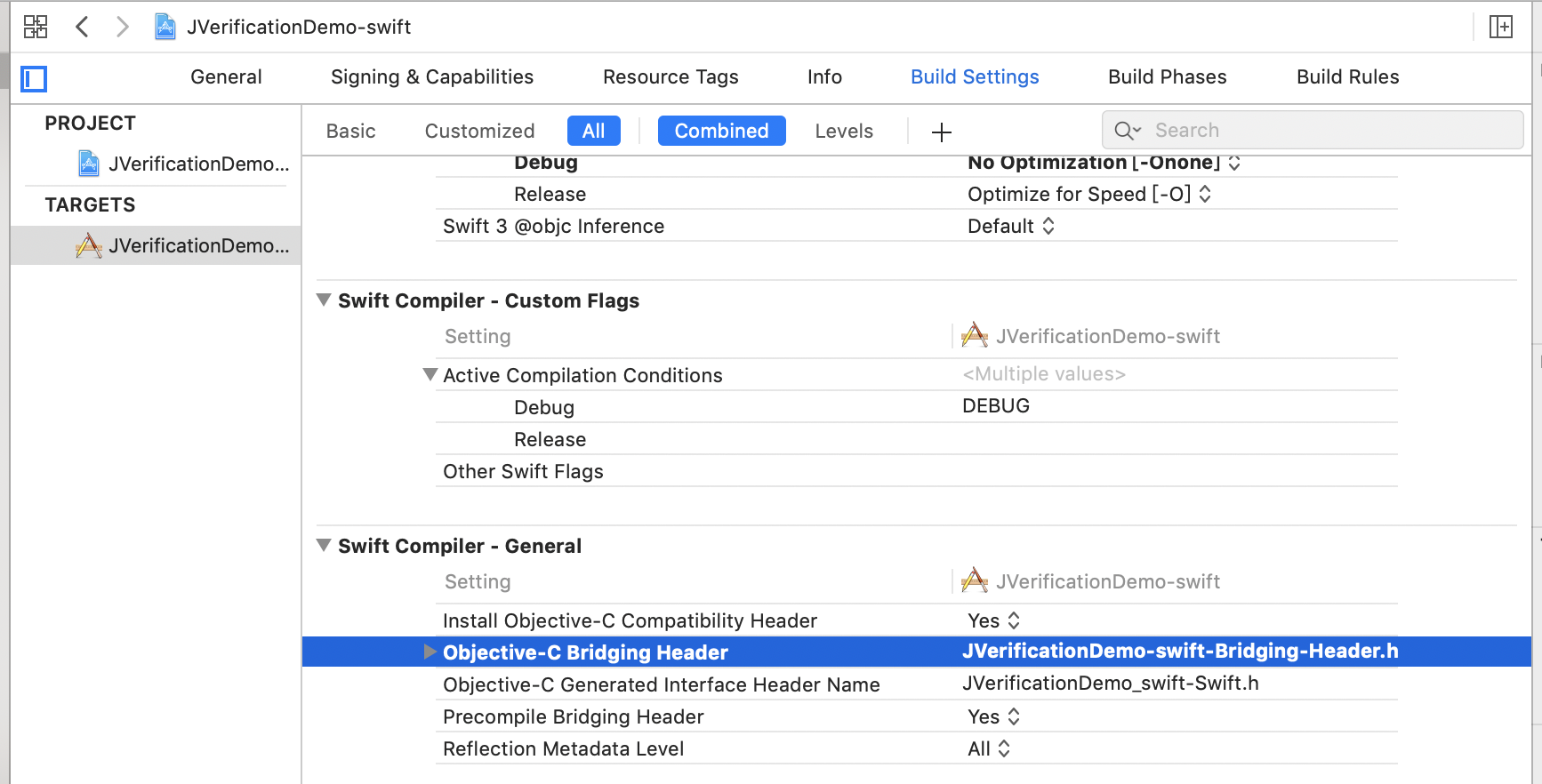
- Organisation
Yes. 工程名称 -Bridging-Header.h Include header in file
          // Import the JVERIFICATIONService.h header file
# import "JVERIFICATIONService.h"
// Header file required for idfa functionality (optional)
# import <AdSupport/AdSupport.h>
- Access sdk
I need it. sdk, initialize JVERIFICATIONService
           let adString = ASIdentifierManager.shared().advertisingIdentifier.uuidString
 let config = JVAuthConfig()
 config.appKey = "your appkey"
 JVERIFICATIONService.setup(with: config)
More API
Other API for the use of the interface document:iOS SDK API
Run Demo
Compressed bag. Jiguang Demo It's one. API A demonstration example.
Swift Demo Download:Swift Demo
Technical Support
Email:support@jiguang.cn

