


Product Capability Introduction
The Jiguang Verification product includes three core capabilities: one-click login, number verification, and business risk control. These capabilities systematically solve identity recognition, security risk control, and completion-rate issues before, during, and after user login.
One-Click Login
Introduction
Users can quickly complete registration or login with one tap and without entering a phone number, improving conversion rate and user experience.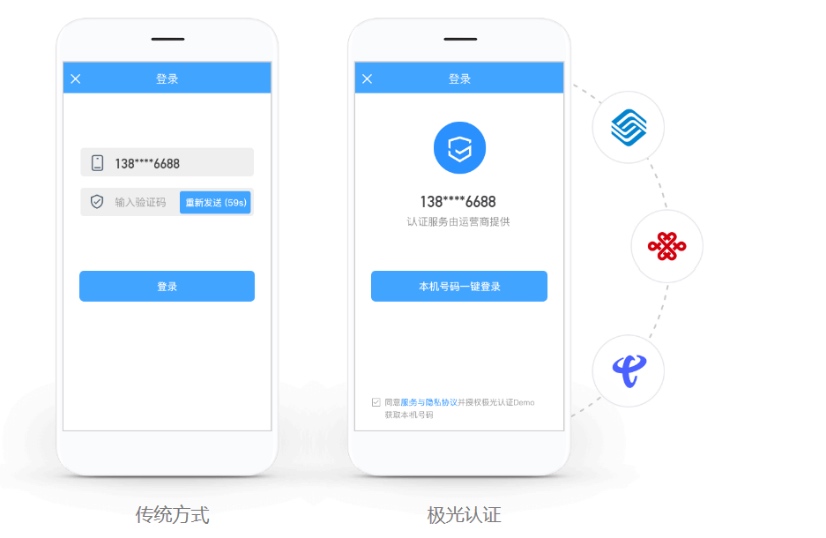
Application Scenarios
App registration and login: avoid registration or login failure caused by users not receiving SMS verification codes, improve the registration and login experience, and increase registration and login conversion rates.
H5 marketing campaign registration and login: avoid registration or login failure caused by users not receiving SMS verification codes, improve the registration and login experience, and increase campaign participation.
Number Verification
Introduction
Users can quickly verify whether the phone number matches the local SIM card without entering an SMS verification code, avoiding interception of plaintext SMS verification codes and improving security.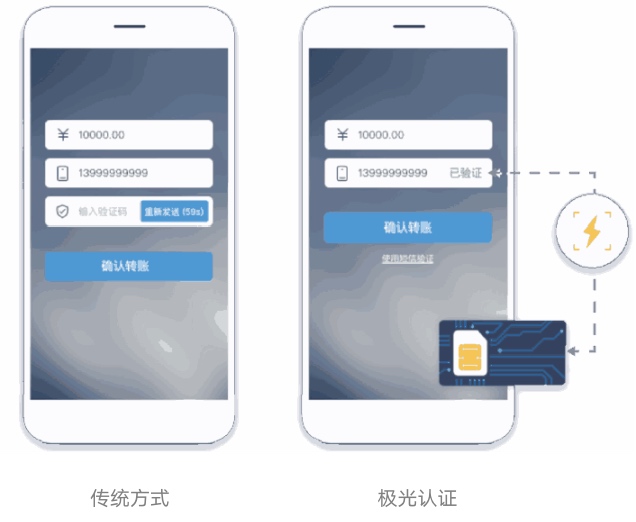
Application Scenarios
Payment and transfer: reduce interception of plaintext SMS verification codes and improve transfer security.
Order recharge: reduce interception of plaintext SMS verification codes and improve transaction security.
Application Scenarios
Account registration: reduce mass junk account registration by machines.
SMS anti-abuse: prevent SMS from being refreshed continuously and frequently, reducing enterprise SMS costs.
Voting and likes: prevent malicious vote and like manipulation, maintaining online fairness.
UGC content: prevent distribution of large volumes of spam traffic-diversion ads.
Search scenarios: prevent malicious account searches and content crawling.
Campaign coupon claiming: prevent automated bulk abuse.
Business Risk Control
Introduction
The business risk engine determines the business risk of a number and decides whether to block or ban it.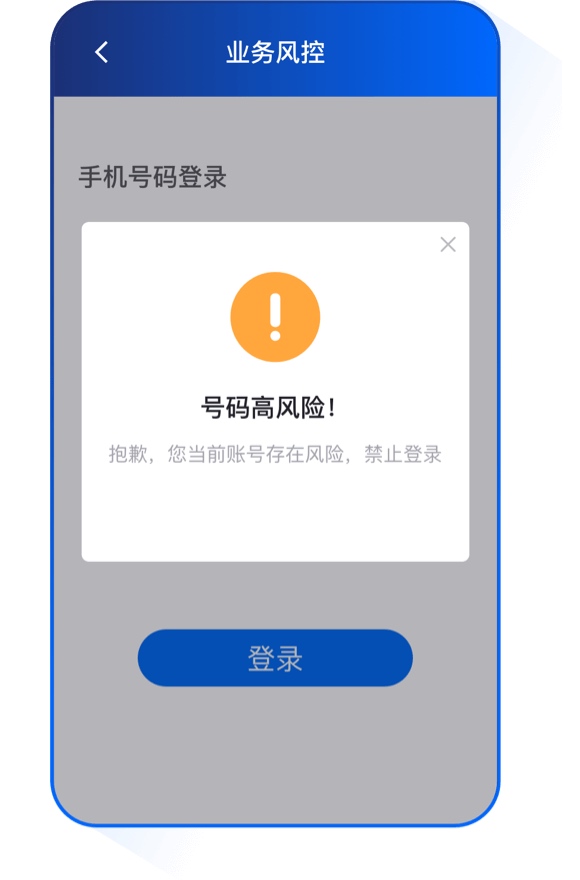
Application Scenarios
Device risk identification: identify tampered, forged, or virtual devices, such as PC emulators, cloud phones, device farms, box-controlled devices, and multi-instance devices.
Account risk identification: identify risk risks at the account dimension, including black-market junk registration, account washing, account farming, and other risky behaviors.
The above risk coefficients are returned, and customers decide whether to allow the request.
Device-Card Consistency Verification
Function description: After authorization by the user, app developers anonymize collected information to identify device-SIM separation status, thereby providing a risk control technology analysis service for determining device business security.
To enable device-card consistency verification, email our Support team: support@jiguang.cn
Quick Start
If You Are Using a Jiguang Developer Product for the First Time
- Go to the Jiguang official website to register a developer account.
- Go to the management console, create an application, and obtain the AppKey. The SDK and server identify each other through the AppKey.
- Complete developer authentication.
- Select the application for which you want to enable Jiguang Verification, and click Jiguang Verification on the left side of Application Settings. In the application introduction, fill in Application Category and Application Introduction. Android applications need to fill in Application Package Name and Application Signature; iOS applications need to fill in Bundle ID. After completing the fields, click Submit for Review. If the application has both Android and iOS versions, submit the application separately for each platform on this page.
- If developers need to use one-click login, after step 4 is complete, select the platform for which one-click login needs to be enabled in One-Click Login Settings, enter the RSA encryption public key, and click Submit for Review.
- After the review is approved, download the SDK and complete JVerification SDK integration with the help of the Integration Guide, then run the application.
If You Are Already a Jiguang Developer
- Complete developer authentication.
- Select the application for which you want to enable Jiguang Verification, and click Jiguang Verification on the left side of Application Settings. In the application introduction, fill in Application Category and Application Introduction. Android applications need to fill in Application Package Name and Application Signature; iOS applications need to fill in Bundle ID. After completing the fields, click Submit for Review. If the application has both Android and iOS versions, submit the application separately for each platform on this page.
- If developers need to use one-click login, after step 2 is complete, select the platform for which one-click login needs to be enabled in One-Click Login Settings, enter the RSA encryption public key, and click Submit for Review.
- After the review is approved, download the SDK and complete JVerification SDK integration with the help of the Integration Guide, then run the application.
Technical Support
When problems occur:
- Read the documentation carefully and check whether anything has been missed.
- Email our Support team: support@jiguang.cn
To resolve issues more quickly, provide the following information when seeking help:
- Provide the appKey.
- If it is an SDK issue, provide the corresponding SDK version and complete logs.

