


Android SDK Integration Guide
Usage tips
This article is JVerification Android SDK Standard integration guide document.
matching SDK The version is:v2.0.0 and later versions.
- If you want to test quickly, please refer to this article to run through it in a few minutes. Demo。
- JVerificationOn the documentation website, there are all relevant guides,API, tutorials and all other documents. Updated versions, including those of this document, will be posted to this website in a timely manner.
Product Description
JVerificationIntegrated three majorcarriersThe gateway authentication capability provides developers with one-click login and number authentication functions, optimizing the user registration/login and number verification experience and improving security.
main scene
- register
- Login
- Second verification
Get application information
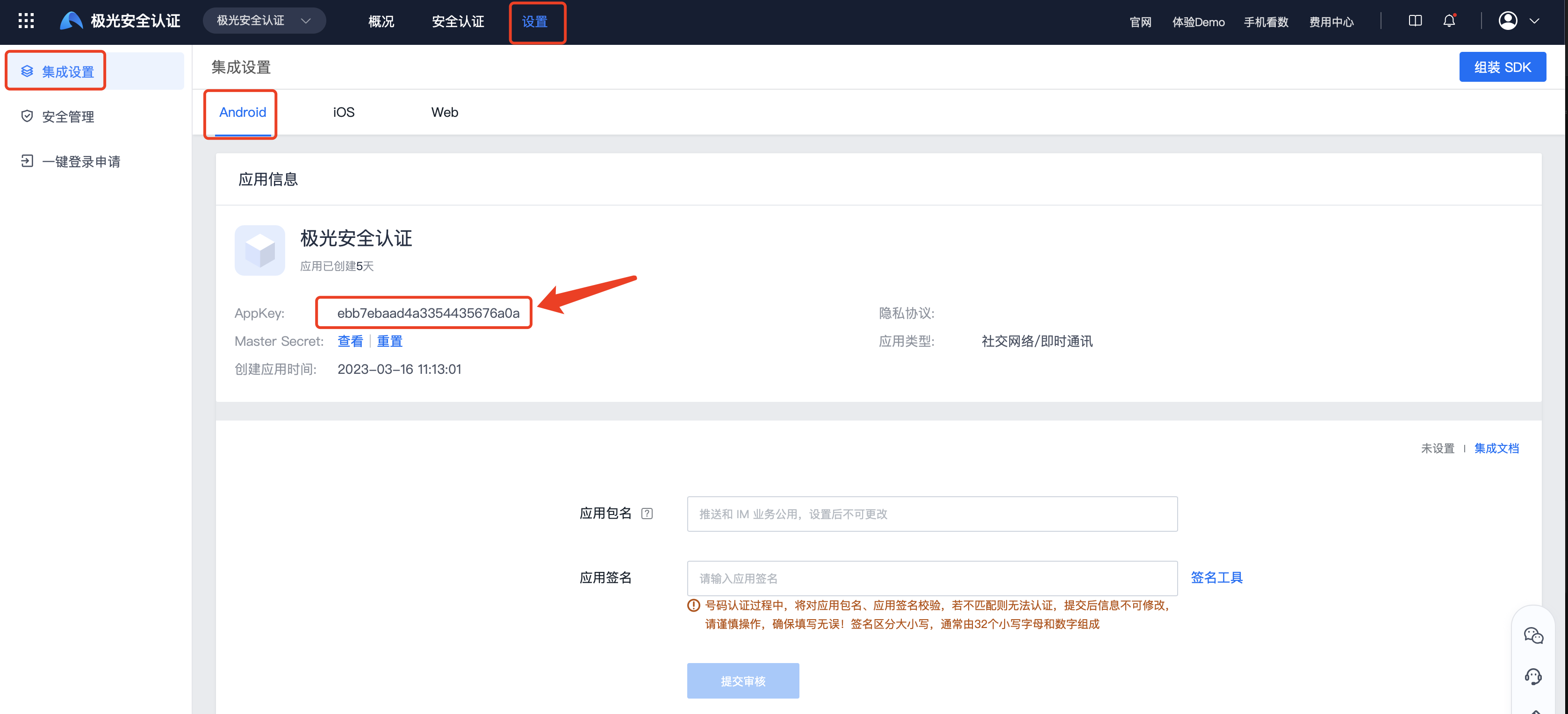
on the console Create app After that, you can enter the [Authentication Settings]-[Integration Settings] page to obtain the information used to identify the application. AppKey。
Android Version
at present SDK Only supports Android 4.0 or above version of mobile phone system.
mavenCentral Automatic integration method
Instructions: Use mavenCentral Automatically integrated developers, no need to add them to the project jar and so,mavenCentral Dependencies will be automatically completed; in AndroidManifest.xml No need to add anything to SDK related configuration,mavenCentral will be imported automatically.
- confirm android studio of Project root directory master gradle configured in mavenCentral support. (New project Supported by default configuration)
                  buildscript {
            repositories {mavenCentral() }
            ......
        }

        allprojects {
            repositories {mavenCentral()}}
- exist module of gradle Add dependencies and AndroidManifest replacement variable.
                  android {
            ......
            defaultConfig {
                applicationId "com.xxx.xxx" // 您应用的包名.
                ......

                ndk {
                    // 选择要添加的对应 cpu 类型的 .so 库。
                    abiFilters 'armeabi', 'armeabi-v7a', 'arm64-v8a'
                    // 还可以添加 'x86', 'x86_64'
                }

                manifestPlaceholders = [
                    JPUSH_PKGNAME : applicationId,
                    JPUSH_APPKEY : "你的 Appkey", //Portal 上注册的包名对应的 appKey.
                    JPUSH_CHANNEL : "developer-default", // 暂时填写默认值即可.
                ]
                ......
            }
            ......
        }


        dependencies {
            ......

            implementation 'cn.jiguang.sdk:jverification:3.1.7'// 此处以 3.1.7 版本为例,3.0.0 版本开始可以自动拉取 JCore 包,无需另外配置
            ......
        }
- If you want to eliminate JVerify automatically dependent JCore, you can use the following methods:
           implementation ('cn.jiguang.sdk:jverification:3.1.7'){
       exclude group: 'cn.jiguang.sdk', module: 'jcore'//会自动把 jcore 剔除
}
- If using JVerify 3.0.0 and below versions, configuration is required JCore rely:
          implementation 'cn.jiguang.sdk:jverification:2.x.x'
implementation 'cn.jiguang.sdk:jcore:4.x.x'
add code
JVerification SDK provided API Interfaces are mainly concentrated on cn.jiguang.verify.api.JVerificationInterface In the category.
Base API
- initialization sdk: Incoming application of context to initialize sdk 。
JVerificationInterface.init(Context context);
- Set debugging mode: the parameters are true Indicates that debugging mode is turned on and you can see sdk log.
JVerificationInterface.setDebugMode(boolean isDebugMode);
More API
other API Please refer to the interface documentation for usage:Android SDK API
Local project configuration
Obfuscated configuration
- Please download 4.x and above versions proguard.jar, and replace your Android SDK "tools\proguard\lib\proguard.jar"
- Please add the following configuration to the obfuscation file of the project:
                  -dontoptimize
        -dontpreverify

        -dontwarn cn.jpush.**
        -keep class cn.jpush.** {*;}
        -dontwarn cn.jiguang.**
        -keep class cn.jiguang.** {*;}

        -dontwarn cn.com.chinatelecom.**
        -keep class cn.com.chinatelecom.** {*;}
        -dontwarn com.ct.**
        -keep class com.ct.** {*;}
        -dontwarn a.a.**
        -keep class a.a.** {*;}
        -dontwarn com.cmic.**
        -keep class com.cmic.** {*;}
        -dontwarn com.unicom.**
        -keep class com.unicom.** {*;}
        -dontwarn com.sdk.**
        -keep class com.sdk.** {*;}

        -dontwarn com.sdk.**
        -keep class com.sdk.** {*;}
Other integration methods
Group package service integration steps
The group package service is for manual integration SDK encapsulation service, by converting SDK combined into separate jiguang module, hiding the common configuration business of manual integration, developers only need to focus on their own personalized configuration, reducing integration steps and improving developer access efficiency.
If you need to use JVerification For group package service, please check the box on the group package service interface. JVerification service, and Assemble SDK。
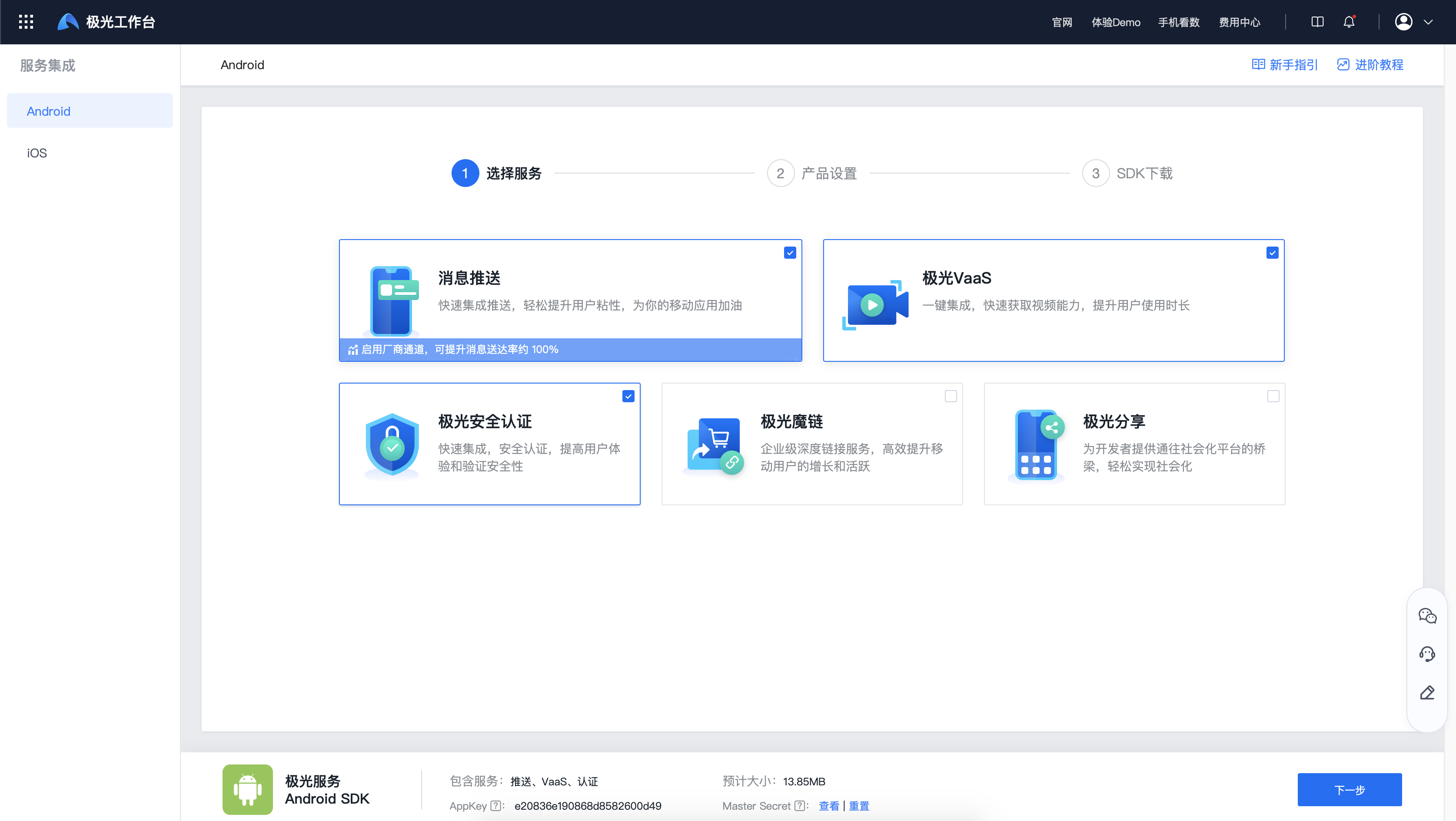
jiguang_sdk.zip Integrated compressed package contents
jiguang
- JIGUANG SDK Combo pack
- Resource files, etc. are already dependent on this package, so there is no need to manually copy the dependencies.
jiguang-demo
- JIGUANG SDK Combo package integration demo。
- is a complete Android This project demonstrates the basic usage of package services and can be used as a reference.
- It will be automatically combined and built based on the services you selected, and the related configurations preset before package assembly will be pre-buried in demo middle
import JIGUANG SDK
Pass AS will SDK as module Import project
Import steps:AndroidStudio -> File -> New -> Import Module -> Select jiguang import
Configuration JIGUANG SDK
settings.gradle Configuration added:
include ':jiguang'
in application module gradle Medium Add SDK rely
          android {
    ......
    defaultConfig {
        applicationId "com.xxx.xxx" //JVerification  上注册的包名.
        ......

        manifestPlaceholders = [
            JPUSH_PKGNAME : applicationId,
            JPUSH_APPKEY : "你的 Appkey", //JVerification  上注册的包名对应的 Appkey.
            JPUSH_CHANNEL : "developer-default", // 暂时填写默认值即可.
        ]
        ......
    }
    ......
}

dependencies {
    ......

    implementation project(':jiguang')
    ......
}
in application module Androidmanifest Medium configuration
          application 标签中添加
android:networkSecurityConfig="@xml/network_security_config"
<activity android:name="cn.jiguang.demo.jverification.MainActivity" />
exist res Create a new directory xml directory and create a new network_security_config.xml
          <?xml version="1.0" encoding="utf-8"?>
<network-security-config>
    <base-config cleartextTrafficPermitted="true">
        <trust-anchors>
            <certificates src="system" />
        </trust-anchors>
    </base-config>
</network-security-config>
Manual integration steps
Manually integrated compressed package download link:Go to download
jverification-android-release-2.x.y.zip Integrated compressed package contents
- AndroidManifest.xml
- client side embed SDK Reference configuration file
- libs/jcore-android_v2.x.x.jar
- sdk core package
- libs/xxx/xx.so
- sdk so files needed
- libs/jverification-android-sdk_v2.x.x.jar
- JVerification SDK development kit
- res/xxx
- JVerification SDK Required resource files
- assets/xxx
- JVerification SDK Required resource files
- example
- is a complete Android project, passed this demonstration JVerification SDK The basic usage can be used as a reference.
SDK File migration
- Unzip jverification-android-2.x.x-release.zip Integrated compressed package.
- copy libs/jcore-android-2.x.x.jar to project libs/ directory.
- copy libs/jverification-android-2.x.x.jar to project libs/ directory.
- copy res/xxx to project res/xxx in the corresponding directory.
- copy assets/xxx to project assets/xxx in the corresponding directory.
- copy libs/(cpu-type)/xxx.so Store the correspondence in your project cpu type directory.
Instructions 1: Use android studio developers, if using jniLibs folder into the so file, you only need to add all cpu Copy the folder of type into it; if you add the so file in module of libs folder, pay attention to the module of gradle Add the following configuration to the configuration:
                  android {
            ......
            sourceSets {
                main {jniLibs.srcDirs = ['libs']
                    ......
                }
                ......
            }
            ......
        }
Note 2: If your application selects targetSdkVersion >=28, the device is Android P is the default restriction on use http To request, developers need to configure the following:
- exist res Create one under the folder xml folder and then create a network_security_config.xml file, the contents of the file are as follows:
                  <?xml version="1.0" encoding="utf-8"?>
        <network-security-config>
            <base-config cleartextTrafficPermitted="true">
                <trust-anchors>
                    <certificates src="system" />
                </trust-anchors>
            </base-config>
        </network-security-config>
- exist AndroidManifest.xml under the file application The label adds the following attributes:
              <application
        ...
        android:networkSecurityConfig="@xml/network_security_config"
        ...
        />
- exist AndroidManifest.xml under the file application The label adds the following attributes:
              <application
        ...
        <provider
            android:exported="false"
            android:authorities="${applicationId}.jiguang.InitProvider"
            android:name="cn.jpush.android.service.InitProvider"></provider>
        ...
        />
Configuration AndroidManifest
AndroidManifest Example
          <?xml version="1.0" encoding="utf-8"?>
<manifest xmlns:android="http://schemas.android.com/apk/res/android"
    package="您应用的包名"
    android:versionCode="100"
    android:versionName="1.0.0"
    >

    <!-- Required  -->
    <uses-permission android:name="android.permission.INTERNET" />
    <uses-permission android:name="android.permission.ACCESS_NETWORK_STATE"/>
    <uses-permission android:name="android.permission.ACCESS_WIFI_STATE" />
    <uses-permission android:name="android.permission.CHANGE_NETWORK_STATE" />


    <!-- Optional -->
    <uses-permission android:name="android.permission.SYSTEM_ALERT_WINDOW" /> <!-- 用于开启 debug 版本的应用在 6.0 系统上 层叠窗口权限 -->
    <uses-permission android:name="android.permission.CHANGE_WIFI_STATE" />
    <uses-permission android:name="android.permission.VIBRATE" />
    <uses-permission android:name="android.permission.WAKE_LOCK" />
    <!--    地理位置 -->
    <uses-permission android:name="android.permission.ACCESS_COARSE_LOCATION" />
    <uses-permission android:name="android.permission.ACCESS_FINE_LOCATION" />
    <uses-permission android:name="android.permission.ACCESS_BACKGROUND_LOCATION" />

    <!--    应用列表 -->
    <uses-permission android:name="android.permission.QUERY_ALL_PACKAGES"/>


    <application
        android:icon="@drawable/ic_launcher"
        android:label="@string/app_name"
        android:name="Your Application Name">

        <!-- since 2.0.0 optional 可选项,使用一键登录功能必须添加  -->
        <!-- since 2.1.1 optional 可选项,通过 screenOrientation 设置授权页面横竖屏展示  -->
        <!-- since 2.0.0 optional 可选项,使用一键登录功能必须添加  -->
        <!-- since 2.1.1 optional 可选项,通过 screenOrientation 设置授权页面横竖屏展示  -->
        <activity
            android:name="com.cmic.sso.sdk.activity.LoginAuthActivity"
            android:theme="@style/ActivityDialogStyle"
            android:configChanges="orientation|keyboardHidden|screenSize"
            android:screenOrientation="portrait"
            android:launchMode="singleTop">
        </activity>
        <!-- 使用认证版本小于 2.9.0 时使用 com.cmic.sso.sdk.activity.LoginAuthActivity-->
<!--        <activity-->
<!--            android:name="com.cmic.sso.sdk.activity.LoginAuthActivity"-->
<!--            android:theme="@style/ActivityDialogStyle"-->
<!--            android:configChanges="orientation|keyboardHidden|screenSize"-->
<!--            android:screenOrientation="portrait"-->
<!--            android:launchMode="singleTop">-->
<!--        </activity>-->
        <!-- 从认证版本 2.9.0 开始使用 com.cmic.gen.sdk.view.GenLoginAuthActivity-->
        <activity
            android:name="com.cmic.gen.sdk.view.GenLoginAuthActivity"
            android:configChanges="orientation|keyboardHidden|screenSize"
            android:launchMode="singleTop"
            android:screenOrientation="unspecified"
            android:theme="@style/ActivityDialogStyle"/>
        <!-- since 2.0.0 optional 可选项,使用一键登录功能必须添加  -->
        <!-- since 2.1.1 optional 可选项,通过 screenOrientation 设置授权页面横竖屏展示  -->
        <activity android:name="cn.jiguang.verifysdk.CtLoginActivity"
            android:configChanges="orientation|keyboardHidden|screenSize"
            android:theme="@style/ActivityDialogStyle"
            android:screenOrientation="portrait"
            android:launchMode="singleTop">
        </activity>

        <!-- Required -->
        <meta-data android:name="JPUSH_APPKEY" android:value="您应用的 Appkey"/>
        <meta-data android:name="JPUSH_CHANNEL" android:value="developer-default"/>

        <!-- 如果你使用的 JCore 是 2.0.0 及以上的版本,需要额外在 Androidmanifest 中配置一个 Service,以在更多手机平台上获得更稳定的支持,示例如下。(JCore1.x 版本不需要) -->
        <!-- 可配置 android:process 参数将 Service 放在其他进程中;android:enabled 属性不能是 false -->
        <!-- 这个是自定义 Service,要继承极光 JCommonService,可以在更多手机平台上使得推送通道保持的更稳定 -->
        <!-- 如果不配置这个 Service,认证的数据就不会上报 -->
                <!-- 当使用的 jcore 版本大于 2.8.6,小于 3.3.0 时,需要增加配置  -->
        <service android:name="xx.xx.XService"
                 android:enabled="true"
                 android:exported="false"
                 android:process=":pushcore">
                 <intent-filter>
                     <action android:name="cn.jiguang.user.service.action" />
                 </intent-filter>
        </service>

    </application>
</manifest>
run Demo
Comes with compressed package example is a API Demonstration example. You can import it into your project and add your appKey Fill in example of AndroidManifest, and then run it directly to test.
Technical support
Email contact:support@jiguang.cn

