


iOS SDK API
SDK Description
- JVERIFICATIONService,include SDK All interfaces
- JVAuthConfig class, apply configuration information class
- JVLayoutConstraint Class, Authentication Interface Control Layout Category
- JVLayoutItem, layout reference
- JVUIConfig Category,LoginInterface UI Configure Base Category
- JVMobileUIConfig Class, MoveLoginInterface UI Configuration Category,JVUIConfig Subcategory
- JVUnicomUIConfig Class, ConnectLoginInterface UI Configuration Category,JVUIConfig Subcategory
- VTelecomUIConfig Category, telecommunicationsLoginInterface UI Configuration Category,JVUIConfig Subcategory
- JVCollectControl Category, compliance acquisition configuration Category
Settings Debug Mode
Supported version
Supported since version 1.0.0
API definition
- + (void)setDebug:(BOOL)enable;
- Description:
- Open debug Mode
- Parameters
- enable Whether to open debug Mode
SDK Initialize
Supporting echo parameters
Supported version
Supported since version 2.3.6
API definition
+ setupWithConfig:(JVAuthConfig *)config;
Description:
Initialise Interface
Parameters
config Configure Class
Example:
          OC
 // 如需使用 IDFA 功能请添加此代码并在初始化配置类中设置 advertisingId
 NSString *idfaStr = [[[ASIdentifierManager sharedManager] advertisingIdentifier] UUIDString];

 JVAuthConfig *config = [[JVAuthConfig alloc] init];
 config.appKey = @"AppKey copied from JiGuang Portal application";
 config.advertisingId = idfaStr;
 config.authBlock = ^(NSDictionary *result) {NSLog(@"初始化结果 result:%@", result);
 };
 [JVERIFICATIONService setupWithConfig:config];

Swift
 let adString = ASIdentifierManager.shared().advertisingIdentifier.uuidString
 let config = JVAuthConfig()
 config.appKey = "a0e6ace8d5b3e0247e3f58db"
 config.authBlock = {(result) -> Void in
         if let result = result {if let code = result["code"], let content = result["content"] {print("初始化结果 result: code = \(code), content = \(content)")}}
 }
 JVERIFICATIONService.setup(with: config)
Access SDK Initialization State
Supported version
Supported since version 2.3.2
API definition
+ (BOOL)isSetupClient
- Description:
- Successful initialization
- Return value
- YES Initialization succeeded
- NO Initialization Failed
- Example:
- Description:
          OC
    BOOL isSetupClient = [JVERIFICATIONService isSetupClient];
    if (isSetupClient) {// 初始化完成,可以进行后续操作}

Swift
    let isSetup = JVERIFICATIONService.isSetupClient()
    if isSetup {// 初始化完成,可以进行后续操作}
Assess whether the network environment supports
Supported version
Supported since version 1.1.2
API definition
+ (BOOL)checkVerifyEnable;
Description:
Judge whether the current network environment can initiate authentication
Return value
YES Can authenticate
NO Not Authentication
Example:
          OC
 if(![JVERIFICATIONService checkVerifyEnable]) {NSLog(@"当前网络环境不支持认证!");
 return;
 }
 // 继续获取 token 操作...
Swift
      if!JVERIFICATIONService.checkVerifyEnable() {print("当前网络环境不支持认证!")
 return
 }
 // 继续获取 token 操作...
Deciding whether the network environment supports (support for mobile Hong Kong cards)
If you need support to move the Hong Kong card, you need a preclaim number, one-tap login, the number authentication interface is to be called before the interface is used to determine if it is supported, and if it is supported, continue with the pre-number, one-tap loginor the number authentication operation.
Supported version
Supported since version 3.2.7
API definition
***+ (void)checkVerifyEnable:(void(^)(BOOL isSupport, NSString operatorType))completion;**
Description:
Deciding whether the current web environment can initiate authentication (support for mobile Hong Kong cards)
Return value
completion Turn back.
completion:isSupport:YES Support, No Support
completion:carrierType:UNKNOW-Unknown;CM-Movement;CU-Connect;CT- Telecommunications;CMHK-China moving Hong Kong
Example:
~~~ OC [JVERIFICATIONService checkVerifyEnable:^(BOOL isSupport, NSString * _Nonnull operatorType) { NSLog(@"isSupport: %d -- operatorType: %@", isSupport, operatorType); if (isSupport) {
[JVERIFICATIONService preLogin:5000 completion:^(NSDictionary *result) { NSLog(@"预取号 result:%@", result); }]; } }];... Swift
JVERIFICATIONService.checkVerifyEnable { isSupport, operatorType in if (isSupport) { // 继续获取 预取号 or 一键Login or 号码认证 操作 JVERIFICATIONService.preLogin(5000) {(result) in if let result = result {if let code = result["code"], let message = result["message"] {print("preLogin result: code = (code), message = (message)")}} } } }...
### Verify whether the precalibration cache is valid

#### Supported version
Supported since version 3.1.8

#### API definition

+ ***+ (BOOL)validePreloginCache;***
 + Description:
 + Verify whether the precalibration cache is valid
 + Return value
 + YES Valid.
 + NO Invalid

 + Example:
OC if(![JVERIFICATIONService validePreloginCache]) {NSLog(@"预取号缓存无效"); // 预取号 操作 }... Swift if!JVERIFICATIONService.validePreloginCache() {print("预取号缓存无效") // 预取号 操作 }...
### Access to geographic information

#### Supported version
Supported since version 1.1.2
Start invalid version 3.2.2

Note: The interface is on 3.2.2 is deleted.

#### API definition

+ ***+ (void)setLocationEanable:(BOOL)isEanble;***
 + Description:
 + Settings SDKGeographic access switches,YESFor opening, NO for closing, default for opening.
 + After closing down the location,push SDKThe associated functions of the geographical fence will be affected.

 + Example:
[JVERIFICATIONService setLocationEanable:NO];
## One-Tap Login
### Initialize

Call SDK Before other process methods, make sure that initialization has been called or returns uninitialized, for more information [SDK Initialize API](/en/jverification/client/ios_api#sdk-initialize) After initialization, if you call the following functional interface, you are considered to agree to open Jiguang Securely certifying business functions, we collect and report personal information necessary for business functions.

### Assess whether the network environment supports

To judge whether the current mobile phone network is able to use a single keyLoginIfSupported networksCall one more.Login API, or call the otherLoginThe way. API, details [Assess whether the network environment supports API](/en/jverification/client/ios_api#assess-whether-the-network-environment-supports)。

### Preclaim number

#### Supported version
Supported since version 2.2.0
#### API definition

+ ***+ (void)preLogin:(NSTimeInterval)timeout completion:(void (^)(NSDictionary \*result))completion***

 + Description:
 + Authenticate CurrentCarrierCan the network perform a key?LoginOperation, this method will cache access to number information, raise one-tap loginEfficiency. Suggests to launch one-tap loginThis method is called first.
 + Parameters:
 + completion Pre-number results
 + result Dictionary key Yes code and message Two Fields
 + timeout Timeout (ms), active range (0,10000To ensure access token recommended to 3000-5000ms.

 + Example:
OC [JVERIFICATIONService preLogin:5000 completion:^(NSDictionary *result) {NSLog(@"Login预取号 result:%@", result); }];
Swift JVERIFICATIONService.preLogin(5000) {(result) in if let result = result {if let code = result["code"], let message = result["message"] {print("preLogin result: code = (code), message = (message)")}} }
### Clear Pretract Cache

+ **+ (BOOL)clearPreLoginCache;**
 + Description:
 + Clear Pretract Cache

 + Example:
OC [JVERIFICATIONService clearPreLoginCache];
Swift JVERIFICATIONService.clearPreLoginCache()
### Pull up authorized pages

#### Supported version
Supported since version 2.5.2
#### API definition

+ ***+ (void)getAuthorizationWithController:(UIViewController \*)vc hide:(BOOL)hide animated:(BOOL)animationFlag timeout:(NSTimeInterval)timeoutcompletion:(void (^)(NSDictionary \*result))completion actionBlock:(void(^)(NSInteger type, NSString \*content))actionBlock***

 + Description:
 + AuthorizationLogin
 + Parameters:
 + completion LoginResult
 + result Dictionary Accessed token Time key. carrier、code、loginToken fields, not available token is. key Yes code and content Fields
 + vc Current controller
 + hide
 + animationFlag Whether an animation effect is required to pull up the authorized page, default YES
 + timeout Timeout. In milliseconds, the legal range is 0,30000, default value 10000 This parameter also plays a role in pulling up the authorized page timeout and clicking on the authorization PageLoginButton Get LoginToken Timeout
 + actionBlock failed Organisationtype and contentTwo parameters,typeFor the type of event,contentas EventDescription。 type = 1, authorized page closed;type= 2, authorized pages are pulled up;type= 3, protocol clicked;type= 4, access to the authentication code button is clicked;type=6,checkBoxis selected;type=7,checkBoxbecomes unselected;type=8,LoginButton Clicked

 + Example:
OC [JVERIFICATIONService getAuthorizationWithController:self hide:NO animated:YES timeout:5*1000 completion:^(NSDictionary *result) {NSLog(@"一键Login result:%@", result); } actionBlock:^(NSInteger type, NSString *content) {NSLog(@"一键Login actionBlock:%ld %@", (long)type, content);}];
Swift JVERIFICATIONService.getAuthorizationWith(self, hide: true, animated: true, timeout: 5*1000, completion: { (result) in if let result = result {if let token = result["loginToken"] {if let code = result["code"], let op = result["operator"] {print("一键Login result: code = (code), operator = (op), loginToken = (token)")}}else if let code = result["code"], let content = result["content"] {print("一键Login result: code = (code), content = (content)")}} }){ (type, content) in if let content = content {print("一键Login actionBlock:type = (type), content = (content)")}}
Note ***: get one-tap loginYes. loginToken then return it to the application service and call it from the service provider [REST API](https://docs.jiguang.cn/en/jverification/server/rest_api/loginTokenVerify_api/) To get a cell phone number.


### Pull up authorized pages

#### Supported version
Supported since version 3.1.0
#### API definition

+ ***+ (void)getAuthorizationWithController:(UIViewController \*)vc enableSms:(BOOL)enableSms hide:(BOOL)hide animated:(BOOL)animationFlag timeout:(NSTimeInterval)timeoutcompletion:(void (^)(NSDictionary \*result))completion actionBlock:(void(^)(NSInteger type, NSString \*content))actionBlock***

 + Description:
 + AuthorizationLogin
 + Parameters:
 + completion LoginResult
 + result Dictionary Accessed token Time key. carrier、code、loginToken fields, not available token is. key Yes code and content Fields
 + vc Current controller
 + enableSms Whether or not to open a text messageLoginSwitch service, start with authorizationLoginSMS on failureLoginpage.
 + hide
 + animationFlag Whether an animation effect is required to pull up the authorized page, default YES
 + timeout Timeout. In milliseconds, the legal range is 0,30000, default value 10000 This parameter also plays a role in pulling up the authorized page timeout and clicking on the authorization PageLoginButton Get LoginToken Timeout
 + actionBlock failed Organisationtype and contentTwo parameters,typeFor the type of event,contentas EventDescription。 type = 1, authorized page closed;type= 2, authorized pages are pulled up;type= 3, protocol clicked;type= 4, access to the authentication code button is clicked;type=6,checkBoxis selected;type=7,checkBoxbecomes unselected;type=8,LoginButton Clicked

 + Example:
OC [JVERIFICATIONService getAuthorizationWithController:self enableSms:YES hide:YES animated:YES timeout:5*1000 completion:^(NSDictionary * _Nonnull) { } actionBlock:^(NSInteger, NSString * _Nonnull) { }];
Swift JVERIFICATIONService. getAuthorizationWith(self,enableSms:true, hide: true, animated: true, timeout: 5*1000, completion: { (result) in if let result = result {if let token = result["loginToken"] {if let code = result["code"], let op = result["operator"] {print("一键Login result: code = (code), operator = (op), loginToken = (token)")}}else if let code = result["code"], let content = result["content"] {print("一键Login result: code = (code), content = (content)")}} }){ (type, content) in if let content = content {print("一键Login actionBlock:type = (type), content = (content)")}}
Note ***: get one-tap loginYes. loginToken then return it to the application service and call it from the service provider [REST API](https://docs.jiguang.cn/en/jverification/server/rest_api/loginTokenVerify_api/) To get a cell phone number.


### Close Authorized Page

#### Supported version
Supported since version 2.5.2
#### API definition

+ **+ (void)dismissLoginControllerAnimated: (BOOL)flag completion: (void (^)(void))completion;**

 + Description:
 + HideLoginWhen the authorized page is drawn up, this interface is used to hide the authorized page. When one-tap loginDo not recommend calling this interface when automatically hiding an authorized page
 + Parameters:
 + flag Whether animation is required while hiding
 + completion Callback when the dictionary authorized page is hidden
 + Example:
OC [JVERIFICATIONService dismissLoginControllerAnimated:YES completion:^{// 授权页隐藏完成}];
Swift JVERIFICATIONService.dismissLoginController(animated: true) {// 授权页隐藏完成}
#### Supported version
Supported since version:2.3.0
#### API definition


+ ***+ (void)dismissLoginController;***

 + Description:
 + Close authorized page from 2.5.2 Version started, this interface is abandoned

 + Example:
[JVERIFICATIONService dismissLoginController];
### Customise authorized page UI styles

**<font color=red size=2>The developer shall not, by any technical means, use the privacy protocol column of the authorized page,slogan Hide or overwhelm, for accessJVerification SDK And on-line applications, we review the online application authorization page, and if we find that the authorized page is not designed as required, close the application keyLoginServices.</font>**

#### Supported version
Supported since version 2.0.0

#### API definition
/*设置全屏样式UI*/
(void)customFullScreenUI{
JVUIConfig *config = [[JVUIConfig alloc] init]; config.prefersStatusBarHidden = YES; config.shouldAutorotate = YES; config.openPrivacyInBrowser = NO; config.autoLayout = YES; config.agreementNavTextColor = [UIColor redColor];
config.navReturnHidden = NO; config.privacyTextFontSize = 12; config.navText = [[NSAttributedString alloc]initWithString:@"登录统一认证" attributes:@{NSForegroundColorAttributeName:[UIColor whiteColor], NSFontAttributeName:[UIFont boldSystemFontOfSize:18]}]; config.privacyTextAlignment = NSTextAlignmentLeft; config.numberFont = [UIFont boldSystemFontOfSize:12]; config.logBtnFont = [UIFont boldSystemFontOfSize:13]; config.sloganFont = [UIFont boldSystemFontOfSize:16]; config.modalTransitionStyle = UIModalTransitionStyleCoverVertical;
config.privacyTextAlignment = NSTextAlignmentLeft; config.privacyShowBookSymbol = YES;
config.privacyComponents = @[@"登录表示同意",@"文本1",@"文本2",@"文本3",@"文本4",@"文本5"];
config.preferredStatusBarStyle = 0; config.agreementPreferredStatusBarStyle = 0; config.privacyState = NO; config.dismissAnimationFlag = YES;
///协议二次弹窗默认配置 config.isAlertPrivacyVC = YES;
// config.agreementAlertViewLogBtnTextColor = [UIColor whiteColor]; // config.agreementAlertViewTitleTextColor = [UIColor colorWithRed:34/255 green:35/255 blue:40/255 alpha:1]; config.agreementAlertViewContentTextFontSize = 10; config.agreementAlertViewContentTextAlignment = NSTextAlignmentLeft; // config.agreementAlertViewTitleTexFont = [UIFont fontWithName:NSFontAttributeName size:16];
          config.windowCornerRadius = 15;

config.resetAgreementAlertViewFrameBlock = ^(NSValue  *_Nullable* _Nullable  superViewFrame ,NSValue  *_Nullable* _Nullable  alertViewFrame , NSValue  *_Nullable* _Nullable titleFrame , NSValue  *_Nullable* _Nullable contentFrame, NSValue  *_Nullable* _Nullable buttonFrame){
    *superViewFrame = [NSValue valueWithCGRect:CGRectMake(10, 60, 280, 180)];
    *alertViewFrame = [NSValue valueWithCGRect:CGRectMake(0, 0, 280, 180)];
    *buttonFrame = [NSValue valueWithCGRect:CGRectMake(CGRectGetMidX([*contentFrame CGRectValue])-180/2, CGRectGetMaxY([*contentFrame CGRectValue])+5, 180, CGRectGetHeight([*buttonFrame CGRectValue]))];
};

config.customLoadingViewBlock = ^(UIView *View) {

    //https://github.com/jdg/MBProgressHUD
    MBProgressHUD *hub = [MBProgressHUD showHUDAddedTo:View animated:YES];
    hub.backgroundColor = [UIColor clearColor];
    hub.label.text = @"正在登录..";
    [hub showAnimated:YES];

};

config.customPrivacyAlertViewBlock = ^(UIViewController *vc , NSArray *appPrivacys,void(^loginAction)(void)) {
    UIAlertController *alert = [UIAlertController alertControllerWithTitle:@"请点击同意协议" message:appPrivacys.description preferredStyle:UIAlertControllerStyleAlert];
    [alert addAction:[UIAlertAction actionWithTitle:@"确定" style:UIAlertActionStyleDefault handler:^(UIAlertAction * _Nonnull action) {
        loginAction();
    }]];
    [vc presentViewController:alert animated:true completion:nil];
};

config.agreementAlertViewShowWindow = YES;

__weak __typeof(self)weakSelf = self;
config.customAgreementAlertView = ^(UIView *superView,void(^hidAlertView)(void)){

    weakSelf.hidAlertView = hidAlertView;

    UIButton *button = [UIButton buttonWithType:UIButtonTypeSystem];
    button.frame = CGRectMake(10, 50, 60, 40);
    [button setTitle:@"关闭拉起" forState:UIControlStateNormal];
    button.backgroundColor = [UIColor greenColor];
    [button addTarget:self action:@selector(buttonTouch_alerView) forControlEvents:UIControlEventTouchUpInside];
    [superView addSubview:button];

};

//logo
config.logoImg = [UIImage imageNamed:@"cmccLogo"];
CGFloat logoWidth = config.logoImg.size.width?:100;
CGFloat logoHeight = logoWidth;
JVLayoutConstraint *logoConstraintX = [JVLayoutConstraint constraintWithAttribute:NSLayoutAttributeCenterX relatedBy:NSLayoutRelationEqual toItem:JVLayoutItemSuper attribute:NSLayoutAttributeCenterX multiplier:1 constant:0];
JVLayoutConstraint *logoConstraintY = [JVLayoutConstraint constraintWithAttribute:NSLayoutAttributeBottom relatedBy:NSLayoutRelationEqual toItem:JVLayoutItemSuper attribute:NSLayoutAttributeCenterY multiplier:1 constant:-90];
JVLayoutConstraint *logoConstraintW = [JVLayoutConstraint constraintWithAttribute:NSLayoutAttributeWidth relatedBy:NSLayoutRelationEqual toItem:JVLayoutItemNone attribute:NSLayoutAttributeWidth multiplier:1 constant:logoWidth];
JVLayoutConstraint *logoConstraintH = [JVLayoutConstraint constraintWithAttribute:NSLayoutAttributeHeight relatedBy:NSLayoutRelationEqual toItem:JVLayoutItemNone attribute:NSLayoutAttributeHeight multiplier:1 constant:logoHeight];
config.logoConstraints = @[logoConstraintX,logoConstraintY,logoConstraintW,logoConstraintH];
config.logoHorizontalConstraints = config.logoConstraints;

//号码栏
JVLayoutConstraint *numberConstraintX = [JVLayoutConstraint constraintWithAttribute:NSLayoutAttributeCenterX relatedBy:NSLayoutRelationEqual toItem:JVLayoutItemSuper attribute:NSLayoutAttributeCenterX multiplier:1 constant:0];
JVLayoutConstraint *numberConstraintY = [JVLayoutConstraint constraintWithAttribute:NSLayoutAttributeCenterY relatedBy:NSLayoutRelationEqual toItem:JVLayoutItemSuper attribute:NSLayoutAttributeCenterY multiplier:1 constant:-55];
JVLayoutConstraint *numberConstraintW = [JVLayoutConstraint constraintWithAttribute:NSLayoutAttributeWidth relatedBy:NSLayoutRelationEqual toItem:JVLayoutItemNone attribute:NSLayoutAttributeWidth multiplier:1 constant:130];
JVLayoutConstraint *numberConstraintH = [JVLayoutConstraint constraintWithAttribute:NSLayoutAttributeHeight relatedBy:NSLayoutRelationEqual toItem:JVLayoutItemNone attribute:NSLayoutAttributeHeight multiplier:1 constant:25];
config.numberConstraints = @[numberConstraintX,numberConstraintY, numberConstraintW, numberConstraintH];
config.numberHorizontalConstraints = config.numberConstraints;

//slogan展示
JVLayoutConstraint *sloganConstraintX = [JVLayoutConstraint constraintWithAttribute:NSLayoutAttributeCenterX relatedBy:NSLayoutRelationEqual toItem:JVLayoutItemSuper attribute:NSLayoutAttributeCenterX multiplier:1 constant:0];
JVLayoutConstraint *sloganConstraintY = [JVLayoutConstraint constraintWithAttribute:NSLayoutAttributeBottom relatedBy:NSLayoutRelationEqual toItem:JVLayoutItemSuper attribute:NSLayoutAttributeCenterY multiplier:1 constant:-20];
JVLayoutConstraint *sloganConstraintW = [JVLayoutConstraint constraintWithAttribute:NSLayoutAttributeWidth relatedBy:NSLayoutRelationEqual toItem:JVLayoutItemNone attribute:NSLayoutAttributeWidth multiplier:1 constant:180];
JVLayoutConstraint *sloganConstraintH = [JVLayoutConstraint constraintWithAttribute:NSLayoutAttributeHeight relatedBy:NSLayoutRelationEqual toItem:JVLayoutItemNone attribute:NSLayoutAttributeHeight multiplier:1 constant:20];
config.sloganConstraints = @[sloganConstraintX,sloganConstraintY, sloganConstraintW, sloganConstraintH];
config.sloganHorizontalConstraints = config.sloganConstraints;


//登录按钮
UIImage *login_nor_image = [self imageNamed:@"loginBtn_Nor"];
UIImage *login_dis_image = [self imageNamed:@"loginBtn_Dis"];
UIImage *login_hig_image = [self imageNamed:@"loginBtn_Hig"];
if (login_nor_image && login_dis_image && login_hig_image) {
    config.logBtnImgs = @[login_nor_image, login_dis_image, login_hig_image];
}
CGFloat loginButtonWidth = login_nor_image.size.width?:100;
CGFloat loginButtonHeight = login_nor_image.size.height?:100;
JVLayoutConstraint *loginConstraintX = [JVLayoutConstraint constraintWithAttribute:NSLayoutAttributeCenterX relatedBy:NSLayoutRelationEqual toItem:JVLayoutItemSuper attribute:NSLayoutAttributeCenterX multiplier:1 constant:0];
JVLayoutConstraint *loginConstraintY = [JVLayoutConstraint constraintWithAttribute:NSLayoutAttributeBottom relatedBy:NSLayoutRelationEqual toItem:JVLayoutItemSuper attribute:NSLayoutAttributeCenterY multiplier:1 constant:30];
JVLayoutConstraint *loginConstraintW = [JVLayoutConstraint constraintWithAttribute:NSLayoutAttributeWidth relatedBy:NSLayoutRelationEqual toItem:JVLayoutItemNone attribute:NSLayoutAttributeWidth multiplier:1 constant:loginButtonWidth];
JVLayoutConstraint *loginConstraintH = [JVLayoutConstraint constraintWithAttribute:NSLayoutAttributeHeight relatedBy:NSLayoutRelationEqual toItem:JVLayoutItemNone attribute:NSLayoutAttributeHeight multiplier:1 constant:loginButtonHeight];
config.logBtnConstraints = @[loginConstraintX,loginConstraintY,loginConstraintW,loginConstraintH];
config.logBtnHorizontalConstraints = config.logBtnConstraints;

//勾选框---全屏样式 sdk先add隐私 因为隐私大小随内容变化而变化
UIImage * uncheckedImg = [self imageNamed:@"checkBox_unSelected"];
UIImage * checkedImg = [self imageNamed:@"checkBox_selected"];
CGFloat checkViewWidth = uncheckedImg.size.width;
CGFloat checkViewHeight = uncheckedImg.size.height;
config.uncheckedImg = uncheckedImg;
config.checkedImg = checkedImg;
JVLayoutConstraint *checkViewConstraintX = [JVLayoutConstraint constraintWithAttribute:NSLayoutAttributeLeft relatedBy:NSLayoutRelationEqual toItem:JVLayoutItemSuper attribute:NSLayoutAttributeLeft multiplier:1 constant:20];
JVLayoutConstraint *checkViewConstraintY = [JVLayoutConstraint constraintWithAttribute:NSLayoutAttributeTop relatedBy:NSLayoutRelationEqual toItem:JVLayoutItemPrivacy attribute:NSLayoutAttributeTop multiplier:1 constant:0];//改为top对齐
JVLayoutConstraint *checkViewConstraintW = [JVLayoutConstraint constraintWithAttribute:NSLayoutAttributeWidth relatedBy:NSLayoutRelationEqual toItem:JVLayoutItemNone attribute:NSLayoutAttributeWidth multiplier:1 constant:checkViewWidth];
JVLayoutConstraint *checkViewConstraintH = [JVLayoutConstraint constraintWithAttribute:NSLayoutAttributeHeight relatedBy:NSLayoutRelationEqual toItem:JVLayoutItemNone attribute:NSLayoutAttributeHeight multiplier:1 constant:checkViewHeight];
config.checkViewConstraints = @[checkViewConstraintX,checkViewConstraintY,checkViewConstraintW,checkViewConstraintH];
config.checkViewHorizontalConstraints = config.checkViewConstraints;

config.navCustom = YES;
config.privacysNavCustom = NO;


//隐私
config.textVerAlignment = JVVerAlignmentTop;///设置隐私Label的垂直对齐方式
//隐私---旧方法
CGFloat spacing = checkViewWidth + 20 + 5;
config.appPrivacyOne = @[@"应用自定义服务条款1",@"https://example.com/privacy-policy-1"];
config.appPrivacyTwo = @[@"应用自定义服务条款2",@"https://example.com/privacy-policy-2"];

//隐私---新方法 存在appPrivacys则默认使用appPrivacys方式
config.appPrivacys = @[
    @"头部文字",//头部文字
    @[@"、",@"应用自定义服务条款1",@"https://www.taobao.com/",@"协议1自定义标题"],
    @[@"、",@"应用自定义服务条款2",@"https://example.com/privacy-policy-2",@"协议2自定义标题"],
    @[@"、",@"应用自定义服务条款3",@"https://example.com/privacy-policy-3", @"协议3自定义标题"],
// @[@"、",@"应用自定义服务条款4",@"https://www.taobao.com/",@"协议4自定义标题"], // @[@"、",@"应用自定义服务条款5",@"https://www.taobao.com/",@"协议5自定义标题"], @"尾部文字。" ];
          JVLayoutConstraint *privacyConstraintX = [JVLayoutConstraint constraintWithAttribute:NSLayoutAttributeLeft relatedBy:NSLayoutRelationEqual toItem:JVLayoutItemSuper attribute:NSLayoutAttributeLeft multiplier:1 constant:spacing];
JVLayoutConstraint *privacyConstraintX2 = [JVLayoutConstraint constraintWithAttribute:NSLayoutAttributeRight relatedBy:NSLayoutRelationEqual toItem:JVLayoutItemSuper attribute:NSLayoutAttributeRight multiplier:1 constant:-spacing];
JVLayoutConstraint *privacyConstraintY = [JVLayoutConstraint constraintWithAttribute:NSLayoutAttributeBottom relatedBy:NSLayoutRelationEqual toItem:JVLayoutItemSuper attribute:NSLayoutAttributeBottom multiplier:1 constant:-20];
JVLayoutConstraint *privacyConstraintH = [JVLayoutConstraint constraintWithAttribute:NSLayoutAttributeHeight relatedBy:NSLayoutRelationEqual toItem:JVLayoutItemNone attribute:NSLayoutAttributeHeight multiplier:1 constant:80];
config.privacyConstraints = @[privacyConstraintX,privacyConstraintX2,privacyConstraintY,privacyConstraintH];
config.privacyHorizontalConstraints = config.privacyConstraints;


//loading
JVLayoutConstraint *loadingConstraintX = [JVLayoutConstraint constraintWithAttribute:NSLayoutAttributeCenterX relatedBy:NSLayoutRelationEqual toItem:JVLayoutItemSuper attribute:NSLayoutAttributeCenterX multiplier:1 constant:0];
JVLayoutConstraint *loadingConstraintY = [JVLayoutConstraint constraintWithAttribute:NSLayoutAttributeCenterY relatedBy:NSLayoutRelationEqual toItem:JVLayoutItemSuper attribute:NSLayoutAttributeCenterY multiplier:1 constant:0];
JVLayoutConstraint *loadingConstraintW = [JVLayoutConstraint constraintWithAttribute:NSLayoutAttributeWidth relatedBy:NSLayoutRelationEqual toItem:JVLayoutItemNone attribute:NSLayoutAttributeWidth multiplier:1 constant:30];
JVLayoutConstraint *loadingConstraintH = [JVLayoutConstraint constraintWithAttribute:NSLayoutAttributeHeight relatedBy:NSLayoutRelationEqual toItem:JVLayoutItemNone attribute:NSLayoutAttributeHeight multiplier:1 constant:30];
config.loadingConstraints = @[loadingConstraintX,loadingConstraintY,loadingConstraintW,loadingConstraintH];
config.loadingHorizontalConstraints = config.loadingConstraints;

// 设置 gif背景
//    config.authPageGifImagePath = [[NSBundle mainBundle] pathForResource:@"auth" ofType:@"gif"];

/*
 config.authPageBackgroundImage = [UIImage imageNamed:@"背景图"];
 config.navColor = [UIColor redColor];
 config.preferredStatusBarStyle = UIStatusBarStyleDefault;
 config.navText = [[NSAttributedString alloc] initWithString:@"自定义标题"];
 config.navReturnImg = [UIImage imageNamed:@"自定义返回键"];
 UIButton *button = [UIButton buttonWithType:UIButtonTypeCustom];
 button.frame = CGRectMake(0, 0, 44, 44);
 button.backgroundColor = [UIColor greenColor];
 config.navControl = [[UIBarButtonItem alloc] initWithCustomView:button];
 config.logoHidden = NO;
 config.logBtnText = @"自定义登录按钮文字";
 config.logBtnTextColor = [UIColor redColor];
 config.numberColor = [UIColor blueColor];
 config.appPrivacyOne = @[@"应用自定义服务条款1",@"https://example.com/privacy-policy-1"];
 config.appPrivacyTwo = @[@"应用自定义服务条款2",@"https://example.com/privacy-policy-2"];
 config.privacyComponents = @[@"文本1",@"文本2",@"文本3",@"文本4"];
 config.appPrivacyColor = @[[UIColor redColor], [UIColor blueColor]];
 config.sloganTextColor = [UIColor redColor];
 config.navCustom = NO;
 config.numberSize = 24;
 config.privacyState = YES;
 */
config.navCustom = NO;
NSString *urlStr = @"https://example.com/background-video.mp4";
[config setVideoBackgroudResource:urlStr placeHolder:@"cmBackground.jpeg"];
[JVERIFICATIONService customUIWithConfig:[self customSMSUI:config] customViews:^(UIView *customAreaView) {
    /*
     //添加一个自定义label
     UILabel *lable  = [[UILabel alloc] init];
     lable.text = @"这是一个自定义label";
     [lable sizeToFit];
     lable.center = customAreaView.center;
     [customAreaView addSubview:lable];
     */


    UIButton *button = [UIButton buttonWithType:UIButtonTypeSystem];
    button.frame = CGRectMake(10, 400, 100, 40);
    [button setTitle:@"关闭拉起" forState:UIControlStateNormal];
    button.backgroundColor = [UIColor greenColor];
    [button addTarget:self action:@selector(buttonTouch) forControlEvents:UIControlEventTouchUpInside];
    [customAreaView addSubview:button];

    UIButton *button2 = [UIButton buttonWithType:UIButtonTypeSystem];
    button2.frame = CGRectMake(200, 400, 100, 40);
    [button2 setTitle:@"关闭" forState:UIControlStateNormal];
    button2.backgroundColor = [UIColor greenColor];
    [button2 addTarget:self action:@selector(buttonTouch2) forControlEvents:UIControlEventTouchUpInside];
// [customAreaView addSubview:button2];
              /*
     UILabel *autoLabel  = [[UILabel alloc] init];
     autoLabel.text = @"这是一个自定义autoLable";
     [autoLabel sizeToFit];
     [customAreaView addSubview:autoLabel];


     autoLabel.translatesAutoresizingMaskIntoConstraints = NO;
     NSLayoutConstraint *constraintCenterX = [NSLayoutConstraint constraintWithItem:autoLabel attribute:NSLayoutAttributeCenterX relatedBy:NSLayoutRelationEqual toItem:customAreaView attribute:NSLayoutAttributeCenterX multiplier:1 constant:10];
     NSLayoutConstraint *constraintCenterY = [NSLayoutConstraint constraintWithItem:autoLabel attribute:NSLayoutAttributeCenterY relatedBy:NSLayoutRelationEqual toItem:customAreaView attribute:NSLayoutAttributeCenterY multiplier:1 constant:10];
     NSLayoutConstraint *constarintW = [NSLayoutConstraint constraintWithItem:autoLabel attribute:NSLayoutAttributeWidth relatedBy:NSLayoutRelationEqual toItem:nil attribute:NSLayoutAttributeWidth multiplier:1 constant:50];
     NSLayoutConstraint *constarintH = [NSLayoutConstraint constraintWithItem:autoLabel attribute:NSLayoutAttributeHeight relatedBy:NSLayoutRelationEqual toItem:nil attribute:NSLayoutAttributeHeight multiplier:1 constant:20];
     [autoLabel addConstraint:constarintW];
     [autoLabel addConstraint:constarintH];
     [customAreaView addConstraint:constraintCenterX];
     [customAreaView addConstraint:constraintCenterY];
     */
}];
}
(JVUIConfig *)customSMSUI:(JVUIConfig *)config {
//logo图片 config.smsLogoImg = [UIImage imageNamed:@"cmccLogo"]; CGFloat smslogoWidth = config.smsLogoImg.size.width?:100; CGFloat smslogoHeight = smslogoWidth; JVLayoutConstraint *smslogoConstraintX = [JVLayoutConstraint constraintWithAttribute:NSLayoutAttributeCenterX relatedBy:NSLayoutRelationEqual toItem:JVLayoutItemSuper attribute:NSLayoutAttributeCenterX multiplier:1 constant:0]; JVLayoutConstraint *smslogoConstraintY = [JVLayoutConstraint constraintWithAttribute:NSLayoutAttributeBottom relatedBy:NSLayoutRelationEqual toItem:JVLayoutItemSuper attribute:NSLayoutAttributeCenterY multiplier:1 constant:-150]; JVLayoutConstraint *smslogoConstraintW = [JVLayoutConstraint constraintWithAttribute:NSLayoutAttributeWidth relatedBy:NSLayoutRelationEqual toItem:JVLayoutItemNone attribute:NSLayoutAttributeWidth multiplier:1 constant:smslogoWidth]; JVLayoutConstraint *smslogoConstraintH = [JVLayoutConstraint constraintWithAttribute:NSLayoutAttributeHeight relatedBy:NSLayoutRelationEqual toItem:JVLayoutItemNone attribute:NSLayoutAttributeHeight multiplier:1 constant:smslogoHeight]; config.smsLogoConstraints = @[smslogoConstraintX,smslogoConstraintY,smslogoConstraintW,smslogoConstraintH]; config.smsLogoHorizontalConstraints = config.smsLogoConstraints;
//slogan展示 JVLayoutConstraint *smsSloganConstraintX = [JVLayoutConstraint constraintWithAttribute:NSLayoutAttributeCenterX relatedBy:NSLayoutRelationEqual toItem:JVLayoutItemLogo attribute:NSLayoutAttributeCenterX multiplier:1 constant:0]; JVLayoutConstraint *smsSloganConstraintY = [JVLayoutConstraint constraintWithAttribute:NSLayoutAttributeTop relatedBy:NSLayoutRelationEqual toItem:JVLayoutItemLogo attribute:NSLayoutAttributeBottom multiplier:1 constant:20]; JVLayoutConstraint *smsSloganConstraintW = [JVLayoutConstraint constraintWithAttribute:NSLayoutAttributeWidth relatedBy:NSLayoutRelationEqual toItem:JVLayoutItemNone attribute:NSLayoutAttributeWidth multiplier:1 constant:180]; JVLayoutConstraint *smsSloganConstraintH = [JVLayoutConstraint constraintWithAttribute:NSLayoutAttributeHeight relatedBy:NSLayoutRelationEqual toItem:JVLayoutItemNone attribute:NSLayoutAttributeHeight multiplier:1 constant:20]; config.smsSloganConstraints = @[smsSloganConstraintX,smsSloganConstraintY, smsSloganConstraintW, smsSloganConstraintH]; config.smsSloganHorizontalConstraints = config.smsSloganConstraints;
//号码输入框 JVLayoutConstraint *phoneTextFieldConstraintX = [JVLayoutConstraint constraintWithAttribute:NSLayoutAttributeCenterX relatedBy:NSLayoutRelationEqual toItem:JVLayoutItemSlogan attribute:NSLayoutAttributeCenterX multiplier:1 constant:0]; JVLayoutConstraint *phoneTextFieldConstraintY = [JVLayoutConstraint constraintWithAttribute:NSLayoutAttributeTop relatedBy:NSLayoutRelationEqual toItem:JVLayoutItemSlogan attribute:NSLayoutAttributeBottom multiplier:1 constant:20]; JVLayoutConstraint *phoneTextFieldConstraintW = [JVLayoutConstraint constraintWithAttribute:NSLayoutAttributeWidth relatedBy:NSLayoutRelationEqual toItem:JVLayoutItemSuper attribute:NSLayoutAttributeWidth multiplier:1 constant:-40]; JVLayoutConstraint *phoneTextFieldConstraintH = [JVLayoutConstraint constraintWithAttribute:NSLayoutAttributeHeight relatedBy:NSLayoutRelationEqual toItem:JVLayoutItemNone attribute:NSLayoutAttributeHeight multiplier:1 constant:30]; config.smsNumberTFConstraints = @[phoneTextFieldConstraintX,phoneTextFieldConstraintY, phoneTextFieldConstraintW, phoneTextFieldConstraintH]; config.smsNumberTFHorizontalConstraints = config.smsNumberTFConstraints;
//验证码输入框 JVLayoutConstraint *codeTFConstraintsX = [JVLayoutConstraint constraintWithAttribute:NSLayoutAttributeCenterX relatedBy:NSLayoutRelationEqual toItem:JVLayoutItemNumberTF attribute:NSLayoutAttributeCenterX multiplier:1 constant:0]; JVLayoutConstraint *codeTFConstraintsY = [JVLayoutConstraint constraintWithAttribute:NSLayoutAttributeTop relatedBy:NSLayoutRelationEqual toItem:JVLayoutItemNumberTF attribute:NSLayoutAttributeBottom multiplier:1 constant:20]; JVLayoutConstraint *codeTFConstraintsW = [JVLayoutConstraint constraintWithAttribute:NSLayoutAttributeWidth relatedBy:NSLayoutRelationEqual toItem:JVLayoutItemNumberTF attribute:NSLayoutAttributeWidth multiplier:1 constant:0]; JVLayoutConstraint *codeTFConstraintsH = [JVLayoutConstraint constraintWithAttribute:NSLayoutAttributeHeight relatedBy:NSLayoutRelationEqual toItem:JVLayoutItemNumberTF attribute:NSLayoutAttributeHeight multiplier:1 constant:0]; config.smsCodeTFConstraints = @[codeTFConstraintsX,codeTFConstraintsY, codeTFConstraintsW, codeTFConstraintsH]; config.smsCodeTFHorizontalConstraints = config.smsCodeTFConstraints;
//获取验证码按钮 JVLayoutConstraint *getCodeTFConstraintsX = [JVLayoutConstraint constraintWithAttribute:NSLayoutAttributeRight relatedBy:NSLayoutRelationEqual toItem:JVLayoutItemSuper attribute:NSLayoutAttributeRight multiplier:1 constant:0]; JVLayoutConstraint *getCodeTFConstraintsY = [JVLayoutConstraint constraintWithAttribute:NSLayoutAttributeTop relatedBy:NSLayoutRelationEqual toItem:JVLayoutItemCodeTF attribute:NSLayoutAttributeTop multiplier:1 constant:0]; JVLayoutConstraint *getCodeTFConstraintsW = [JVLayoutConstraint constraintWithAttribute:NSLayoutAttributeWidth relatedBy:NSLayoutRelationEqual toItem:JVLayoutItemNone attribute:NSLayoutAttributeWidth multiplier:1 constant:150]; JVLayoutConstraint *getCodeTFConstraintsH = [JVLayoutConstraint constraintWithAttribute:NSLayoutAttributeHeight relatedBy:NSLayoutRelationEqual toItem:JVLayoutItemNumberTF attribute:NSLayoutAttributeHeight multiplier:1 constant:0]; config.smsGetCodeBtnConstraints = @[getCodeTFConstraintsX,getCodeTFConstraintsY, getCodeTFConstraintsW, getCodeTFConstraintsH]; config.smsGetCodeBtnHorizontalConstraints = config.smsGetCodeBtnConstraints;
//登录按钮 UIImage *login_nor_image = [self imageNamed:@"loginBtn_Nor"]; UIImage *login_dis_image = [self imageNamed:@"loginBtn_Dis"]; UIImage *login_hig_image = [self imageNamed:@"loginBtn_Hig"]; if (login_nor_image && login_dis_image && login_hig_image) { config.logBtnImgs = @[login_nor_image, login_dis_image, login_hig_image]; } CGFloat loginButtonWidth = login_nor_image.size.width?:100; CGFloat loginButtonHeight = login_nor_image.size.height?:100; JVLayoutConstraint *loginConstraintX = [JVLayoutConstraint constraintWithAttribute:NSLayoutAttributeCenterX relatedBy:NSLayoutRelationEqual toItem:JVLayoutItemSuper attribute:NSLayoutAttributeCenterX multiplier:1 constant:0]; JVLayoutConstraint *loginConstraintY = [JVLayoutConstraint constraintWithAttribute:NSLayoutAttributeTop relatedBy:NSLayoutRelationEqual toItem:JVLayoutItemCodeTF attribute:NSLayoutAttributeBottom multiplier:1 constant:30]; JVLayoutConstraint *loginConstraintW = [JVLayoutConstraint constraintWithAttribute:NSLayoutAttributeWidth relatedBy:NSLayoutRelationEqual toItem:JVLayoutItemNone attribute:NSLayoutAttributeWidth multiplier:1 constant:loginButtonWidth]; JVLayoutConstraint *loginConstraintH = [JVLayoutConstraint constraintWithAttribute:NSLayoutAttributeHeight relatedBy:NSLayoutRelationEqual toItem:JVLayoutItemNone attribute:NSLayoutAttributeHeight multiplier:1 constant:loginButtonHeight]; config.smsLogBtnConstraints = @[loginConstraintX,loginConstraintY,loginConstraintW,loginConstraintH]; config.smsLogBtnHorizontalConstraints = config.smsLogBtnConstraints;
UIImage * uncheckedImg = [self imageNamed:@"checkBox_unSelected"]; UIImage * checkedImg = [self imageNamed:@"checkBox_selected"]; CGFloat checkViewWidth = 20; CGFloat checkViewHeight = 20; CGFloat spacing = checkViewWidth + 20 + 5;
JVLayoutConstraint *privacyConstraintX = [JVLayoutConstraint constraintWithAttribute:NSLayoutAttributeLeft relatedBy:NSLayoutRelationEqual toItem:JVLayoutItemSuper attribute:NSLayoutAttributeLeft multiplier:1 constant:spacing]; JVLayoutConstraint *privacyConstraintX2 = [JVLayoutConstraint constraintWithAttribute:NSLayoutAttributeRight relatedBy:NSLayoutRelationEqual toItem:JVLayoutItemSuper attribute:NSLayoutAttributeRight multiplier:1 constant:-spacing]; JVLayoutConstraint *privacyConstraintY = [JVLayoutConstraint constraintWithAttribute:NSLayoutAttributeBottom relatedBy:NSLayoutRelationEqual toItem:JVLayoutItemSuper attribute:NSLayoutAttributeBottom multiplier:1 constant:-10]; JVLayoutConstraint *privacyConstraintH = [JVLayoutConstraint constraintWithAttribute:NSLayoutAttributeHeight relatedBy:NSLayoutRelationEqual toItem:JVLayoutItemNone attribute:NSLayoutAttributeHeight multiplier:1 constant:50]; config.smsPrivacyConstraints = @[privacyConstraintX,privacyConstraintY,privacyConstraintX2,privacyConstraintH]; config.smsPrivacyHorizontalConstraints = config.smsPrivacyConstraints;
//勾选框 config.smsUncheckedImg = uncheckedImg; config.smsCheckedImg = checkedImg;
JVLayoutConstraint *checkViewConstraintX = [JVLayoutConstraint constraintWithAttribute:NSLayoutAttributeLeft relatedBy:NSLayoutRelationEqual toItem:JVLayoutItemSuper attribute:NSLayoutAttributeLeft multiplier:1 constant:20]; JVLayoutConstraint *checkViewConstraintY = [JVLayoutConstraint constraintWithAttribute:NSLayoutAttributeTop relatedBy:NSLayoutRelationEqual toItem:JVLayoutItemPrivacy attribute:NSLayoutAttributeTop multiplier:1 constant:0]; JVLayoutConstraint *checkViewConstraintW = [JVLayoutConstraint constraintWithAttribute:NSLayoutAttributeWidth relatedBy:NSLayoutRelationEqual toItem:JVLayoutItemNone attribute:NSLayoutAttributeWidth multiplier:1 constant:checkViewWidth]; JVLayoutConstraint *checkViewConstraintH = [JVLayoutConstraint constraintWithAttribute:NSLayoutAttributeHeight relatedBy:NSLayoutRelationEqual toItem:JVLayoutItemNone attribute:NSLayoutAttributeHeight multiplier:1 constant:checkViewHeight]; config.smsCheckViewConstraints = @[checkViewConstraintX,checkViewConstraintY,checkViewConstraintW,checkViewConstraintH]; config.smsCheckViewHorizontalConstraints = config.smsCheckViewConstraints;
config.smsCustomPrivacyAlertViewBlock = ^(UIViewController *vc , NSArray *appPrivacys,void(^loginAction)(void)) { UIAlertController *alert = [UIAlertController alertControllerWithTitle:@"请点击同意协议" message:appPrivacys.description preferredStyle:UIAlertControllerStyleAlert]; [alert addAction:[UIAlertAction actionWithTitle:@"确定" style:UIAlertActionStyleDefault handler:^(UIAlertAction * _Nonnull action) { loginAction(); }]]; [vc presentViewController:alert animated:true completion:nil]; };
config.smsShowWindow = NO; config.smsAutoLayout = YES;
config.smsAgreementAlertViewShowWindow = YES; config.smsWindowCornerRadius = 15;
config.smsResetAgreementAlertViewFrameBlock = ^(NSValue _Nullable _Nullable superViewFrame ,NSValue _Nullable _Nullable alertViewFrame , NSValue _Nullable _Nullable titleFrame , NSValue _Nullable _Nullable contentFrame, NSValue _Nullable _Nullable buttonFrame){ *superViewFrame = [NSValue valueWithCGRect:CGRectMake(10, 60, 280, 180)]; *alertViewFrame = [NSValue valueWithCGRect:CGRectMake(0, 0, 280, 180)]; *buttonFrame = [NSValue valueWithCGRect:CGRectMake(CGRectGetMidX([*contentFrame CGRectValue])-180/2, CGRectGetMaxY([*contentFrame CGRectValue])+5, 180, CGRectGetHeight([*buttonFrame CGRectValue]))]; };
__weak __typeof(self)weakSelf = self; config.smsCustomAgreementAlertView = ^(UIView *superView,void(^hidAlertView)(void)){
weakSelf.hidAlertView = hidAlertView; UIButton *button = [UIButton buttonWithType:UIButtonTypeSystem]; button.frame = CGRectMake(10, 50, 60, 40); [button setTitle:@"关闭拉起" forState:UIControlStateNormal]; button.backgroundColor = [UIColor greenColor]; [button addTarget:self action:@selector(buttonTouch_alerView) forControlEvents:UIControlEventTouchUpInside]; [superView addSubview:button];weakSelf.hidAlertView = hidAlertView; UIButton *button = [UIButton buttonWithType:UIButtonTypeSystem]; button.frame = CGRectMake(10, 50, 60, 40); [button setTitle:@"关闭拉起" forState:UIControlStateNormal]; button.backgroundColor = [UIColor greenColor]; [button addTarget:self action:@selector(buttonTouch_alerView) forControlEvents:UIControlEventTouchUpInside]; [superView addSubview:button];This code block is shown in the floating window};
config.smsAuthBtnBlock = ^(NSInteger code,NSString *msg){
[MBProgressHUD showToast:msg duration:3];[MBProgressHUD showToast:msg duration:3];This code block is shown in the floating window}; config.isSmsAlertPrivacyVC = YES; config.smsPrivacysNavCustom = NO; config.smsTextVerAlignment = JVVerAlignmentTop;
config.smsPrivacyTextAlignment = NSTextAlignmentLeft; config.smsPrivacyShowBookSymbol = YES; config.smsAutoLayout = YES; config.privacyComponents = @[@"登录即同意",@"文本1",@"文本2",@"文本3",@"文本4",@"文本5"]; //隐私---新方法 存在appPrivacys则默认使用appPrivacys方式 config.smsAppPrivacys = @[ @"头部文字",//头部文字 @[@"",@"应用自定义服务条款1",@"https://www.taobao.com/",@"协议1自定义标题"], @[@"、",@"应用自定义服务条款2",@"https://example.com/privacy-policy-2",@"协议2自定义标题"], @[@"、",@"应用自定义服务条款3",@"https://example.com/privacy-policy-3", @"协议3自定义标题"], @"尾部文字。" ]; UIImage *sms_nor_image = [self imageNamed:@"loginBtn_Nor"]; UIImage *sms_dis_image = [self imageNamed:@"loginBtn_Dis"]; UIImage *sms_hig_image = [self imageNamed:@"loginBtn_Hig"]; if (sms_nor_image && sms_dis_image && sms_hig_image) { ///协议二次弹窗的btn图片 config.smsAgreementAlertViewLogBtnImgs = @[sms_nor_image, sms_dis_image, sms_hig_image]; } return config;
}
(JVUIConfig *)customSMSWindowSUI:(JVUIConfig *)config {
//弹框 config.smsShowWindow = YES; config.smsWindowCornerRadius = 10; config.smsWindowBackgroundAlpha = 0.3; CGFloat windowW = 300; CGFloat windowH = 300; JVLayoutConstraint *windowConstraintX = [JVLayoutConstraint constraintWithAttribute:NSLayoutAttributeCenterX relatedBy:NSLayoutRelationEqual toItem:JVLayoutItemSuper attribute:NSLayoutAttributeCenterX multiplier:1 constant:0]; JVLayoutConstraint *windowConstraintY = [JVLayoutConstraint constraintWithAttribute:NSLayoutAttributeCenterY relatedBy:NSLayoutRelationEqual toItem:JVLayoutItemSuper attribute:NSLayoutAttributeCenterY multiplier:1 constant:0]; JVLayoutConstraint *windowConstraintW = [JVLayoutConstraint constraintWithAttribute:NSLayoutAttributeWidth relatedBy:NSLayoutRelationEqual toItem:JVLayoutItemNone attribute:NSLayoutAttributeWidth multiplier:1 constant:windowW]; JVLayoutConstraint *windowConstraintH = [JVLayoutConstraint constraintWithAttribute:NSLayoutAttributeHeight relatedBy:NSLayoutRelationEqual toItem:JVLayoutItemNone attribute:NSLayoutAttributeHeight multiplier:1 constant:windowH]; config.smsWindowConstraints = @[windowConstraintX,windowConstraintY,windowConstraintW,windowConstraintH]; config.smsWindowHorizontalConstraints = config.windowConstraints;
//弹窗close按钮 UIImage *window_close_nor_image = [self imageNamed:@"windowClose"]; UIImage *window_close_hig_image = [self imageNamed:@"windowClose"]; if (window_close_nor_image && window_close_hig_image) { config.smsWindowCloseBtnImgs = @[window_close_nor_image, window_close_hig_image]; } CGFloat windowCloseBtnWidth = window_close_nor_image.size.width?:15; CGFloat windowCloseBtnHeight = window_close_nor_image.size.height?:15;; JVLayoutConstraint *windowCloseBtnConstraintX = [JVLayoutConstraint constraintWithAttribute:NSLayoutAttributeRight relatedBy:NSLayoutRelationEqual toItem:JVLayoutItemSuper attribute:NSLayoutAttributeRight multiplier:1 constant:-10]; JVLayoutConstraint *windowCloseBtnConstraintY = [JVLayoutConstraint constraintWithAttribute:NSLayoutAttributeTop relatedBy:NSLayoutRelationEqual toItem:JVLayoutItemSuper attribute:NSLayoutAttributeTop multiplier:1 constant:10]; JVLayoutConstraint *windowCloseBtnConstraintW = [JVLayoutConstraint constraintWithAttribute:NSLayoutAttributeWidth relatedBy:NSLayoutRelationEqual toItem:JVLayoutItemNone attribute:NSLayoutAttributeWidth multiplier:1 constant:windowCloseBtnWidth]; JVLayoutConstraint *windowCloseBtnConstraintH = [JVLayoutConstraint constraintWithAttribute:NSLayoutAttributeHeight relatedBy:NSLayoutRelationEqual toItem:JVLayoutItemNone attribute:NSLayoutAttributeHeight multiplier:1 constant:windowCloseBtnHeight]; config.smsWindowCloseBtnConstraints = @[windowCloseBtnConstraintX,windowCloseBtnConstraintY,windowCloseBtnConstraintW,windowCloseBtnConstraintH]; config.smsWindowCloseBtnHorizontalConstraints = config.windowCloseBtnConstraints;
//logo图片 config.smsLogoImg = [UIImage imageNamed:@"cmccLogo"]; CGFloat smslogoWidth = config.smsLogoImg.size.width?:100; CGFloat smslogoHeight = smslogoWidth; JVLayoutConstraint *smslogoConstraintX = [JVLayoutConstraint constraintWithAttribute:NSLayoutAttributeCenterX relatedBy:NSLayoutRelationEqual toItem:JVLayoutItemSuper attribute:NSLayoutAttributeCenterX multiplier:1 constant:0]; JVLayoutConstraint *smslogoConstraintY = [JVLayoutConstraint constraintWithAttribute:NSLayoutAttributeBottom relatedBy:NSLayoutRelationEqual toItem:JVLayoutItemSuper attribute:NSLayoutAttributeCenterY multiplier:1 constant:-150]; JVLayoutConstraint *smslogoConstraintW = [JVLayoutConstraint constraintWithAttribute:NSLayoutAttributeWidth relatedBy:NSLayoutRelationEqual toItem:JVLayoutItemNone attribute:NSLayoutAttributeWidth multiplier:1 constant:smslogoWidth]; JVLayoutConstraint *smslogoConstraintH = [JVLayoutConstraint constraintWithAttribute:NSLayoutAttributeHeight relatedBy:NSLayoutRelationEqual toItem:JVLayoutItemNone attribute:NSLayoutAttributeHeight multiplier:1 constant:smslogoHeight]; config.smsLogoConstraints = @[smslogoConstraintX,smslogoConstraintY,smslogoConstraintW,smslogoConstraintH]; config.smsLogoHorizontalConstraints = config.smsLogoConstraints;
//slogan展示 JVLayoutConstraint *smsSloganConstraintX = [JVLayoutConstraint constraintWithAttribute:NSLayoutAttributeCenterX relatedBy:NSLayoutRelationEqual toItem:JVLayoutItemLogo attribute:NSLayoutAttributeCenterX multiplier:1 constant:0]; JVLayoutConstraint *smsSloganConstraintY = [JVLayoutConstraint constraintWithAttribute:NSLayoutAttributeTop relatedBy:NSLayoutRelationEqual toItem:JVLayoutItemLogo attribute:NSLayoutAttributeBottom multiplier:1 constant:20]; JVLayoutConstraint *smsSloganConstraintW = [JVLayoutConstraint constraintWithAttribute:NSLayoutAttributeWidth relatedBy:NSLayoutRelationEqual toItem:JVLayoutItemNone attribute:NSLayoutAttributeWidth multiplier:1 constant:180]; JVLayoutConstraint *smsSloganConstraintH = [JVLayoutConstraint constraintWithAttribute:NSLayoutAttributeHeight relatedBy:NSLayoutRelationEqual toItem:JVLayoutItemNone attribute:NSLayoutAttributeHeight multiplier:1 constant:20]; config.smsSloganConstraints = @[smsSloganConstraintX,smsSloganConstraintY, smsSloganConstraintW, smsSloganConstraintH]; config.smsSloganHorizontalConstraints = config.smsSloganConstraints;
//号码输入框 JVLayoutConstraint *phoneTextFieldConstraintX = [JVLayoutConstraint constraintWithAttribute:NSLayoutAttributeCenterX relatedBy:NSLayoutRelationEqual toItem:JVLayoutItemSlogan attribute:NSLayoutAttributeCenterX multiplier:1 constant:0]; JVLayoutConstraint *phoneTextFieldConstraintY = [JVLayoutConstraint constraintWithAttribute:NSLayoutAttributeTop relatedBy:NSLayoutRelationEqual toItem:JVLayoutItemSlogan attribute:NSLayoutAttributeBottom multiplier:1 constant:20]; JVLayoutConstraint *phoneTextFieldConstraintW = [JVLayoutConstraint constraintWithAttribute:NSLayoutAttributeWidth relatedBy:NSLayoutRelationEqual toItem:JVLayoutItemSuper attribute:NSLayoutAttributeWidth multiplier:1 constant:-40]; JVLayoutConstraint *phoneTextFieldConstraintH = [JVLayoutConstraint constraintWithAttribute:NSLayoutAttributeHeight relatedBy:NSLayoutRelationEqual toItem:JVLayoutItemNone attribute:NSLayoutAttributeHeight multiplier:1 constant:30]; config.smsNumberTFConstraints = @[phoneTextFieldConstraintX,phoneTextFieldConstraintY, phoneTextFieldConstraintW, phoneTextFieldConstraintH]; config.smsNumberTFHorizontalConstraints = config.smsNumberTFConstraints;
//验证码输入框 JVLayoutConstraint *codeTFConstraintsX = [JVLayoutConstraint constraintWithAttribute:NSLayoutAttributeCenterX relatedBy:NSLayoutRelationEqual toItem:JVLayoutItemNumberTF attribute:NSLayoutAttributeCenterX multiplier:1 constant:0]; JVLayoutConstraint *codeTFConstraintsY = [JVLayoutConstraint constraintWithAttribute:NSLayoutAttributeTop relatedBy:NSLayoutRelationEqual toItem:JVLayoutItemNumberTF attribute:NSLayoutAttributeBottom multiplier:1 constant:20]; JVLayoutConstraint *codeTFConstraintsW = [JVLayoutConstraint constraintWithAttribute:NSLayoutAttributeWidth relatedBy:NSLayoutRelationEqual toItem:JVLayoutItemNumberTF attribute:NSLayoutAttributeWidth multiplier:1 constant:0]; JVLayoutConstraint *codeTFConstraintsH = [JVLayoutConstraint constraintWithAttribute:NSLayoutAttributeHeight relatedBy:NSLayoutRelationEqual toItem:JVLayoutItemNumberTF attribute:NSLayoutAttributeHeight multiplier:1 constant:0]; config.smsCodeTFConstraints = @[codeTFConstraintsX,codeTFConstraintsY, codeTFConstraintsW, codeTFConstraintsH]; config.smsCodeTFHorizontalConstraints = config.smsCodeTFConstraints;
//获取验证码按钮 JVLayoutConstraint *getCodeTFConstraintsX = [JVLayoutConstraint constraintWithAttribute:NSLayoutAttributeRight relatedBy:NSLayoutRelationEqual toItem:JVLayoutItemSuper attribute:NSLayoutAttributeRight multiplier:1 constant:0]; JVLayoutConstraint *getCodeTFConstraintsY = [JVLayoutConstraint constraintWithAttribute:NSLayoutAttributeTop relatedBy:NSLayoutRelationEqual toItem:JVLayoutItemCodeTF attribute:NSLayoutAttributeTop multiplier:1 constant:0]; JVLayoutConstraint *getCodeTFConstraintsW = [JVLayoutConstraint constraintWithAttribute:NSLayoutAttributeWidth relatedBy:NSLayoutRelationEqual toItem:JVLayoutItemNone attribute:NSLayoutAttributeWidth multiplier:1 constant:150]; JVLayoutConstraint *getCodeTFConstraintsH = [JVLayoutConstraint constraintWithAttribute:NSLayoutAttributeHeight relatedBy:NSLayoutRelationEqual toItem:JVLayoutItemNumberTF attribute:NSLayoutAttributeHeight multiplier:1 constant:0]; config.smsGetCodeBtnConstraints = @[getCodeTFConstraintsX,getCodeTFConstraintsY, getCodeTFConstraintsW, getCodeTFConstraintsH]; config.smsGetCodeBtnHorizontalConstraints = config.smsGetCodeBtnConstraints;
//登录按钮 UIImage *login_nor_image = [self imageNamed:@"loginBtn_Nor"]; UIImage *login_dis_image = [self imageNamed:@"loginBtn_Dis"]; UIImage *login_hig_image = [self imageNamed:@"loginBtn_Hig"]; if (login_nor_image && login_dis_image && login_hig_image) { config.logBtnImgs = @[login_nor_image, login_dis_image, login_hig_image]; } CGFloat loginButtonWidth = login_nor_image.size.width?:100; CGFloat loginButtonHeight = login_nor_image.size.height?:100; JVLayoutConstraint *loginConstraintX = [JVLayoutConstraint constraintWithAttribute:NSLayoutAttributeCenterX relatedBy:NSLayoutRelationEqual toItem:JVLayoutItemSuper attribute:NSLayoutAttributeCenterX multiplier:1 constant:0]; JVLayoutConstraint *loginConstraintY = [JVLayoutConstraint constraintWithAttribute:NSLayoutAttributeTop relatedBy:NSLayoutRelationEqual toItem:JVLayoutItemCodeTF attribute:NSLayoutAttributeBottom multiplier:1 constant:30]; JVLayoutConstraint *loginConstraintW = [JVLayoutConstraint constraintWithAttribute:NSLayoutAttributeWidth relatedBy:NSLayoutRelationEqual toItem:JVLayoutItemNone attribute:NSLayoutAttributeWidth multiplier:1 constant:loginButtonWidth]; JVLayoutConstraint *loginConstraintH = [JVLayoutConstraint constraintWithAttribute:NSLayoutAttributeHeight relatedBy:NSLayoutRelationEqual toItem:JVLayoutItemNone attribute:NSLayoutAttributeHeight multiplier:1 constant:loginButtonHeight]; config.smsLogBtnConstraints = @[loginConstraintX,loginConstraintY,loginConstraintW,loginConstraintH]; config.smsLogBtnHorizontalConstraints = config.smsLogBtnConstraints;
UIImage * uncheckedImg = [self imageNamed:@"checkBox_unSelected"]; UIImage * checkedImg = [self imageNamed:@"checkBox_selected"]; CGFloat checkViewWidth = 20; CGFloat checkViewHeight = 20; CGFloat spacing = checkViewWidth + 20 + 5;
JVLayoutConstraint *privacyConstraintX = [JVLayoutConstraint constraintWithAttribute:NSLayoutAttributeLeft relatedBy:NSLayoutRelationEqual toItem:JVLayoutItemSuper attribute:NSLayoutAttributeLeft multiplier:1 constant:spacing]; JVLayoutConstraint *privacyConstraintX2 = [JVLayoutConstraint constraintWithAttribute:NSLayoutAttributeRight relatedBy:NSLayoutRelationEqual toItem:JVLayoutItemSuper attribute:NSLayoutAttributeRight multiplier:1 constant:-spacing]; JVLayoutConstraint *privacyConstraintY = [JVLayoutConstraint constraintWithAttribute:NSLayoutAttributeBottom relatedBy:NSLayoutRelationEqual toItem:JVLayoutItemSuper attribute:NSLayoutAttributeBottom multiplier:1 constant:-10]; JVLayoutConstraint *privacyConstraintH = [JVLayoutConstraint constraintWithAttribute:NSLayoutAttributeHeight relatedBy:NSLayoutRelationEqual toItem:JVLayoutItemNone attribute:NSLayoutAttributeHeight multiplier:1 constant:50]; config.smsPrivacyConstraints = @[privacyConstraintX,privacyConstraintY,privacyConstraintX2,privacyConstraintH]; config.smsPrivacyHorizontalConstraints = config.smsPrivacyConstraints;
//勾选框 config.smsUncheckedImg = uncheckedImg; config.smsCheckedImg = checkedImg;
JVLayoutConstraint *checkViewConstraintX = [JVLayoutConstraint constraintWithAttribute:NSLayoutAttributeLeft relatedBy:NSLayoutRelationEqual toItem:JVLayoutItemSuper attribute:NSLayoutAttributeLeft multiplier:1 constant:20]; JVLayoutConstraint *checkViewConstraintY = [JVLayoutConstraint constraintWithAttribute:NSLayoutAttributeTop relatedBy:NSLayoutRelationEqual toItem:JVLayoutItemPrivacy attribute:NSLayoutAttributeTop multiplier:1 constant:0]; JVLayoutConstraint *checkViewConstraintW = [JVLayoutConstraint constraintWithAttribute:NSLayoutAttributeWidth relatedBy:NSLayoutRelationEqual toItem:JVLayoutItemNone attribute:NSLayoutAttributeWidth multiplier:1 constant:checkViewWidth]; JVLayoutConstraint *checkViewConstraintH = [JVLayoutConstraint constraintWithAttribute:NSLayoutAttributeHeight relatedBy:NSLayoutRelationEqual toItem:JVLayoutItemNone attribute:NSLayoutAttributeHeight multiplier:1 constant:checkViewHeight]; config.smsCheckViewConstraints = @[checkViewConstraintX,checkViewConstraintY,checkViewConstraintW,checkViewConstraintH]; config.smsCheckViewHorizontalConstraints = config.smsCheckViewConstraints;
config.smsCustomPrivacyAlertViewBlock = ^(UIViewController *vc , NSArray *appPrivacys,void(^loginAction)(void)) { UIAlertController *alert = [UIAlertController alertControllerWithTitle:@"请点击同意协议" message:appPrivacys.description preferredStyle:UIAlertControllerStyleAlert]; [alert addAction:[UIAlertAction actionWithTitle:@"确定" style:UIAlertActionStyleDefault handler:^(UIAlertAction * _Nonnull action) { loginAction(); }]]; [vc presentViewController:alert animated:true completion:nil]; };
config.smsShowWindow = YES; config.smsAutoLayout = NO;
config.smsAgreementAlertViewShowWindow = YES; config.smsWindowCornerRadius = 15;
config.smsResetAgreementAlertViewFrameBlock = ^(NSValue _Nullable _Nullable superViewFrame ,NSValue _Nullable _Nullable alertViewFrame , NSValue _Nullable _Nullable titleFrame , NSValue _Nullable _Nullable contentFrame, NSValue _Nullable _Nullable buttonFrame){ *superViewFrame = [NSValue valueWithCGRect:CGRectMake(10, 60, 280, 180)]; *alertViewFrame = [NSValue valueWithCGRect:CGRectMake(0, 0, 280, 180)]; *buttonFrame = [NSValue valueWithCGRect:CGRectMake(CGRectGetMidX([*contentFrame CGRectValue])-180/2, CGRectGetMaxY([*contentFrame CGRectValue])+5, 180, CGRectGetHeight([*buttonFrame CGRectValue]))]; };
__weak __typeof(self)weakSelf = self; config.smsCustomAgreementAlertView = ^(UIView *superView,void(^hidAlertView)(void)){
weakSelf.hidAlertView = hidAlertView; UIButton *button = [UIButton buttonWithType:UIButtonTypeSystem]; button.frame = CGRectMake(10, 50, 60, 40); [button setTitle:@"关闭拉起" forState:UIControlStateNormal]; button.backgroundColor = [UIColor greenColor]; [button addTarget:self action:@selector(buttonTouch_alerView) forControlEvents:UIControlEventTouchUpInside]; [superView addSubview:button];weakSelf.hidAlertView = hidAlertView; UIButton *button = [UIButton buttonWithType:UIButtonTypeSystem]; button.frame = CGRectMake(10, 50, 60, 40); [button setTitle:@"关闭拉起" forState:UIControlStateNormal]; button.backgroundColor = [UIColor greenColor]; [button addTarget:self action:@selector(buttonTouch_alerView) forControlEvents:UIControlEventTouchUpInside]; [superView addSubview:button];This code block is shown in the floating window};
config.smsAuthBtnBlock = ^(NSInteger code,NSString *msg){
[MBProgressHUD showToast:msg duration:3];[MBProgressHUD showToast:msg duration:3];This code block is shown in the floating window}; config.isSmsAlertPrivacyVC = YES; config.smsPrivacysNavCustom = NO; config.smsTextVerAlignment = JVVerAlignmentTop;
config.smsPrivacyTextAlignment = NSTextAlignmentLeft; config.smsPrivacyShowBookSymbol = YES; config.smsAutoLayout = YES; config.privacyComponents = @[@"登录即同意",@"文本1",@"文本2",@"文本3",@"文本4",@"文本5"]; //隐私---新方法 存在appPrivacys则默认使用appPrivacys方式 config.smsAppPrivacys = @[ @"头部文字",//头部文字 @[@"",@"应用自定义服务条款1",@"https://www.taobao.com/",@"协议1自定义标题"], @[@"、",@"应用自定义服务条款2",@"https://example.com/privacy-policy-2",@"协议2自定义标题"], @[@"、",@"应用自定义服务条款3",@"https://example.com/privacy-policy-3", @"协议3自定义标题"], @"尾部文字。" ]; UIImage *sms_nor_image = [self imageNamed:@"loginBtn_Nor"]; UIImage *sms_dis_image = [self imageNamed:@"loginBtn_Dis"]; UIImage *sms_hig_image = [self imageNamed:@"loginBtn_Hig"]; if (sms_nor_image && sms_dis_image && sms_hig_image) { ///协议二次弹窗的btn图片 config.smsAgreementAlertViewLogBtnImgs = @[sms_nor_image, sms_dis_image, sms_hig_image]; } return config;
}
-(UIViewController*)topViewController{ UIViewController *topViewController = [UIApplication sharedApplication].keyWindow.rootViewController; while (topViewController.presentedViewController) { topViewController = topViewController.presentedViewController; } return topViewController; }
//设置授权弹窗样式UI
(void)customWindowUI{ JVUIConfig *config = [[JVUIConfig alloc] init]; config.navCustom = YES; config.autoLayout = YES; config.modalTransitionStyle = UIModalTransitionStyleCoverVertical; config.agreementNavTextColor = UIColor.redColor; //弹框 config.showWindow = YES; config.windowCornerRadius = 10; config.windowBackgroundAlpha = 0.3; // config.windowBackgroundImage = [UIImage imageNamed:@"cuccLogo"]; CGFloat windowW = 300; CGFloat windowH = 300; JVLayoutConstraint *windowConstraintX = [JVLayoutConstraint constraintWithAttribute:NSLayoutAttributeCenterX relatedBy:NSLayoutRelationEqual toItem:JVLayoutItemSuper attribute:NSLayoutAttributeCenterX multiplier:1 constant:0]; JVLayoutConstraint *windowConstraintY = [JVLayoutConstraint constraintWithAttribute:NSLayoutAttributeCenterY relatedBy:NSLayoutRelationEqual toItem:JVLayoutItemSuper attribute:NSLayoutAttributeCenterY multiplier:1 constant:0]; JVLayoutConstraint *windowConstraintW = [JVLayoutConstraint constraintWithAttribute:NSLayoutAttributeWidth relatedBy:NSLayoutRelationEqual toItem:JVLayoutItemNone attribute:NSLayoutAttributeWidth multiplier:1 constant:windowW]; JVLayoutConstraint *windowConstraintH = [JVLayoutConstraint constraintWithAttribute:NSLayoutAttributeHeight relatedBy:NSLayoutRelationEqual toItem:JVLayoutItemNone attribute:NSLayoutAttributeHeight multiplier:1 constant:windowH]; config.windowConstraints = @[windowConstraintX,windowConstraintY,windowConstraintW,windowConstraintH]; config.windowHorizontalConstraints = config.windowConstraints;
config.agreementNavText = [[NSAttributedString alloc]initWithString:@"运营商自定义标题" attributes:@{NSForegroundColorAttributeName:[UIColor whiteColor]}]; config.firstPrivacyAgreementNavText = [[NSAttributedString alloc]initWithString:@"协议1自定义标题" attributes:@{NSForegroundColorAttributeName:[UIColor whiteColor],NSFontAttributeName:[UIFont boldSystemFontOfSize:18]}]; config.secondPrivacyAgreementNavText = [[NSAttributedString alloc]initWithString:@"协议2自定义标题" attributes:@{NSForegroundColorAttributeName:[UIColor whiteColor]}];
//弹窗close按钮 UIImage *window_close_nor_image = [self imageNamed:@"windowClose"]; UIImage *window_close_hig_image = [self imageNamed:@"windowClose"]; if (window_close_nor_image && window_close_hig_image) { config.windowCloseBtnImgs = @[window_close_nor_image, window_close_hig_image]; } CGFloat windowCloseBtnWidth = window_close_nor_image.size.width?:15; CGFloat windowCloseBtnHeight = window_close_nor_image.size.height?:15;; JVLayoutConstraint *windowCloseBtnConstraintX = [JVLayoutConstraint constraintWithAttribute:NSLayoutAttributeRight relatedBy:NSLayoutRelationEqual toItem:JVLayoutItemSuper attribute:NSLayoutAttributeRight multiplier:1 constant:-5]; JVLayoutConstraint *windowCloseBtnConstraintY = [JVLayoutConstraint constraintWithAttribute:NSLayoutAttributeTop relatedBy:NSLayoutRelationEqual toItem:JVLayoutItemSuper attribute:NSLayoutAttributeTop multiplier:1 constant:5]; JVLayoutConstraint *windowCloseBtnConstraintW = [JVLayoutConstraint constraintWithAttribute:NSLayoutAttributeWidth relatedBy:NSLayoutRelationEqual toItem:JVLayoutItemNone attribute:NSLayoutAttributeWidth multiplier:1 constant:windowCloseBtnWidth]; JVLayoutConstraint *windowCloseBtnConstraintH = [JVLayoutConstraint constraintWithAttribute:NSLayoutAttributeHeight relatedBy:NSLayoutRelationEqual toItem:JVLayoutItemNone attribute:NSLayoutAttributeHeight multiplier:1 constant:windowCloseBtnHeight]; config.windowCloseBtnConstraints = @[windowCloseBtnConstraintX,windowCloseBtnConstraintY,windowCloseBtnConstraintW,windowCloseBtnConstraintH]; config.windowCloseBtnHorizontalConstraints = config.windowCloseBtnConstraints;
//logo config.logoImg = [UIImage imageNamed:@"cmccLogo"]; CGFloat logoWidth = config.logoImg.size.width?:100; CGFloat logoHeight = logoWidth; JVLayoutConstraint *logoConstraintX = [JVLayoutConstraint constraintWithAttribute:NSLayoutAttributeCenterX relatedBy:NSLayoutRelationEqual toItem:JVLayoutItemSuper attribute:NSLayoutAttributeCenterX multiplier:1 constant:0]; JVLayoutConstraint *logoConstraintY = [JVLayoutConstraint constraintWithAttribute:NSLayoutAttributeTop relatedBy:NSLayoutRelationEqual toItem:JVLayoutItemSuper attribute:NSLayoutAttributeTop multiplier:1 constant:10]; JVLayoutConstraint *logoConstraintW = [JVLayoutConstraint constraintWithAttribute:NSLayoutAttributeWidth relatedBy:NSLayoutRelationEqual toItem:JVLayoutItemNone attribute:NSLayoutAttributeWidth multiplier:1 constant:logoWidth]; JVLayoutConstraint *logoConstraintH = [JVLayoutConstraint constraintWithAttribute:NSLayoutAttributeHeight relatedBy:NSLayoutRelationEqual toItem:JVLayoutItemNone attribute:NSLayoutAttributeHeight multiplier:1 constant:logoHeight]; config.logoConstraints = @[logoConstraintX,logoConstraintY,logoConstraintW,logoConstraintH]; config.logoHorizontalConstraints = config.logoConstraints;
//号码栏 JVLayoutConstraint *numberConstraintX = [JVLayoutConstraint constraintWithAttribute:NSLayoutAttributeCenterX relatedBy:NSLayoutRelationEqual toItem:JVLayoutItemSuper attribute:NSLayoutAttributeCenterX multiplier:1 constant:0]; JVLayoutConstraint *numberConstraintY = [JVLayoutConstraint constraintWithAttribute:NSLayoutAttributeCenterY relatedBy:NSLayoutRelationEqual toItem:JVLayoutItemSuper attribute:NSLayoutAttributeTop multiplier:1 constant:130]; JVLayoutConstraint *numberConstraintW = [JVLayoutConstraint constraintWithAttribute:NSLayoutAttributeWidth relatedBy:NSLayoutRelationEqual toItem:JVLayoutItemNone attribute:NSLayoutAttributeWidth multiplier:1 constant:130]; JVLayoutConstraint *numberConstraintH = [JVLayoutConstraint constraintWithAttribute:NSLayoutAttributeHeight relatedBy:NSLayoutRelationEqual toItem:JVLayoutItemNone attribute:NSLayoutAttributeHeight multiplier:1 constant:25]; config.numberConstraints = @[numberConstraintX,numberConstraintY, numberConstraintW, numberConstraintH]; config.numberHorizontalConstraints = config.numberConstraints;
//slogan展示 JVLayoutConstraint *sloganConstraintX = [JVLayoutConstraint constraintWithAttribute:NSLayoutAttributeCenterX relatedBy:NSLayoutRelationEqual toItem:JVLayoutItemSuper attribute:NSLayoutAttributeCenterX multiplier:1 constant:0]; JVLayoutConstraint *sloganConstraintY = [JVLayoutConstraint constraintWithAttribute:NSLayoutAttributeCenterY relatedBy:NSLayoutRelationEqual toItem:JVLayoutItemSuper attribute:NSLayoutAttributeTop multiplier:1 constant:160]; JVLayoutConstraint *sloganConstraintW = [JVLayoutConstraint constraintWithAttribute:NSLayoutAttributeWidth relatedBy:NSLayoutRelationEqual toItem:JVLayoutItemNone attribute:NSLayoutAttributeWidth multiplier:1 constant:130]; JVLayoutConstraint *sloganConstraintH = [JVLayoutConstraint constraintWithAttribute:NSLayoutAttributeHeight relatedBy:NSLayoutRelationEqual toItem:JVLayoutItemNone attribute:NSLayoutAttributeHeight multiplier:1 constant:20]; config.sloganConstraints = @[sloganConstraintX,sloganConstraintY, sloganConstraintW, sloganConstraintH]; config.sloganHorizontalConstraints = config.sloganConstraints;
//登录按钮 UIImage *login_nor_image = [self imageNamed:@"loginBtn_Nor"]; UIImage *login_dis_image = [self imageNamed:@"loginBtn_Dis"]; UIImage *login_hig_image = [self imageNamed:@"loginBtn_Hig"]; if (login_nor_image && login_dis_image && login_hig_image) { config.logBtnImgs = @[login_nor_image, login_dis_image, login_hig_image]; } CGFloat loginButtonWidth = login_nor_image.size.width?:100; CGFloat loginButtonHeight = login_nor_image.size.height?:100; JVLayoutConstraint *loginConstraintX = [JVLayoutConstraint constraintWithAttribute:NSLayoutAttributeCenterX relatedBy:NSLayoutRelationEqual toItem:JVLayoutItemSuper attribute:NSLayoutAttributeCenterX multiplier:1 constant:0]; JVLayoutConstraint *loginConstraintY = [JVLayoutConstraint constraintWithAttribute:NSLayoutAttributeTop relatedBy:NSLayoutRelationEqual toItem:JVLayoutItemSuper attribute:NSLayoutAttributeTop multiplier:1 constant:180]; JVLayoutConstraint *loginConstraintW = [JVLayoutConstraint constraintWithAttribute:NSLayoutAttributeWidth relatedBy:NSLayoutRelationEqual toItem:JVLayoutItemNone attribute:NSLayoutAttributeWidth multiplier:1 constant:loginButtonWidth]; JVLayoutConstraint *loginConstraintH = [JVLayoutConstraint constraintWithAttribute:NSLayoutAttributeHeight relatedBy:NSLayoutRelationEqual toItem:JVLayoutItemNone attribute:NSLayoutAttributeHeight multiplier:1 constant:loginButtonHeight]; config.logBtnConstraints = @[loginConstraintX,loginConstraintY,loginConstraintW,loginConstraintH]; config.logBtnHorizontalConstraints = config.logBtnConstraints;
//勾选框 UIImage * uncheckedImg = [self imageNamed:@"checkBox_unSelected"]; UIImage * checkedImg = [self imageNamed:@"checkBox_selected"]; CGFloat checkViewWidth = 30; CGFloat checkViewHeight = 30; config.uncheckedImg = uncheckedImg; config.checkedImg = checkedImg; JVLayoutConstraint *checkViewConstraintX = [JVLayoutConstraint constraintWithAttribute:NSLayoutAttributeLeft relatedBy:NSLayoutRelationEqual toItem:JVLayoutItemSuper attribute:NSLayoutAttributeLeft multiplier:1 constant:20]; JVLayoutConstraint *checkViewConstraintY = [JVLayoutConstraint constraintWithAttribute:NSLayoutAttributeCenterY relatedBy:NSLayoutRelationEqual toItem:JVLayoutItemPrivacy attribute:NSLayoutAttributeCenterY multiplier:1 constant:0]; JVLayoutConstraint *checkViewConstraintW = [JVLayoutConstraint constraintWithAttribute:NSLayoutAttributeWidth relatedBy:NSLayoutRelationEqual toItem:JVLayoutItemNone attribute:NSLayoutAttributeWidth multiplier:1 constant:checkViewWidth]; JVLayoutConstraint *checkViewConstraintH = [JVLayoutConstraint constraintWithAttribute:NSLayoutAttributeHeight relatedBy:NSLayoutRelationEqual toItem:JVLayoutItemNone attribute:NSLayoutAttributeHeight multiplier:1 constant:checkViewHeight]; config.checkViewConstraints = @[checkViewConstraintX,checkViewConstraintY,checkViewConstraintW,checkViewConstraintH]; config.checkViewHorizontalConstraints = config.checkViewConstraints;
//隐私---旧方法 CGFloat spacing = checkViewWidth + 20 + 5; config.privacyState = YES; config.appPrivacyOne = @[@"应用自定义服务条款1",@"https://example.com/privacy-policy-1"]; config.appPrivacyTwo = @[@"应用自定义服务条款2",@"https://example.com/privacy-policy-2"];
//隐私---新方法 存在appPrivacys则默认使用appPrivacys方式 config.appPrivacys = @[ @"头部文字",//头部文字 @[@"、",@"应用自定义服务条款1",@"https://www.taobao.com/",@"协议1自定义标题"], @[@"、",@"应用自定义服务条款2",@"https://example.com/privacy-policy-2",@"协议2自定义标题"], @[@"、",@"应用自定义服务条款3",@"https://example.com/privacy-policy-3", @"协议3自定义标题"], @[@"、",@"应用自定义服务条款4",@"https://www.taobao.com/",@"协议4自定义标题"], @[@"、",@"应用自定义服务条款5",@"https://www.taobao.com/",@"协议5自定义标题"], @"尾部文字。" ];
JVLayoutConstraint *privacyConstraintX = [JVLayoutConstraint constraintWithAttribute:NSLayoutAttributeLeft relatedBy:NSLayoutRelationEqual toItem:JVLayoutItemSuper attribute:NSLayoutAttributeLeft multiplier:1 constant:spacing]; JVLayoutConstraint *privacyConstraintX2 = [JVLayoutConstraint constraintWithAttribute:NSLayoutAttributeRight relatedBy:NSLayoutRelationEqual toItem:JVLayoutItemSuper attribute:NSLayoutAttributeRight multiplier:1 constant:-spacing]; JVLayoutConstraint *privacyConstraintY = [JVLayoutConstraint constraintWithAttribute:NSLayoutAttributeBottom relatedBy:NSLayoutRelationEqual toItem:JVLayoutItemSuper attribute:NSLayoutAttributeBottom multiplier:1 constant:-20]; JVLayoutConstraint *privacyConstraintH = [JVLayoutConstraint constraintWithAttribute:NSLayoutAttributeHeight relatedBy:NSLayoutRelationEqual toItem:JVLayoutItemNone attribute:NSLayoutAttributeHeight multiplier:1 constant:50]; config.privacyConstraints = @[privacyConstraintX,privacyConstraintX2,privacyConstraintY,privacyConstraintH]; config.privacyHorizontalConstraints = config.privacyConstraints;
//loading JVLayoutConstraint *loadingConstraintX = [JVLayoutConstraint constraintWithAttribute:NSLayoutAttributeCenterX relatedBy:NSLayoutRelationEqual toItem:JVLayoutItemSuper attribute:NSLayoutAttributeCenterX multiplier:1 constant:0]; JVLayoutConstraint *loadingConstraintY = [JVLayoutConstraint constraintWithAttribute:NSLayoutAttributeCenterY relatedBy:NSLayoutRelationEqual toItem:JVLayoutItemSuper attribute:NSLayoutAttributeCenterY multiplier:1 constant:0]; JVLayoutConstraint *loadingConstraintW = [JVLayoutConstraint constraintWithAttribute:NSLayoutAttributeWidth relatedBy:NSLayoutRelationEqual toItem:JVLayoutItemNone attribute:NSLayoutAttributeWidth multiplier:1 constant:30]; JVLayoutConstraint *loadingConstraintH = [JVLayoutConstraint constraintWithAttribute:NSLayoutAttributeHeight relatedBy:NSLayoutRelationEqual toItem:JVLayoutItemNone attribute:NSLayoutAttributeHeight multiplier:1 constant:30]; config.loadingConstraints = @[loadingConstraintX,loadingConstraintY,loadingConstraintW,loadingConstraintH]; config.loadingHorizontalConstraints = config.loadingConstraints;
/* config.authPageBackgroundImage = [UIImage imageNamed:@"背景图"]; config.navColor = [UIColor redColor]; config.preferredStatusBarStyle = UIStatusBarStyleDefault; config.navText = [[NSAttributedString alloc] initWithString:@"自定义标题"]; config.navReturnImg = [UIImage imageNamed:@"自定义返回键"]; UIButton *button = [UIButton buttonWithType:UIButtonTypeCustom]; button.frame = CGRectMake(0, 0, 44, 44); button.backgroundColor = [UIColor greenColor]; config.navControl = [[UIBarButtonItem alloc] initWithCustomView:button]; config.logoHidden = NO; config.logBtnText = @"自定义登录按钮文字"; config.logBtnTextColor = [UIColor redColor]; config.numberColor = [UIColor blueColor]; config.appPrivacyColor = @[[UIColor redColor], [UIColor blueColor]]; config.sloganTextColor = [UIColor redColor]; config.navCustom = NO; config.numberSize = 24; config.privacyState = YES; */ config.authPageGifImagePath = [[NSBundle mainBundle] pathForResource:@"auth" ofType:@"gif"];
NSString *urlStr = @"https://example.com/background-video.mp4"; // [config setVideoBackgroudResource:urlStr placeHolder:@"cmBackground.jpeg"];
[JVERIFICATIONService customUIWithConfig:[self customSMSWindowSUI:config] customViews:^(UIView customAreaView) { / //添加一个自定义label UILabel *lable = [[UILabel alloc] init]; lable.text = @"这是一个自定义label"; [lable sizeToFit]; lable.center = customAreaView.center; [customAreaView addSubview:lable]; */
UILabel *autoLabel = [[UILabel alloc] init]; autoLabel.text = @"这是一个自定义autoLable"; [autoLabel sizeToFit]; [customAreaView addSubview:autoLabel];
autoLabel.translatesAutoresizingMaskIntoConstraints = NO; NSLayoutConstraint *constraintCenterX = [NSLayoutConstraint constraintWithItem:autoLabel attribute:NSLayoutAttributeCenterX relatedBy:NSLayoutRelationEqual toItem:customAreaView attribute:NSLayoutAttributeCenterX multiplier:1 constant:10]; NSLayoutConstraint *constraintCenterY = [NSLayoutConstraint constraintWithItem:autoLabel attribute:NSLayoutAttributeCenterY relatedBy:NSLayoutRelationEqual toItem:customAreaView attribute:NSLayoutAttributeCenterY multiplier:1 constant:10]; NSLayoutConstraint *constarintW = [NSLayoutConstraint constraintWithItem:autoLabel attribute:NSLayoutAttributeWidth relatedBy:NSLayoutRelationEqual toItem:nil attribute:NSLayoutAttributeWidth multiplier:1 constant:50]; NSLayoutConstraint *constarintH = [NSLayoutConstraint constraintWithItem:autoLabel attribute:NSLayoutAttributeHeight relatedBy:NSLayoutRelationEqual toItem:nil attribute:NSLayoutAttributeHeight multiplier:1 constant:20]; [autoLabel addConstraint:constarintW]; [autoLabel addConstraint:constarintH]; [customAreaView addConstraint:constraintCenterX]; [customAreaView addConstraint:constraintCenterY]; }];
}
### Enables the addition of custom controls to the authorized page

#### Supported version
Supported since version 2.1.0

#### API definition

+ ***+ (void)customUIWithConfig:(JVUIConfig \*)UIConfig customViews:(void(^)(UIView \*customAreaView))customViewsBlk;***

    + Description:
        + Customise authorized page UI styles and add custom controls
    + Parameters:
        + UIConfig JVUIConfig Subcategory
        + customViewsBlk Add Custom View block

    + Example:
OC
JVUIConfig *config = [[JVUIConfig alloc] init];
config.navCustom = NO;
// config.prefersStatusBarHidden = YES;
config.shouldAutorotate = YES;
config.autoLayout = YES;
// config.orientation = UIInterfaceOrientationPortrait;
          config.navReturnHidden = NO;
config.privacyTextFontSize = 12;
config.navText = [[NSAttributedString alloc]initWithString:@"登录统一认证" attributes:@{NSForegroundColorAttributeName:[UIColor whiteColor], NSFontAttributeName:[UIFont systemFontOfSize:18]}];
// config.navColor = [UIColor redColor]; // config.navBarBackGroundImage = [UIImage imageNamed:@"cmccLogo"]; config.privacyTextAlignment = NSTextAlignmentLeft; // config.numberFont = [UIFont systemFontOfSize:10]; // config.logBtnFont = [UIFont systemFontOfSize:5]; // config.privacyShowBookSymbol = YES; // config.privacyLineSpacing = 5; // config.agreementNavBackgroundColor = [UIColor redColor]; // config.sloganFont = [UIFont systemFontOfSize:30]; // config.checkViewHidden = YES; config.modalTransitionStyle = UIModalTransitionStyleCoverVertical;
          /*
config.customLoadingViewBlock = ^(UIView *View) {

    //https://github.com/jdg/MBProgressHUD
    MBProgressHUD *hub = [MBProgressHUD showHUDAddedTo:View animated:YES];
    hub.backgroundColor = [UIColor clearColor];
    hub.label.text = @"正在登录..";
    [hub showAnimated:YES];
};
*/

/*
config.customPrivacyAlertViewBlock = ^(UIViewController *vc , NSArray *appPrivacys,void(^loginAction)(void)) {
    UIAlertController *alert = [UIAlertController alertControllerWithTitle:@"请点击同意协议" message:appPrivacys.description preferredStyle:UIAlertControllerStyleAlert];
    [alert addAction:[UIAlertAction actionWithTitle:@"确定" style:UIAlertActionStyleDefault handler:^(UIAlertAction * _Nonnull action) {
        loginAction();
    }]];
    [vc presentViewController:alert animated:true completion:nil];
};
*/


//logo
config.logoImg = [UIImage imageNamed:@"cmccLogo"];
CGFloat logoWidth = config.logoImg.size.width?:100;
CGFloat logoHeight = logoWidth;
JVLayoutConstraint *logoConstraintX = [JVLayoutConstraint constraintWithAttribute:NSLayoutAttributeCenterX relatedBy:NSLayoutRelationEqual toItem:JVLayoutItemSuper attribute:NSLayoutAttributeCenterX multiplier:1 constant:0];
JVLayoutConstraint *logoConstraintY = [JVLayoutConstraint constraintWithAttribute:NSLayoutAttributeBottom relatedBy:NSLayoutRelationEqual toItem:JVLayoutItemSuper attribute:NSLayoutAttributeCenterY multiplier:1 constant:-90];
JVLayoutConstraint *logoConstraintW = [JVLayoutConstraint constraintWithAttribute:NSLayoutAttributeWidth relatedBy:NSLayoutRelationEqual toItem:JVLayoutItemNone attribute:NSLayoutAttributeWidth multiplier:1 constant:logoWidth];
JVLayoutConstraint *logoConstraintH = [JVLayoutConstraint constraintWithAttribute:NSLayoutAttributeHeight relatedBy:NSLayoutRelationEqual toItem:JVLayoutItemNone attribute:NSLayoutAttributeHeight multiplier:1 constant:logoHeight];
config.logoConstraints = @[logoConstraintX,logoConstraintY,logoConstraintW,logoConstraintH];
config.logoHorizontalConstraints = config.logoConstraints;


// 号码栏
JVLayoutConstraint *numberConstraintX = [JVLayoutConstraint constraintWithAttribute:NSLayoutAttributeCenterX relatedBy:NSLayoutRelationEqual toItem:JVLayoutItemSuper attribute:NSLayoutAttributeCenterX multiplier:1 constant:0];
JVLayoutConstraint *numberConstraintY = [JVLayoutConstraint constraintWithAttribute:NSLayoutAttributeCenterY relatedBy:NSLayoutRelationEqual toItem:JVLayoutItemSuper attribute:NSLayoutAttributeCenterY multiplier:1 constant:-55];
JVLayoutConstraint *numberConstraintW = [JVLayoutConstraint constraintWithAttribute:NSLayoutAttributeWidth relatedBy:NSLayoutRelationEqual toItem:JVLayoutItemNone attribute:NSLayoutAttributeWidth multiplier:1 constant:130];
JVLayoutConstraint *numberConstraintH = [JVLayoutConstraint constraintWithAttribute:NSLayoutAttributeHeight relatedBy:NSLayoutRelationEqual toItem:JVLayoutItemNone attribute:NSLayoutAttributeHeight multiplier:1 constant:25];
config.numberConstraints = @[numberConstraintX,numberConstraintY, numberConstraintW, numberConstraintH];
config.numberHorizontalConstraints = config.numberConstraints;

//slogan 展示
JVLayoutConstraint *sloganConstraintX = [JVLayoutConstraint constraintWithAttribute:NSLayoutAttributeCenterX relatedBy:NSLayoutRelationEqual toItem:JVLayoutItemSuper attribute:NSLayoutAttributeCenterX multiplier:1 constant:0];
JVLayoutConstraint *sloganConstraintY = [JVLayoutConstraint constraintWithAttribute:NSLayoutAttributeBottom relatedBy:NSLayoutRelationEqual toItem:JVLayoutItemSuper attribute:NSLayoutAttributeCenterY multiplier:1 constant:-20];
JVLayoutConstraint *sloganConstraintW = [JVLayoutConstraint constraintWithAttribute:NSLayoutAttributeWidth relatedBy:NSLayoutRelationEqual toItem:JVLayoutItemNone attribute:NSLayoutAttributeWidth multiplier:1 constant:130];
JVLayoutConstraint *sloganConstraintH = [JVLayoutConstraint constraintWithAttribute:NSLayoutAttributeHeight relatedBy:NSLayoutRelationEqual toItem:JVLayoutItemNone attribute:NSLayoutAttributeHeight multiplier:1 constant:20];
config.sloganConstraints = @[sloganConstraintX,sloganConstraintY, sloganConstraintW, sloganConstraintH];
config.sloganHorizontalConstraints = config.sloganConstraints;


// 登录按钮
UIImage *login_nor_image = [self imageNamed:@"loginBtn_Nor"];
UIImage *login_dis_image = [self imageNamed:@"loginBtn_Dis"];
UIImage *login_hig_image = [self imageNamed:@"loginBtn_Hig"];
if (login_nor_image && login_dis_image && login_hig_image) {config.logBtnImgs = @[login_nor_image, login_dis_image, login_hig_image];
}
CGFloat loginButtonWidth = login_nor_image.size.width?:100;
CGFloat loginButtonHeight = login_nor_image.size.height?:100;
JVLayoutConstraint *loginConstraintX = [JVLayoutConstraint constraintWithAttribute:NSLayoutAttributeCenterX relatedBy:NSLayoutRelationEqual toItem:JVLayoutItemSuper attribute:NSLayoutAttributeCenterX multiplier:1 constant:0];
JVLayoutConstraint *loginConstraintY = [JVLayoutConstraint constraintWithAttribute:NSLayoutAttributeBottom relatedBy:NSLayoutRelationEqual toItem:JVLayoutItemSuper attribute:NSLayoutAttributeCenterY multiplier:1 constant:30];
JVLayoutConstraint *loginConstraintW = [JVLayoutConstraint constraintWithAttribute:NSLayoutAttributeWidth relatedBy:NSLayoutRelationEqual toItem:JVLayoutItemNone attribute:NSLayoutAttributeWidth multiplier:1 constant:loginButtonWidth];
JVLayoutConstraint *loginConstraintH = [JVLayoutConstraint constraintWithAttribute:NSLayoutAttributeHeight relatedBy:NSLayoutRelationEqual toItem:JVLayoutItemNone attribute:NSLayoutAttributeHeight multiplier:1 constant:loginButtonHeight];
config.logBtnConstraints = @[loginConstraintX,loginConstraintY,loginConstraintW,loginConstraintH];
config.logBtnHorizontalConstraints = config.logBtnConstraints;

// 勾选框
UIImage * uncheckedImg = [self imageNamed:@"checkBox_unSelected"];
UIImage * checkedImg = [self imageNamed:@"checkBox_selected"];
CGFloat checkViewWidth = uncheckedImg.size.width;
CGFloat checkViewHeight = uncheckedImg.size.height;
config.uncheckedImg = uncheckedImg;
config.checkedImg = checkedImg;
JVLayoutConstraint *checkViewConstraintX = [JVLayoutConstraint constraintWithAttribute:NSLayoutAttributeLeft relatedBy:NSLayoutRelationEqual toItem:JVLayoutItemSuper attribute:NSLayoutAttributeLeft multiplier:1 constant:20];
JVLayoutConstraint *checkViewConstraintY = [JVLayoutConstraint constraintWithAttribute:NSLayoutAttributeCenterY relatedBy:NSLayoutRelationEqual toItem:JVLayoutItemPrivacy attribute:NSLayoutAttributeCenterY multiplier:1 constant:0];
JVLayoutConstraint *checkViewConstraintW = [JVLayoutConstraint constraintWithAttribute:NSLayoutAttributeWidth relatedBy:NSLayoutRelationEqual toItem:JVLayoutItemNone attribute:NSLayoutAttributeWidth multiplier:1 constant:checkViewWidth];
JVLayoutConstraint *checkViewConstraintH = [JVLayoutConstraint constraintWithAttribute:NSLayoutAttributeHeight relatedBy:NSLayoutRelationEqual toItem:JVLayoutItemNone attribute:NSLayoutAttributeHeight multiplier:1 constant:checkViewHeight];
config.checkViewConstraints = @[checkViewConstraintX,checkViewConstraintY,checkViewConstraintW,checkViewConstraintH];
config.checkViewHorizontalConstraints = config.checkViewConstraints;


// 隐私
CGFloat spacing = checkViewWidth + 20 + 5;
config.privacyState = YES;

JVLayoutConstraint *privacyConstraintX = [JVLayoutConstraint constraintWithAttribute:NSLayoutAttributeLeft relatedBy:NSLayoutRelationEqual toItem:JVLayoutItemSuper attribute:NSLayoutAttributeLeft multiplier:1 constant:spacing];
JVLayoutConstraint *privacyConstraintX2 = [JVLayoutConstraint constraintWithAttribute:NSLayoutAttributeRight relatedBy:NSLayoutRelationEqual toItem:JVLayoutItemSuper attribute:NSLayoutAttributeRight multiplier:1 constant:-spacing];
JVLayoutConstraint *privacyConstraintY = [JVLayoutConstraint constraintWithAttribute:NSLayoutAttributeBottom relatedBy:NSLayoutRelationEqual toItem:JVLayoutItemSuper attribute:NSLayoutAttributeBottom multiplier:1 constant:-10];
JVLayoutConstraint *privacyConstraintH = [JVLayoutConstraint constraintWithAttribute:NSLayoutAttributeHeight relatedBy:NSLayoutRelationEqual toItem:JVLayoutItemNone attribute:NSLayoutAttributeHeight multiplier:1 constant:50];
config.privacyConstraints = @[privacyConstraintX,privacyConstraintX2,privacyConstraintY,privacyConstraintH];
config.privacyHorizontalConstraints = config.privacyConstraints;


//loading
JVLayoutConstraint *loadingConstraintX = [JVLayoutConstraint constraintWithAttribute:NSLayoutAttributeCenterX relatedBy:NSLayoutRelationEqual toItem:JVLayoutItemSuper attribute:NSLayoutAttributeCenterX multiplier:1 constant:0];
JVLayoutConstraint *loadingConstraintY = [JVLayoutConstraint constraintWithAttribute:NSLayoutAttributeCenterY relatedBy:NSLayoutRelationEqual toItem:JVLayoutItemSuper attribute:NSLayoutAttributeCenterY multiplier:1 constant:0];
JVLayoutConstraint *loadingConstraintW = [JVLayoutConstraint constraintWithAttribute:NSLayoutAttributeWidth relatedBy:NSLayoutRelationEqual toItem:JVLayoutItemNone attribute:NSLayoutAttributeWidth multiplier:1 constant:30];
JVLayoutConstraint *loadingConstraintH = [JVLayoutConstraint constraintWithAttribute:NSLayoutAttributeHeight relatedBy:NSLayoutRelationEqual toItem:JVLayoutItemNone attribute:NSLayoutAttributeHeight multiplier:1 constant:30];
config.loadingConstraints = @[loadingConstraintX,loadingConstraintY,loadingConstraintW,loadingConstraintH];
config.loadingHorizontalConstraints = config.loadingConstraints;


/*
config.authPageBackgroundImage = [UIImage imageNamed:@"背景图"];
config.navColor = [UIColor redColor];
config.preferredStatusBarStyle = 0;
config.navText = [[NSAttributedString alloc] initWithString:@"自定义标题"];
config.navReturnImg = [UIImage imageNamed:@"自定义返回键"];
UIButton *button = [UIButton buttonWithType:UIButtonTypeCustom];
button.frame = CGRectMake(0, 0, 44, 44);
button.backgroundColor = [UIColor greenColor];
config.navControl = [[UIBarButtonItem alloc] initWithCustomView:button];
config.logoHidden = NO;
config.logBtnText = @"自定义登录按钮文字";
config.logBtnTextColor = [UIColor redColor];
config.numberColor = [UIColor blueColor];
config.appPrivacyOne = @[@"应用自定义服务条款 1",@"https://example.com/privacy-policy-1"];
config.appPrivacyTwo = @[@"应用自定义服务条款 2",@"https://example.com/privacy-policy-2"];
config.privacyComponents = @[@"文本 1",@"文本 2",@"文本 3",@"文本 4"];
config.appPrivacyColor = @[[UIColor redColor], [UIColor blueColor]];
config.sloganTextColor = [UIColor redColor];
config.navCustom = NO;
config.numberSize = 24;
config.privacyState = YES;
 */
[JVERIFICATIONService customUIWithConfig:config customViews:^(UIView *customAreaView) {
    /*
    // 添加一个自定义 label
    UILabel *lable  = [[UILabel alloc] init];
    lable.text = @"这是一个自定义 label";
    [lable sizeToFit];
    lable.center = customAreaView.center;
    [customAreaView addSubview:lable];
     */

}];
Swift let config = JVUIConfig() // 导航栏 config.navCustom = false config.navText = NSAttributedString.init(string: "登录统一认证", attributes: [NSAttributedString.Key.foregroundColor: UIColor.white, NSAttributedString.Key.font:UIFont.systemFont(ofSize: 18)]) config.navReturnHidden = false
config.shouldAutorotate = true config.autoLayout = true // 弹窗弹出方式 config.modalTransitionStyle = UIModalTransitionStyle.coverVertical //logo config.logoImg = UIImage(named: "cmccLogo") let logoWidth = config.logoImg?.size.width ?? 100 let logoHeight = logoWidth let logoConstraintX = JVLayoutConstraint(attribute: NSLayoutConstraint.Attribute.centerX, relatedBy: NSLayoutConstraint.Relation.equal, to: JVLayoutItem.super, attribute: NSLayoutConstraint.Attribute.centerX, multiplier: 1, constant: 0) let logoConstraintY = JVLayoutConstraint(attribute: NSLayoutConstraint.Attribute.bottom, relatedBy: NSLayoutConstraint.Relation.equal, to: JVLayoutItem.super, attribute: NSLayoutConstraint.Attribute.centerY, multiplier: 1, constant: -90) let logoConstraintW = JVLayoutConstraint(attribute: NSLayoutConstraint.Attribute.width, relatedBy: NSLayoutConstraint.Relation.equal, to: JVLayoutItem.none, attribute: NSLayoutConstraint.Attribute.width, multiplier: 1, constant: logoWidth) let logoConstraintH = JVLayoutConstraint(attribute: NSLayoutConstraint.Attribute.height, relatedBy: NSLayoutConstraint.Relation.equal, to: JVLayoutItem.none, attribute: NSLayoutConstraint.Attribute.height, multiplier: 1, constant: logoHeight) config.logoConstraints = [logoConstraintX!,logoConstraintY!,logoConstraintW!,logoConstraintH!] config.logoHorizontalConstraints = config.logoConstraints
// 号码栏
let numberConstraintX = JVLayoutConstraint(attribute: NSLayoutConstraint.Attribute.centerX, relatedBy: NSLayoutConstraint.Relation.equal, to: JVLayoutItem.super, attribute: NSLayoutConstraint.Attribute.centerX, multiplier: 1, constant:0) let numberConstraintY = JVLayoutConstraint(attribute: NSLayoutConstraint.Attribute.centerY, relatedBy: NSLayoutConstraint.Relation.equal, to: JVLayoutItem.super, attribute: NSLayoutConstraint.Attribute.centerY, multiplier: 1, constant:-55) let numberConstraintW = JVLayoutConstraint(attribute: NSLayoutConstraint.Attribute.width, relatedBy: NSLayoutConstraint.Relation.equal, to: JVLayoutItem.none, attribute: NSLayoutConstraint.Attribute.width, multiplier: 1, constant:130) let numberConstraintH = JVLayoutConstraint(attribute: NSLayoutConstraint.Attribute.height, relatedBy: NSLayoutConstraint.Relation.equal, to: JVLayoutItem.none, attribute: NSLayoutConstraint.Attribute.height, multiplier: 1, constant:25) config.numberConstraints = [numberConstraintX!, numberConstraintY!, numberConstraintW!, numberConstraintH!] config.numberHorizontalConstraints = config.numberConstraints
          //slogan
let sloganConstraintX = JVLayoutConstraint(attribute: NSLayoutConstraint.Attribute.centerX, relatedBy: NSLayoutConstraint.Relation.equal, to: JVLayoutItem.super, attribute: NSLayoutConstraint.Attribute.centerX, multiplier: 1, constant:0)
let sloganConstraintY = JVLayoutConstraint(attribute: NSLayoutConstraint.Attribute.bottom, relatedBy: NSLayoutConstraint.Relation.equal, to: JVLayoutItem.super, attribute: NSLayoutConstraint.Attribute.centerY, multiplier: 1, constant:-20)
let sloganConstraintW = JVLayoutConstraint(attribute: NSLayoutConstraint.Attribute.width, relatedBy: NSLayoutConstraint.Relation.equal, to: JVLayoutItem.none, attribute: NSLayoutConstraint.Attribute.width, multiplier: 1, constant:130)
let sloganConstraintH = JVLayoutConstraint(attribute: NSLayoutConstraint.Attribute.height, relatedBy: NSLayoutConstraint.Relation.equal, to: JVLayoutItem.none, attribute: NSLayoutConstraint.Attribute.height, multiplier: 1, constant:20)
config.sloganConstraints = [sloganConstraintX!, sloganConstraintY!, sloganConstraintW!, sloganConstraintH!]
config.sloganHorizontalConstraints = config.sloganConstraints

 // 登录按钮
 let login_nor_image = imageNamed(name: "loginBtn_Nor")
 let login_dis_image = imageNamed(name: "loginBtn_Dis")
 let login_hig_image = imageNamed(name: "loginBtn_Hig")
 if let norImage = login_nor_image, let disImage = login_dis_image, let higImage = login_hig_image {config.logBtnImgs = [norImage, disImage, higImage]
   }
 let loginBtnWidth = login_nor_image?.size.width ?? 100
 let loginBtnHeight = login_nor_image?.size.height ?? 100
 let loginConstraintX = JVLayoutConstraint(attribute: NSLayoutConstraint.Attribute.centerX, relatedBy: NSLayoutConstraint.Relation.equal, to: JVLayoutItem.super, attribute: NSLayoutConstraint.Attribute.centerX, multiplier: 1, constant:0)
 let loginConstraintY = JVLayoutConstraint(attribute: NSLayoutConstraint.Attribute.bottom, relatedBy: NSLayoutConstraint.Relation.equal, to: JVLayoutItem.super, attribute: NSLayoutConstraint.Attribute.centerY, multiplier: 1, constant:30)
 let loginConstraintW = JVLayoutConstraint(attribute: NSLayoutConstraint.Attribute.width, relatedBy: NSLayoutConstraint.Relation.equal, to: JVLayoutItem.none, attribute: NSLayoutConstraint.Attribute.width, multiplier: 1, constant:loginBtnWidth)
 let loginConstraintH = JVLayoutConstraint(attribute: NSLayoutConstraint.Attribute.height, relatedBy: NSLayoutConstraint.Relation.equal, to: JVLayoutItem.none, attribute: NSLayoutConstraint.Attribute.height, multiplier: 1, constant:loginBtnHeight)
 config.logBtnConstraints = [loginConstraintX!, loginConstraintY!, loginConstraintW!, loginConstraintH!]
 config.logBtnHorizontalConstraints = config.logBtnConstraints

 // 勾选框
 let uncheckedImage = imageNamed(name: "checkBox_unSelected")
 let checkedImage = imageNamed(name: "checkBox_selected")
 let checkViewWidth = uncheckedImage?.size.width ?? 10
 let checkViewHeight = uncheckedImage?.size.height ?? 10
 config.uncheckedImg = uncheckedImage
 config.checkedImg = checkedImage
 let checkViewConstraintX = JVLayoutConstraint(attribute: NSLayoutConstraint.Attribute.left, relatedBy: NSLayoutConstraint.Relation.equal, to: JVLayoutItem.super, attribute: NSLayoutConstraint.Attribute.left, multiplier: 1, constant:20)
 let checkViewConstraintY = JVLayoutConstraint(attribute: NSLayoutConstraint.Attribute.centerY, relatedBy: NSLayoutConstraint.Relation.equal, to: JVLayoutItem.privacy, attribute: NSLayoutConstraint.Attribute.centerY, multiplier: 1, constant:0)
 let checkViewConstraintW = JVLayoutConstraint(attribute: NSLayoutConstraint.Attribute.width, relatedBy: NSLayoutConstraint.Relation.equal, to: JVLayoutItem.none, attribute: NSLayoutConstraint.Attribute.width, multiplier: 1, constant:checkViewWidth)
 let checkViewConstraintH = JVLayoutConstraint(attribute: NSLayoutConstraint.Attribute.height, relatedBy: NSLayoutConstraint.Relation.equal, to: JVLayoutItem.none, attribute: NSLayoutConstraint.Attribute.height, multiplier: 1, constant:checkViewHeight)
 config.checkViewConstraints = [checkViewConstraintX!, checkViewConstraintY!, checkViewConstraintW!, checkViewConstraintH!]
 config.checkViewHorizontalConstraints = config.checkViewConstraints

 // 隐私
 let spacing = checkViewWidth + 20 + 5
 config.privacyState = true
 config.privacyTextFontSize = 12
 config.privacyTextAlignment = NSTextAlignment.left
 config.appPrivacyOne = ["应用自定义服务条款 1","应用自定义服务条款 2"]
 let privacyConstraintX = JVLayoutConstraint(attribute: NSLayoutConstraint.Attribute.left, relatedBy: NSLayoutConstraint.Relation.equal, to: JVLayoutItem.super, attribute: NSLayoutConstraint.Attribute.left, multiplier: 1, constant:spacing)
 let privacyConstraintX2 = JVLayoutConstraint(attribute: NSLayoutConstraint.Attribute.right, relatedBy: NSLayoutConstraint.Relation.equal, to: JVLayoutItem.super, attribute: NSLayoutConstraint.Attribute.right, multiplier: 1, constant:-spacing)
 let privacyConstraintY = JVLayoutConstraint(attribute: NSLayoutConstraint.Attribute.bottom, relatedBy: NSLayoutConstraint.Relation.equal, to: JVLayoutItem.super, attribute: NSLayoutConstraint.Attribute.bottom, multiplier: 1, constant:-10)
 let privacyConstraintH = JVLayoutConstraint(attribute: NSLayoutConstraint.Attribute.height, relatedBy: NSLayoutConstraint.Relation.equal, to: JVLayoutItem.none, attribute: NSLayoutConstraint.Attribute.height, multiplier: 1, constant:50)
 config.privacyConstraints = [privacyConstraintX!,privacyConstraintX2!, privacyConstraintY!, privacyConstraintH!]
 config.privacyHorizontalConstraints = config.privacyConstraints

//loading
 let loadingConstraintX = JVLayoutConstraint(attribute: NSLayoutConstraint.Attribute.centerX, relatedBy: NSLayoutConstraint.Relation.equal, to: JVLayoutItem.super, attribute: NSLayoutConstraint.Attribute.centerX, multiplier: 1, constant:0)
 let loadingConstraintY = JVLayoutConstraint(attribute: NSLayoutConstraint.Attribute.centerY, relatedBy: NSLayoutConstraint.Relation.equal, to: JVLayoutItem.super, attribute: NSLayoutConstraint.Attribute.centerY, multiplier: 1, constant:0)
 let loadingConstraintW = JVLayoutConstraint(attribute: NSLayoutConstraint.Attribute.width, relatedBy: NSLayoutConstraint.Relation.equal, to: JVLayoutItem.none, attribute: NSLayoutConstraint.Attribute.width, multiplier: 1, constant:30)
 let loadingConstraintH = JVLayoutConstraint(attribute: NSLayoutConstraint.Attribute.height, relatedBy: NSLayoutConstraint.Relation.equal, to: JVLayoutItem.none, attribute: NSLayoutConstraint.Attribute.height, multiplier: 1, constant:30)
 config.loadingConstraints = [loadingConstraintX!, loadingConstraintY!, loadingConstraintW!, loadingConstraintH!]
 config.loadingHorizontalConstraints = config.loadingConstraints

 JVERIFICATIONService.customUI(with: config) {(customView) in
    // 自定义 view, 加到 customView 上
    guard let customV = customView else {return}
    let label = UILabel()
    label.text = "customLabel"
    label.frame = CGRect(x: 0, y: 0, width: 60, height: 30)
    customV.addSubview(label)
}
### Create JVLayoutConstraint Layout Object

+ ***+(instancetype _Nullable )constraintWithAttribute:(NSLayoutAttribute)attr1
 relatedBy:(NSLayoutRelation)relation
 toItem:(JVLayoutItem)item
 attribute:(NSLayoutAttribute)attr2
 multiplier:(CGFloat)multiplier
 constant:(CGFloat)c;***

+ Description:
    + Create JVLayoutConstraint Layout Object

+ Parameters:
    + attr1 Type of binding
    + relation The binding relationship with the reference view
    + item References item
    + attr2 References item Type of binding
    + multiplier Multiplier
    + c Constant

+ Example:
          CGFloat windowW = 300;
CGFloat windowH = 300;
JVLayoutConstraint *windowConstraintX = [JVLayoutConstraint constraintWithAttribute:NSLayoutAttributeCenterX relatedBy:NSLayoutRelationEqual toItem:JVLayoutItemSuper attribute:NSLayoutAttributeCenterX multiplier:1 constant:0];
JVLayoutConstraint *windowConstraintY = [JVLayoutConstraint constraintWithAttribute:NSLayoutAttributeCenterY relatedBy:NSLayoutRelationEqual toItem:JVLayoutItemSuper attribute:NSLayoutAttributeCenterY multiplier:1 constant:0];
JVLayoutConstraint *windowConstraintW = [JVLayoutConstraint constraintWithAttribute:NSLayoutAttributeWidth relatedBy:NSLayoutRelationEqual toItem:JVLayoutItemNone attribute:NSLayoutAttributeWidth multiplier:1 constant:windowW];
JVLayoutConstraint *windowConstraintH = [JVLayoutConstraint constraintWithAttribute:NSLayoutAttributeHeight relatedBy:NSLayoutRelationEqual toItem:JVLayoutItemNone attribute:NSLayoutAttributeHeight multiplier:1 constant:windowH];
config.windowConstraints = @[windowConstraintX,windowConstraintY,windowConstraintW,windowConstraintH];
### JVLayoutItem Enumeration

|Enumeration Value|Enumeration|
|:-----:|:-----:|
|JVLayoutItemNone |Without reference to anyitem Use for direct settingswidth、height|
|JVLayoutItemLogo|ReferenceslogoView|
|JVLayoutItemNumber|Reference Bar|
|JVLayoutItemNumberTF|Text Page Cell Input Box|
|JVLayoutItemCodeTF|SMS Page Validation Code Input Box|
|JVLayoutItemGetCode|Message Page Get Verifier button|
|JVLayoutItemSlogan|Reference Tabbar|
|JVLayoutItemLogin|ReferencesLoginbutton|
|JVLayoutItemCheck|Reference Privacy Selection Box|
|JVLayoutItemPrivacy| Reference Privacy Bar|
|JVLayoutItemSuper|Reference parent view|

### JVLayoutConstraint Category
Attribute description:

| Parameter Name | Parameter Type | Parameters |
|:-----|:----|:-----|
|firstAttribute |NSLayoutAttribute| Type of binding |
|relation|NSLayoutRelation| The binding relationship with the reference view |
|item|JVLayoutItem| References item|
|attr2|NSLayoutAttribute| References item Type of binding |
|multiplier|CGFloat| Multiplier |
|c|CGFloat| Constant |


### JVAuthConfig Category

Applys the configuration information class. The following are the attributes:

| Parameter Name | Parameter Type | Parameters |
|:-----|:----|:-----|
|AppKey |NSString| Jiguang The system applies the only sign. |
|channel|NSString| Apply publication channels, options |
|advertisingId|NSString| Advertising identifier, optional |
|timeout|NSTimeInterval| Sets the initialization timeout, in milliseconds, with a legal range (0,30000, recommended set to 5000-10000, Default is 10000|
|isProduction|BOOL| The production environment. If state of exploitation, set to NO; if state of production, read YES optional, default to NO|
|authBlock|Block| Initialise Callback, Include code and content Two parameters. Yes. timeout Return timeout if time is not completed |

+ Set one-tap loginPage Background Video Method
    + +(**void**)setVideoBackgroudResource:(NSString *)path placeHolder:(NSString *)imageName;

        + Parameters

            + path Video Path Support Online url Or a local video path.
            + imageName Name of place taken when video is not ready to play

        + Example
// 在线视频 NSString urlStr = @"在线视频地址"; / 本地视频 NSString *urlStr = [[NSBundle mainBundle] pathForResource:@"本地视频文件地址" ofType:@"本地文件类型"]; **/ [config setVideoBackgroudResource:urlStr placeHolder:@"cmBackground.jpeg"];
### JVUIConfig Category
UI Configuration Base Category. The following are the attributes:
+ Authorized Page Settings
| Parameter Name | Parameter Type | Parameters |
|:-----|:----|:-----|
|authPageBackgroundImage|UIImage| Enable interface background pictures |
|authPageGifImagePath|NSString| Authorization Interface Background gif Resource path, with authPageBackgroundImage Properties mutually exclusive. |
|autoLayout|BOOL| Whether to use autoLayoutDefault YES,|
|shouldAutorotate|BOOL| Whether automatic rotation is supported by default YES|
|orientation|UIInterfaceOrientation| Sets the screen direction for entering the authorized page, not supported UIInterfaceOrientationPortraitUpsideDown|
|modalTransitionStyle|UIModalTransitionStyle| Authorise page popup mode, not supported in window mode UIModalTransitionStylePartialCurl|
|dismissAnimationFlag|BOOL| Closes the authorized page with an animation. Default YESThere's animation. Parameters only work in the following two scenarios: 1 and 1 keyLoginInterface SettingsLoginAfter completion, automatically close the authorized page 2 and the user click the authorized page to close the button and close the authorization Page |
+ Multilingual Configuration
| Parameter Name | Parameter Type | Parameters |
|:-----|:----|:-----|
| appLanguageType | JVLanguageType | Configures the language of the authorized page, the value that can be configured:JVLanguageSimplifiedChinese-English JVLanguageTraditionalChinese-Chinese; JVLanguageEnglish-English|
+ Navigation Bar
| Parameter Name | Parameter Type | Parameters |
|:-----|:----|:-----|
|navCustom|BOOL| Whether to hide the navigation bar (compatible fullscreen pictures)|
|navColor|UIColor| Navigation Bar Colour |
|barStyle|UIBarStyle| This method is from v2.5.0 The version is now obsolete. Recommended preferredStatusBarStyle Control status bar.preferredStatusBarStyle Default as UIStatusBarStyleDefault, when barStyle Effect and preferredStatusBarStyle In the conflict,barStyle The effect will expire.|
|preferredStatusBarStyle|UIStatusBarStyle| Authorization Page preferred status bar stylereplace barStyle Parameters |
|navText|NSAttributedString| Navigation Bar Title |
|navReturnImg|UIImage| Navigator Return Icon |
|navControl|UIBarButtonItem| Custom Control to the Right of the Navigation Bar |
|prefersStatusBarHidden|BOOL|, if you want to hide the status bar. Default NO. Under project Info.plist Settings in File UIViewControllerBasedStatusBarAppearance Yes YES. Note: Invalid in bullet window mode, hidden under external controller |
|navTransparent|BOOL| Whether the navigation bar is transparent or not. This parameter and navBarBackGroundImage Conflict, should avoid simultaneous use |
|navReturnHidden|BOOL| The navigation bar default returns the button hidden, the default does not hide |
|navReturnImageEdgeInsets|UIEdgeInsets| The navigation bar returns the button image indentation, defaults to UIEdgeInsetsZero|
|navDividingLineHidden|BOOL| Whether the navigation bar partition lines are hidden, by default |
|navBarBackGroundImage|UIImage| Navigator Bar Background Picture. This parameter and navTransparent Conflict, should avoid simultaneous use |
+ LOGO
| Parameter Name | Parameter Type | Parameters |
|:-----|:----|:-----|
|logoImg|UIImage|LOGO Picture |
|logoWidth|CGFloat|LOGO Image width |
|logoHeight|CGFloat|LOGO Image height |
|logoOffsetY|CGFloat|LOGO Picture Offset |
|logoConstraints|NSArray|LOGO Picture Layout Object |
|logoHorizontalConstraints|NSArray|LOGO Picture, screen layout, priority over screen logoConstraints|
|logoHidden|BOOL|LOGO Picture Hide |
+ Loginbutton
| Parameter Name | Parameter Type | Parameters |
|:-----|:----|:-----|
|logBtnText|NSString| LoginButton Text |
|logBtnOffsetY|CGFloat| LoginButton Y Offset |
|logBtnConstraints|NSArray| LoginButton Layout Object |
|logBtnHorizontalConstraints|NSArray| LoginButton A screen layout with priority above screen logBtnConstraints|
|logBtnTextColor|UIImage| LoginButton Text Colour |
|logBtnFont|UIFont| Loginbutton font, default following system |
|logBtnImgs|UIColor| LoginButton background pictures added to arrays (in the following order)@ [activated pictures, invalid images, highlighted images]|
+ Phone number.
| Parameter Name | Parameter Type | Parameters |
|:-----|:----|:-----|
|numberColor|UIColor| Font colour for cell phone number |
|numberSize|CGFloat| Font size of cell phone number |
|numberFont|UIFont| Cell phone number font, higher priority numberSize|
|numFieldOffsetY|CGFloat| Bar Y offset |
|numberConstraints|NSArray| Bar Layout Object |
|numberHorizontalConstraints|NSArray| Number Bar A screen layout, with priority above screen numberConstraints|
+ checkBox
| Parameter Name | Parameter Type | Parameters |
|:-----|:----|:-----|
|uncheckedImg|UIImage|checkBox Pictures When Not Selected |
|checkedImg|UIImage|checkBox Pictures on Selection |
|checkViewConstraints|NSArray|checkBox Layout Object |
|checkViewHorizontalConstraints|NSArray|checkBox Screen layout, screen priority above checkViewConstraints|
|checkViewHidden|BOOL|checkBox Whether to hide, default not to hide |
|privacyState|BOOL| Privacy provisions check Box Default Status Default:NO|
+ Privacy Bar
| Parameter Name | Parameter Type | Parameters |
|:-----|:----|:-----|
|appPrivacyOne|NSArray| Privacy clause I: Arguments (must be sequential)@[Agreement, Link; supporting online documents and NSBundle Local file, only supported in sandbox NSTemporaryDirectory() File under path,274 The subsequent version is invalid |
|appPrivacyTwo|NSArray| Privacy clause II: Arguments (must be sequential)@[Agreement, Link; supporting online documents and NSBundle Local file, only supported in sandbox NSTemporaryDirectory() File under path,274 The subsequent version is invalid |
|appPrivacyColor|UIImage| PrivacyAgreementColour@ [Basic text colour, clause colour]|
|privacyTextFontSize|CGFloat| Private clause font size, default 12|
|privacyOffsetY |CGFloat| Privacy clause Y offset (Note: This property is at a distance from the bottom of the screen)|
|privacyComponents|NSArray| Private article aggregating text arrays |
|privacyConstraints|NSArray| Layout of Privacy Clauses |
|privacyHorizontalConstraints|NSArray| The privacy clause. privacyConstraints|
|privacyTextFontSize|CGFloat| Private clause font size, default 12|
|privacyTextAlignment|NSTextAlignment| The text of the privacy clause is aligned and currently only supported left、center|
|privacyShowBookSymbol|BOOL| Whether the book number is displayed in the privacy clause, and not by default |
|privacyLineSpacing|CGFloat| Privacy clause line spacing, default following system |
|customPrivacyAlertViewBlock|Block Type | Custom Alert view, click when privacy clause is not selectedLoginbutton. When this parameter exists, no privacy clause is selected.LoginButtons can be clicked,block Internal parameters are customised Alert view Addable controllers, for detailed use Example demo|
|isAlertPrivacyVC|BOOL Type | Whether to open a window prompt window without ticking a privacy protocol
|appPrivacys|NSArray| Privacy clause combination: array@[privacyComponents, Agreement, Link] Link, support online files and NSBundle Local file, sandbox only supported NSTemporaryDirectory() File under Path since2.7.4|
|openPrivacyInBrowser|BOOL| The privacy protocol click is open with the browser.since 2.9.4|
+ Add Additional Text Properties to Privacy Bar
+ (**void**)addPrivacyTextAttribute:(NSAttributedStringKey *)name value: (**id**)value range:(NSRange)range;
+ Parameters
+ name NSAttributedStringKey
+ value NSAttributedStringKey Corresponding value
+ range Corresponding String Range
+ Example
~~~
[config addPrivacyTextAttribute:NSUnderlineStyleAttributeName value:@(NSUnderlineStyleSingle) range: NSMakeRange(5, 10)];
~~~
+ Privacy protocol page
| Parameter Name | Parameter Type | Parameters |
|:-----|:----|:-----|
|agreementNavBackgroundColor|UIColor| Protocol Page Navigation Bar Background Colour |
|agreementNavText|NSAttributedString| CarrierProtocol Page Navigation Bar Title |
|firstPrivacyAgreementNavText|NSAttributedString| Title of the protocol page navigation bar for custom protocol 1 |
|secondPrivacyAgreementNavText|NSAttributedString| Title of the protocol page navigation bar for custom protocol 2 |
|agreementNavReturnImage|UIImage| Protocol Page Navigator Return Button Picture |
|agreementPreferredStatusBarStyle|UIStatusBarStyle| Protocol Page preferred status bar stylereplace barStyle Parameters |
|agreementNavTextFont|UIFont| Sets the permission page to click on the privacy protocol, enters the protocol page, customizes the font of the navigation column title on the protocol page agreementNavText、secondPrivacyAgreementNavText、 firstPrivacyAgreementNavText Not Effective when Existing since2.7.4|
|agreementNavTextColor|UIColor| Sets the permission page to click on the privacy protocol, enters the protocol page, customizes the colour of the navigation column title on the protocol page agreementNavText、secondPrivacyAgreementNavText、 firstPrivacyAgreementNavText Not Effective when Existing since2.7.4|
+ slogan
| Parameter Name | Parameter Type | Parameters |
|:-----|:----|:-----|
|sloganOffsetY|CGFloat|slogan Offset Y|
|sloganConstraints|NSArray|slogan Layout Object |
|sloganHorizontalConstraints|NSArray|slogan Screen layout, priority below screen above sloganConstraints|
|sloganTextColor|UIColor|slogan Text Colour |
|sloganFont|UIFont|slogan Text font, Default 12|
+ loading
| Parameter Name | Parameter Type | Parameters |
|:-----|:----|:-----|
|loadingConstraints|NSArray|loading Layout Object |
|loadingHorizontalConstraints|NSArray| Default loading A screen layout with higher priority below the screen loadingConstraints|
|customLoadingViewBlock|Block Type | Custom loading view, when authorized page clickLoginbutton. Default when this parameter exists loading view Do not show, developer has to design itself loading view。block Internal parameters are customised loading view Addable parent view, for detailed use in display Example demo|
+ Blast the window.
| Parameter Name | Parameter Type | Parameters |
|:-----|:----|:-----|
|showWindow|BOOL| Whether to pop a window, default no|
|windowBackgroundImage|UIImage| Box internal background pictures |
|windowBackgroundAlpha|CGFloat| Outside of the bullet window. Transparency.1.0|
|windowCornerRadius|CGFloat| Round angle value for bullet windows |
|windowConstraints|NSArray| Window Layout Object |
|windowHorizontalConstraints|NSArray| Blast screen layout, higher priority below screen windowConstraints|
|windowCloseBtnImgs|NSArray| Blast the window. close Button Picture|
|windowCloseBtnConstraints|NSArray| Blast the window. close Button Layout |
|windowCloseBtnHorizontalConstraints|NSArray| Blast the window. close Button Wide Screen Layout, Under Screen Priority Above windowCloseBtnConstraints|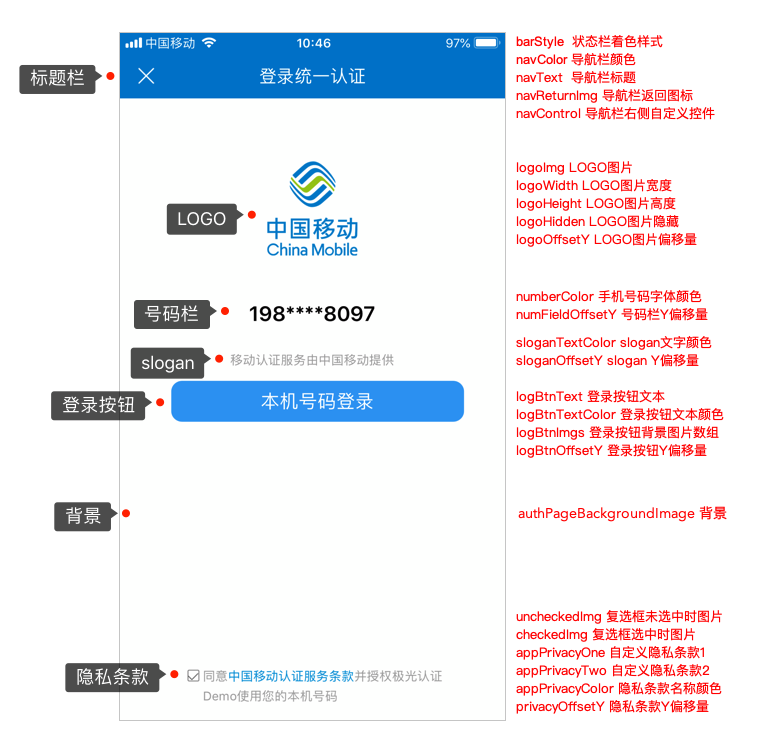
+ Second bullet window of protocol (no default hint of protocol ticked)
| Parameter Name | Parameter Type | Parameters |
|:-----|:----|:-----|
|agreementAlertViewBackgroundColor|UIColor|Protocol Blast Window Background Color|
|agreementAlertViewBackgroundImage|UIImage|Protocol Blast Background Picture|
|agreementAlertViewTitleText|NSString| Protocol Second Bullet Window Title Text|
|agreementAlertViewTitleTexFont|UIFont| Protocol Second Bullet Window Title Text Style|
|agreementAlertViewTitleTextColor|UIColor| Color of text for protocol binary window title |
|agreementAlertViewContentTextAlignment|NSTextAlignment| Arrange for the text alignment of the second bullet window|
|agreementAlertViewContentTextFontSize|NSInteger| Font size for protocol binary window content text |
|agreementAlertViewLogBtnImgs|NSArray| A second bullet window.LoginButton background picture added to array |
|agreementAlertViewLogBtnTextColor|UIColor| A second bullet window.LoginButton Text Colour|
|agreementAlertViewLogBtnText|NSString| A second bullet window.LoginButton Text|
|agreementAlertViewLogBtnTextFontSize|NSInteger|A second bullet window.LoginButton Text Font Size|
SMSLoginInterface UI Configuration Base Category. The following are the attributes:
+ SMSLoginPage Settings
| Parameter Name | Parameter Type | Parameters |
|:-----|:----|:-----|
|smsAuthPageBackgroundImage |UIImage| SMSLoginPage Background Picture |
|smsAuthPageGifImagePath |NSString| SMSLoginPage Background gif Resource path, with smsAuthPageBackgroundImage Properties mutually exclusive. |
|smsAutoLayout|BOOL| Whether to use autoLayoutDefault YES,|
|shouldAutorotate|BOOL| Whether automatic rotation is supported by default YES|
|orientation|UIInterfaceOrientation| Set In text messageLoginScreen orientation of page not supported UIInterfaceOrientationPortraitUpsideDown|
|modalTransitionStyle|UIModalTransitionStyle| SMSLoginPage popup mode, not supported in window mode UIModalTransitionStylePartialCurl|
|dismissAnimationFlag|BOOL| Close TextLoginpage. Default YESThere's animation. Parameters only work in the following two scenarios: 1 and 1 keyLoginInterface/SMSLoginInterface SettingsLoginAutomatically close authorized page 2, short user click after completion LetterLoginPage off button, text offLoginPage |
+ Navigation Bar
| Parameter Name | Parameter Type | Parameters |
|:-----|:----|:-----|
|smsPrivacysNavCustom|BOOL| Whether to hide the navigation bar (compatible fullscreen pictures)|
|navColor|UIColor| Navigation Bar Colour |
|barStyle|UIBarStyle| This method is from v2.5.0 The version is now obsolete. Recommended preferredStatusBarStyle Control status bar.preferredStatusBarStyle Default as UIStatusBarStyleDefault, when barStyle Effect and preferredStatusBarStyle In the conflict,barStyle The effect will expire.|
|preferredStatusBarStyle|UIStatusBarStyle| Authorization Page preferred status bar stylereplace barStyle Parameters |
|smsNavText|NSAttributedString| Navigation Bar Title |
|navReturnImg|UIImage| Navigator Return Icon |
|navControl|UIBarButtonItem| Custom Control to the Right of the Navigation Bar |
|prefersStatusBarHidden|BOOL|, if you want to hide the status bar. Default NO. Under project Info.plist Settings in File UIViewControllerBasedStatusBarAppearance Yes YES. Note: Invalid in bullet window mode, hidden under external controller |
|navTransparent|BOOL| Whether the navigation bar is transparent or not. This parameter and navBarBackGroundImage Conflict, should avoid simultaneous use |
|navReturnHidden|BOOL| The navigation bar default returns the button hidden, the default does not hide |
|navReturnImageEdgeInsets|UIEdgeInsets| The navigation bar returns the button image indentation, defaults to UIEdgeInsetsZero|
|navDividingLineHidden|BOOL| Whether the navigation bar partition lines are hidden, by default |
|navBarBackGroundImage|UIImage| Navigator Bar Background Picture. This parameter and navTransparent Conflict, should avoid simultaneous use |
+ LOGO
| Parameter Name | Parameter Type | Parameters |
|:-----|:----|:-----|
|smsLogoImg|UIImage|LOGO Picture |
|smsLogoConstraints|NSArray|LOGO Picture Layout Object |
|smsLogoHorizontalConstraints|NSArray|LOGO Picture, screen layout, priority over screen smsLogoConstraints |
|smsLogoHidden|BOOL|LOGO Picture Hide |
+ Cell phone input box
| Parameter Name | Parameter Type | Parameters |
|:-----|:----|:-----|
|smsNumberTFPlaceholder|NSString|Cell phone number input box default tip|
|smsNumberTFColor|UIColor|Font colour for cell phone number input box|
|smsNumberTFSize|CGFloat|Size of cell phone number input box font|
|smsNumberTFFont|UIFont|Cell phone number input box font with higher prioritynumberSize|
|smsNumberTFConstraints|NSArray|Cell phone number input box layout object|
|smsNumberTFHorizontalConstraints|NSArray|Cell phone number input box, screen layout, priority over screennumberConstraints|
+ Authentication Code Input Box
| Parameter Name | Parameter Type | Parameters |
|:-----|:----|:-----|
|smsCodeTFPlaceholder|NSString|Cell phone number input box default tip|
|smsCodeTFColor|UIColor|Font colour for cell phone number input box|
|smsCodeTFSize|CGFloat|Size of cell phone number input box font|
|smsCodeTFFont|UIFont|Cell phone number input box font with higher prioritynumberSize|
|smsCodeTFConstraints|NSArray|Cell phone number input box layout object|
|smsCodeTFHorizontalConstraints|NSArray|Cell phone number input box, screen layout, priority over screennumberConstraints|
+ Get Authentication Code button
| Parameter Name | Parameter Type | Parameters |
|:-----|:----|:-----|
|smsGetCodeBtnCornerRadius|CGFloat|Number of round angles to get authentication code buttons|
|smsGetCodeBtnText|NSString|Get Authentication Code button text|
|smsGetCodeBtnConstraints|NSArray|Fetch Authentication Code Layout Object|
|smsGetCodeBtnHorizontalConstraints|NSArray|Acquiring authentication codes A screen layout with priority above screenlogBtnConstraints|
|smsGetCodeBtnTextColor|UIColor|Colour to fetch authentication code text|
|smsGetCodeBtnAttributedString|UIFont|Fetch authentication code font, default following system|
|smsGetCodeBtnImgs|NSArray|Get authentication code background pictures added to arrays (in the following order)@ [activated images, invalid images, highlighted images]|
+ Loginbutton
| Parameter Name | Parameter Type | Parameters |
|:-----|:----|:-----|
|smsLogBtnText|NSString|LoginButton Text|
|smsLogBtnConstraints|NSArray|LoginButton Layout Object|
|smsLogBtnHorizontalConstraints|NSArray|LoginButton A screen layout with priority above screenlogBtnConstraints|
|smsLogBtnTextColor|UIColor|LoginButton Text Colour|
|smsLogBtnAttributedString|UIFont|Loginbutton font, default following system|
|smsLogBtnImgs|NSArray|LoginButton background picture added to arrays (in the following order)@ [activated picture, invalid picture, highlighted picture]|
+ checkBox
| Parameter Name | Parameter Type | Parameters |
|:-----|:----|:-----|
|smsUncheckedImg|UIImage|Pictures when checkbox not selected|
|smsCheckedImg|UIImage|Pictures on check box selection|
|smsCheckViewConstraints|NSArray|Checkbox Layout Object|
|smsCheckViewHorizontalConstraints|NSArray|check box A screen layout, screen priority abovecheckViewConstraints|
|smsCheckViewHidden|BOOL|Whether the check box is hidden, not by default|
+ Privacy Bar
| Parameter Name | Parameter Type | Parameters |
|:-----|:----|:-----|
|smsAppPrivacyColor|UIImage|PrivacyAgreementColour@ [Basic text colour, clause colour]|
|smsPrivacyTextFontSize|CGFloat|Private clause font size, default 12|
|smsPrivacyComponents|NSArray|Private article aggregating text arrays|
|smsPrivacyConstraints|NSArray|Layout of Privacy Clauses|
|smsPrivacyHorizontalConstraints|NSArray|The privacy clause.privacyConstraints|
|smsPrivacyTextAlignment|NSTextAlignment|The text of the privacy clause is aligned and currently only supported left、center|
|smsPrivacyLineSpacing|CGFloat|Privacy clause line spacing, default following system|
+ Privacy protocol page
| Parameter Name | Parameter Type | Parameters |
|:-----|:----|:-----|
|agreementNavBackgroundColor|UIColor| Protocol Page Navigation Bar Background Colour |
|agreementNavText|NSAttributedString| CarrierProtocol Page Navigation Bar Title |
|firstPrivacyAgreementNavText|NSAttributedString| Title of the protocol page navigation bar for custom protocol 1 |
|secondPrivacyAgreementNavText|NSAttributedString| Title of the protocol page navigation bar for custom protocol 2 |
|agreementNavReturnImage|UIImage| Protocol Page Navigator Return Button Picture |
|agreementPreferredStatusBarStyle|UIStatusBarStyle| Protocol Page preferred status bar stylereplace barStyle Parameters |
|agreementNavTextFont|UIFont| Sets the permission page to click on the privacy protocol, enters the protocol page, customizes the font of the navigation column title on the protocol page agreementNavText、secondPrivacyAgreementNavText、 firstPrivacyAgreementNavText Not Effective when Existing since2.7.4|
|agreementNavTextColor|UIColor| Sets the permission page to click on the privacy protocol, enters the protocol page, customizes the colour of the navigation column title on the protocol page agreementNavText、secondPrivacyAgreementNavText、 firstPrivacyAgreementNavText Not Effective when Existing since2.7.4|
+ slogan
| Parameter Name | Parameter Type | Parameters |
|:-----|:----|:-----|
|smsSloganConstraints|NSArray|sloganLayout Object|
|smsSloganHorizontalConstraints|NSArray|slogan A screen layout with higher priority below the screensloganConstraints|
|smsSloganTextColor|UIColor|sloganText Colour|
|smsSloganFont|UIFont|sloganTextfontDefault 12|
+ loading
| Parameter Name | Parameter Type | Parameters |
|:-----|:----|:-----|
|loadingConstraints|NSArray|loading Layout Object |
|loadingHorizontalConstraints|NSArray| Default loading A screen layout with higher priority below the screen loadingConstraints|
|customLoadingViewBlock|Block Type | Custom loading view, when authorized page clickLoginbutton. Default when this parameter exists loading view Do not show, developer has to design itself loading view。block Internal parameters are customised loading view Addable parent view, for detailed use in display Example demo|
+ Blast the window.
| Parameter Name | Parameter Type | Parameters |
|:-----|:----|:-----|
|smsShowWindow|BOOL|Whether to open windows, defaultno|
|smsWindowBackgroundImage|UIImage|Box internal background pictures|
|smsWindowBackgroundAlpha|CGFloat|Outside of the bullet window. Transparency.1.0|
|smsWindowCornerRadius|CGFloat|Round angle value for bullet windows|
|smsWindowConstraints|NSArray|Window Layout Object|
|smsWindowHorizontalConstraints|NSArray|Blast screen layout, higher priority below screenwindowConstraints|
|smsWindowCloseBtnImgs|NSArray|Blast the window.closeButton Picture|
|smsWindowCloseBtnConstraints|NSArray|Blast the window.closeButton Layout|
|smsWindowCloseBtnHorizontalConstraints|NSArray|Blast the window.closeButton Wide Screen Layout, Under Screen Priority HigherwindowCloseBtnConstraints|
+ Second bullet window of protocol (no default hint of protocol ticked)
| Parameter Name | Parameter Type | Parameters |
|:-----|:----|:-----|
|smsAgreementAlertViewBackgroundColor|UIColor|Protocol Blast Window Background Color|
|smsAgreementAlertViewBackgroundImage|UIImage|Protocol Blast Background Picture|
|smsAgreementAlertViewTitleText|NSString| Protocol Second Bullet Window Title Text|
|smsAgreementAlertViewTitleTexFont|UIFont| Protocol Second Bullet Window Title Text Style|
|smsAgreementAlertViewTitleTextColor|UIColor| Color of text for protocol binary window title |
|smsAgreementAlertViewContentTextAlignment|NSTextAlignment| Arrange for the text alignment of the second bullet window|
|smsAgreementAlertViewContentTextFontSize|NSInteger| Font size for protocol binary window content text|
|smsAgreementAlertViewLogBtnImgs|NSArray| A second bullet window.LoginButton background picture added to array |
|smsAgreementAlertViewLogBtnTextColor|UIColor| A second bullet window.LoginButton Text Colour|
|smsAgreementAlertViewLogBtnText|NSString|A second bullet window.LoginButton Text|
|smsAgreementAlertViewLogBtnTextFontSize|NSInteger|A second bullet window.LoginButton Text Font Size|
### SDK Request authorization.Login(old)
#### Supported version
Supported since version 2.4.0
#### API definition
+ ***+ (void)getAuthorizationWithController:(UIViewController \*)vc hide:(BOOL)hide completion:(void (^)(NSDictionary \*result))completion actionBlock:(void(^)(NSInteger type, NSString \*content))actionBlock***
+ Description:
+ AuthorizationLogin
+ Parameters:
+ completion LoginResult
+ result Dictionary Accessed token Time key. carrier、code、loginToken fields, not available token is. key Yes code and content Fields
+ vc Current controller
+ hide
+ actionBlock failed Organisationtype and contentTwo parameters,typeFor the type of event,contentas EventDescription。 type = 1, authorized page closed;type= 2, authorized pages are pulled up;type= 3, protocol clicked;type= 4, access to the authentication code button is clicked;type=6,checkBoxis selected;type=7,checkBoxbecomes unselected;type=8,LoginButton Clicked
+ Example:
[JVERIFICATIONService getAuthorizationWithController:self hide:YES completion:^(NSDictionary *result) {NSLog(@"一键Login result:%@", result); } actionBlock:^(NSInteger type, NSString *content) {NSLog(@"一键Login actionBlock:%ld %@", (long)type, content);}];
### SDK Request authorization.Login(old)

#### Supported version
Supported since version 2.3.0
#### API definition


+ ***+ (void)getAuthorizationWithController:(UIViewController \*)vc hide:(BOOL)hide completion:(void (^)(NSDictionary \*result))completion***

 + Description:
 + Authority OneLogin
 + Parameters:
 + completion LoginResult
 + result Dictionary Accessed token Time key. carrier、code、loginToken fields, not available token is. key Yes code and content Fields
 + vc Current controller
 + hide: whether to automatically hide authorized pages after completion, default YES If this field is set to NO, please receive one-tap loginCall back SDK Provides an authorized page closure method.

 + Example:
[JVERIFICATIONService getAuthorizationWithController:self hide:YES completion:^(NSDictionary *result) {NSLog(@"一键Login result:%@", result); }];
## Number authentication
### Initialize

Call SDK Before other process methods, make sure that initialization has been called or returns uninitialized, for more information [SDK Initialize API](/en/jverification/client/ios_api#sdk-initialize) After initialization, if you call the following functional interface, you are considered to agree to open Jiguang Securely certifying business functions, we collect and report personal information necessary for business functions.

### Assess whether the network environment supports

To determine whether the current mobile phone network environment can be used for a number authentication ifSupported networks, call the number. API, or call another authentication mode API, details [Assess whether the network environment supports API](/en/jverification/client/ios_api#assess-whether-the-network-environment-supports)。

### Access number authentication token

#### Supported version
Supported since version 2.2.0
#### API definition


+ ***+ (void)getToken:(NSTimeInterval)timeout completion:(void (^)(NSDictionary \* result))completion;***

 + Description:
 + Get cell phone checkup token
 + Parameters
 + completion Arguments are dictionary returns token 、Error CodeWe'll wait for the information.token Valid 1 minute after authentication
 + result Dictionary Accessed token Time key. carrier、code、token fields, not available token is. key Yes code and content Fields
 + timeout Timeout (ms), active range (0,10000To ensure access token recommended to 3000-5000ms.

 + Example:
OC [JVERIFICATIONService getToken:(NSTimeInterval)timeout completion:^(NSDictionary *result) {NSLog(@"getToken result:%@", result) //TODO: 获取 token 后相关操作 }];
Swift JVERIFICATIONService.getToken {(result) in if let result = result {if let token = result["token"] {if let code = result["code"], let op = result["operator"] {print("get token result: code = (code), operator = (op), token = (token)")}}else if let code = result["code"], let content = result["content"] {print("get token result: code = (code), content = (content)")}} }
***Note ***: Developer can access SDK Access token The callback information of the interface to select the authentication method, if obtained successfully token You can use it again.JVerificationPerform number validation; if acquired token Failure to do so requires the continuation of the validation with, for example, text message authentication codes.


### Access number authentication token(new)

#### Supported version
Supported since version 2.2.0
#### API definition


+ ***+ (void)getTokenWithEnableSms:(BOOL)enableSms timeout:(NSTimeInterval)timeout completion:(void (^)(NSDictionary \* result))completion;***

 + Description:
 + Get cell phone checkup token
 + Parameters
 + completion Arguments are dictionary returns token 、Error CodeWe'll wait for the information.token Valid 1 minute after authentication
 + result Dictionary Accessed token Time key. carrier、code、token fields, not available token is. key Yes code and content Fields
 + timeout Timeout (ms), active range (0,10000To ensure access token recommended to 3000-5000ms.
 + enableSms Are you getting a number?Authentication failed, switch to text messageLogin

 + Example:
OC [JVERIFICATIONService getTokenWithEnableSms:(BOOL)enableSms timeout:(NSTimeInterval)timeout completion:^(NSDictionary *result) {NSLog(@"getToken result:%@", result) //TODO: 获取 token 后相关操作 }];
Swift JVERIFICATIONService.getTokenWithEnableSms(true, timeout: 5000) {(result) in if let result = result {if let token = result["token"] {if let code = result["code"], let op = result["operator"] {print("get token result: code = (code), operator = (op), token = (token)")}}else if let code = result["code"], let content = result["content"] {print("get token result: code = (code), content = (content)")}} }
***Note ***: Developer can access SDK Access token The callback information of the interface to select the authentication method, if obtained successfully token You can use it again.JVerificationPerform number validation; if acquired token Failure to do so requires the continuation of the validation with, for example, text message authentication codes.


## SMSLogin

### SDK SMSLogin

#### Supported version
Supported since version 3.1.0
#### API definition


+ ***+(void)getSMSAuthorizationWithController:(UIViewController \*)vc hide:(BOOL)hide animated:(BOOL)animationFlag timeout:(NSTimeInterval)timeout completionHandler:(void (^ \_Nonnull)(NSDictionary \* \_Nonnull result)) handler actionBlock:(void (^)(NSInteger, NSString \* ))actionBlock***

    + Description
        + Get SMS authentication code. Use this feature if Portal ConsoleJSMSModule AddSMS signature and failed See:[How-to Guides](https://docs.jiguang.cn//jsms/guideline/JSMS_consoleguide/#_3)。
        + Once you get the SMS authentication code through this interface, you need to call Jiguang Authentication API For validation, see:[Authentication API](https://docs.jiguang.cn//jsms/server/rest_api_jsms/#api_3)。

    + Parameters

         + completion LoginResult
 + result Dictionary AccessedtokenTimekey.carrier、code、msgFields
 + vc Current controller
 + hide
 + animationFlag Pull up the text.Login, defaultYES
 + timeout Timeout. In milliseconds, the legal range is 0,30000, default value10000 This parameter acts as a pullLoginafter page clickLoginPageLoginButton GetLoginThe result is time out.
 + actionBlock failed Organisationtype and contentTwo parameters,typeFor the type of event,contentas EventDescription。 type = 1, authorized page closed;type= 2, authorized pages are pulled up;type= 3, protocol clicked;type= 4, access to the authentication code button is clicked;type=6,checkBoxis selected;type=7,checkBoxbecomes unselected;type=8,LoginButton Clicked


    + Example

```
 [JVERIFICATIONService getSMSAuthorizationWithController:self hide:YES animated:YES timeout:5*1000 completion:^(NSDictionary *result) {
 NSLog(@"短信登录 result:%@", result);
 } actionBlock:^(NSInteger type, NSString *content) {
 NSLog(@"短信登录 actionBlock:%ld %@", (long)type, content);
 }];
```


## Authentication Code

### SDK Get Authentication Code

#### Supported version
Supported since version 2.6.0
#### API definition


+ ***+(void)getSMSCode:(NSString \*)phoneNumber templateID:(NSString \* \_Nullable)templateID signID:(NSString \* \_Nullable)signID completionHandler:(void (^ \_Nonnull)(NSDictionary \* \_Nonnull result) ) handler***

    + Description
        + Get SMS authentication code. Use this feature if Portal ConsoleJSMSModule Add ApplicationSMS signature and Validation code SMS template. Details are given below:[How-to Guides](https://docs.jiguang.cn//jsms/guideline/JSMS_consoleguide/#_3)。
        + Once you get the SMS authentication code through this interface, you need to call Jiguang Authentication API For validation, see:[Authentication API](https://docs.jiguang.cn//jsms/server/rest_api_jsms/#api_3)。

    + Parameters

        + phoneNumberNumber
        + signID:SMS signature ID, if null, the default setSMS signature ID
        + templateID:SMS template ID
        + handler :block Reconciliation. Returned when successful. result Dictionary contains uuid,code, msg fields,uuid failed Time result Field returns only code, msg Fields

    + Example

```
 [JVERIFICATIONService getSMSCode:@"手机号" templateID:@""          signID:@"" completionHandler:^(NSDictionary * _Nonnull result) {NSLog(@"getSMSCodeWithPhoneNumber result:%@",result);
 }];
```

### Set the interval between the time and the time to get the authentication code

#### Supported version
Supported since version 2.6.0
#### API definition


+ ***+ (void)setGetCodeInternal:(NSTimeInterval)intervalTime***

    + Description

        + Sets the time interval between the time and after which the authentication code is obtained, in ms default 30000ms, effective range (0,300000)

    + Parameters

        + intervalTime: time interval in ms

    + Example

```
 [JVERIFICATIONService setGetCodeInternal:30000]
```

## Expand business-related settings

### Optional Personal Information Settings

Call this API To configure optional personal data collection

Please call the interface before initializing the function

#### Supported version
Supported since version 3.1.7, needs to cooperateJCore iOS SDK v4.6.0Use the above version

#### API definition

+ ***+ (void)setCollectControl:(JVCollectControl\*)control***

    + Description

        + Call this API To configure optional personal data collections.

    + Parameters

        + control: Collection control item configuration category.

    + Example

```
 JVCollectControl *collectControl = [[JVCollectControl alloc] init];
 collectControl.cell = YES;
 [JVERIFICATIONService setCollectControl:collectControl];
```

#### JVCollectControl Control Class

#### Base station collection switch

```
@property (nonatomic, assign) BOOL cell;
```

#### Methodological note

Configure base station information capture switch, default toYES,NO-Collection not permitted

### Safety wind control interface

Please call the interface before initializing the function

#### Supported version
Supported since version 3.2.2

#### API definition

+ ***+ (void)setSecureControl:(BOOL)enable***

    + Description

        + The interface may be called if there is a security wind control requirement.

    + Parameters

        + enable: YESTo open, NO to close, default toYES。

    + Example

```
 [JVERIFICATIONService setSecureControl:NO];
```

