


Business Process
Last updated:2022-11-02
Expand all
Business Process
One-Click Login
You need to integrate the Jiguang Verification SDK in the app and complete API integration on the server. The full process mainly includes the following steps: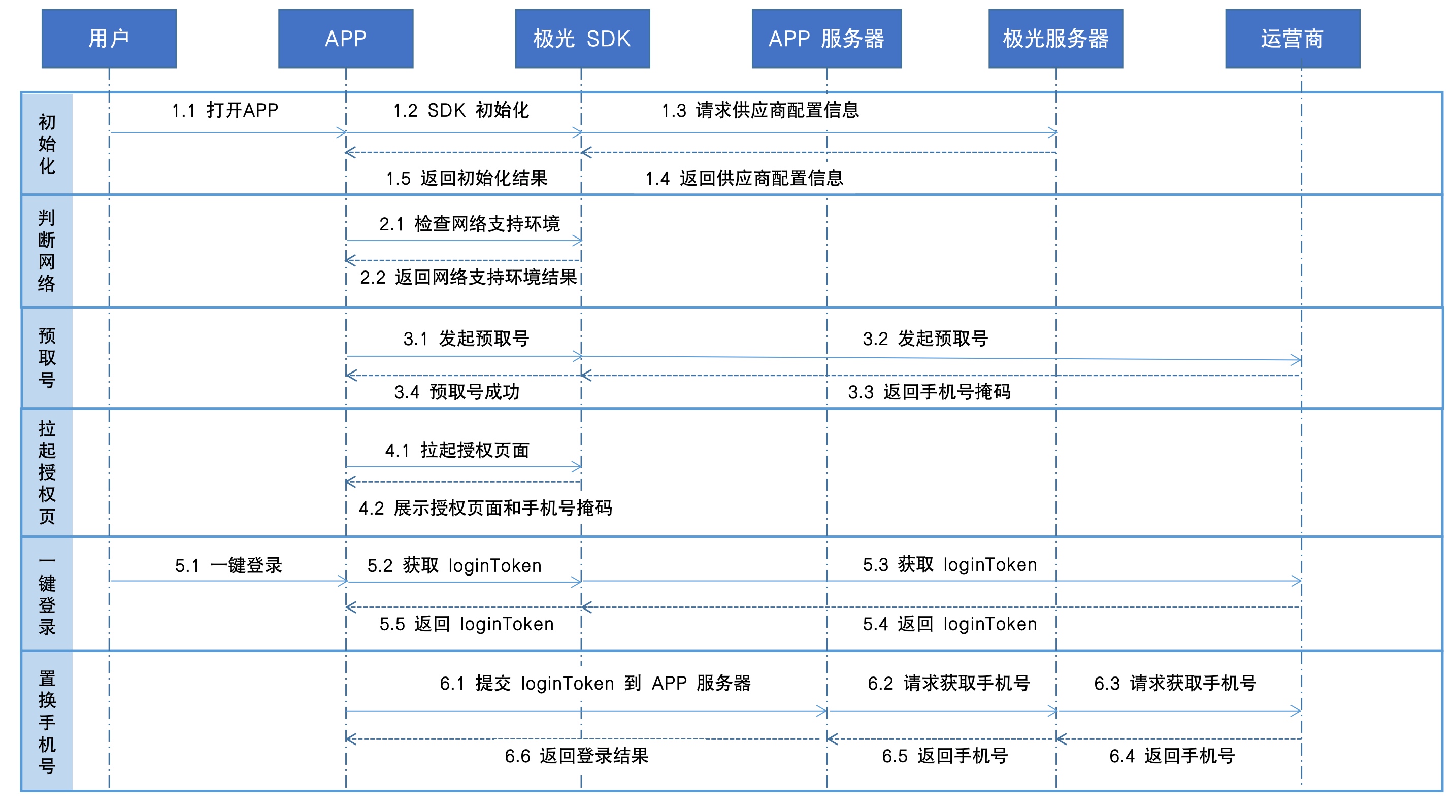
1. SDK Initialization
- The user opens the app to initialize the SDK, requesting information such as the app signature configuration from the Jiguang backend.
- After verification, the Jiguang server returns configuration information to the Jiguang SDK, and the Jiguang SDK returns the initialization result to the app client.
2. Check Network Environment
- After initialization is complete, call the checkVerifyEnable API (Android/HarmonyOS/iOS) to determine whether the network environment is supported.
3. Pre-Fetch Number
Pre-fetching the number can improve the speed of opening the authorization page.
- If the user is not logged in and the mobile network environment supports it, the pre-fetch number method can be executed silently on the splash page or business entry page to improve the speed of opening the authorization page.
- The SDK accesses the carrier cellular mobile network through the SIM card, exchanges data with the carrier, and obtains a temporary token and masked phone number.
- Successfully obtaining a temporary token indicates that number pre-fetching succeeded. The validity periods of temporary tokens from the three major carriers are:
- China Mobile numbers: 30 minutes
- China Unicom numbers: 10 minutes
- China Telecom numbers: 10 minutes
4. Open Authorization Page
- The authorization page can be opened when triggered by the user or automatically when the app starts.
- The app displays the carrier authorization page and masked phone number for user-authorized login or registration.
5. One-Click Login
- After the user agrees to authorize and taps one-click login, the SDK backend initiates a request to the carrier to obtain a loginToken.
- After receiving the loginToken request, the carrier verifies it. If verification passes, the carrier passes the loginToken to the app client.
6. Exchange for Phone Number
- After receiving the loginToken, the app client passes it to the app server. The app server calls the one-click login loginTokenVerify API and submits the loginToken to the Jiguang server to obtain the phone number.
- The Jiguang server passes the loginToken to the carrier to request the phone number. The carrier compares and determines whether the loginToken is consistent. If it is consistent, the encrypted phone number is returned.
- The Jiguang server returns the encrypted phone number to the app server. The app server uses the private key corresponding to the public key configured in the Jiguang console to decrypt the encrypted phone number, then returns the result to the app client.
- The app shows the user a successful login or registration page. If obtaining the phone number fails or times out, the app switches to another login or registration method.
Number Verification
You need to integrate the Jiguang Verification SDK in the app and complete API integration on the server. The full process mainly includes the following steps: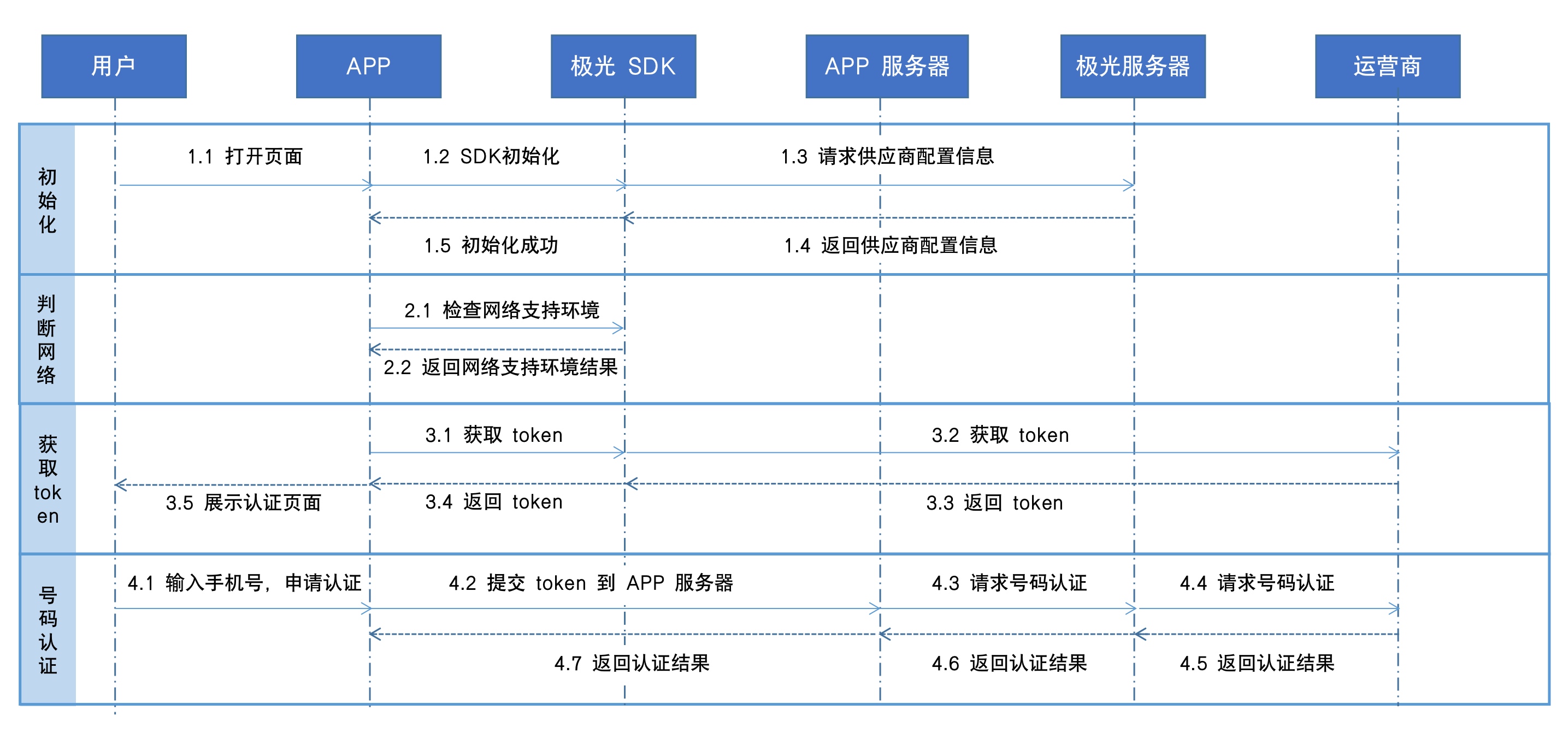
1. SDK Initialization
- The user opens the app to initialize the SDK, requesting application configuration information from the Jiguang backend.
- After verification, the Jiguang server returns configuration information to the Jiguang SDK, and the Jiguang SDK returns the initialization result to the app client.
2. Check Network Environment
- After initialization is complete, call the checkVerifyEnable API (Android/HarmonyOS/iOS) to determine whether the network environment is supported.
3. Obtain Token
- A number verification request is initiated either by the user or automatically under certain conditions. The SDK backend initiates a request to the carrier to obtain a token.
- After receiving the token request, the carrier verifies it. If verification passes, the carrier passes the token to the app client.
- The app client displays the verification page.
4. Number Verification
- The user enters a phone number on the verification page and applies for verification.
- The client passes the obtained token and phone number to the app server. The app server calls the Verify API to request the carrier to verify whether the token matches the phone number to be verified.
- After verification, the carrier returns the verification result to the app server.
- The app server returns the verification result to the app client, and the app shows the user a number verification success or failure page.
Business Risk Control
Business risk control is completed through API integration on the server. The full process mainly includes the following steps: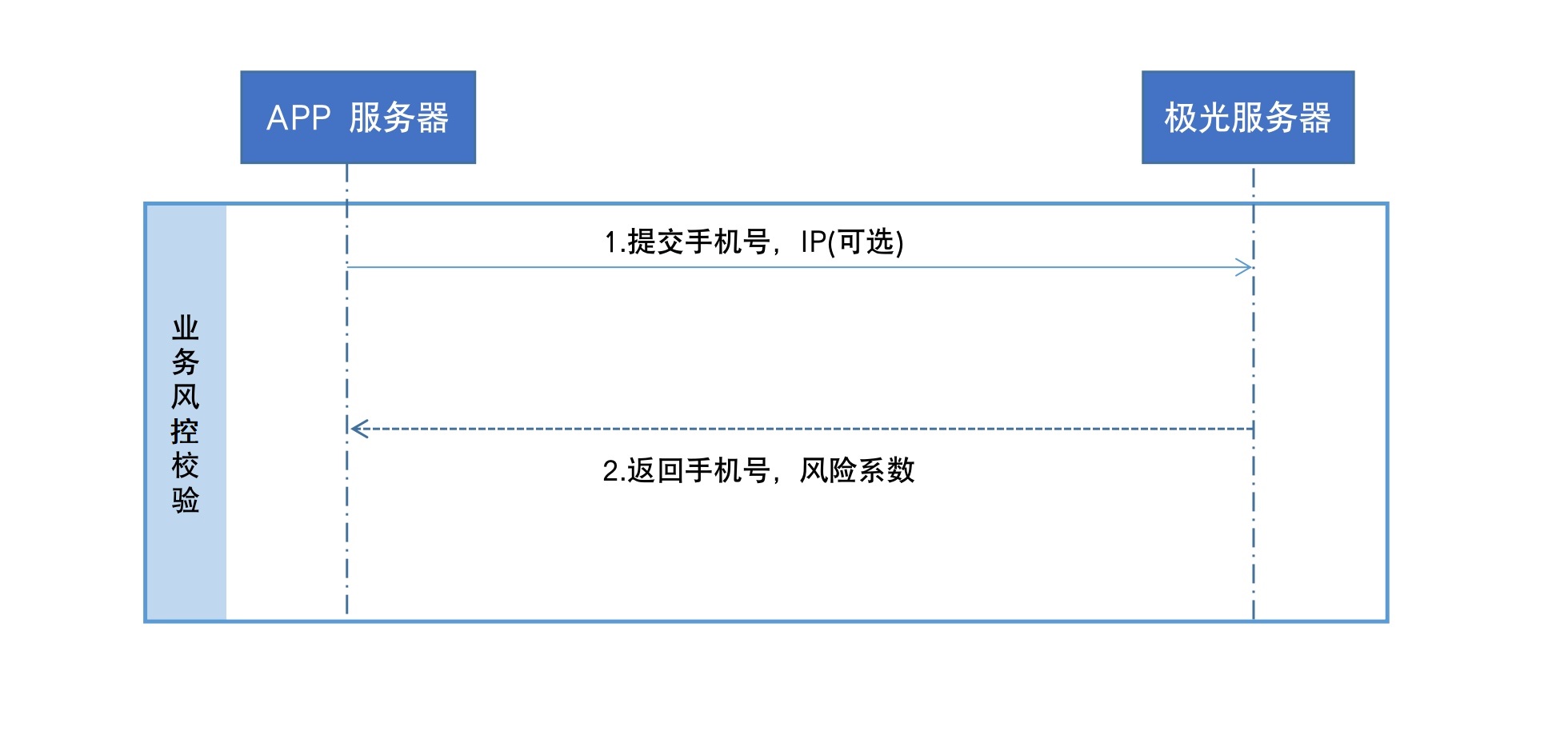
- The app server calls the Business Risk Control API, submitting the phone number and IP to the Jiguang server to request business risk control verification.
- After verification, the Jiguang server returns the phone number and the corresponding risk coefficient to the app server.
Was this document helpful?

