


Project Quick Implementation Guide
For implementation of a Jiguang Operation Growth project (Jiguang Analytics/Jiguang Operation/Jiguang Portrait), you need a planned timeline and coordination with the app release rhythm. Covering more users as quickly as possible is key to effectively applying the project to business scenarios.
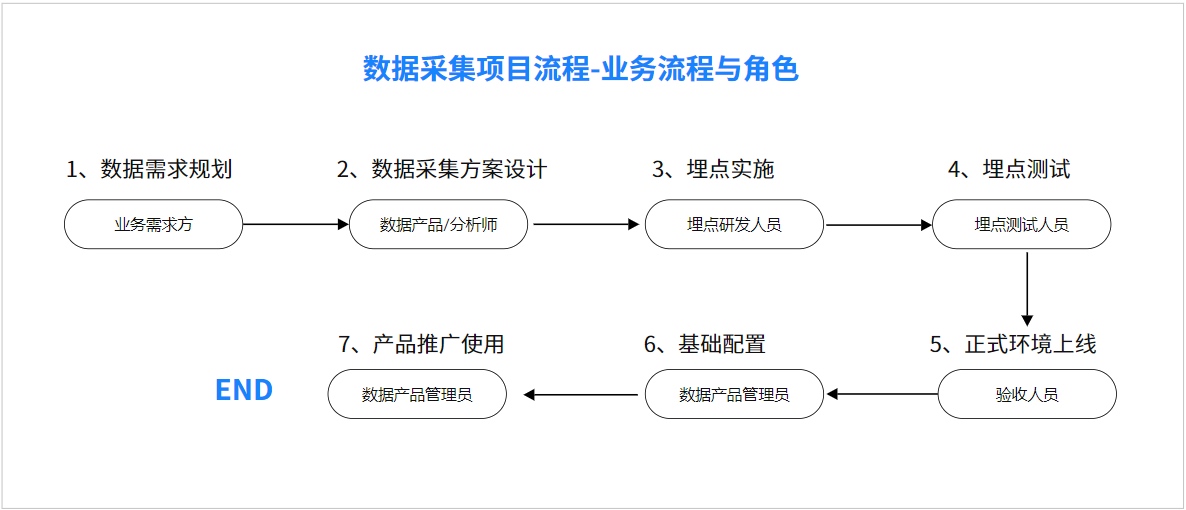
- Create a developer account on the Jiguang official website and create a Jiguang Operation Growth project.
- Gain an initial understanding of the key stages in data collection and usage, and understand the work tasks of each role at each stage.
Step 2: Data Requirement Planning
Before designing event tracking, first understand the business scenarios, sort out and confirm business processes, user operation paths, and various segmented scenarios. Define user behavior paths according to the concrete operation methods and processes users follow in the product.
Scenario decomposition strategy: understand the business, define standards, plan goals, determine strategies, and create plans.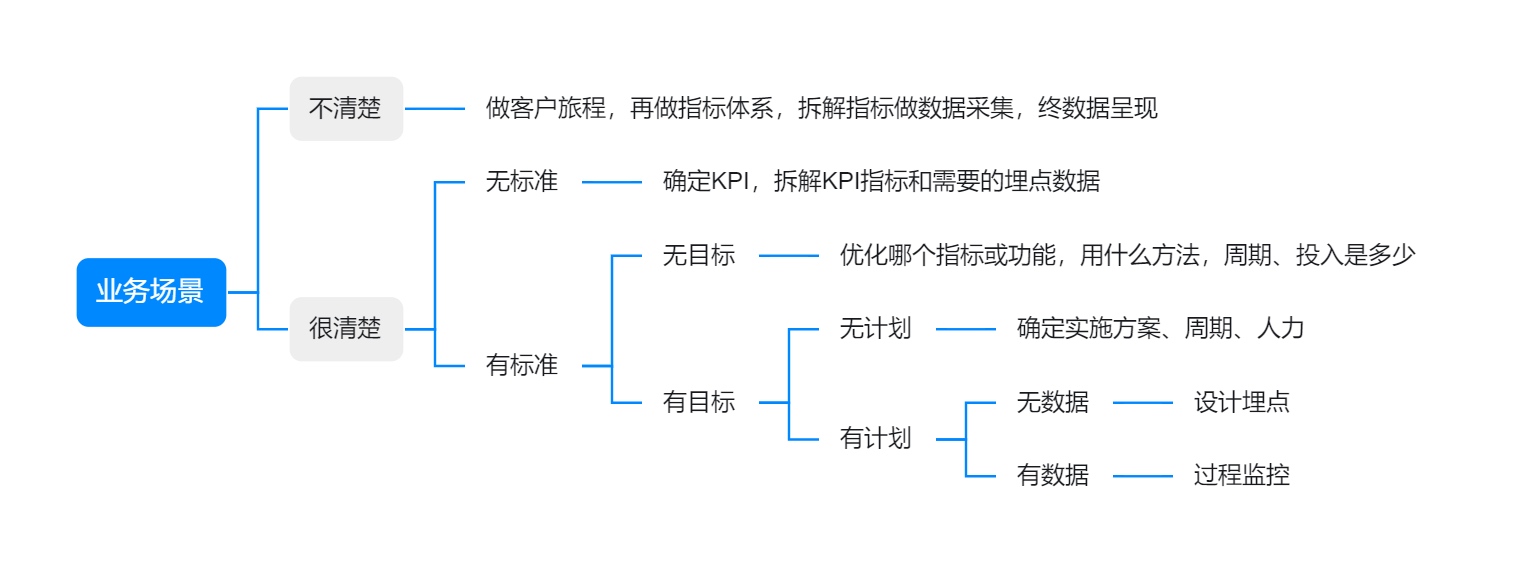
Data requirement planning is the foundation for business development and directly affects subsequent data application and business execution. Try to avoid the following common issues:
- Waste from invalid tracking: Sometimes, for long-term goals or because of concern that incomplete tracking may affect analysis, tracking is planned with a "more is better" mindset. We often find that a large number of historical tracking events are never queried, causing more and more events in the environment. When designing a tracking system, repeatedly confirm whether these tracking points are related to core business metrics. Otherwise, the waste is not only storage and traffic cost, but also more valuable product and developer time.
- Missing key tracking information: Product and operation personnel may discover during analysis that key events are missing, or that key event attributes are missing from tracking events, resulting in inaccurate analysis results and difficulty carrying out business. Therefore, which tracking events are needed and which event attributes those tracking events require are worth more time for thinking and planning.
- Missing tracking description information: When creating tracking points, standardize naming as much as possible, clearly write the trigger timing of the tracking point, and complete tracking information as fully as possible with images and text. This information is important for other colleagues to understand and use tracking events.
Step 3: Data Collection Solution Design
- How to design tracking points based on your own industry scenario: industry scenario tracking solution. Contact technical support to obtain the tracking solution.
- How to design tracking points for general business scenarios: general scenario tracking solution. Contact technical support to obtain the tracking solution.
Step 4: Implement Data Collection Tracking
- How to add data sources
- Guides for adding various data sources
- How to create custom events, event attributes, and user attributes
- Create event attributes and user attributes
- Create custom events
- How to integrate SDKs from scratch
- Android SDK Integration Guide
- iOS SDK Integration Guide
- WebJS Integration Guide
- WeChat Mini Program SDK Integration Guide
- WeChat Official Account Integration Guide
- How to complete tracking
- Integrate the Operation Growth Android SDK from scratch and report tracking events
Step 5: Tracking Test
- Tracking event data verification
- Tracking event Data Verification Guide
- Features that can be used after data is reported successfully
- Jiguang Analytics: dashboards, behavior analysis
- Jiguang Portrait: user labels, user marketing score, big data labels, big data portraits
- Jiguang Operation: operation plans
- Public modules: user segmentation, user prediction
Step 6: Build a User System
Step 7: Create Analysis Models and Dashboards
- How to create an analysis model
- Event Analysis
- Conversion Funnel
- Interval Analysis
- Smart Path
- Attribution Analysis
- Retention Analysis
- Attribute Analysis
- Distribution Analysis
- How to create a dashboard
- Dashboard Creation Guide

