


Project Quick Implementation Guide
Last updated:2023-04-03
Expand all
Project Quick Implementation Guide
For implementing Jiguang Operation Growth (JAnalysis / Jiguang Operation / JPortrait), timeline planning aligned with app release cycles and covering more users as quickly as possible are key to effective business use.
Step 1: Understand the Data Application Flow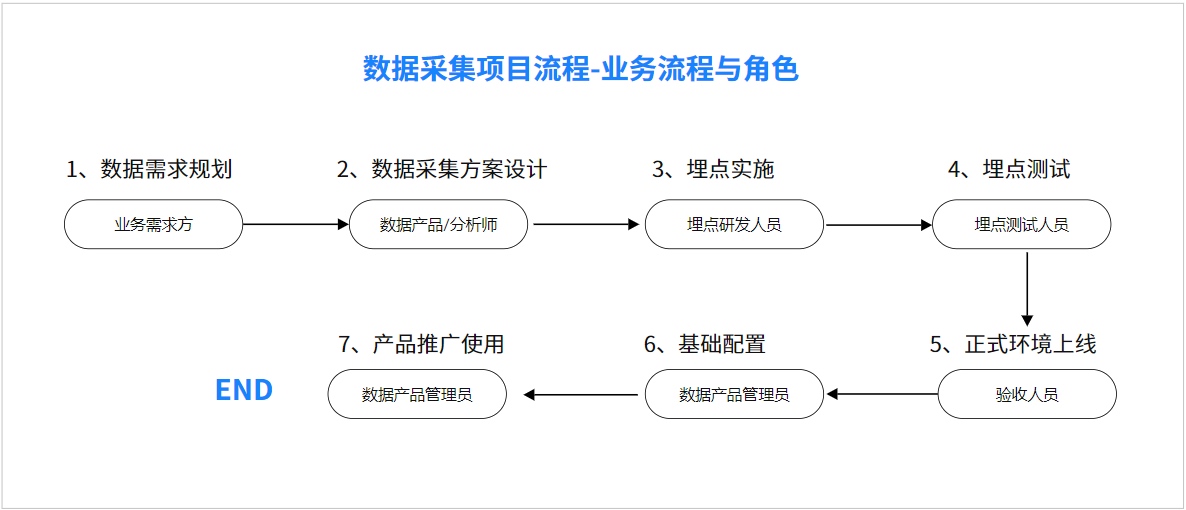
- Create a developer account on the Jiguang website and an Operation Growth project.
- Understand key stages of data collection and usage, and tasks for each role at each stage.
Step 2: Data Requirements Planning
Before event tracking design, understand business scenarios, confirm business flows, user paths, and segment scenarios. Define user behavior paths based on concrete product operations.
Scenario breakdown strategy: understand the business, set standards, plan goals, define strategy, create plans.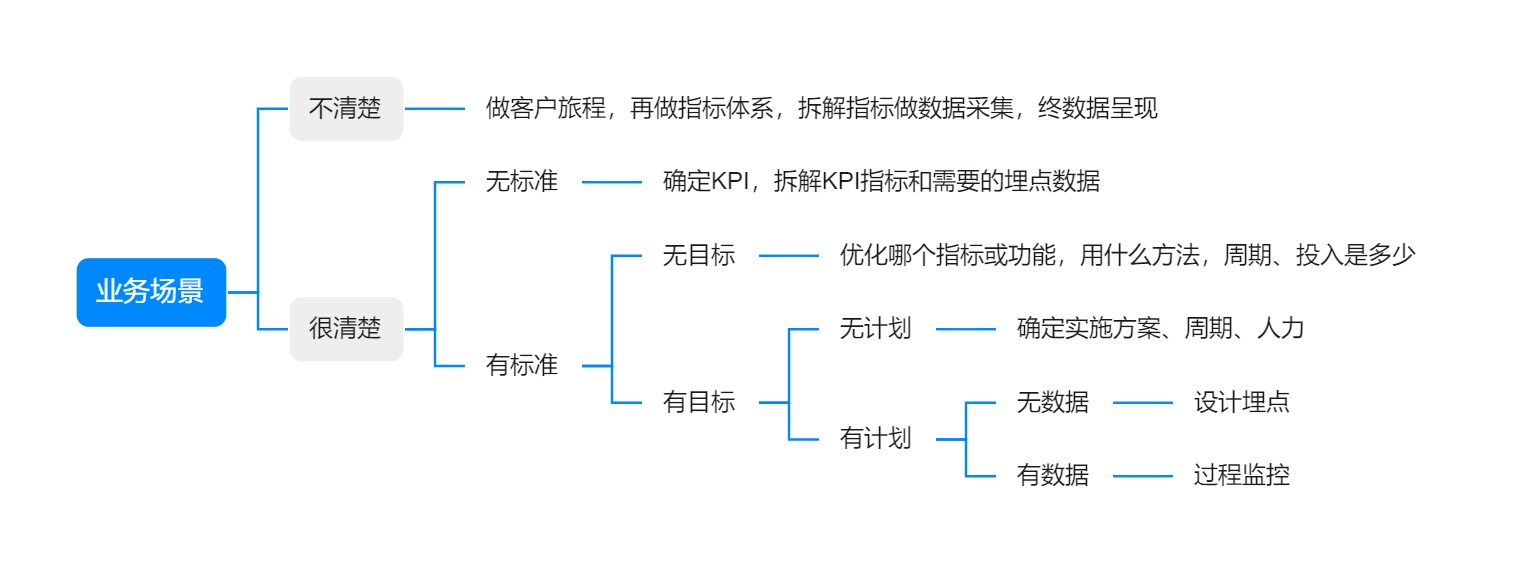
Data requirements planning is the foundation for business. Avoid common issues:
- Wasted invalid tracking: Planning too many events "just in case" leads to unused historical events and bloated environments. Confirm each event relates to core business metrics before design.
- Missing key tracking info: Missing key events or event properties discovered during analysis blocks accurate results. Spend more time planning required events and properties.
- Missing tracking documentation: Use standard naming, document trigger timing, and complete tracking info (images + text) so colleagues can understand and use events.
Step 3: Data Collection Solution Design
- Industry scenario tracking design (contact technical support for tracking plans)
- General business scenario tracking design (contact technical support for tracking plans)
Step 4: Data Collection and Tracking Implementation
- How to add data sources
- Data source integration guide for all types
- How to create custom events, event properties, and user properties
- Create event properties and user properties
- Create custom events
- How to integrate SDK from scratch
- Android SDK Integration Guide
- iOS SDK Integration Guide
- Web JS Integration Guide
- WeChat Mini Program SDK Integration Guide
- WeChat Official Account Integration Guide
- How to complete tracking
- Integrate Operation Growth Android SDK from scratch and report events
Step 5: Tracking Testing
- Event data validation
- Data validation guide
- Features available after successful reporting
- JAnalysis: data dashboards, behavior analysis
- JPortrait: user tags, marketing scores, big data tags, big data portraits
- Jiguang Operation: operation plans
- Public modules: user segments, user prediction
Step 6: Build User System
Step 7: Create Analysis Models and Dashboards
- How to create an analysis model
- Event Analysis
- Conversion Funnel
- Interval Analysis
- Smart Path
- Attribution Analysis
- Retention Analysis
- Attribute Analysis
- Distribution Analysis
- How to create a data dashboard
- Create dashboard guide
Step 8: Create Tags and Marketing Scores
Step 9: Add Reach Channels
- How to add reach channels
- [How to maintain contact methods for each reach channel](/en/public_service/client/Android/sdk_api#Set user contact method)
Step 10: Create Operation Plans
Was this document helpful?

