


Feature Selector
What Is a Feature Selector
A feature selector filters the users and events that have been collected by setting a series of conditions, so that you can obtain the final subset of data you need for use and analysis. Many features in Jiguang Growth, such as user segments, smart labels, and in-app marketing scores, use feature selectors.
- A feature selector is similar to a
wherecondition in SQL. - When it is applied to users, the
wherecondition acts on the user table. When it is applied to events, thewherecondition acts on the event table.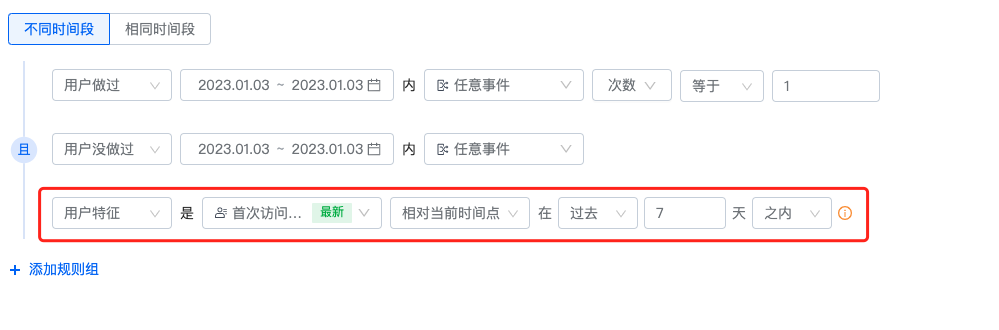
Feature Selector Categories
Feature selectors are divided into event-based feature selectors and non-event feature selectors.Event-Based Feature Selector
An event-based feature selector can act on either the event table or the user table, and can be used to view events or users that meet the selected conditions. Event attributes and user attributes are reported together with events. When conditions are set on event attributes or user attributes, they act on the event table to obtain matching events, and then obtain the corresponding users through the event selection conditions. When conditions are set on user labels, user marketing scores, or user segments, they act on the user table and directly obtain matching users.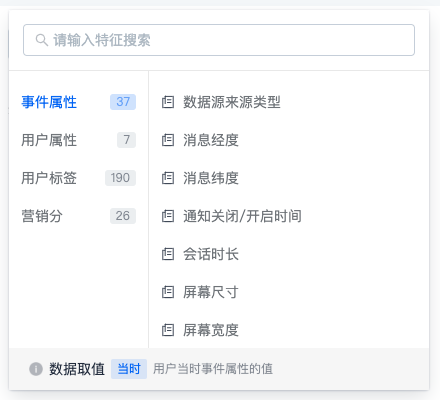
Non-Event Feature Selector
A non-event feature selector is also a user feature selector. Its conditions act on the user table and only look at users that meet the selected conditions. Conditions can be set on user attributes, user labels, user marketing scores, and user segments to obtain matching users.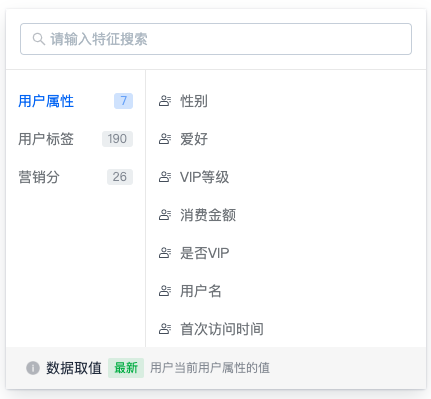
Feature Filter Types
Whether you are filtering different users or different events, each filter feature can be classified by its data type.String Filtering
When the filtered data is a string, refer to the following table for how to use each judgment type:
| Judgment Type | SQL Expression | Description |
|---|---|---|
| Equal to | = | Exact match. The user or event is selected only when the selected attribute equals the entered judgment value. When multiple judgment values are entered, they have an "OR" relationship. |
| Not equal to | != | Exact match. The user or event is selected only when the selected attribute is not equal to the entered judgment value. When multiple judgment values are entered, they have an "AND" relationship. |
| Contains | LIKE "%judgment value%" | Fuzzy match. The user or event is selected only when the selected attribute contains the entered judgment value. When multiple judgment values are entered, they have an "OR" relationship. |
| Does not contain | NOT LIKE "%judgment value%" | Fuzzy match. The user or event is selected only when the selected attribute does not contain any of the entered judgment values. When multiple judgment values are entered, they have an "AND" relationship. |
| Has value | IS NOT NULL AND!="" | The user or event can be selected only when the selected attribute value is not NULL and is not empty. |
| No value | IS NULL OR ="" | The user or event is selected only when the selected attribute value is NULL or empty. |
Numeric Filtering
When the filtered data is numeric, refer to the following table for how to use each judgment type:
| Judgment Type | SQL Expression | Description |
|---|---|---|
| Equal to | = | Same as string filtering. |
| Not equal to | != | Same as string filtering. |
| Less than | < | The user or event is selected only when the selected attribute value is less than the judgment value. |
| Greater than | > | The user or event is selected only when the selected attribute value is greater than the judgment value. |
| Range | between judgment value 1 and judgment value 2 | The user or event is selected only when the selected attribute value falls within the closed interval formed by the judgment values. For example, if the judgment values are set to 10 and 100, the selected attribute value must satisfy [10,100]. |
| Has value | IS NOT NULL AND!="" | Same as string filtering. |
| No value | IS NULL OR ="" | Same as string filtering. |
Boolean Filtering
When the filtered data is Boolean, refer to the following table for how to use each judgment type:
| Judgment Type | SQL Expression | Description |
|---|---|---|
| True | =1 | The user or event is selected only when the selected attribute value is true. |
| False | =0 | The user or event is selected only when the selected attribute value is false. |
| Has value | IS NOT NULL AND!="" | Same as string filtering. |
| No value | IS NULL OR ="" | Same as string filtering. |
Date-Time Filtering
When the filtered data is date-time data, refer to the following table for how to use each judgment type:
| Judgment Type | SQL Expression | Description |
|---|---|---|
| Absolute time | between start time and end time | The user or event is selected only when the selected attribute falls between the start time and end time. |
| Relative to current time | The user or event is selected only when the selected attribute falls within a time range relative to the current time. For example, if today is the 17th and the condition is within the past 7 days, the time range is from the 11th to the 17th, including both the 11th and the 17th. | |
| Has value | IS NOT NULL AND!="" | Same as string filtering. |
| No value | IS NULL OR ="" | Same as string filtering. |
Collection Filtering
When the filtered data is a collection, refer to the following table for how to use each judgment type:
| Judgment Type | SQL Expression | Description |
|---|---|---|
| Contains | ="judgment value" | Exact match. The user or event is selected only when the selected attribute equals any of the entered judgment values. When multiple judgment values are entered, they have an "OR" relationship. |
| Does not contain | !="judgment value" | Exact match. The user or event is selected only when the selected attribute is not equal to all entered judgment values. When multiple judgment values are entered, they have an "AND" relationship. |
| Has value | IS NOT NULL AND!="" | The selected attribute value can be selected only when at least one element exists and satisfies the non-empty string condition. |
| No value | IS NULL OR ="" | The selected attribute value is selected only when no element exists or all elements are empty strings. |
Data Value Rules
When a feature selector is used in different feature scenarios, the value rules vary. In general, there are two types:
- At that time: takes the feature value at the time when the event was reported.
- Latest: takes the current latest feature value.

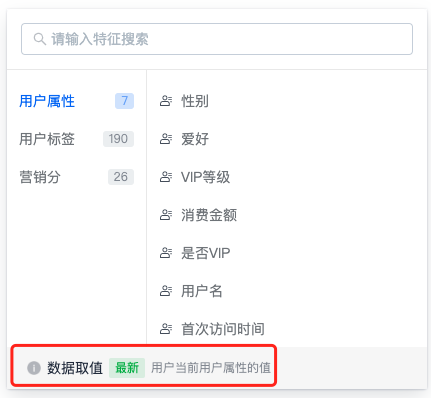
Event-based feature filtering:
| Feature Scenario | Event Attribute | User Attribute | User Segment | User Label | User Marketing Score |
|---|---|---|---|---|---|
| Create virtual event | At that time | At that time | / | / | / |
| Create combined event | At that time | At that time | / | / | / |
| Create operation plan | At that time | At that time | / | / | / |
| Create user label | At that time | At that time | Latest | / | Latest |
| Create user segment | At that time | At that time | / | Latest | Latest |
| Create user marketing score | At that time | At that time | Latest | Latest | / |
| Create behavior analysis | At that time | At that time | Latest | Latest | Latest |
Non-event feature filtering:
| Feature Scenario | User Attribute | User Segment | User Label | User Marketing Score |
|---|---|---|---|---|
| Create user segment | Latest | / | Latest | Latest |
| Create marketing score | Latest | Latest | Latest | / |
| Create user label | Latest | Latest | / | Latest |

