


REST API Overview
Prerequisites
Before using the REST API, obtain the project ID and project secret. Go to [Configuration Management] - [Project Information] to get them.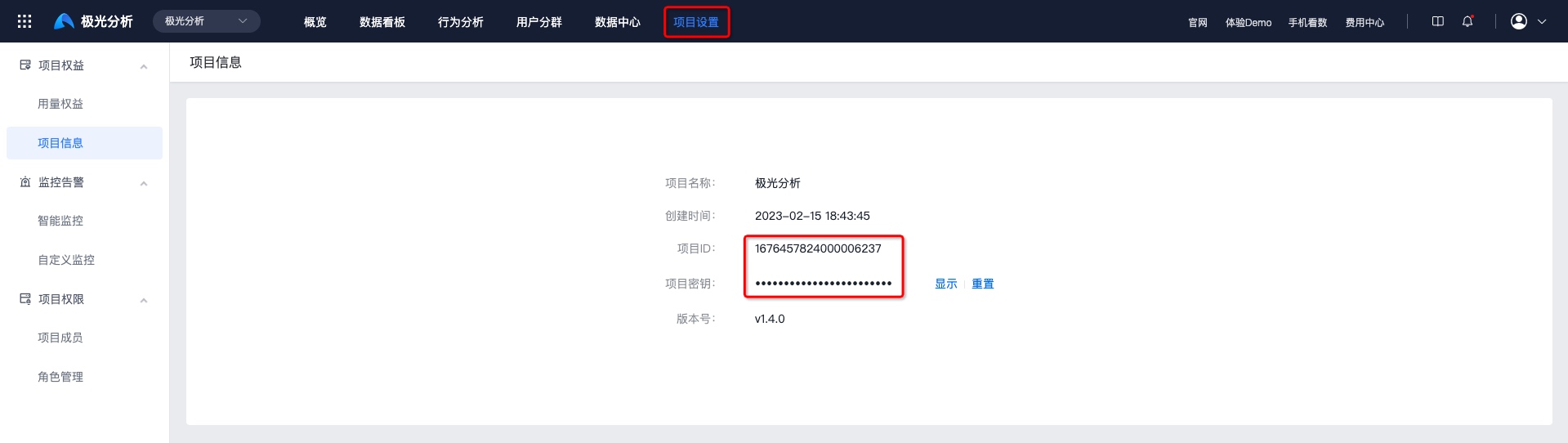
Basic REST API Constraints
- APIs are designed to comply with HTTP and REST specifications. For example, query requests use the GET method, and submit requests use the POST method. If a request does not use the corresponding HTTP method, an error is returned.
- Unless otherwise stated, request parameter values should be encoded as UTF-8 and URL encoded.
Authentication Method
Jiguang REST API uses HTTP Basic Authentication.
The basic method is to add Authorization to the HTTP Header:
Authorization: Basic ${base64_auth_string}
The header name is "Authorization", and the value is the Base64-converted "username:password" pair, separated by a colon. In Operation Growth API scenarios, username is projectId, and password is projectSecret. Both can be viewed in console app settings. That is, the generation algorithm for base64_auth_string is: base64(projectId:projectSecret).
Authentication Example
If your projectId is "100102" and projectSecret is "z7Ls8********WdOvZp", an example curl command when calling Push API v3 is:
          curl --insecure -X POST -v https://xxx -H "Content-Type: application/json"
-u "100102:z7Ls8********WdOvZp"
The HTTP request is:
          > POST /v3/push HTTP/1.1
> Authorization: Basic N2Q0MzFlNDJkZmE2YTZkNjkzYWMyZDA0OjVlOTg3YWM2ZDJlMDRkOTVhOWQ4ZjBkMQ==
Response Description
All API responses described in REST API follow a unified response format standard:
- Whether the API call succeeds or fails, the content-type of the returned HTTP message is application/json.
- Field rules for the returned HTTP body are as follows:
          {
 "code": 0, // code 0 means the API call succeeded. Non-zero means failure. See error code descriptions for specific failure types.
 "msg": "success // Prompt. If the API call fails, this field indicates the error reason.
 "data": {} // Returned data. APIs that need to return data place it in this field. }
- Response code description: response codes include the HTTP status code in the returned HTTP message and the code in the body above. On success, the HTTP status code is 200 and code is 0. For other exceptions, see the error code rules of each API.

